
Easy-to-Use SOPs for Small Business
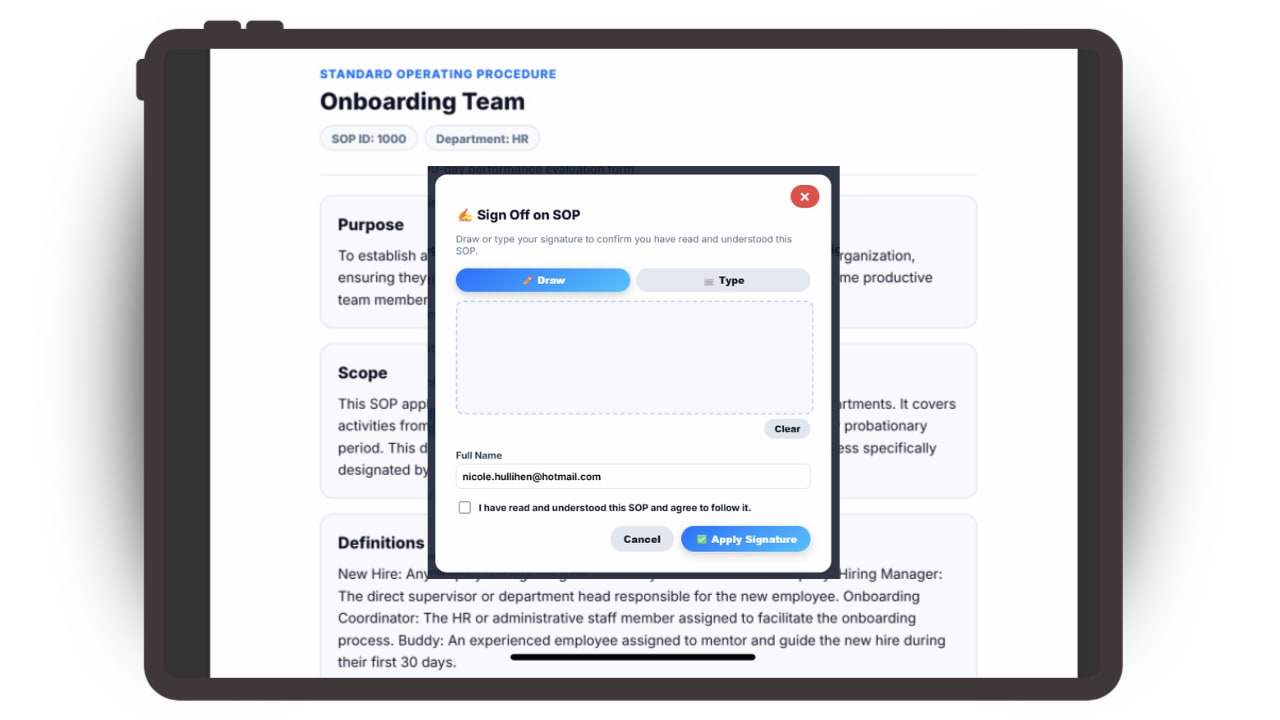
Updoot is SOP management software that gives your team a single source of truth for how work is done. Create, approve and organize standard operating procedures in one library, with an owner on every SOP, role-based access, color-coded review due dates and AI quizzes that confirm your team actually understood the process.
Here is how Updoot SOP management software keeps every procedure approved, current and one click away for your team.
Standardize how work gets done and scale without operational chaos.

The SOP Management Library gives growing businesses a clear, organized way to document how work gets done. Instead of tribal knowledge, outdated documents, or scattered process files, every Standard Operating Procedure lives in one centralized system with defined steps, owners, and responsibilities.
Teams always know the correct process to follow, leaders maintain accountability, and updates happen in one place instead of being lost across emails or folders. SOPs connect directly into onboarding, roles, and daily execution so consistency scales with your team.
Every SOP is easy to access, organized by role or function, and export-ready to Excel or Google Sheets for audits, training, or operational reviews.
Your team's training and reference guide for the workday.
Employees start their day here -- and what better way to start than having immediate access to all Standard Operating Procedures, the instructions for the job.
In one click, employees can pull up SOPs or create their own, keeping them private and sharing when ready. Color coding allows everyone to see when reviews are coming due, and the audit log makes it easy to track publish dates and revision history.
This keeps your team self-sufficient, reduces manager interruptions, and ensures the right process is always followed the first time -- not after a mistake has already been made.

The parts of SOP management that a shared folder or wiki cannot do.
Only approved procedures go live, and nothing quietly goes stale.
Every SOP has an assigned owner and approval tracking, so there is always a clear answer to who signed off on a procedure and when.
Each SOP gets a review due date. Color coding shows what is current, coming due or overdue, so procedures are reviewed on schedule instead of after a mistake exposes an outdated step.
The audit log keeps every publish date and revision for training records, audits and compliance questions.
Know your team learned the procedure, not just that they opened it.
Most SOP tools stop at access: the document was available, so everyone assumes it was learned. Updoot's built-in AI assistant generates quizzes straight from your procedures.
Use quizzes during onboarding, after a procedure changes, or before someone takes on a new responsibility. Gaps show up in a quiz, not in a customer complaint.
See everything the Updoot AI assistant does across the business.
Procedures that live where the work happens.
Updoot also runs your projects, org chart and roles and employee records, so every SOP stays tied to the people and work it describes.
Each SOP has an owner role, access follows the roles you assign, and new hires get the procedures for their job from day one.
When a process changes, update it once and everyone sees the current version.
SOP management software is a system for creating, approving, storing, reviewing and training on standard operating procedures. The difference between SOP management software and a shared folder is governance: every procedure has an owner, an approval record, a review schedule and a revision history, so your team always knows which version is the real one.
For a small business, the goal is simple. The way your best people do the work should become the way everyone does the work, and it should stay current as the business changes. That takes more than storage. It takes approvals so only finished procedures go live, review dates so nothing goes stale, and a way to check that people actually learned the process.
| Shared drive or Google Docs | General wiki | Updoot SOP management | |
|---|---|---|---|
| Approval tracking | None | Manual, through page templates | Built in, with an owner on every SOP |
| Review due dates | Calendar reminders, if anyone sets them | Manual | Color-coded due and overdue flags |
| Proof an SOP was understood | None | None | AI-generated quizzes |
| Revision history | File version history | Page history | Audit log of publish dates and revisions |
| Role-based access | Folder sharing | Space permissions | Access follows the roles you assign |
| Connected to projects and roles | No | Links only | Same system as projects, roles and HR |
| Price | Free or bundled | Per-user wiki pricing | $5 per user, every feature included |
Comparing tools in more detail? Read the best SOP software for small business, filter features with the free SOP software feature cheatsheet, or start from a free standard operating procedure template.
No setup project, no consultant and no IT department. Updoot turns scattered process knowledge into a living, organized library -- so your team always knows what to do, how to do it, and where to find it.
Sign up with your email or Google. You get 14 days free with every feature, and no credit card is needed.
Import your users, add them yourself, or send the list to our support team and we will load your employees for you. Employees you add with an email get an invite automatically.
Write step-by-step procedures, assign owners, set access by role, and organize everything by department -- all in one library.
Approve each SOP before it goes live, then use AI quizzes to confirm your team understood it. Employees find every procedure in one click from their hub.
Color-coded review dates flag when SOPs are due for update. The audit log tracks every revision so nothing goes stale without you knowing.
Updoot runs right in the phone's browser and is designed to look and work just like an app, without the headache of downloads. No app store, no installs, no updates to chase and no storage space used. Employees open the link, log in and they are ready.
The system for documenting, approving, training on and protecting your company's standard operating procedures so execution stays consistent as you scale.
Keep every process, checklist, and workflow in one organized system instead of scattered Google Docs, binders, or outdated files.
Control exactly who can view, edit, or manage procedures so sensitive operations stay protected and employees only see what applies to them.
Every SOP shows who approved it and when, so only finished procedures become the official way to work.
See at a glance which procedures are current, coming due or overdue for review.
Generate quizzes from your procedures to confirm employees understood them, not just opened them.
Track every publish date and revision with a clear audit log so you always know what changed, who changed it, and when it was last reviewed.
Group procedures by team, function, or workflow so employees instantly find what they need without searching or guessing.
Standardize how work is done with clear instructions, responsibilities, and repeatable steps that prevent mistakes and reduce training time.
Copy procedures into Excel or reports instantly and maintain a documented operational system that supports growth, delegation, and accountability.
You get the whole system, not just this feature. Here are a few of the 30+ tools included, with no tiers and no add-ons.
Plus invoicing, payroll reports, meetings, goals, budgeting, roles and more.
Practical guides for writing, organizing and choosing software for your standard operating procedures.
Stop juggling spreadsheets, apps, and manual follow-ups. Start your free trial of Updoot -- SOP management with approvals, review dates and AI quizzes, plus time tracking, scheduling, projects, invoicing, payroll-ready reporting, and accountability all in one platform built for small business.
Start Free Today →