Try Updoot Free

Go beyond spreadsheets, try Updoot

Easy-to-Use Scheduling for Small Business
PTO Calendar and Employee Scheduling Software
Approve Time Off. Plan Coverage. Schedule Instantly.

Updoot PTO calendar and employee scheduling software on desktop and phone

Keep your team aligned with one shared calendar for PTO, holidays, and daily schedules. Instantly see who is out, who is working, and your available capacity for every day.

Prevent staffing gaps before they happen
Reduce schedule mishaps and coverage conflicts
Always real-time data vs spreadsheets
View each month in calendar format with PTO, holidays, and shifts in one place
Start Managing PTO →

End Coverage Gaps and Schedule Conflicts With a Shared PTO Calendar

Here is how the Updoot PTO calendar and work schedule keep everyone on the same page.

PTO + Scheduling Command Center

The admin dashboard for managing time off, coverage, and workforce capacity.

Admin PTO calendar showing employee time off, work schedules, and daily capacity planning

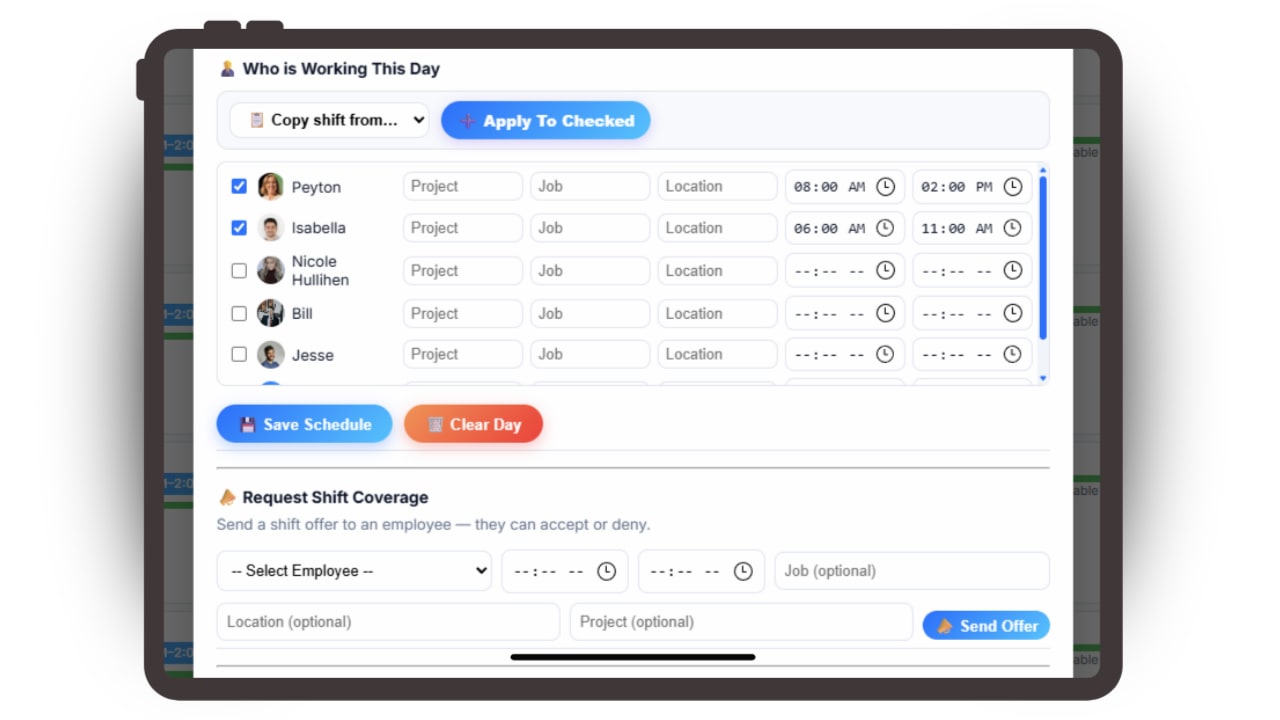
The PTO + Capacity Calendar is the admin command center for keeping your business fully staffed and running smoothly. Instantly see who is out, who is working, and how much coverage you have every day -- all in one clear view.

Approve or deny PTO requests in one click, assign company holidays, and schedule employees with job, location, and shift times directly inside the calendar.

Capacity bars update automatically so you always know when you are fully covered and when a day is at risk of being understaffed.

Everything exports to Excel or Google Sheets for planning outside the platform.

The Employee Schedule Hub

Your team's daily view for shifts, PTO, and availability.

The Employee Schedule Hub is where your team stays aligned on the workweek. Employees can instantly view upcoming shifts, location and job assignments -- they will always know exactly where to be and at what time.

Team members can request PTO directly from their hub without texting managers or digging through spreadsheets.

With schedules, PTO, and workforce planning connected in one place, employees stay informed, managers stay organized, and every shift runs smoother with less confusion and fewer surprises.

Employee schedule and PTO calendar showing upcoming shifts, time off requests, and daily work assignments

Set Up Your PTO Calendar and Employee Schedule in Minutes

No setup project, no consultant and no IT department. Updoot connects PTO requests, approvals, shift scheduling, and capacity planning in one shared calendar -- so managers always know who is out, who is in, and whether the day is covered.

1

Start Your Free PTO Calendar Trial

Sign up with your email or Google. You get 14 days free with every feature, and no credit card is needed.

2

Add Your Team to the Schedule

Import your users, add them yourself, or send the list to our support team and we will load your employees for you. Employees you add with an email get an invite automatically.

3

Employee Requests PTO

Employees request time off directly from their hub in seconds -- no texts, no emails, no paper forms.

4

Manager Approves in One Click

Managers approve or deny requests instantly. Approved days appear on the shared calendar automatically and capacity bars update in real time.

5

Schedule and Export

Assign shifts by job, location, and time. Export the full schedule to Excel or Google Sheets. PTO balances flow directly into payroll.

A Scheduling and PTO App With No Download Required

Updoot runs right in the phone's browser and is designed to look and work just like an app, without the headache of downloads. No app store, no installs, no updates to chase and no storage space used. Employees open the link, log in and they are ready.

  • Nothing to install
  • Always up to date
  • Works on iPhone and Android
Start Managing PTO →

PTO and Scheduling Command Center Built for Small Businesses That Run on Tight Coverage

The admin system for managing time off, shift coverage, and workforce capacity.

✓

One-Click PTO Approvals

Approve or deny requests instantly inside the calendar -- no spreadsheets, no back-and-forth, no email chains.

🎉

Company Holiday Scheduling

Assign holidays across your team in seconds and automatically apply paid hours into time tracking.

👤

Shift Planning by Role and Location

Schedule employees with job titles, work sites, and exact shift times directly in the calendar day view.

🔄

Shift Swap Request Workflow

Employees request shift swaps with coworkers, the other employee confirms, and managers approve -- changes apply instantly.

📊

Live Daily Capacity Bars

Every day updates automatically so you always know if you are fully staffed or short on coverage before it becomes a problem.

📋

Export to Excel Anytime

Copy the full month into Excel or Google Sheets instantly for offline planning, reporting, and payroll prep.

PTO and Scheduling Software That Grows With You

This feature is part of a bigger system you can grow into. Here are a few of the 30+ tools in one app that grows with you.

AI AssistantMeet Doot, your AI assistant built in Employee Time ClockGPS, mobile and kiosk clock-in HR and PerformanceReviews, org charts and employee records HiringApplicant tracking with AI resume scoring Sales and CRMLeads, pipeline and win-loss insights ProjectsPlans, hours and job costing in one place SOPsProcedures with approvals and AI quizzes Business DashboardSee the whole business at a glance

Plus invoicing, payroll reports, meetings, goals, budgeting, roles and more.

See All Features →

Articles and Templates to Help With PTO and Scheduling

Short, practical reads on time off management, shift scheduling, and workforce planning.

📅

Homebase Scheduling vs Updoot Scheduling

Read More →
🔄

Shift Swap Software for Restaurants, Construction, Retail, More

Read More →
🚀

What Is a 9/80 Work Schedule? Guide and Template

Read More →

PTO + Scheduling Calendar FAQs

Is the Updoot PTO calendar and scheduling system included with the software? ▶
Yes. Updoot includes PTO calendars, employee scheduling tools, and capacity planning dashboards as part of the full platform.
How do employees request paid time off in Updoot? ▶
Employees request PTO directly from their dashboard in seconds. Managers can approve requests instantly and approved days appear automatically on the shared calendar.
Can managers see who is out or available each day? ▶
Yes. The calendar shows approved PTO, scheduled employees, and daily availability so you always know coverage at a glance.
Does Updoot support workforce scheduling by job and shift? ▶
Yes. Admins can schedule employees by day with shift times, job roles, and locations to keep teams organized and fully staffed.
What is capacity planning in Updoot? ▶
Capacity planning shows how many employees are available versus out on PTO each day so managers can plan workloads and prevent understaffing.
Can PTO and schedules be managed from one calendar view? ▶
Yes. Updoot combines PTO tracking, employee schedules, and daily staffing visibility into one unified calendar view.
Does Updoot support shift swap requests? ▶
Yes. Employees can request to swap shifts with coworkers, the other employee confirms, and the manager approves -- all inside Updoot with instant calendar updates.
Who is the Updoot PTO calendar and scheduling system built for? ▶
It is built for small businesses, service teams, and growing companies that need PTO tracking, scheduling, and staffing clarity without spreadsheets.
How long does it take to set up the Updoot PTO calendar and scheduling? ▶
Minutes. Sign up, load your team and start using the PTO calendar and schedule right away. You can import your users, add them yourself, or have our support team load your employees for you.
Do employees need to download an app to use the Updoot PTO calendar and scheduling? ▶
No. Updoot runs in the phone's browser and is designed to look and work just like an app, so your team uses the PTO calendar and schedule without the download, the app store or the updates. Employees open the link, log in and they are ready on iPhone or Android.
How do employees get their login to the Updoot PTO calendar and scheduling? ▶
When an admin adds an employee with an email address, Updoot emails them an invite to the PTO calendar and schedule. If you add an employee without an email, you give them their login yourself.

Manage PTO and Employee Schedules From One Calendar

Stop juggling spreadsheets, apps, and manual follow-ups. Start your free trial of Updoot -- time tracking, scheduling, projects, invoicing, SOPs, payroll-ready reporting, and accountability all in one platform built for small business.

Start Free Today →