
Homebase Scheduling vs. Updoot Scheduling: Which Fits Your Business?
Homebase scheduling vs. Updoot scheduling comes down to one question: do you only need shifts filled, or do you need to know what gets done during those shifts? This comparison walks through features, pricing models, and the kinds of businesses each tool fits best, so you can choose with confidence.
Scheduling looks simple on the surface. You assign shifts, publish the schedule, and move on. Anyone who has managed a team knows better. Scheduling is where operations either stay organized or fall apart: missed shifts, last-minute changes, surprise overtime, and endless back-and-forth messages. The right system prevents most of that, but the right system depends on how your business actually runs.
Homebase vs. Updoot at a Glance
| Factor | Homebase | Updoot |
|---|---|---|
| Core focus | Shift scheduling and time tracking for hourly teams | Business management software with scheduling connected to work, projects, and people |
| Scheduling style | Shift-based | Shift-based plus role, location, and task-based |
| Ease of use | Very easy to start | Easy to start, with more depth as you grow |
| Shift swaps and availability | Yes | Yes, with a shift swap request workflow |
| Time off requests | Yes (PTO controls on higher plans) | Yes, with one-click approvals and real-time balances |
| Time clock | Yes | Yes, with mobile, browser, and kiosk clock-in |
| Projects and task hours | Not a core focus | Built in, with time tied to projects and tasks |
| SOPs and procedures | Not a core focus | Built-in SOP library |
| Performance and goals | Not a core focus | Performance reviews, goals, and KPIs |
| Pricing model | Free plan for one location, paid plans per location, payroll as an add-on | $5 per user per month |
| Best for | Single-location restaurants, retail, and hospitality | Growing teams that want scheduling connected to execution |
Feature sets and prices change. Check Homebase's pricing page and Updoot pricing for current details before you decide.
What Is Homebase Scheduling?
Homebase is a scheduling and time tracking platform built mainly for hourly, shift-based businesses such as restaurants, retail stores, salons, and hospitality teams. Its focus is simple: build schedules quickly and keep shift-based teams covered.
Key Homebase Scheduling Features
Drag-and-Drop Scheduling
Managers build schedules visually, move shifts around quickly, and adjust roles and times with a few clicks. Speed is one of Homebase's biggest strengths.
Templates and Auto-Scheduling
You can copy last week's schedule, save templates for recurring shifts, and use auto-scheduling on higher plans. That cuts manual work and keeps schedules consistent.
Availability, Time Off, and Shift Swaps
Employees set availability, request time off, swap shifts, and pick up open shifts, and managers approve or deny changes in the app.
Notifications and Mobile Access
Employees get alerts when schedules change, open shifts are broadcast to the team, and both managers and employees can view and update schedules from their phones.
Labor Cost Visibility
Homebase shows labor cost as you build the schedule and connects with many point-of-sale systems, which helps restaurants and retailers keep labor in line with sales.
Where Homebase Works Best
Homebase is a strong choice if you run one location or a few, manage hourly workers, change schedules often, and your main concern is shift coverage. Its free plan covers one location with a small team, which makes it easy to try. Many managers can build a full week's schedule in minutes with templates and drag-and-drop.
Where Homebase Scheduling Falls Short
Scheduling Is Separate From the Work
Homebase tells you who is working and when. It does not fully answer what each person is responsible for during the shift, how long tasks should take, or whether the work got done. That leaves a gap between the schedule and execution.
Limited Project and Task Management
Homebase offers task features, but it is not built to allocate hours to tasks, manage projects with deadlines, or track progress beyond attendance. Teams often keep spreadsheets, messaging apps, or separate project tools alongside it.
Coverage Is Not Accountability
Scheduling makes sure someone is on shift. It does not show productivity, task completion, or progress against goals, so managers still spend time following up and clarifying expectations.
Per-Location Pricing as You Grow
Homebase prices paid plans per location, and payroll is a separate add-on. That is efficient for one busy location with many employees, but costs rise with every site you add, which can be expensive for businesses with several small locations or crews at client sites.
What Is Updoot Scheduling?
Updoot takes a different approach. Instead of treating scheduling as a standalone calendar, it treats scheduling as one part of a connected operating system. Shifts connect to roles, locations, tasks, projects, time tracking, and performance, so you see not just who is working but what they are working on.
Key Updoot Scheduling Capabilities
Shift Planning by Role and Location
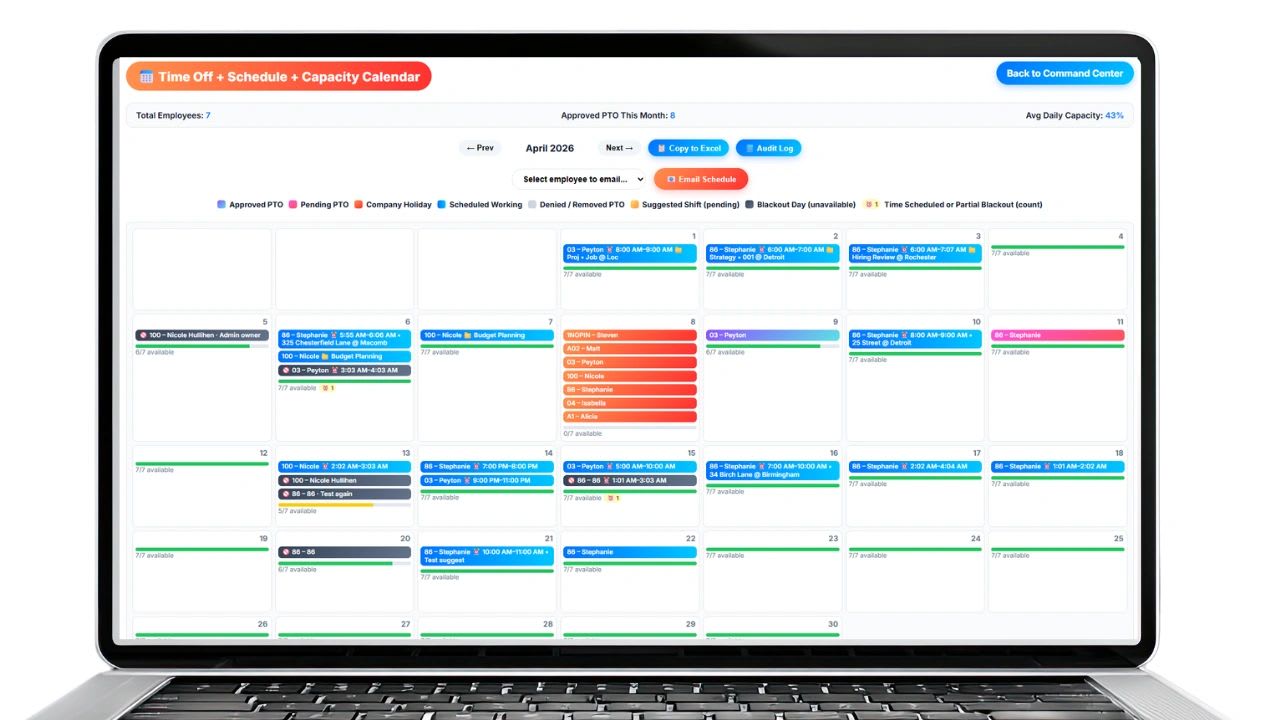
Updoot scheduling plans shifts by role and location, with live daily capacity bars that show whether each day is covered.
Shift Swaps, Open Shifts, and Requests
Employees can request swaps through a built-in workflow, ask for shifts to be filled, and suggest shifts they can take, while managers approve changes and keep coverage balanced.
PTO and Holidays on the Same Calendar
Time off requests are approved in one click and appear on the same calendar as shifts, alongside company holidays, so coverage gaps are visible before they happen.
Integrated Time Tracking
The Updoot time clock lets employees clock in from a phone, browser, or kiosk, and connects hours to jobs, locations, and projects. Overtime and PTO calculate automatically for payroll reports.
Work Tied to Shifts
Projects, tasks, and SOPs live in the same system, so employees know what to do during a shift and how to do it, and managers see progress against expectations instead of just attendance.
Pricing Models Compared
The two tools charge in different ways, and the right model depends on your shape. Homebase offers a free plan for one location and a small team, then charges per location for paid plans, with payroll as an add-on. That tends to favor a single location with many hourly employees. Updoot charges $5 per user per month, which tends to favor businesses with several locations or job sites, smaller crews, or teams that would otherwise pay for separate project, SOP, and performance tools. Add up the full cost of every tool you would need in each scenario, not just the scheduling line item.
The Real Difference: Coverage vs. Execution
Homebase is built for scheduling coverage: who is working, when, and whether every shift is filled. Updoot is built for operational execution: who is working, what they are doing, how the work is progressing, and whether outcomes are achieved. Most businesses start with a scheduling tool. As they grow, they discover that coverage is rarely the real problem. Execution is.
When to Choose Homebase
Choose Homebase if you run a restaurant, retail store, salon, or similar shift-based business, you need fast weekly scheduling, you want something simple to adopt, and shift coverage is your main concern. It is especially strong for small, single-location teams with high turnover.
When to Choose Updoot
Choose Updoot if you want scheduling connected to the actual work, you manage projects as well as shifts, you need accountability and visibility, you want employees to swap shifts and request coverage in a structured workflow, and you want fewer disconnected tools as you scale.
Questions to Ask Before You Choose
- How many locations or job sites do you schedule, and how many people work at each?
- Do you need to know what employees work on during a shift, or only that they showed up?
- Which other tools would you still need, such as project management, SOPs, or performance reviews?
- How does each tool handle overtime, PTO, and payroll exports for your team?
- How easy will it be for employees to adopt on their phones?
How to Switch Scheduling Tools
- Export your employee list, roles, and availability from your current tool.
- Recreate your recurring shifts or schedule templates in the new system.
- Set PTO balances and policies so time off carries over correctly.
- Run both systems side by side for one pay period and compare hours.
- Announce the change, share a one-page guide, and switch fully once hours match.
The Hidden Problem With Standalone Scheduling Tools
Scheduling tools solve coverage, but not clarity, accountability, or performance. So businesses add a task tool, an SOP system, and project management software, and the simple scheduling tool becomes one piece of a fragmented stack. That is why scheduling is evolving from "Who is working?" to "What is getting done?"
Final Thoughts
Homebase is a strong, simple tool for what it is designed to do: fast scheduling for shift-based teams. It has limits once you need to connect schedules to real work. Updoot takes scheduling further by connecting it to tasks, projects, SOPs, time tracking, and performance, so instead of just managing schedules, you manage execution.
Opens in Google Drive. View and download for free.
Related Reading
Homebase Alternatives for Small Businesses in All Industries →
Shift Swap Software for Restaurants, Construction, Retail, and More →
Frequently Asked Questions About Homebase vs. Updoot
What is the difference between Homebase and Updoot scheduling?
Homebase focuses on shift coverage for hourly teams: who is working and when. Updoot connects scheduling to tasks, projects, SOPs, time tracking, and performance, so you also see what people are doing and whether work gets done.
Is Homebase free?
Homebase offers a free plan for one location with a limited number of employees. Paid plans are priced per location, and payroll is a separate add-on. Check Homebase's pricing page for current details.
How much does Updoot cost?
Updoot is priced at $5 per user per month. See the Updoot pricing page for current plan details.
Which businesses is Homebase best for?
Homebase works best for single-location or small multi-location restaurants, retail stores, salons, and hospitality businesses whose main need is fast shift scheduling.
When is Updoot a better fit than Homebase?
Updoot fits better when you need scheduling connected to real work, manage projects as well as shifts, want structured shift swaps and coverage requests, or want to replace several separate tools.
Can I switch from Homebase to Updoot?
Yes. Export your employees, roles, and availability, recreate recurring shifts, set PTO balances, and run both systems for one pay period to confirm hours match before switching fully.