
ClockShark Pricing vs. Updoot Pricing: Let's Talk Value
ClockShark pricing looks simple until your team starts growing. There is a monthly base fee, then a charge for every active user on top of it, and the total climbs with each new hire.
ClockShark is a solid tool, especially for construction and field crews that need GPS time tracking and job costing. The real question is not whether it works. It is what you get for the money, what you will still need to buy separately, and how the bill changes as you scale.
Below is a plain comparison of ClockShark and Updoot pricing, what each includes, the total cost at different team sizes, and a free calculator so you can run your own numbers.
What Is ClockShark?
ClockShark is time tracking and job costing software built mainly for construction companies, field service businesses, and trade crews. Its core job is answering one question: where is my team working, and how many hours are going to each job?
It does that through mobile and web time clocks with GPS, job and task tracking, scheduling, manager roles, and integrations with accounting tools such as QuickBooks and Xero, according to ClockShark's pricing page. It is focused on field operations, and it does that well.
ClockShark Pricing Breakdown
ClockShark uses a base fee plus a per-active-user charge. It offers two plans and a 14-day free trial of Pro features. Published rates at the time of writing, as tracked by Software Finder, are below. Always confirm current prices on ClockShark's own site before you buy.
| Plan | Base Fee | Per Active User | What It Adds |
|---|---|---|---|
| Standard | $40/month | $9/month | Time tracking, GPS, job and task tracking, scheduling, manager roles, integrations |
| Pro | $60/month | $11/month | Everything in Standard plus PTO, multi-department controls, advanced job costing, shift wrap-up forms |
ClockShark notes that you pay only for users who are active, for the days they were active, which helps seasonal businesses.
Updoot Pricing
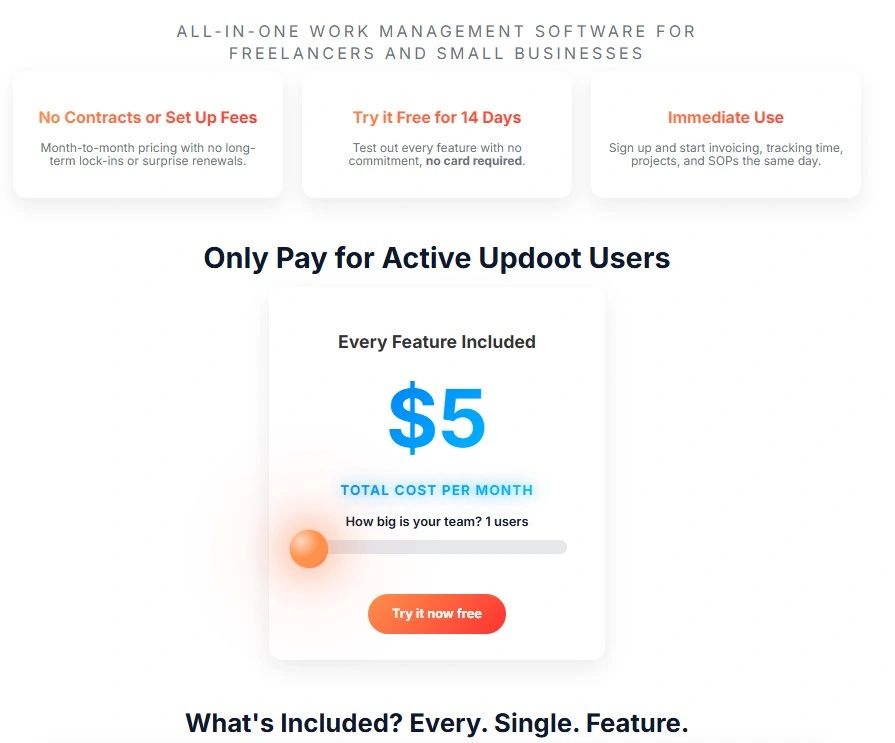
Updoot has one plan: $5 per active user per month, with every feature included. There is no base fee, no tiers, no add-ons, and no contract. You can try it free for 14 days without a credit card. Details are on the Updoot pricing page.
"Every feature" means the whole platform, not just the time clock. The same $5 covers a GPS and photo employee time clock, scheduling with shift swaps and requests, PTO tracking, payroll-ready exports, projects, SOPs, HR records, performance reviews, hiring, CRM, quotes, and invoicing. Managers, office staff, and field crews all use the same system, so hours, jobs, and people data stay connected instead of living in separate apps.
ClockShark vs. Updoot: Total Cost by Team Size
Here is what the software alone costs each month at common team sizes, using the rates above.
| Team Size | ClockShark Standard | ClockShark Pro | Updoot |
|---|---|---|---|
| 5 users | $85/month | $115/month | $25/month |
| 10 users | $130/month | $170/month | $50/month |
| 25 users | $265/month | $335/month | $125/month |
| 50 users | $490/month | $610/month | $250/month |
At 10 users, the gap between ClockShark Pro and Updoot is $120 a month, or $1,440 a year, before you count any other tools you might need to add.
Free ClockShark vs. Updoot Cost Calculator
ClockShark vs. Updoot Cost Calculator
Enter your team size to compare monthly and yearly cost. The prices are filled in from published rates at the time of writing. If a vendor changes its prices, type the new numbers in. Add what you pay for other tools you would still need alongside a time tracker. Nothing you enter is saved or sent anywhere.
Rates
| Option | Software / Month | Other Tools / Month | Total / Month | Total / Year |
|---|
Features Side by Side
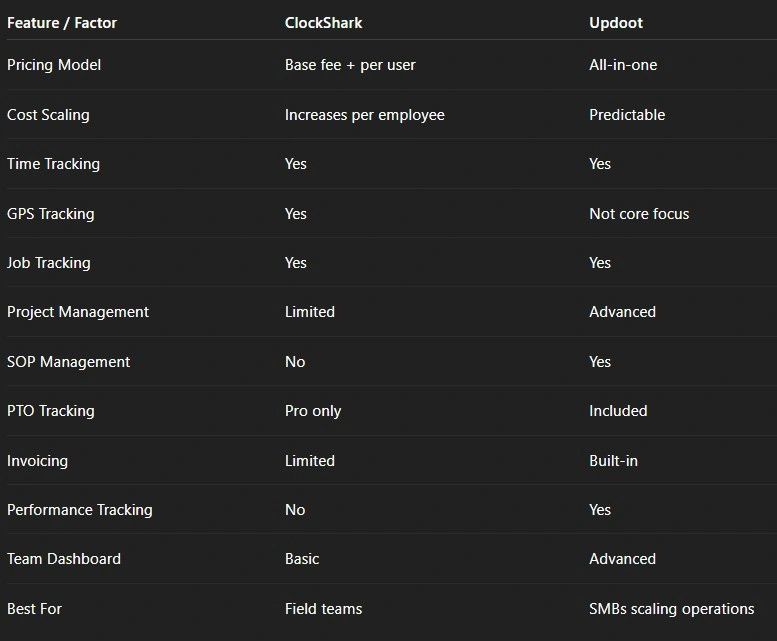
| Feature | ClockShark | Updoot |
|---|---|---|
| Mobile and web time clock with GPS | Yes | Yes, with photo capture |
| Job and task time tracking | Yes | Yes, tied to projects |
| Scheduling | Yes | Yes, with shift swaps, requests, and AI-assisted fill |
| PTO tracking | Pro plan | Included |
| Advanced job costing | Pro plan | Hours and labor cost by project |
| Payroll export | Integrations | Payroll-ready exports |
| Project management | Job tracking | Full projects with owners, deadlines, and progress |
| Invoicing from tracked hours | Through accounting integrations | Built in |
| SOPs and documentation | No | Built in |
| HR records and performance reviews | No | Built in |
| CRM and quotes | No | Built in |
| Pricing model | Base fee plus per user, two tiers | $5 per user, one plan |
Where ClockShark Is Strong
- Built for the field. Crews, job sites, and trade work are its home turf.
- Job costing focus. It is designed around tying hours to jobs.
- Active-user billing. Seasonal crews do not cost you money in the off months.
- Accounting integrations. It connects to common tools like QuickBooks and Xero.
Where ClockShark Falls Short for Growing Businesses
The bill grows with every hire
A base fee plus a per-user charge means every new employee raises your monthly cost, and the Pro features many teams want, like PTO, come at the higher rate.
It stops at time tracking
ClockShark is excellent at hours and crews. It is not built for SOPs, internal documentation, full project management, performance reviews, or goal tracking. Most businesses end up adding separate tools for those, and each one has its own subscription and its own login.
It is built for field teams
If you run office, hybrid, or mixed teams alongside field crews, a field-first tool can feel limiting.
The Real Cost Is the Whole Stack
Comparing time trackers on price alone misses the bigger number: what you pay for everything around them. A typical small business adds a project tool, an HR or PTO tool, a documentation tool, invoicing, and a CRM. Each one costs money, and every connection between them is manual work.
| You Need | With ClockShark | With Updoot |
|---|---|---|
| Time tracking and scheduling | ClockShark | Included |
| Project management | Separate tool | Included |
| SOPs and documentation | Separate tool | Included |
| HR records and reviews | Separate tool | Included |
| Invoicing and CRM | Separate tools | Included |
Use the "Other Tools" box in the calculator to add what you would pay for those, and the comparison gets much more realistic.
What Happens to the Bill as You Grow
Per-user pricing is fair in principle: you pay for the people who use the software. The difference is in how steep the line is. Say you start the year with 10 people and grow to 25 by the end of it.
- ClockShark Pro goes from $170 to $335 a month, an increase of $165 every month.
- Updoot goes from $50 to $125 a month, an increase of $75 every month.
Over time, that gap compounds. It also matters when you hire seasonal staff, bring on part-timers, or want office staff and managers in the same system as your crews. When every seat is expensive, businesses start leaving people out of the system, and the data gets worse.
Questions to Ask Before You Choose a Time Tracking Tool
- What will we pay at next year's headcount, not today's? Run the calculator with the team size you expect.
- Which features are on the plan we can afford? Check whether PTO, job costing, or approvals sit behind a higher tier.
- What other tools will we still need? List them with their monthly cost.
- Does it handle overtime and breaks the way we need? The Fair Labor Standards Act sets federal rules on minimum wage, overtime, and recordkeeping, and your tool should make those easy to follow.
- Are there contracts or long commitments? Read the terms before you sign.
- How easy is it for employees? The best time clock is the one your team actually uses every shift.
How to Switch Time Tracking Software Without Losing Data
- Export your history first. Download timesheets, job codes, and employee lists from your current tool.
- Pick a clean start date. The first day of a pay period keeps payroll simple.
- Set up jobs and projects before people. Employees should see the right jobs on day one.
- Run both systems for one pay period. Compare totals before you cancel the old tool.
- Train crews in five minutes. Show them how to clock in, clock out, and switch jobs, and nothing more at first.
Which One Should You Choose?
Choose ClockShark if
- You run a construction or field service business
- You mainly need GPS time tracking and job costing
- You are happy to keep separate tools for everything else
Choose Updoot if
- You want time tracking, scheduling, projects, HR, SOPs, invoicing, and CRM in one system
- You want one simple price that does not change by plan tier
- You manage office, hybrid, or mixed teams, not only field crews
- You want to stop paying for and switching between several apps
Still comparing? See Connecteam pricing vs. Updoot pricing.
Final Thoughts
ClockShark is a strong tool that solves a focused problem. When you compare pricing, look past the per-user number to what you still need to add and how the bill grows as you hire. The cheapest tool up front is rarely the cheapest once the rest of the business needs software too. Run your numbers in the calculator above and let the total decide.
If you are leaning toward Updoot, start the 14-day free trial with a small group, such as one crew and one manager, and run it alongside your current tool for a pay period. You will know quickly whether it fits the way your team works.
Opens in Google Drive. View and download for free.
Related Reading
Connecteam Pricing vs. Updoot Pricing Explained →
Best Time Clock Software for Contractors →
Best Time Clocks for Small Business: A Side-by-Side Comparison →
Frequently Asked Questions About ClockShark and Updoot Pricing
How much does ClockShark cost?
At the time of writing, ClockShark's Standard plan is listed at $40 per month plus $9 per active user, and the Pro plan at $60 per month plus $11 per active user. Confirm current prices on ClockShark's website before buying.
How much does ClockShark cost for 10 employees?
Using those published rates, 10 active users cost about $130 per month on Standard and $170 per month on Pro. Updoot costs $50 per month for 10 users with every feature included.
Does ClockShark have a free trial?
Yes. ClockShark offers a 14-day free trial with access to Pro plan features. Updoot also offers a 14-day free trial with no credit card required.
What does Updoot include that ClockShark does not?
Updoot includes full project management, SOPs and documentation, HR records and performance reviews, invoicing from tracked hours, and a CRM alongside time tracking, GPS time clock, scheduling, and PTO.
Is ClockShark good for construction companies?
Yes. ClockShark is built mainly for construction, field service, and trade crews, with GPS time tracking, job tracking, and job costing. Businesses that also need HR, projects, documentation, and invoicing usually add other tools.
How is Updoot priced?
Updoot is $5 per active user per month with every feature included. There is no base fee, no plan tiers, no add-ons, and no contract.