
Shift Swap Software for Restaurants, Construction, Retail, More
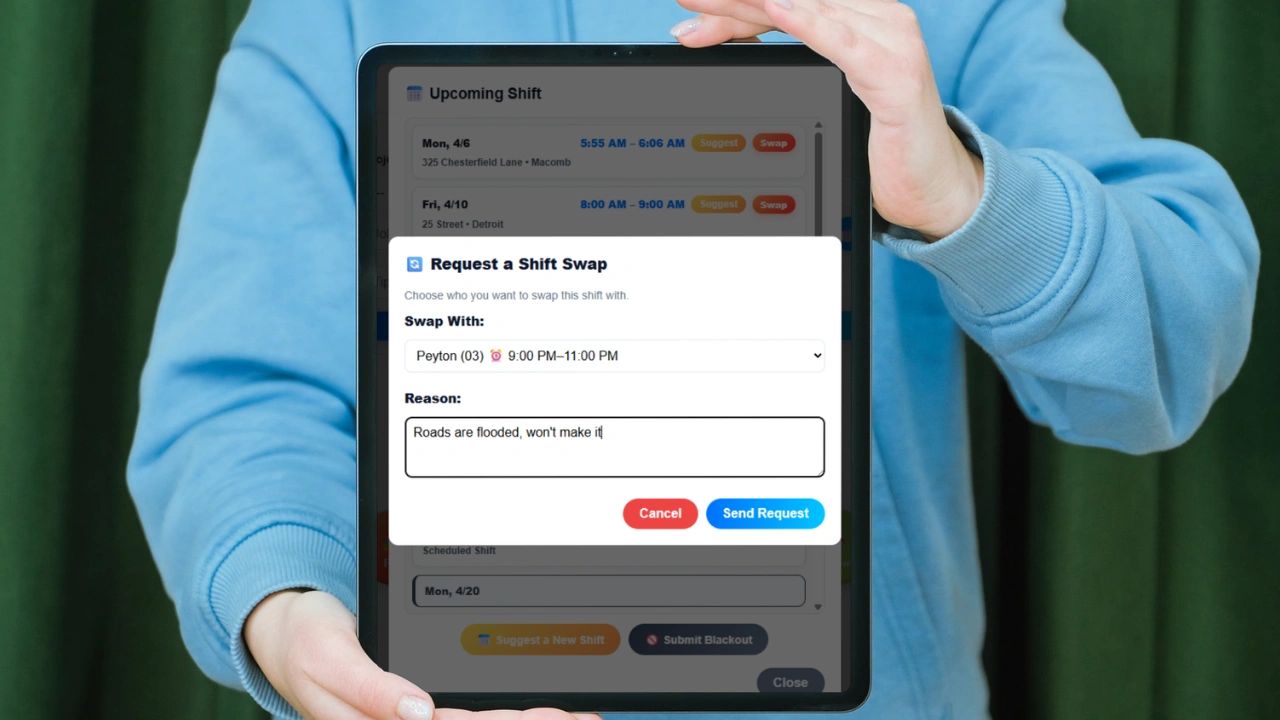
This is a list of features your shift swap software must have in various industries. Shift swap software has become a critical tool for modern businesses that rely on hourly employees, rotating schedules, or multi-location teams. Whether you are running a restaurant, managing a healthcare facility, or overseeing a retail operation, one thing is constant: schedules change. Employees call in sick. Emergencies happen. Preferences shift. The question is no longer whether schedules will change -- it is how efficiently your business can adapt.
What Is Shift Swap Software?
Shift swap software is a feature within employee scheduling systems that allows workers to exchange, pick up, or drop shifts through a centralized platform or mobile app. Instead of managers manually texting, calling, or emailing employees to fill shifts, the system automates the process: employees request swaps, the system matches shifts with qualified coworkers, available staff are notified, company rules and labor laws are enforced automatically, and schedules update in real time.
Modern systems also integrate with scheduling, time tracking, payroll, and communication tools -- creating a single source of truth for workforce management rather than a patchwork of spreadsheets, group texts, and phone calls.
Why Shift Swapping Matters More Than Ever
Workforce expectations have changed. Employees want flexibility. Businesses need consistency. Shift swapping bridges that gap. Without software, shift changes lead to missed shifts, overtime costs, manager burnout, communication breakdowns, and compliance risks. With software, those problems are dramatically reduced. Instead of a manager scrambling to cover a no-show, the system automatically notifies qualified employees and fills the shift within minutes -- without the manager needing to make a single call.
Key Benefits of Shift Swap Software
Increased Scheduling Flexibility
Employees gain control over their schedules -- they can trade shifts with coworkers, pick up additional hours, and adjust for personal commitments. This flexibility leads to higher engagement and job satisfaction, and has been shown to improve morale, reduce stress, and increase retention across hourly teams that have historically had very little schedule control.
Reduced Manager Workload
Managers no longer need to call multiple employees, track availability manually, update spreadsheets, or resolve scheduling conflicts individually. The system handles requests, approvals, and notifications automatically. This recovers hours each week and allows managers to focus on operations instead of admin work that should not require their direct involvement.
Better Shift Coverage
One of the biggest operational risks in any shift-based business is being understaffed during a critical period. Shift swap software ensures open shifts are filled quickly, employees can claim available shifts through a marketplace, and coverage gaps are surfaced before they become operational problems. This leads to smoother operations and more consistent customer or client experiences.
Improved Compliance and Accuracy
Modern systems enforce rules around maximum working hours, required certifications, role-based permissions, and labor law compliance. This prevents costly mistakes like assigning unqualified staff to specialized shifts or accidentally creating overtime violations that only surface at payroll.
Real-Time Communication
Instead of scattered texts and emails across multiple channels, swap requests, approvals, notifications, and schedule updates all happen in one place. Employees and managers always know the current state of the schedule without having to ask.
Reduced Absenteeism and No-Shows
When employees can easily swap a shift they cannot cover, they are far less likely to simply not show up. The ability to adjust their schedule without consequence removes the incentive for last-minute call-outs, creating a more reliable workforce overall.
Core Features of Shift Swap Software
Not all systems are built the same. The best shift swap software includes a full suite of scheduling and workforce management features.
| Feature | What It Does |
|---|---|
| Employee Self-Service | Employees request swaps, offer shifts, claim open shifts, and set availability without manager involvement |
| Open Shift Marketplace | Managers post available shifts; employees bid, claim, or are auto-assigned based on rules |
| Qualification and Role Matching | Only eligible employees can take certain shifts; certifications and skill requirements are enforced automatically |
| Manager Approval Controls | Businesses choose fully automated swaps, manager approval required, or conditional approvals |
| Real-Time Notifications | Instant alerts for open shifts, swap requests, and approval updates sent via mobile |
| Mobile Accessibility | Employees manage shifts, receive alerts, and stay connected from any device |
| Payroll and Time Tracking Integration | Connects to time clocks, payroll systems, and reporting tools for accurate hours and billing |
| Multi-Location Scheduling | Manages shifts across sites, allows cross-location swaps, and standardizes scheduling processes |
| Labor Cost Forecasting | Tracks budget, optimizes staffing levels, and surfaces cost implications of scheduling decisions |
Scheduling Features That Enhance Shift Swapping
Shift swapping works best when it is part of a broader scheduling platform rather than a standalone feature. Key scheduling capabilities that make swap management more effective include drag-and-drop scheduling tools, recurring and rotating shift templates, availability and time-off request management, automated schedule generation, team messaging, and digital time clocks with GPS confirmation. These features ensure that schedules are not just flexible but optimized -- built on real availability data rather than assumptions that create conflicts the moment someone needs to swap.
Industries That Benefit Most from Shift Swap Software
Healthcare
Hospitals, clinics, and care facilities operate 24 hours a day. Even a single missed shift can impact patient safety, which makes automated coverage and qualification matching critical rather than optional. Shift swap software ensures continuity of care without placing the burden of every schedule change on charge nurses or administrators.
Hospitality -- Restaurants and Hotels
High turnover, variable demand, and last-minute call-outs are the norm in hospitality. Peak hours need to be staffed regardless of who originally held the shift. Shift swapping ensures that service quality stays consistent and front-of-house coverage does not collapse when a team member cannot make their shift.
Retail
Retail businesses deal with seasonal demand spikes, a part-time workforce, and often multiple locations. Shift swapping allows employees to pick up extra hours during busy periods, adjust schedules around personal commitments, and support coverage across stores -- giving managers flexibility without requiring them to be the constant point of coordination.
Manufacturing
Manufacturing environments depend on strict shift coverage, skilled labor requirements, and continuous operations where a gap in a single position can halt production. Software that enforces skill matching and covers shifts automatically is not a convenience -- it is an operational requirement.
Construction and Field Services
Field teams need flexible scheduling, mobile access, and location-based shift assignments. Conditions change -- project timelines shift, weather disrupts plans, and teams need to reallocate quickly. Shift swap software gives field managers the agility to adapt without manual coordination across multiple crew members.
Call Centers and Customer Support
Customer service teams must maintain consistent coverage across time blocks tied to demand forecasts. Staffing gaps in call centers directly affect response times and customer satisfaction scores. Shift swapping allows teams to maintain coverage standards even when individual schedules need to change.
Manual Scheduling vs. Shift Swap Software
Many businesses still rely on spreadsheets or group chats for schedule management. That approach does not scale. Manual scheduling leads to errors and double-bookings, lack of real-time visibility, miscommunication across channels, and time-consuming manual updates every time something changes. Shift swap software replaces all of that with centralized communication, automated workflows, real-time schedule updates, and built-in compliance enforcement. It is not just a convenience upgrade -- it is an operational improvement that eliminates an entire category of recurring management problems.
How to Choose the Right Shift Swap Software
When evaluating options, focus on ease of use for frontline employees -- a tool that your team finds confusing will not be adopted regardless of its capabilities. Look for mobile accessibility since most hourly workers do not manage their schedules from a desktop. Prioritize automation so that the system handles the work rather than creating a new set of digital steps that still require manager intervention. Confirm integration with your existing payroll and time tracking systems so you are not creating a new data silo. Verify that the platform can be configured to match your specific business rules rather than forcing you to change your processes to fit the software. And consider scalability if you have or plan to have multiple locations.
Take Scheduling Further with Updoot
If you are looking for more than just shift swapping, Updoot connects scheduling to the rest of your workforce operations. Shift scheduling and swap management sit alongside employee time tracking, GPS clock-ins, PTO and availability management, project and job-based time tracking, and payroll-ready reporting in one platform. Instead of managing scheduling in one tool, time tracking in another, and payroll in a third, everything runs together. Shift swaps are just the beginning -- Updoot connects your team's time directly to productivity, operations, and revenue, giving you full visibility into what is actually happening in your business in real time.
Related Reading
How Many Breaks for a 12-Hour Shift? Rules and Examples →
Vacation Scheduling Software: How to Find the Best →
The Best Time Clock Kiosk App and Software for Small Business →