
How to Manage Customer Relationships
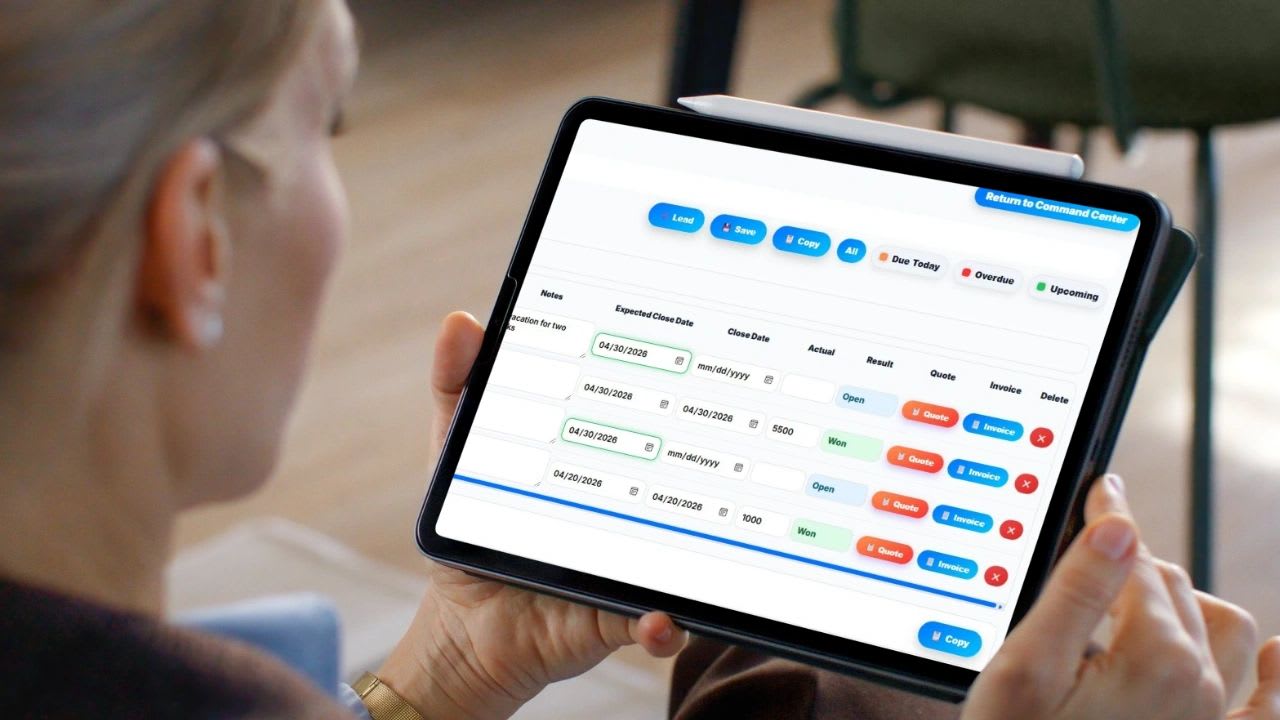
Managing customer relationships well comes down to one habit: never letting a conversation go quiet by accident. Every business owner knows the feeling. A client calls about a proposal you forgot to send. A lead that seemed ready to buy goes cold because nobody checked in. A deal disappears because the person who owned it left and took all the context with them.
In theory, it is simple. You talk to people, follow up, deliver value, and close. In practice, without a system holding it together, the cracks appear fast, and they widen as your team grows.
Here is how to manage customer relationships the right way, the habits and tools that actually work, and a free follow-up tracker so nobody slips through the cracks again.
Why Customer Relationship Management Matters
The way people buy has changed. Customers research more before reaching out, take longer to decide, and expect fast answers when they do. Business-to-business deals often involve several conversations over weeks or months before anything is signed.
That means the relationship you build during the sale matters as much as what you are selling. A competitor with a slightly weaker offer but better follow-up will often win, not because their product is better, but because they showed up consistently.
Poor relationship management shows up as:
- Deals that go cold because of missed follow-ups
- Proposals that expire before anyone checks in on them
- New reps starting from zero because context lives in someone's inbox
- Inaccurate revenue forecasts because pipeline data is guesswork
- Frustrated clients who feel like they are chasing you instead of the other way around
None of these problems are about effort. They are about systems.
Know Where Every Relationship Stands
Before you can manage customer relationships effectively you need to know where every single one stands at any given moment. That means having a single place where the following information lives for every lead or client:
- Contact name, company, email, and phone
- Where they are in your sales process (stage)
- When you last contacted them
- When you need to follow up next
- What was quoted and for how much
- What the expected close date is
- Who on your team owns the relationship
If any of those fields exist in your head or in a spreadsheet that only one person has access to, you have a systems problem. The fix is a proper customer relationship management setup, whether that is a dedicated CRM tool or a structured internal system that your whole team uses consistently.
Build a Clear Sales Pipeline
A sales pipeline is a visual representation of where every deal is in your sales process. Think of it as a series of stages that every lead moves through from first contact to closed deal.
A basic pipeline for most small businesses looks like this:
- Prospect: you have identified a potential customer but have not reached out yet
- Contacted: you have made initial contact and are waiting for a response
- Qualified: you have confirmed they have a real need, a budget, and the authority to buy
- Proposal Sent: you have sent a quote or formal proposal
- Negotiation: they are engaged on pricing, scope, or terms
- Sent to Finance: the deal is agreed in principle and is being processed internally by their team
- Closed Won or Lost: the deal is done
Every lead in your system should always be in one of these stages. The stage tells you and your whole team exactly what needs to happen next without anyone having to ask.
The reason pipelines work so well is that they make the invisible visible. Instead of wondering where a deal is, you look at the stage and you know. Instead of guessing how much revenue is coming in next month, you look at your pipeline and you calculate.
For a deeper look at stage probabilities and forecasting, see the best CRM for SaaS and how to organize and track sales leads.
Follow Up on Purpose
Follow-up is where most businesses lose deals. Plenty of sales take several touches before a buyer is ready, yet many people give up after one or two attempts. The fix is not trying harder. It is building follow-up into the system.
| Good Follow-Up | Bad Follow-Up |
|---|---|
| Every lead has a specific next follow-up date | Following up only when you remember |
| Overdue follow-ups are flagged automatically | Sending one email and waiting indefinitely |
| Cadence depends on the deal stage | No record of when you last spoke |
| One named person owns each follow-up | Everyone owns it, so nobody does |
Free Customer Follow-Up Tracker
Set how many days you want between touches at each stage, then add your contacts. Click "Contacted Today" after each conversation and the next date resets automatically.
Free Customer Follow-Up Tracker
Add each lead or customer with their stage and the date you last spoke. The tracker sets the next follow-up date from your cadence for that stage and flags anyone overdue or due today.
Follow-Up Cadence (days after last contact)
Add a Contact
| Contact | Stage | Owner | Value | Last Contact | Next Follow-Up | Status |
|---|
The "Deal Value Overdue" number is the revenue sitting in conversations that have gone quiet. Bring that number to your weekly pipeline meeting.
Manage Quotes and Proposals So Deals Do Not Stall
Sending a proposal is a major milestone in any sales process. It signals that the prospect is serious and you are serious. But it is also where a surprising number of deals stall and die.
Common reasons proposals fail to convert:
- The proposal is sent and then never followed up on
- There is no expiry date so the prospect feels no urgency
- The proposal is not tracked so no one knows when it was sent or if it was received
- The proposal gets sent to the wrong person or with incorrect pricing
Good proposal management looks like this:
- Every proposal has a quote number so it can be referenced in conversation
- Every proposal has an expiry date so the prospect knows the offer is time-sensitive
- The moment a proposal is sent, it is logged in your system with a timestamp
- A follow-up date is automatically set for a few days after sending
- The proposal is stored against the specific lead so anyone on the team can pull it up
When a proposal is sent, the stage in your pipeline should move to Proposal Sent and an audit record should be created automatically. This gives you a clean history of when proposals went out, who sent them, and which deals they were tied to without anyone having to manually log anything.
Close the Loop From Quote to Invoice
One of the biggest disconnects in small business sales is what happens after a deal closes. The salesperson marks it as won, shakes hands, and then finance finds out about it two days later through an email chain with no attached quote and the wrong total.
Closing the loop between the sales process and the invoicing process is critical for several reasons:
- It prevents billing errors that damage client relationships
- It ensures finance has the right information to invoice correctly and on time
- It gives you a clean record of what was sold, to whom, and for how much
- It removes the manual handoff that is the single most common source of errors in small business billing
The ideal workflow looks like this:
- A lead is qualified and a quote is built directly from the lead record
- The quote is sent to the client by email with the PDF attached
- When the deal closes, a single button generates a pre-filled invoice using the quote data
- Finance reviews and downloads the invoice without re-entering any information
- The invoice is logged, tracked, and marked paid when payment is received
Every step in this workflow should happen in one place. The moment you are copying information between systems or re-typing client details into an invoice, you have introduced unnecessary risk and wasted time.
Turn Pipeline Data Into Decisions
Managing customer relationships well is not just about individual deals. It is about understanding patterns across your entire pipeline so you can make better decisions.
The metrics every sales manager should be looking at every week:
- Total leads by month: is your pipeline growing or shrinking
- Close rate: what percentage of leads are converting to closed deals
- Average deal size: are you winning bigger or smaller deals over time
- Pipeline by stage: where are deals stalling
- Forecasted revenue: based on current pipeline, what is likely to close this month
- Revenue by rep: who is performing and who needs support
- Top lead sources: where are your best leads coming from
These numbers should be visible at a glance without building a spreadsheet or pulling a report. If it takes more than thirty seconds to answer the question "how much are we going to close this month," your system is not working for you.
The best CRM setups update these metrics in real time as deals are added, moved through stages, and closed. Clicking any month in your dashboard should show you a breakdown of exactly what happened that month, by stage, by source, and by rep.
Build a Relationship Culture on Your Team
Tools and systems only work if your team uses them consistently. Here is how to build a culture where customer relationship management actually happens:
- Make pipeline updates part of your weekly routine, not an afterthought
- Hold a short weekly pipeline review where every deal in negotiation or later gets a status check
- Make it easy to update a stage, add a note, or set a follow-up date so the friction of updating is lower than the friction of not updating
- Celebrate wins publicly when they are logged in the system so there is a reason to mark deals as won correctly
- Use the audit log to coach, not to punish, look at who is sending proposals and who is not, who is following up and who is letting things go cold
The goal is a team where everyone defaults to the system as the source of truth rather than their inbox or their memory. That transition does not happen overnight but it happens faster when the system is simple enough that updating it takes less time than explaining where a deal stands in a meeting.
Keep Customers After the Sale
Managing relationships does not end when the deal closes. Keeping a customer is usually far cheaper than finding a new one, and happy customers bring referrals. After the sale:
- Check in within the first two weeks to confirm they are getting what they expected.
- Schedule regular touchpoints, such as a quarterly review for larger accounts.
- Log every support issue and request against the customer record so anyone on the team has the full story.
- Ask for feedback and referrals once they have seen results.
- Watch for warning signs like slower replies, fewer orders, or new decision-makers.
Customer Relationship Metrics Worth Watching
| Metric | What It Tells You |
|---|---|
| Response time to new leads | How quickly interest turns into a conversation |
| Follow-ups overdue | Relationships that are quietly going cold |
| Quote-to-close rate | How many proposals turn into paying customers |
| Customer retention rate | Share of customers who stay from one period to the next |
| Repeat purchase rate | Whether customers come back without being chased |
| Referrals received | Whether customers trust you enough to recommend you |
Review these monthly. A rising number of overdue follow-ups is usually the earliest warning that customers are about to slip away.
How to Win Back a Customer Who Went Quiet
- Look at the history first. Check the last order, the last conversation, and any open issues before you reach out.
- Reach out with a reason. Share something useful, such as a new service, a seasonal reminder, or a fix to a past problem.
- Ask directly. "We have not worked together in a while. Is there anything we could do better?" often gets an honest answer.
- Fix what you hear. If the answer points to a real problem, solve it and tell them you did.
- Log the outcome so the next person knows where the relationship stands.
What to Look for in a Customer Relationship Management Tool
If you are evaluating tools to manage your customer relationships, here is what actually matters for a small or growing business:
- A clean pipeline with color-coded stages so status is visible at a glance
- Follow-up date tracking with overdue alerts so nothing gets forgotten
- Quote and proposal generation built into the lead record
- The ability to email a quote directly from the platform with PDF attachment
- Invoice generation that pulls from the quote data automatically
- A dashboard that shows pipeline, close rate, revenue, and rep performance by month
- An audit log that tracks when proposals were sent and by whom
- Private and public lead lists so sensitive deals can be kept confidential
- Owner assignment with clear accountability for every deal
What you do not need, especially early on, is a tool with dozens of features you will never use, a six-month onboarding process, or a price tag that requires a CFO to approve.
Updoot: A CRM Built for Teams That Actually Sell
Updoot's Sales CRM takes customer relationships from first contact to paid invoice. It includes a lead table with color-coded stages, follow-up alerts, and owner assignment; quote generation with PDF download and one-click emailing; automatic audit logging when proposals are sent; invoices pre-filled from quote data; and a live dashboard with monthly forecast, revenue, close rate, deal size, pipeline by stage, lead sources, and revenue by rep. It also handles time tracking, payroll, HR, PTO, and projects, so sales and operations live in one system. Plans start at $5 per user per month.
Final Thoughts
Strong customer relationships are built on consistency: knowing where every conversation stands, following up on schedule, tracking every quote, and handing off cleanly to billing. Put those habits into a simple system your whole team uses, and deals stop slipping through the cracks.
Opens in Google Drive. View and download for free.
Related Reading
Sales Lead Tracker: How to Organize, Track, and Convert More Leads →
Frequently Asked Questions About Managing Customer Relationships
How do you win back a customer who stopped buying?
Review their history, reach out with a useful reason rather than a generic check-in, ask directly what you could do better, fix what you hear, and log the outcome so the whole team knows where the relationship stands.
What is customer relationship management?
Customer relationship management is the set of tools and habits a business uses to track, follow up with, and close deals with leads and customers, and to keep customers after the sale.
What should a basic sales pipeline include?
A basic pipeline moves leads through Prospect, Contacted, Qualified, Proposal Sent, Negotiation, and Closed Won or Lost. Every lead should always sit in one stage so the team knows what happens next.
How often should you follow up with a lead?
Set a follow-up cadence by stage, such as every two to five days for active deals, and make sure every lead has a specific next contact date and a named owner.
What information should you track for every customer?
Track contact details, pipeline stage, last contact date, next follow-up date, what was quoted and for how much, expected close date, and who owns the relationship.
What sales metrics should a business review every week?
Review leads by month, close rate, average deal size, pipeline by stage, forecasted revenue, revenue by rep, and top lead sources.
What is the biggest mistake businesses make with proposals?
Sending a proposal and never following up. Every proposal should have a quote number, an expiry date, a logged send date, and a follow-up date a few days later.