
Best CRM for SaaS: What You Need to Look For
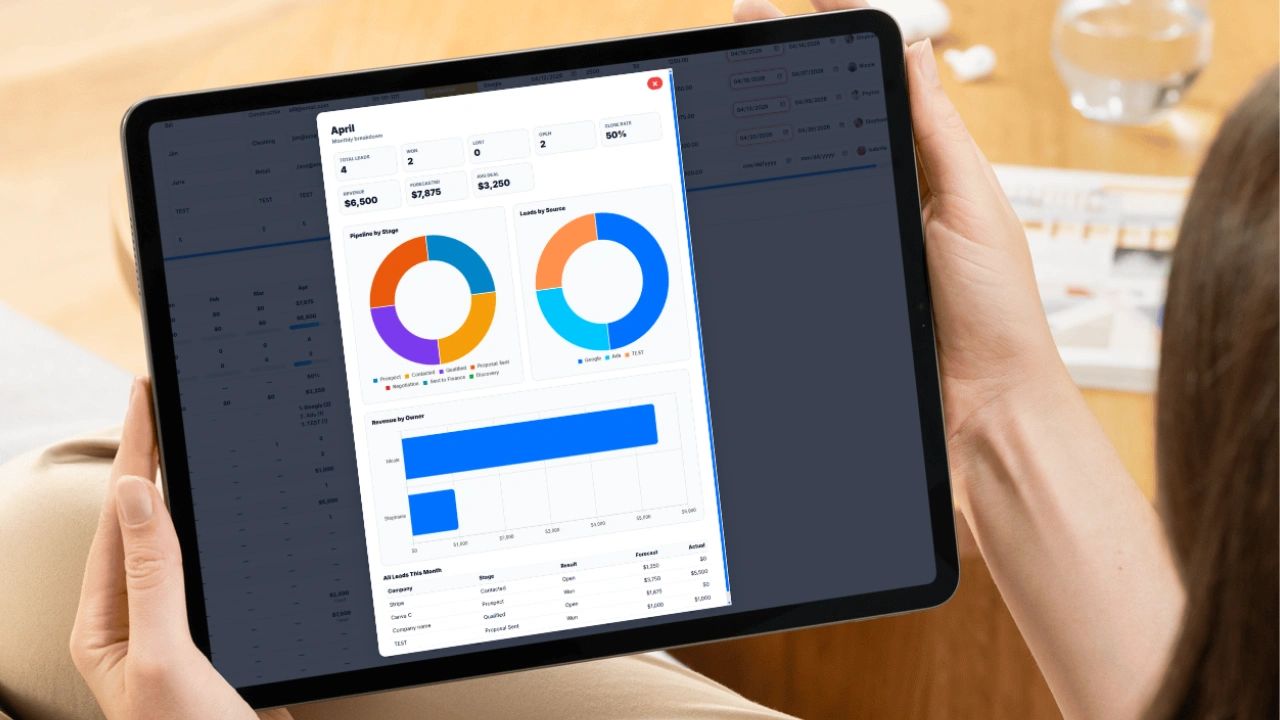
The best CRM for SaaS is one that tracks every prospect, follow-up, and deal stage, weights your pipeline by close probability, and connects the closed deal to invoicing, without the setup burden of an enterprise platform. This guide covers why SaaS teams lose revenue without a CRM, the features that matter, the mistakes to avoid, the pipeline stages that work, and a free weighted forecast calculator you can use today.
Why SaaS Businesses Lose Revenue Without a CRM
Every SaaS founder knows this moment. You are three months into a sales cycle with a prospect who seemed like a sure thing. You follow up. No response. You look for your notes and there are none, just an email thread from six weeks ago and a reminder you forgot to act on. The deal dies not because the product fell short, but because a follow-up fell through a crack that did not need to exist.
That is not a talent problem. It is a systems problem. Founders and reps who lose deals this way are rarely lazy. They are juggling demos, onboarding calls, investor updates, and product questions at once. Effort without structure produces inconsistent results, and inconsistent results kill growth. A CRM does not replace the effort. It makes the effort count.
What a CRM Is and What It Is Not
Customer relationship management software gets oversold as a magic revenue engine and undersold as a glorified spreadsheet. In practice, a CRM is a structured system for tracking every prospect, interaction, follow-up, and outcome across your pipeline. It will not replace good salespeople. It is the infrastructure that makes good salespeople better and keeps average ones from losing deals they should have won.
For SaaS, a CRM is close to mandatory because the sales cycle is relationship driven. Unlike ecommerce, where someone browses and buys in one session, SaaS deals unfold over days, weeks, or months. There are demos, pricing conversations, security reviews, stakeholder approvals, legal redlines, and onboarding discussions before any money changes hands. Without a system tracking each touchpoint:
- A rep sends a proposal and forgets to follow up because a demo ran long.
- A manager cannot say how many deals are in negotiation because the answer lives in three inboxes.
- A founder presents a board forecast built on memory rather than data.
The Real Cost of Not Having a CRM
Most founders count the deals they know they lost. Few count the deals they lost without noticing: the prospect who went cold, the quote that expired, the lead that signed with a faster competitor.
Speed. Response time matters. A widely cited Harvard Business Review study of online sales leads found that companies that contacted a lead within an hour were far more likely to qualify it than companies that waited longer, and many firms took more than a day to respond at all. You cannot respond fast to a lead you cannot see.
Visibility. Without a CRM, the pipeline lives in someone's head. When that person is out or leaves, the pipeline leaves too. A CRM makes the sales process a company asset instead of a personal one.
Forecasting. Without deal values, probabilities, and expected close dates, a revenue forecast is a guess dressed up as a number.
Culture. When there is no shared system, reps protect their deals, managers act on whoever spoke to them last, and new hires take months to ramp because there is no record of what was tried before.
What to Look For in a SaaS CRM
Many CRMs are built for enterprise teams with dedicated admins and large implementation budgets. For a growing SaaS company, these are the features that matter most.
| Feature | What It Does | Why It Matters for SaaS |
|---|---|---|
| Pipeline by stage | Shows deal count and dollar value at every stage | Your weighted pipeline is your most important sales number |
| Per-rep performance | Leads, close rate, and overdue follow-ups by owner | Shows where to coach and where the process breaks |
| Lead source attribution | Tags each lead with where it came from | Turns marketing spend decisions into data |
| Follow-up alerts | Flags overdue, due today, and cold leads | Missed follow-up is the top cause of lost deals |
| Monthly forecasting | Forecast vs. actual, close rate, average deal size | Reveals seasonality and sets realistic targets |
| Quote integration | Records what was quoted, to whom, and when it expires | Stops expired proposals from slipping away |
| Invoice handoff | Turns a closed deal into an invoice without retyping | Removes billing errors between sales and finance |
| Mobile and multi-user | Reps update records from anywhere at the same time | Deals move between meetings, not at a desk |
| Private and shared lists | Controls who can see which accounts | Protects sensitive deals while allowing handoffs |
What to Avoid in a CRM
Enterprise Complexity You Will Not Use
Enterprise platforms are powerful for large sales organizations with full-time administrators. For a 10-person SaaS company, the setup can become a tax on your time. The best CRM for a growing company is the one your team actually uses, not the one that sits half-empty after a three-month rollout. If you are weighing options, see Salesforce alternatives for small businesses.
Tools That Do Not Connect to Your Workflow
If the CRM does not talk to invoicing, email, or project management, you get silos. Sales updates the CRM, finance works from spreadsheets, and management pulls reports that contradict each other.
Weak Reporting
If the CRM cannot show close rate by month, average days to close, top lead sources by conversion, or revenue by rep, you are paying for a database you cannot learn from.
No Audit Trail
Knowing when a proposal went out, who sent it, and what it contained protects you in pricing disputes and contract questions.
Pricing That Punishes Growth
Some platforms are cheap at ten users and expensive at fifty. Check pricing at two and three times your current team size, because migrating data, history, and workflows later is costly.
Setup That Requires a Consultant
If you must hire someone to build custom objects before your team can log a call, you bought a construction project. Good systems are useful out of the box and flexible enough to fit your process.
The Pipeline Stages That Actually Matter
A common setup mistake is creating too many stages, or stages that do not match how deals move. For most SaaS teams, this sequence works. The probabilities are starting points, so replace them with your own historical close rates once you have a few months of data.
| Stage | What It Means | Example Probability |
|---|---|---|
| Prospect | Identified as a potential fit, no contact yet | 5% |
| Contacted | First outreach made, waiting on a response | 10% |
| Discovery | In conversation, learning their problem and educating them on yours | 20% |
| Qualified | Confirmed problem, budget, and decision authority | 30% |
| Proposal Sent | Formal quote delivered and logged | 50% |
| Negotiation | Price, scope, term, or implementation under discussion | 70% |
| Sent to Finance | Verbal yes, in legal, procurement, or finance review | 90% |
| Closed Won / Lost | Signed, or formally lost with a reason recorded | 100% / 0% |
Qualified is the most important gate. Deals that skip real qualification clog the later stages and inflate the forecast. Sent to Finance is often overlooked, but it is what keeps close dates honest when a prospect's procurement process adds weeks. Give each stage a distinct color so anyone scanning the pipeline knows where every deal stands.
Forecasting That Actually Works
Most forecasts are wrong because they treat every deal as equally likely to close. A deal in Negotiation with a verbal yes is not the same as a Prospect who received one cold email. A weighted forecast multiplies each deal's value by its close probability.
If you have a $10,000 deal at 70%, its forecasted value is $7,000. Ten deals like that forecast $70,000, not $100,000. That gap is the difference between making payroll and missing it.
The second metric most teams ignore is average days to close. If deals usually take 47 days from first contact to signature and one has sat in Negotiation for 60 days, it is either stalling for a reason you need to understand or it is not as close as the rep believes. Try it with your own pipeline below.
Free Weighted Pipeline Forecast Calculator
Free Weighted Pipeline Forecast Calculator
Add each open deal with its value and stage. The stage sets a starting close probability that you can override. The calculator shows total pipeline, weighted forecast, and value by stage.
| Deal | Stage | Value | Probability | Weighted Value |
|---|
Pipeline by Stage
| Stage | Deals | Total Value | Weighted Value |
|---|
Closed Won deals appear in their own total and are not counted in the open pipeline, so the forecast only reflects revenue that is still in play. For more metrics to watch, see sales operations KPIs for small business.
SaaS Metrics Your CRM Should Help You Track
A SaaS business lives on recurring revenue, so the numbers that matter go beyond "deals closed this month." A good CRM either tracks these directly or holds the data you need to calculate them.
| Metric | How It Is Calculated | Why It Matters |
|---|---|---|
| MRR (monthly recurring revenue) | Total recurring subscription revenue for the month | The heartbeat of the business |
| ARR (annual recurring revenue) | MRR x 12 | How investors and buyers size a SaaS company |
| Win rate | Deals won divided by deals closed (won plus lost) | Shows how well sales converts qualified opportunities |
| Sales cycle length | Average days from first contact to closed-won | Tells you how far ahead your pipeline has to be built |
| Customer churn rate | Customers lost in a period divided by customers at the start | Churn quietly erases new sales |
| Net revenue retention | (Starting MRR + expansion - contraction - churned MRR) divided by starting MRR | Above 100% means existing customers grow on their own |
| CAC (customer acquisition cost) | Sales and marketing spend divided by new customers won | What each new customer costs you |
| LTV (lifetime value) | Average revenue per account x gross margin, divided by churn rate | What a customer is worth over their lifetime |
| CAC payback | CAC divided by (monthly revenue per account x gross margin) | Months until a new customer pays back what it cost to win |
If your CRM, billing, and support data live in separate tools, calculating these becomes a monthly spreadsheet project. That is one of the strongest arguments for keeping customers, quotes, invoices, and activity in one system.
How Much Pipeline Do You Need?
Pipeline coverage compares the value of open opportunities to your sales target for the period. Because not every deal closes, you need more pipeline than quota. Many SaaS teams aim for roughly three to four times coverage, adjusted by their own win rate.
A simple way to find your number: divide 1 by your win rate. If you close 25 percent of qualified opportunities, you need about four dollars of qualified pipeline for every dollar of new revenue you want to book. If your target is $30,000 in new MRR this quarter and your win rate is 25 percent, you need about $120,000 in qualified pipeline, and it needs to be built early enough to close within your average sales cycle.
The weighted forecast calculator above gives you the other half of the picture: not just how much pipeline you have, but how much of it is realistically going to close.
Use Your CRM After the Sale, Too
In SaaS, the sale is the start of the revenue, not the end. Renewals, upgrades, and churn decide whether a customer is profitable, so your CRM should follow the customer after closed-won.
- Track renewal dates and start renewal conversations well before the contract ends.
- Log support issues and product feedback on the customer record so sales and success see the same history.
- Flag churn risks, such as falling usage, unpaid invoices, a lost champion, or repeated complaints.
- Create expansion opportunities as their own pipeline when a customer adds seats or needs a higher plan.
- Record why customers leave. Win and loss reasons for churn are as valuable as win and loss reasons for new deals.
Data Hygiene Rules That Keep a CRM Useful
| Rule | Why |
|---|---|
| Every open deal has a next step and a date | Deals without a next step are deals nobody is working |
| Close dates are updated when they slip | Stale close dates break every forecast |
| Lost deals get a reason | You cannot fix what you do not measure |
| One owner per account | Shared ownership means no ownership |
| Duplicates are merged weekly | Two records for one customer split the history |
| Stages have written entry rules | "Qualified" should mean the same thing to every rep |
Questions to Ask Before You Buy a SaaS CRM
- What will this cost at our headcount a year from now, including add-ons?
- Can a won deal become a quote and an invoice without re-entering data?
- Does every change to a deal show who made it and when?
- Can we build a weighted forecast without exporting to a spreadsheet?
- Can customer success and support work in the same record as sales?
- How long until a new rep can use it without training help?
- If we leave, how do we get all of our data out?
How to Set Up a SaaS CRM in One Week
- Day 1: Define your stages and exit criteria. Write one sentence for what must be true to move a deal forward.
- Day 2: Import contacts and open deals from spreadsheets and inboxes. Assign an owner to every record.
- Day 3: Add value, probability, expected close date, and lead source to every open deal.
- Day 4: Set follow-up dates on every deal. No open deal should be without a next step.
- Day 5: Connect quoting and invoicing so proposals are logged and closed deals flow to billing.
- Weekly after that: Run a pipeline review from the CRM, not from memory.
Updoot: A CRM Built for Teams That Actually Work
Updoot is an all-in-one business operations platform for growing companies that need real tools without enterprise complexity. Its Sales CRM gives every deal a stage, source, potential value, close probability, forecast, follow-up date, and owner in one clean lead table. Color-coded stages show pipeline health at a glance, and follow-ups are flagged as overdue, due today, or upcoming so nothing slips.
The dashboard updates as the team edits the pipeline, with monthly forecast vs. actual revenue, close rate, average account value, top lead sources, and value by stage. When a deal reaches Proposal Sent, a timestamped audit log entry is created automatically. When a deal closes, one button pre-fills an invoice from the quote data so finance never retypes a field.
Because Updoot also handles time tracking, payroll, projects, PTO, and HR records, the same employee records that power HR feed the owner list in the CRM. It is built for companies between five and two hundred people who are tired of stitching eight tools together, starting at $5 per user per month.
Final Thoughts
If your sales process lives in a spreadsheet, a shared inbox, or someone's memory, it is time to change that. Choose a CRM your team will actually use, set clear stages, weight your forecast by probability, and connect closed deals to billing. The deals you are losing are not going to a better product. They are going to a better-organized competitor.
Sources: Harvard Business Review, "The Short Life of Online Sales Leads" (hbr.org).
Opens in Google Drive. View and download for free.
Related Reading
Sales Lead Tracker: How to Organize, Track, and Convert More Leads →
Salesforce Alternatives: What Small Businesses Actually Need →
Frequently Asked Questions About CRMs for SaaS
How much pipeline does a SaaS sales team need?
Divide 1 by your win rate to find your coverage ratio. With a 25 percent win rate, you need about four times your new revenue target in qualified pipeline. Many SaaS teams aim for roughly three to four times coverage, built early enough to close within the average sales cycle.
What is net revenue retention?
Net revenue retention compares recurring revenue from existing customers now to what it was at the start of a period, after expansion, downgrades, and churn. Above 100 percent means your existing customers are growing faster than you are losing revenue from them.
Should customer success use the same CRM as sales?
Yes. Renewals, upgrades, support history, and churn risks belong on the same customer record as the original deal, so everyone sees the full relationship and expansion opportunities are not missed.
Why do SaaS businesses need a CRM?
SaaS deals unfold over weeks or months with demos, pricing conversations, and approvals. A CRM tracks every touchpoint and follow-up so deals are not lost to a missed email or a forgotten task.
What does a CRM actually do?
A CRM is a structured system for tracking every prospect, interaction, follow-up, and outcome across your pipeline, so sales knowledge belongs to the company instead of living in one person's inbox.
What should a SaaS company look for in a CRM?
Look for pipeline visibility by stage, per-rep performance tracking, lead source attribution, follow-up alerts, monthly forecasting, quote integration, invoice handoff, and mobile multi-user access.
What CRM mistakes should SaaS companies avoid?
Avoid enterprise tools your team will not use, CRMs that do not connect to invoicing or project tools, weak reporting, no audit trail, pricing that jumps as you grow, and setups that require a consultant.
What pipeline stages should a SaaS CRM use?
A simple sequence works for most teams: Prospect, Contacted, Discovery, Qualified, Proposal Sent, Negotiation, Sent to Finance, and Closed Won or Lost.
How do you calculate a weighted pipeline forecast?
Multiply each open deal's value by its close probability and add the results. A $10,000 deal at 70% contributes $7,000 to the forecast.