
Sales Lead Tracker: How to Organize, Track, and Convert More Leads
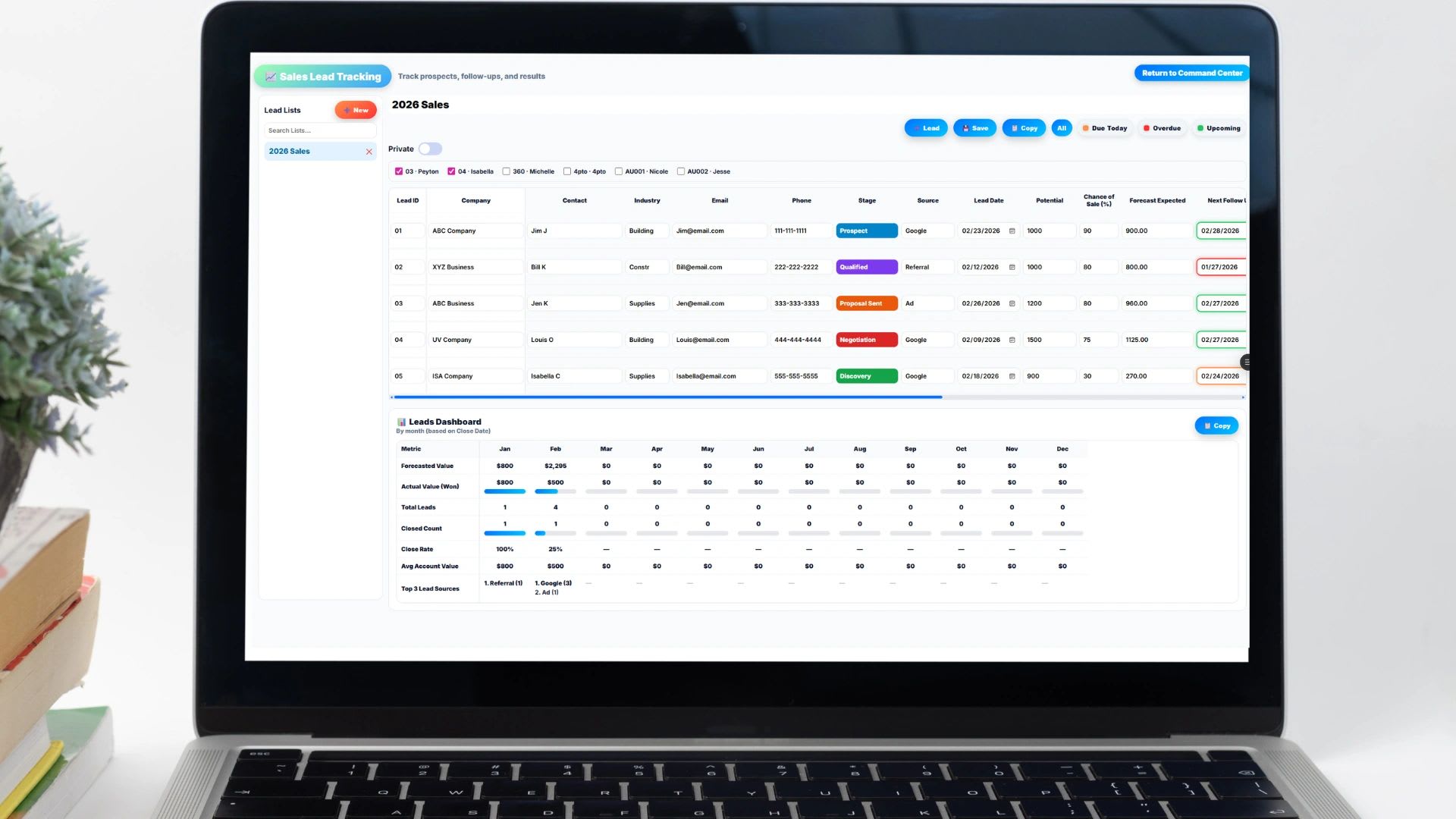
Sales lead trackers turn a scattered list of names into a pipeline you can actually manage. Use the free sales lead tracker below or grab the free Lead Tracker Template, then use this guide to set it up so no lead slips through the cracks and your forecast finally means something.
If you generate leads but have no clear system for managing them, you do not have a sales process. You have a gamble. A sales lead tracker shows where every opportunity stands, who owns it, how close it is to closing, and how much revenue is realistically on the way.
This lead tracker will stop working.
Beyond 1 or 2 users, spreadsheets become more of a problem than a solution. Manual entry is slow, error prone, and doesn't scale. Updoot does all of this for you.
- Slow. Leads get copied in by hand from email, forms, and notes
- Error-prone. Stages and deal values get overwritten or left blank
- Blind. No live view of pipeline value or conversion
- Live. Real-time pipeline visibility by stage
- Measured. Stage conversion and revenue forecasting built in
- Connected. Quote, close, and invoice in one system
Free template: Get the free Lead Tracker Template for Excel and Google Sheets. It includes the pipeline stages, deal values, and next-action fields covered in this guide.
Free Sales Lead Tracker
Free Sales Lead Tracker
Add each lead with its stage, value, owner, and next action. The tracker totals your open pipeline, flags overdue follow-ups, and copies straight into Excel or Google Sheets.
| Lead | Source | Stage | Value | Owner | Next Action | Due |
|---|
What Is a Sales Lead Tracker?
A sales lead tracker is a system for recording and managing potential customers as they move through your pipeline, from first contact to closed deal. It can be a spreadsheet or dedicated software, but the job is the same: keep every opportunity visible, owned, and moving.
At a minimum, every lead record should capture these fields:
| Field | Why it matters |
|---|---|
| Lead name and company | Identifies who you are selling to and prevents duplicate records |
| Contact information | Keeps outreach in one place instead of scattered inboxes |
| Lead source | Shows which channels actually produce revenue |
| Pipeline stage | Tells you exactly where the deal stands today |
| Estimated deal value | Makes pipeline value and forecasting possible |
| Assigned rep | Creates clear ownership and accountability |
| Expected close date | Turns the pipeline into a monthly revenue forecast |
| Next action and date | Keeps every open deal moving forward |
Once those fields are filled in consistently, the tracker stops being a contact list and becomes a reporting tool. You can see total pipeline value, conversion rates between stages, how quickly deals move, how each rep is performing, and a revenue forecast you can plan around.
Why Businesses Lose Leads Without a Tracker
Most small businesses start with an informal system: notes in email, a few spreadsheets, sticky notes on a monitor, or a CRM so complicated that nobody keeps it updated. Sometimes the system is simply someone's memory.
The results are predictable. Follow-ups get missed. Two people contact the same prospect. Nobody can say which stage a deal is in, the forecast is a guess, and revenue surprises show up at the end of the month. The worst part is that lost deals rarely announce themselves. When leads are not tracked in one central place, opportunities disappear quietly, and you usually find out after it is too late to save them.
What a Sales Lead Tracker Should Include
If you are building a tracker or evaluating one, focus on structured data rather than a list of contacts. Four elements do most of the work.
Lead Source
Knowing where every lead came from lets you measure the return on each channel, whether that is paid ads, social media, search, trade shows, referrals, or outbound campaigns. If you cannot tie revenue back to its source, your marketing budget is guesswork.
Defined Pipeline Stages
Your tracker needs a fixed set of stages that everyone uses the same way. A simple set works for most businesses: New Lead, Contacted, Qualified, Proposal Sent, Negotiation, Closed Won, and Closed Lost. Standard stages let you measure conversion from one step to the next, find the bottleneck where deals stall, and see how long deals sit in each phase.
Deal Value and Forecast
Every lead should carry an estimated value. With values in place, you can calculate total pipeline value, a weighted forecast that adjusts each deal by its likelihood of closing, expected monthly revenue, and each rep's progress against quota. If your tracker cannot produce a forecast, it is incomplete.
Activity and Next Action
Missed follow-ups are one of the biggest reasons deals stall. Log calls, emails, meetings, and proposal status, and above all give every lead a next action with a date. A lead with no next step is effectively dead, even if it still shows as open.
How to Track Sales Leads Effectively
A tool alone will not fix a pipeline. The habits around it matter more. This four-step routine works for teams of any size.
Step 1: Standardize Your Pipeline
Define each stage by a measurable action, such as "discovery call held" or "proposal sent." Avoid vague stages like "In Progress" that mean something different to every rep.
Step 2: Assign One Owner per Lead
Every lead needs a single owner. Shared responsibility quickly becomes no responsibility, and deals without an owner are the first ones to go cold.
Step 3: Require a Next Action Date
Make the next action date a required field. When every open lead has a date attached, idle deals become visible the moment they slip.
Step 4: Review the Pipeline Weekly
Hold a short pipeline review every week. Look at which leads advanced, which stalled, which need help from leadership, and whether projected revenue still lines up with your goals. A tracker becomes powerful when it is reviewed on a consistent rhythm.
How a Lead Tracker Improves Conversion Rates
A structured tracker improves results in four ways. It speeds up response time, because new leads are visible the moment they arrive and a fast first reply sets the tone for the whole deal. It makes follow-up consistent, which matters because most deals close only after several touchpoints. It gives you data to act on: when you can see where leads drop off, you can fix the exact step that is failing. And it makes your forecast reliable enough to plan hiring, inventory, and cash around.
Spreadsheet vs. Sales Lead Tracking Software
A spreadsheet is a sensible place to start. It is low cost, familiar, and flexible enough to match your process, and the free template on this page gives you the core structure without a subscription. As lead volume grows, though, spreadsheets get fragile.
| Spreadsheet | Lead tracking software | |
|---|---|---|
| Cost | Free or already owned | Monthly subscription |
| Automation | Manual entry and updates | Calculations and reminders run on their own |
| Collaboration | Everyone can edit everything | Role-based permissions and an audit history |
| Reporting | Dashboards built and maintained by hand | Live pipeline and conversion dashboards |
| Best for | Early-stage teams with low lead volume | Growing teams with several reps |
Common Sales Lead Tracking Mistakes
Even teams that have a tracker often undermine it. The most common problems are too many pipeline stages, stage definitions that vary by rep, no required fields, deals entered without a value, no record of why deals were lost, and no weekly review. A tracker has to be structured, enforced, and reviewed, or it turns into a static database instead of a revenue system.
What to Look For in Lead Tracking Software
When you are ready to move beyond a spreadsheet, look for custom pipeline stages, a visual pipeline view, deal value tracking, conversion reporting, lead source tracking, exportable reports, role-based permissions, and a clean interface your reps will actually use. Many CRMs are bloated and many spreadsheets are fragile, so the best tools balance structure with simplicity.
Also look for a tool that connects sales to the rest of the business. When a deal closes, it should flow into projects, invoicing, team capacity, and KPI dashboards without anyone retyping it. That connection is where operational software beats a standalone CRM.
How Updoot Handles Sales Lead Tracking
Updoot Sales CRM is built for growing businesses that need structure without CRM complexity. You get live pipeline visibility by stage, quota and target tracking, stage conversion tracking, revenue forecasting, and performance dashboards with coaching insights for each rep. When a deal closes, you can quote, close, and invoice from the same system, so sales and operations stay connected from first contact to collected revenue.
Opens in Google Drive. View and download for free.
Related Reading
How to Track Leads Effectively →
Frequently Asked Questions About Sales Lead Trackers
What is a sales lead tracker?
A sales lead tracker is a system for recording and managing potential customers as they move through your sales pipeline. It keeps each lead's source, stage, value, owner, and next step in one place so no opportunity gets lost.
What should a sales lead tracker include?
Include the lead name and company, contact information, lead source, pipeline stage, estimated deal value, assigned rep, expected close date, and a next action with a date. Those fields make pipeline value, conversion rates, and forecasting possible.
Can I use Excel or Google Sheets as a sales lead tracker?
Yes. A spreadsheet works well for early-stage teams with low lead volume. Use fixed pipeline stages and required fields so the data stays consistent, and review it weekly.
How often should I review my sales pipeline?
Review it weekly. Check which leads advanced, which stalled, which need help, and whether projected revenue still matches your goals.
When should I switch from a spreadsheet to lead tracking software?
Switch when several reps share the tracker, formulas start breaking, or building reports takes more time than selling. Software adds live dashboards, permissions, an audit history, and automatic calculations.
Is there a free online sales lead tracker?
Yes. The free sales lead tracker on this page records each lead with its stage, deal value, owner, and next action, totals your open pipeline, and flags overdue follow-ups. Copy it into Excel or Google Sheets or print it.