
Goal Tracker Inspired by Traction by Gino Wickman
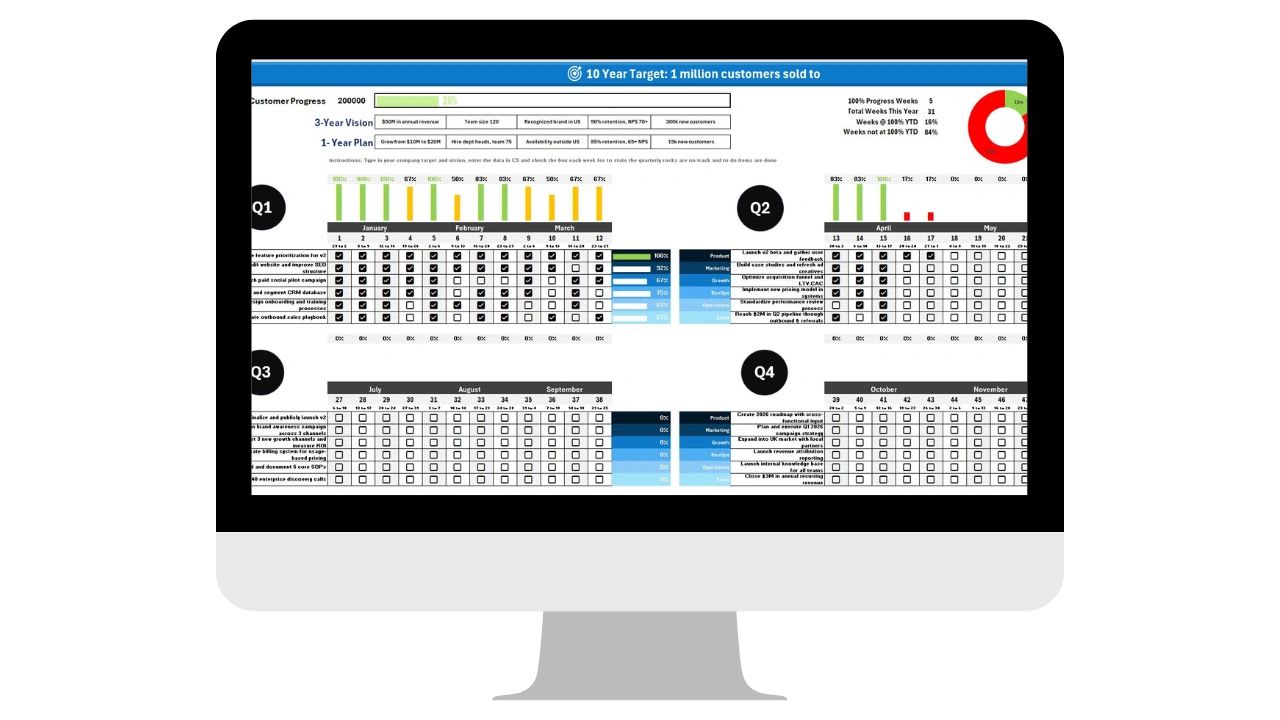
Goal trackers inspired by Traction help leadership teams turn a long-term vision into quarterly priorities they can actually track. Use the free Rock tracker below or grab the free Vision Tracker Template, then use this guide to put the Vision/Traction Organizer and Level 10 meetings to work every week.
As a COO, I have read my share of business books, but few have had the lasting operational impact on my teams that Traction by Gino Wickman has. The book introduces the Entrepreneurial Operating System (EOS), a framework that helps leadership teams define their vision, gain traction, and build healthy organizations. Two tools stood out to me most: the Vision/Traction Organizer (V/TO) and the Level 10 meeting.
The hard part is not buying into these ideas. It is putting them into practice consistently. That is why I built a simple goal tracker in Excel that bridges the gap between strategy and execution, especially for growing teams that are not ready to add another platform.
This goal tracker will stop working.
Beyond 1 or 2 users, spreadsheets become more of a problem than a solution. Manual entry is slow, error prone, and doesn't scale. Updoot does all of this for you.
- Slow. Rocks and statuses get updated by hand before every meeting
- Error-prone. Versions multiply as each department edits its own copy
- Invisible. The vision lives in a file most of the team never opens
- Connected. Vision, quarterly Rocks, and meetings in one system
- Live. Level 10 meetings run from live scorecard data
- Accountable. Every Rock and to-do leaves with an owner
Free template: Get the free Vision Tracker Template for Excel and Google Sheets. The Goal Dashboard and Level 10 Meeting templates on the same page pair well with it.
Free Vision and Rock Tracker
Free Vision and Rock Tracker
Write your 10-year target, 3-year picture, and 1-year plan, then add this quarter's Rocks by department with an owner and status. Print it for your next Level 10 meeting or copy it into Excel or Google Sheets.
Vision
Quarterly Rocks
| Rock | Department | Owner | Due | Status |
|---|
The Vision/Traction Organizer in a Nutshell
In Traction, the V/TO is a one-page strategic plan. It answers four questions: What is your 10-year target? Where do you want to be in three years? What is the one-year plan to get there? And what are this quarter's Rocks, the handful of priorities that will move you forward?
It is deceptively simple. If you have ever worked in a company where departments pulled in different directions or strategy changed every few months, you know how valuable that clarity is. In my experience, the problem is rarely writing the vision. It is that the document ends up in a shared drive, seen only by the leadership team. The real power of the V/TO comes from keeping it visible and revisiting it constantly across the whole organization.
What the Excel Goal Tracker Tracks
The tracker puts the entire V/TO into one workspace your team can use every day.
10-Year Target
Set your long-range goal and keep it in front of everyone. This long view drives alignment and ambition.
3-Year Picture
Describe what success looks like in more detail, including revenue targets, team size, and key milestones.
1-Year Plan
List the company's top goals for the year. These shape the quarterly Rocks that follow.
Quarterly Rocks by Department
This is where the tracker earns its keep. Each department has its own section to set, update, and track Rocks, with fields for the owner, status, and progress. Nobody has to guess what was prioritized, and the plan becomes a living document instead of a forgotten slide deck.
Level 10 Meetings: Turning Strategy Into Weekly Execution
The second Traction tool I rely on is the Level 10 meeting, a weekly 90-minute meeting held by each team. It follows the same agenda every week: a check-in, a scorecard review, a Rock review, customer and employee headlines, a to-do list review, and time to identify, discuss, and solve issues.
What makes it different from a typical team meeting is the rhythm. It is focused on solving real problems, and it is ruthlessly efficient. But a Level 10 meeting is only as good as the tools you use to track Rocks and scorecards. With the goal tracker open during the meeting, department leaders can pull up their Rocks, see instantly what is off track, and record updates in real time.
Why Start With Excel
For many small and mid-sized teams, Excel is already part of the daily workflow, and that makes it a practical way to start EOS without a new subscription. A spreadsheet tracker is familiar, flexible enough to match your departments and terminology, easy to share through cloud storage, and free. It lowers the barrier to getting EOS running, especially in the early stages of implementation.
What This Looks Like in Practice
Say your marketing team has three quarterly Rocks: launch a new website, build a content calendar for the next two quarters, and increase the newsletter open rate by 15%. Each Rock goes into the marketing section of the tracker with a due date and an owner.
During the weekly Level 10 meeting, the team opens the sheet and marks each Rock On Track, At Risk, or Off Track. If something is stuck, it goes onto the issues list and gets worked through right then. By the end of the quarter, you have a clear record of what was accomplished and what needs to roll forward or be reconsidered. Repeat that across product, operations, sales, and finance, and you have company-wide visibility and accountability.
When a Spreadsheet Is No Longer Enough
As more departments use the tracker, the spreadsheet starts to strain. Someone has to update statuses before every meeting, copies multiply, and the scorecard lives in a different file than the Rocks. Updoot's EOS Vision Tracker keeps the Vision/Traction Organizer, quarterly Rock tracking, structured Level 10 agendas, scorecard integration, the issues list, and to-dos with owners in one connected system, so meetings run from live data instead of last week's spreadsheet.
Final Thoughts
Traction gives leadership teams the playbook. Implementation is where results happen. The value is not in the V/TO or the Level 10 meeting on their own, but in making them visible, measurable, and habitual. If you use EOS, or simply want to clarify your goals and run more focused meetings, this tracker is a good place to start.
Opens in Google Drive. View and download for free.
Related Reading
The Level 10 Meeting Template: How to Run It and Why It Works →
Frequently Asked Questions About Traction Goal Trackers
What is the Vision/Traction Organizer?
The Vision/Traction Organizer (V/TO) is a one-page strategic plan from Traction by Gino Wickman. It captures your 10-year target, 3-year picture, 1-year plan, and quarterly Rocks.
What are Rocks in EOS?
Rocks are the handful of top priorities a company, department, or person commits to completing in a quarter. Each Rock has one owner and is reviewed weekly.
Can I run EOS in Excel?
Yes. An Excel goal tracker can hold your V/TO and quarterly Rocks by department, and you can review it during weekly Level 10 meetings. It works well for teams getting started with EOS.
Is this goal tracker template free?
Yes. The Vision Tracker Template is free on the XecuteTheVision free tracking templates page and works in Excel and Google Sheets.
Is there a free EOS Rock tracker?
Yes. The free Vision and Rock Tracker on this page holds your 10-year target, 3-year picture, and 1-year plan, plus quarterly Rocks by department with an owner, due date, and On Track, Off Track, or Done status.