
Company Intranet Examples: What Great Employee Intranets Look Like
Quick Answer
The best company intranet examples share the same core elements: an announcements feed for company news, an employee directory and org chart for finding people, a document and SOP library for how work gets done, an HR self-service hub for policies and PTO, and a recognition feed for shoutouts. The ones that work are easy to post to, searchable, mobile-friendly and built into tools employees already use.
Search "company intranet examples" and you will find a lot of screenshots of enterprise platforms with logos you recognize, and very little explanation of why those pages actually work. That is the more useful question. A company intranet is not a category of software so much as a pattern: a private, internal home base where employees find news, people, documents, and each other without digging through email threads and half-remembered Slack messages. Some companies build that pattern with a dedicated intranet portal. Others build it inside company intranet software that is bundled with the tools they already use for projects, HR, and payroll. Either way, the intranets that actually get used share a small set of traits, and the ones that get abandoned within a year share the opposite ones. This guide walks through real patterns of company intranet examples worth borrowing from, what to look for in company intranet software before you buy it, the mistakes that quietly kill most intranets, and how to build one your team will actually open.
Quick Answer
The best company intranet examples combine a small set of repeatable elements: an announcements feed for company news, an employee directory for finding people, a document or SOP library for how work gets done, an HR self-service hub, and a culture or recognition feed for shoutouts and spotlights. Good company intranet software makes all of this easy to post to, searchable, accessible on mobile, and, ideally, built into the same platform employees already use for their daily work rather than a separate destination they have to remember to visit.
What a Company Intranet Actually Is
A company intranet is a private network or platform that only people inside an organization can access, built to centralize internal information and communication. Where the public internet is open to anyone, an intranet's whole value comes from being closed: it is where a company keeps the things only employees need, from the PTO policy to Tuesday's product update to a coworker's phone extension.
That sounds simple, and in the early days of intranets it was. A static page of links to shared drives counted as an intranet for a lot of companies for a long time. What has changed is the bar for usefulness. Employees now compare every internal tool to the consumer apps they use outside of work, so a clunky, hard-to-search page of PDFs no longer counts as a functioning intranet even if it technically qualifies as one. Modern company intranet examples look and feel more like a private social feed crossed with a filing cabinet: scannable, searchable, and updated often enough that checking it feels worthwhile.
Company Intranet Examples Worth Borrowing From
Rather than pointing at specific enterprise screenshots that may not translate to a team your size, it is more useful to look at the patterns behind the intranets that actually get used. Most strong company intranet examples are built around one or more of the following.
The Announcements-First Intranet
This is the most common pattern and the one most people picture when they hear "company intranet." The homepage is a chronological or pinned feed of company news: new hires, policy changes, product launches, all-hands recaps. It works because it mirrors a habit employees already have from social feeds, and because there is a clear, obvious reason to check it: something new might be there. The failure mode is a feed that goes quiet for weeks, which trains people to stop checking. The fix is treating the feed like a muscle that needs regular use, not a bulletin board that fills itself.
The Employee Directory and Org Chart Intranet
As companies grow past the size where everyone knows everyone, "who does this?" becomes a real time cost. This pattern centers on a searchable people directory tied to an org chart, so anyone can find the right person by name, role, or department without pinging five people first. The best versions include a photo, role, and department at minimum, and some let employees add a bit of personality so it does not read like a phone book.
The SOP and Document Library Intranet
This pattern treats the intranet as the single source of truth for how work actually gets done: SOPs, templates, onboarding checklists, brand guidelines. It solves the problem of knowledge living in one person's head or a folder nobody remembers the path to. The intranets that do this well organize documents by role or process rather than by department, since that is how people actually search when they are stuck mid-task.
The HR Self-Service Intranet
Here the intranet doubles as an employee portal: PTO requests, pay stub access, benefits enrollment, policy documents. This pattern earns daily or weekly logins on its own, since employees have concrete reasons to be there that have nothing to do with company culture. Pairing HR self-service with the other patterns on this list is often what pushes an intranet from "occasionally useful" to "part of how people work."
The Culture and Recognition Intranet
This pattern is less about information and more about connection: employee spotlights, birthday and work-anniversary shoutouts, team wins, photos from company events. It matters more than it sounds like it should, especially for distributed or hybrid teams that do not share a break room. A recognition feed gives remote employees the same visibility a hallway conversation gives an in-office one, and it is often the single feature that gets people to open the intranet on a day they had no task-related reason to.
The Hybrid Intranet
Most organizations that get real, sustained use out of their intranet are not running just one of these patterns; they are running two or three of them inside the same platform. An announcements feed alone becomes a bulletin board nobody checks. A document library alone becomes a graveyard of outdated files. Combined, each pattern gives employees a different reason to visit, and the platform starts to function less like a project and more like a habit.
What to Look For in Company Intranet Software
Once you know which patterns you want, the next decision is what company intranet software to build them on. The right choice depends heavily on company size and how much dedicated IT or comms support you have, but a few criteria matter regardless of scale.
Genuinely easy to post to. If publishing an announcement requires a ticket to IT or a multi-step CMS workflow, updates will slow to a crawl. The intranets that stay current are the ones where anyone with permission can post in under a minute.
Built for mobile, not just desktop. A meaningful share of most workforces, especially in retail, field services, and hospitality, rarely sits at a desk. Company intranet software that only works well on a browser tab quietly excludes a big chunk of the company from ever seeing it.
Actually searchable. As the document library and post history grow, search stops being a nice-to-have and becomes the difference between an intranet people trust and one they route around by asking a coworker directly.
Permission and privacy controls. Not everything belongs in front of the whole company. Look for software that lets you scope announcements, documents, or entire sections to specific departments, locations, or roles without needing a second tool to manage the exceptions.
Lives where employees already are. The single biggest predictor of whether an intranet gets used is how many extra logins stand between an employee and the content. Intranet functionality built into the same platform employees already use for scheduling, payroll, or project work gets checked far more often than a separate destination with its own URL and its own password.
Low setup and maintenance burden. A platform that needs a dedicated administrator to keep running is a real cost for a small or mid-sized company. Favor software that a non-technical HR or ops person can own without a training course.
Why Most Company Intranets Fail
The pattern behind failed intranets is almost always the same, regardless of which platform was chosen. It starts strong: a launch announcement, a burst of posts, maybe a contest to get people to fill out their directory profile. Then the person who was driving it gets pulled onto something else, the feed goes quiet, and employees who checked it twice and found nothing new stop checking a third time. Once traffic drops, whoever might have posted something loses the incentive to bother, since no one is reading it anyway. Within a few months, what was announced as the new home for company information is a stale page nobody opens, and the company is back to email and hallway conversations for anything that actually matters.
The second most common failure is scope: trying to launch every pattern above at once, on day one, with no owner assigned to keep any of it fresh. A narrower intranet that reliably gets updated beats a comprehensive one that quietly rots.
How to Build an Intranet Your Team Actually Uses
Start with one or two patterns, not all five. Pick the patterns that solve the most immediate pain, usually announcements plus one other, and get those genuinely working before adding more.
Assign an owner, not a committee. Someone specific needs to feel responsible for posting regularly. Shared ownership tends to mean no ownership.
Give people an easy reason to visit weekly, not just at launch. A recognition feed, a rotating spotlight, or a simple weekly update gives employees a habit to build instead of a one-time announcement to forget.
Make posting as easy as messaging a coworker. If leadership or HR has to fight the tool to publish something, they will stop trying within a month.
Measure whether it is actually being opened. Most intranet platforms show basic usage data. Check it. A quiet intranet is a signal to change something, not a sign to wait it out.
Where Updoot Fits In
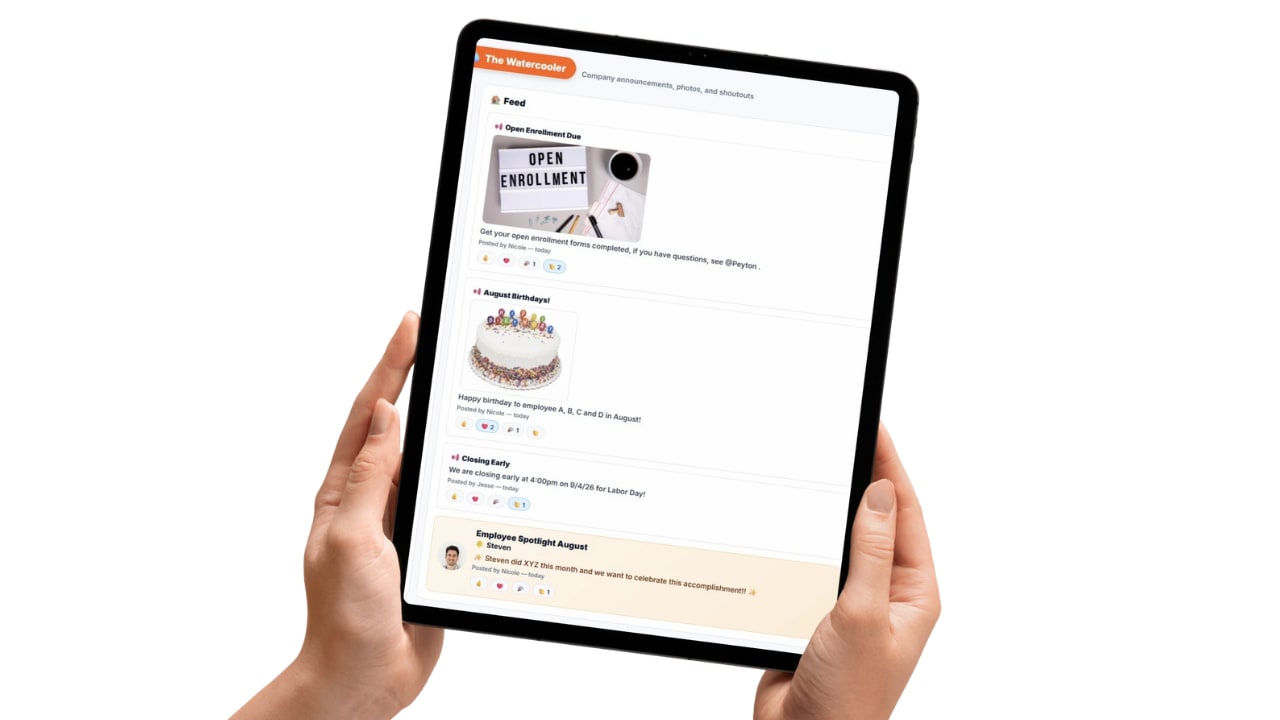
Updoot's Watercooler feature is built around the two intranet patterns that consistently earn the most repeat visits: company announcements and employee spotlights, in one shared feed employees actually check. Because Watercooler lives inside the same platform employees already use for scheduling, time tracking, and payroll, posting a company update or celebrating a team win does not require a separate login or a separate habit to build, which is the single biggest reason most standalone intranets go stale. Paired with Updoot's SOP library for documented processes and its business health dashboard, Doot's Desk, for company-wide visibility, Updoot covers the core company intranet examples above without asking a small business to stitch together three different tools or hire someone to administer a dedicated intranet platform. For a company that wants the benefits of an intranet, employees who feel informed and connected, without the maintenance burden that kills most of them, that combination is the practical starting point.
Final Thoughts
The company intranet examples worth copying are not the flashiest ones; they are the ones still getting posts and page views a year after launch. That comes down to picking a small set of patterns that solve a real problem for your team, choosing company intranet software that makes posting effortless rather than a chore, and putting someone specific in charge of keeping it alive. Do that, and the intranet stops being a project that launched once and starts being the place employees actually check first.
Related Reading
CEO Dashboard Software: What to Look For and How It Works →
Best Team Management Software: Top 7 Compared →
Business Dashboard: What to Put On One and How to Build It →
Frequently Asked Questions
A company intranet is a private, internal space where employees find company news, policies, documents, and each other. Unlike the public internet, only people inside the organization can access it, and it typically centralizes things like announcements, an employee directory, HR resources, and shared files so staff are not hunting across email threads and chat channels for basic information.
Strong intranets tend to follow a few repeatable patterns: an announcements-first homepage for company news, an employee directory and org chart for finding people, a document and SOP library for how work actually gets done, an HR self-service hub for policies and PTO, and a culture or recognition feed for spotlights and shoutouts. The best examples combine several of these into one place instead of scattering them across separate tools.
Look for software that is genuinely easy to post to, works on mobile, searches well, lets you control who sees what, and lives inside tools employees already use rather than becoming one more login they forget. Avoid platforms so complex that only IT can update them, since an intranet that is hard to maintain quietly goes stale.
Most intranets fail because they turn into a dumping ground nobody maintains, or because they were built as a separate destination employees have no reason to visit daily. Once the content goes stale, people stop checking it, which makes it stale for the next visitor too, and the whole thing dies quietly within a few months of launch.
They overlap but are not identical. An employee portal usually emphasizes self-service tasks like requesting time off, viewing pay stubs, or updating personal information. A company intranet is broader and includes culture, communication, and knowledge sharing alongside those self-service functions. Many modern platforms combine both under one roof.