
AI Powered Project Management Software for Small Business
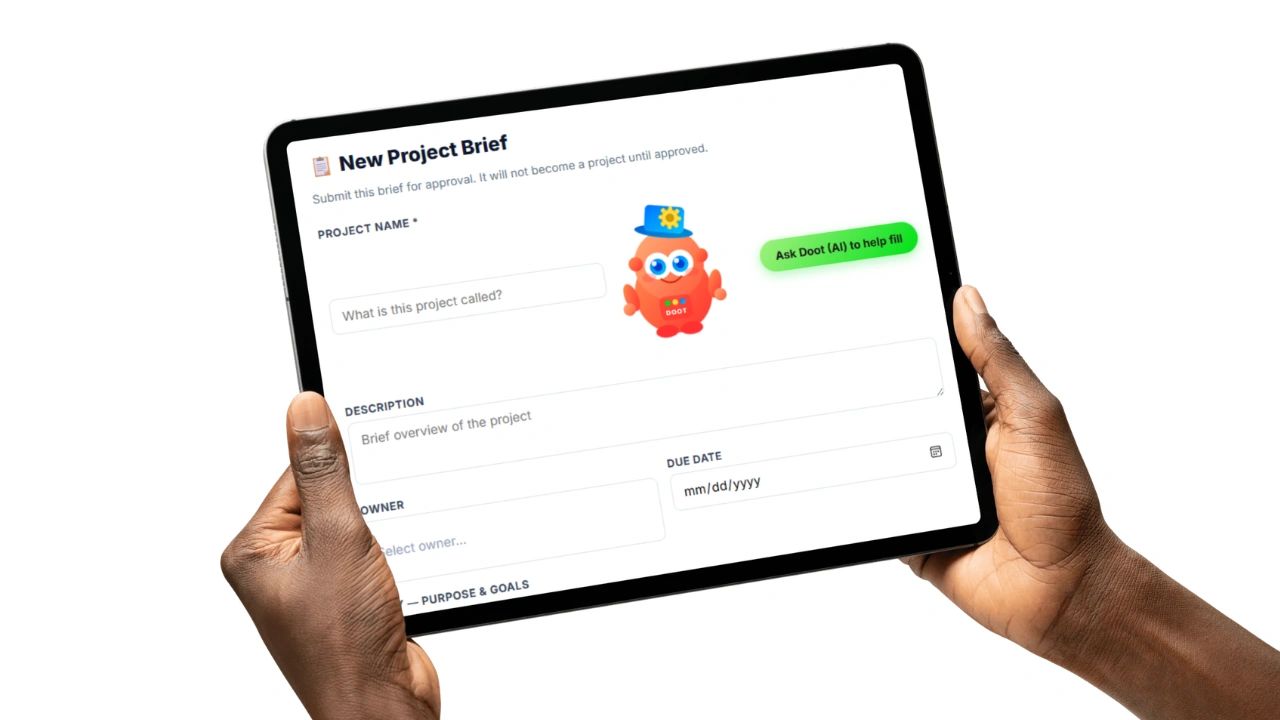
AI powered project management software promises to do the part of managing projects that nobody enjoys: chasing updates, spotting what is slipping, and figuring out who has too much on their plate.
For a small business, that matters more than it does for a big company. There is no project management office. The owner or a manager is usually running projects on top of their real job, and the warning signs get missed until a deadline is already blown.
Here is what AI actually does in a project tool, what it cannot do for you, how to compare options without getting lost in feature lists, and a free project health checker that runs the same kind of risk check on your own tasks.
What AI Powered Project Management Actually Means
Traditional project software stores tasks. You create them, assign them, update them, and read the board to see where things stand. AI powered project management software adds a layer that works on that information for you. Depending on the tool, that can include:
- Drafting task lists from a project description, so you edit a plan instead of starting from a blank page
- Summarizing progress in plain language, so you do not have to read every task to know where a project stands
- Flagging risk when tasks stall, dependencies slip, or deadlines get close without matching progress
- Spotting workload problems when one person is assigned far more than everyone else
- Answering questions like "what is overdue this week?" without building a report
The shift is from reactive to proactive. Instead of finding out a project is late at the status meeting, you get a heads-up while there is still time to fix it.
Where Small Businesses Stand on AI
If you have not added AI to your project tools yet, you are in good company. The U.S. Census Bureau's Business Trends and Outlook Survey found that roughly one in five businesses currently uses AI. Larger firms lead: about 37 percent of businesses with 250 or more employees use it, compared with just under 20 percent of firms with four or fewer employees.
That gap is an opportunity. Small teams feel coordination problems the most, and AI features are increasingly built into tools at small business prices instead of sold as separate enterprise products.
What AI Can and Cannot Do for Your Projects
| AI Is Good At | You Still Need To |
|---|---|
| Drafting a first version of a task list | Check it against how your team really works |
| Summarizing where a project stands | Keep task status honest so the summary is accurate |
| Flagging tasks that look late | Talk to the owner and remove the blocker |
| Noticing uneven workloads | Decide who takes on the extra work |
| Answering questions about project data | Make the call on priorities and trade-offs |
The pattern is simple. AI handles the noticing and the paperwork. People handle the judgment. A tool that promises to "run your projects for you" is overselling, and any AI output should be reviewed before anyone acts on it.
How AI Spots Project Risk Before It Becomes a Problem
Most AI risk detection starts with a comparison you can do by hand: how far along should this task be by today, and how far along is it actually? If a two-week task is halfway through its timeline but only 10 percent done, it is probably going to be late. AI tools run that check across every task, every day, and add signals like stalled activity and blocked dependencies.
The free checker below does the core version of that math for one project. Add your open tasks and it will show what is on track, what is behind, what is overdue, and whether anyone is overloaded.
Free Project Health Checker
Free Project Health Checker
Add the open tasks on one project. The checker compares how far along each task should be by today with how far along it actually is, flags anything behind or overdue, and warns you when one person is carrying too much. This is the same kind of check AI tools run in the background. Nothing you enter is saved or sent anywhere.
| Task | Owner | Due | Done | Expected | Status |
|---|
A task is marked behind when it is more than 15 percentage points short of where its timeline says it should be. Anyone with four or more open tasks on the same project is flagged for a workload check.
How to Choose AI Project Management Software
Every major project tool now advertises AI, so the label alone tells you little. These questions separate useful AI from a marketing checkbox:
| Question to Ask | Why It Matters |
|---|---|
| Is AI included in the plan price, or an add-on? | Some tools charge extra per user for AI features |
| Does it connect to time tracking, scheduling, and people data? | AI can only flag workload problems if it can see workload |
| Can it explain why it flagged something? | You need to trust a warning before you act on it |
| Is your data used to train AI models? | Your client and employee information should stay yours |
| How long does setup take? | A tool that needs weeks of configuration rarely gets used well by a small team |
| What does it cost for your whole team? | Per-user pricing adds up fast once everyone needs access |
Monday.com, Asana, and ClickUp
These three are the names most small businesses compare first, and all three have added AI features on top of their project boards.
- Monday.com is known for colorful, flexible boards and a gentle learning curve. It works well for teams that want visual tracking and are willing to build their own workflows and automations.
- Asana is strong on structured task management, dependencies, and cross-team work. It suits teams that already think in projects, milestones, and portfolios.
- ClickUp combines tasks, docs, dashboards, and time tracking with a lot of customization. That flexibility is powerful but can take real time to set up and maintain.
All three focus on projects. If you also need time tracking, scheduling, payroll exports, HR, and a CRM, you will usually be adding more tools and more subscriptions around them. Features and AI pricing change often, so check each vendor's current plans before you decide. For side-by-side price comparisons, see Asana vs. Updoot pricing.
How to Roll Out AI Project Management Without Chaos
- Start with one to three active projects. Do not migrate everything at once.
- Give every task an owner and a due date. AI cannot flag risk on a task with no deadline.
- Let AI draft, then edit. Use generated task lists and summaries as a starting point, never as the final word.
- Keep status current. Ask the team to update percent complete or status at least weekly.
- Review flags in a short weekly meeting. Fifteen minutes on what is behind and why beats an hour of status updates.
- Write down your AI rules. Decide what data goes into AI tools and who reviews AI output. Our AI policy template is a good starting point.
Common Mistakes With AI Project Tools
- Trusting generated plans without review. AI does not know your customers, your team, or your constraints.
- Letting task data go stale. AI insights are only as good as the status updates behind them.
- Buying for features you will not use. Pick the tool that fits how your team works today.
- Ignoring data privacy. Know where your data goes and whether it trains someone else's model.
- Keeping projects separate from everything else. A project tool that cannot see schedules or hours will miss half the story.
How Updoot Brings AI Into Project Management
Updoot is business management software for small businesses that puts project management in the same system as time tracking, scheduling, HR, CRM, and invoicing. Doot, Updoot's built-in AI assistant, works across the platform, and its risk register uses Doot to analyze project data, schedules, and team activity and surface risks you may not have flagged yet.
Because projects live next to hours and schedules, you can see who is overloaded and what work is actually costing, not just what is on a board. Updoot does not use your business or employee data to train AI models, as outlined on its security page. Plans start at $5 per user per month with AI included.
Final Thoughts
AI powered project management software is most useful when it takes over the noticing: what is slipping, who is stretched, and what needs attention today. It works best on top of good basics, meaning clear owners, real due dates, and honest status updates. Start small, review what the AI tells you, and choose a tool that sees the whole business, not just the task board.
Opens in Google Drive. View and download for free.
Related Reading
Best Project Management Software and App for Small Business →
Frequently Asked Questions About AI Project Management Software
What is AI powered project management software?
It is project software that uses artificial intelligence to work on your project data, not just store it. Common features include drafting task lists, summarizing progress, flagging tasks at risk of running late, and spotting uneven workloads.
How does AI detect project risk?
Most tools compare how far along a task should be by today with how far along it actually is, then add signals like stalled activity and blocked dependencies. Tasks that fall well behind their timeline get flagged early so the team can respond.
Can AI replace a project manager?
No. AI is good at noticing problems and handling routine updates, but people still need to set priorities, talk to the task owner, remove blockers, and make trade-off decisions. Any AI output should be reviewed before anyone acts on it.
How many small businesses use AI?
According to the U.S. Census Bureau's Business Trends and Outlook Survey, roughly one in five businesses currently uses AI, with adoption higher among larger firms than among very small ones.
What should I look for in AI project management software?
Check whether AI is included in the price, whether the tool connects projects to time tracking and scheduling, whether it explains its flags, whether your data is used to train AI models, and how long setup takes.
Does Updoot include AI in project management?
Yes. Doot, Updoot's built-in AI assistant, works across the platform, and the risk register uses it to analyze project data, schedules, and team activity to surface risks. Plans start at $5 per user per month.