Sales Team Management for Small Business

Updoot is sales management software for the part a CRM does not cover: the team. Document your sales playbook, arm reps with AI battlecards and customer profiles, hire sellers with scorecards, run weekly sales meetings with real accountability, and track rep KPIs and commissions, all in the same system as your pipeline.
Most small businesses have a pipeline but no system for the sales team itself. Here is how Updoot helps you hire, train, coach and pay reps from one place.
Write down how your team sells, then make sure every rep actually knows it.

Most small sales teams run on whatever the top rep happens to do. Updoot lets you document the sales process as SOPs: how leads are qualified, what happens on a discovery call, when a deal moves to a proposal and how it hands off to delivery.
Approvals keep one official version, so reps are never working from an old copy. AI-generated quizzes confirm each rep understands the process, which makes onboarding new sellers faster and keeps veterans consistent.
See how SOP management software works in Updoot.
Give every rep the same winning answers to competitors and objections.
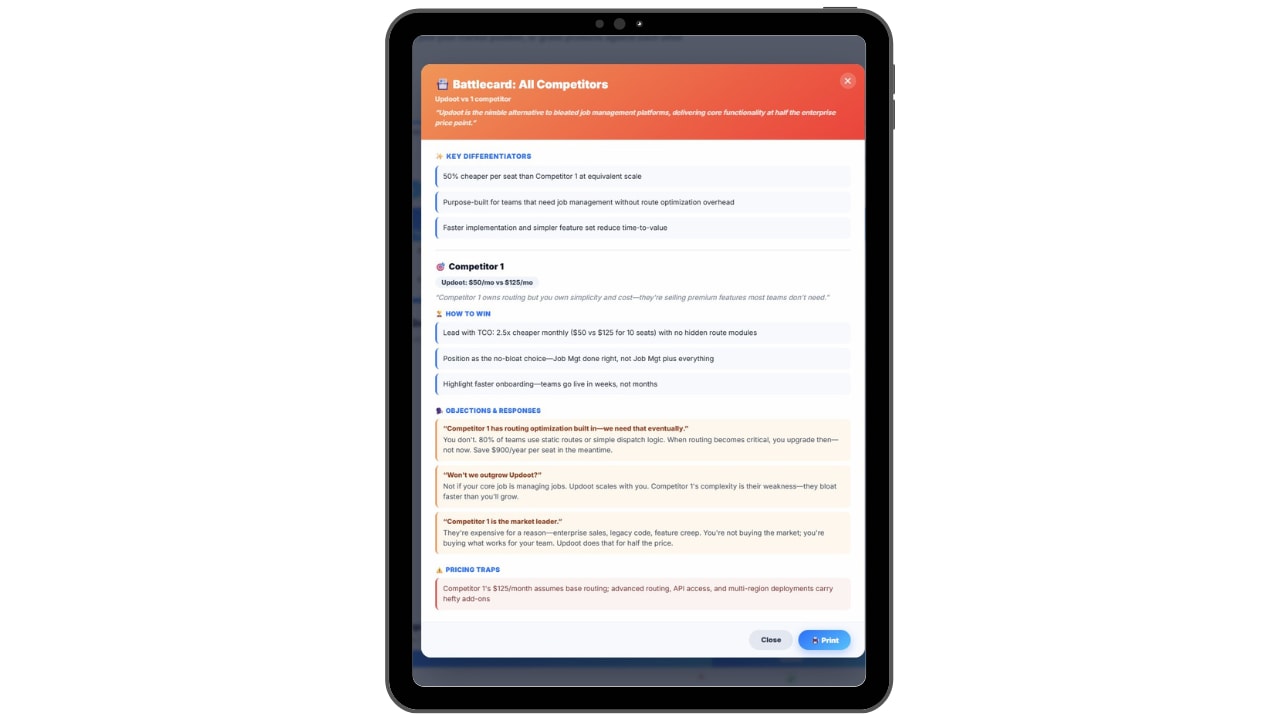
Build competitor battlecards with AI in seconds, including positioning, pricing notes, key differentiators and responses to the objections your reps hear most. Every battlecard sits in one shared library, and when you edit one, the change is live for the whole team.
New reps stop improvising against competitors, and experienced reps stop carrying the best answers around in their heads.
Learn more about sales battlecard software, or practice scripts and objections with the free sales training tools.
Point the whole team at the buyers most likely to close.

Define your ideal customer profile and build personas with demographics, goals, pain points and buying triggers. Reps prospect the right accounts, tailor their pitch to what each buyer cares about and spend less time on deals that were never going to close.
Because profiles are shared across the company, sales and marketing work from the same picture of who you serve.
Build yours with the customer persona and profile builder.
Score sales candidates on the same criteria and onboard them in one place.
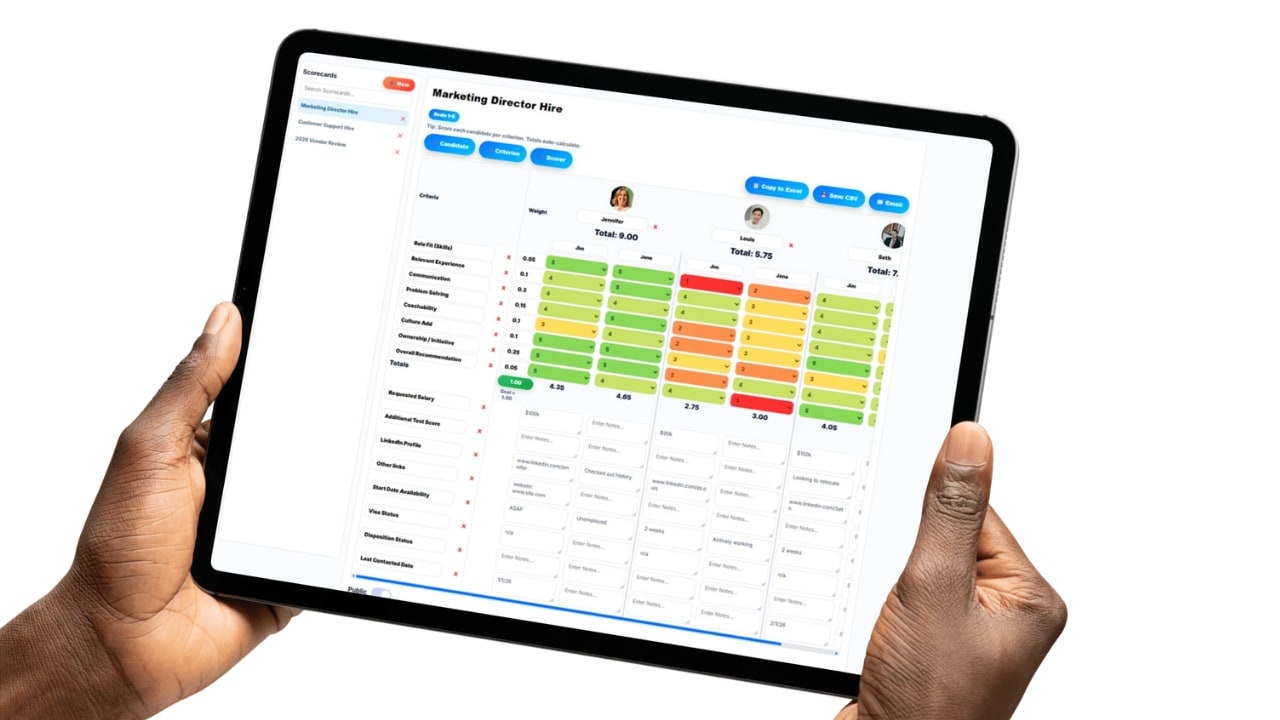
A bad sales hire costs months of quota. Upload resumes in bulk and let AI parse them, then compare candidates with scorecards built around what your best reps have in common, such as coachability, communication and drive.
Interview questions stay consistent for every sales candidate, offers go out from the same system, and new hires carry straight into onboarding with your playbook and battlecards ready on day one.
See applicant tracking software and use the sales rep evaluation checklist to define what good looks like.
Run sales meetings that end with owners and next steps.

Replace the weekly sales meeting that turns into a status recap. Updoot gives every meeting a set agenda, a scorecard review, an issues list and quarterly goal updates, so problems get solved and someone owns the fix before the meeting ends.
Quarterly goals connect to your longer-term vision, so each rep can see how this quarter's number fits the plan for the year.
See how meeting agenda and vision tracking works.
Track the numbers each rep owns and pay them correctly.
Give every rep a clear view of the metrics they own, and give managers the same view across the team. Individual KPIs make coaching conversations specific instead of based on gut feel.
Commission tracking is included in the same $5 per user price, so variable pay calculates from the sales data you already track instead of a separate spreadsheet at the end of the month. Model a new plan first with the free sales commission calculator.
Find the right metrics in the KPI dashboard and the guide to top sales operations KPIs.

Same login, same price, connected to everything above.
Lead tracking, pipeline stages, revenue forecasting, the sales performance dashboard and quote-to-invoice all live in Updoot's sales CRM and tracking software. The CRM shows where every deal stands. The tools on this page help you build and run the team that closes them.
Sales management software is how owners and sales managers run the sales function: defining the process, training and equipping reps, setting goals, reviewing performance every week and paying commissions accurately. A CRM is a record of customers and deals. You need both, but they solve different problems.
When a small team grows from one or two sellers to five or ten, the CRM usually keeps working while everything around it breaks. New reps learn by shadowing, every rep handles the same objection differently, meetings turn into status updates and commissions get rebuilt in a spreadsheet every month. Sales management tools fix those gaps by putting the playbook, training, goals and pay in one system the whole team uses.
| CRM | Sales management software | |
|---|---|---|
| What it manages | Leads, accounts, deals and pipeline stages | Reps, process, training, goals and pay |
| Main question it answers | Where does each deal stand? | Is the team set up to win, and is every rep doing what works? |
| Typical tools | Lead lists, pipeline board, forecasts, quotes | Playbooks, battlecards, customer profiles, hiring scorecards, meetings, KPIs, commissions |
| Who uses it most | Reps, every day | Sales managers and owners, every week |
| In Updoot | Sales CRM and tracking | Sales management tools on this page |
No implementation project and no sales ops hire. Load your team, document how you sell and run your first structured sales meeting this week.
Sign up with your email or Google. You get 14 days free with every feature, and no credit card is needed.
Import your reps, add them yourself, or send the list to our support team and we will load them for you. Reps with an email get an invite automatically.
Write your sales process as SOPs and build battlecards and customer profiles so every rep sells the same way.
Set quarterly goals, track rep KPIs and run a structured sales meeting with an issues list and clear owners.
Score new sales candidates consistently and calculate commissions from the sales data you already track.
Updoot runs right in the phone's browser and is designed to look and work just like an app, without the headache of downloads. Reps on the road open the link, log in and have the playbook, battlecards and their goals in their pocket.
No sales add-ons and no premium tier. Every tool below is part of the same $5 per user plan.
Document your sales process with approvals so there is one official version.
Confirm reps understand the playbook, not just that they opened it.
Competitor positioning, pricing notes and differentiators in seconds.
Shared talking points for the objections reps hear most.
Personas with pain points and buying triggers the whole team uses.
Parse resumes in bulk and compare sales candidates with scorecards.
Agenda, scorecard review, issues list and owners every week.
Goals that connect this quarter's number to the yearly plan.
Each rep sees the metrics they own, and managers see the whole team.
Variable pay calculated from the sales data you already track.
Pipeline, forecasts and quotes in the same login.
Reps use it in the browser on the road, with nothing to install.
You get the whole system, not just this feature. Here are a few of the 30+ tools included, with no tiers and no add-ons.
Plus invoicing, payroll reports, meetings, goals, budgeting, roles and more.
Practical reads on evaluating reps, choosing the right metrics and paying commissions.
Stop managing reps through spreadsheets, shared drives and memory. Start your free trial of Updoot and get sales playbooks, battlecards, customer profiles, rep hiring, sales meetings, KPIs and commissions, plus the CRM, time tracking and projects, in one platform built for small business.
Start Free Today →