Work Management Software
Stop chasing down a Word doc or a generic online form every time someone leaves. Run every exit interview from the same place you already manage the employee, with the dates filled in for you.
Updoot's exit interview lives right on the employee it belongs to, so nothing has to be recreated by hand and nothing goes missing after the employee is gone.
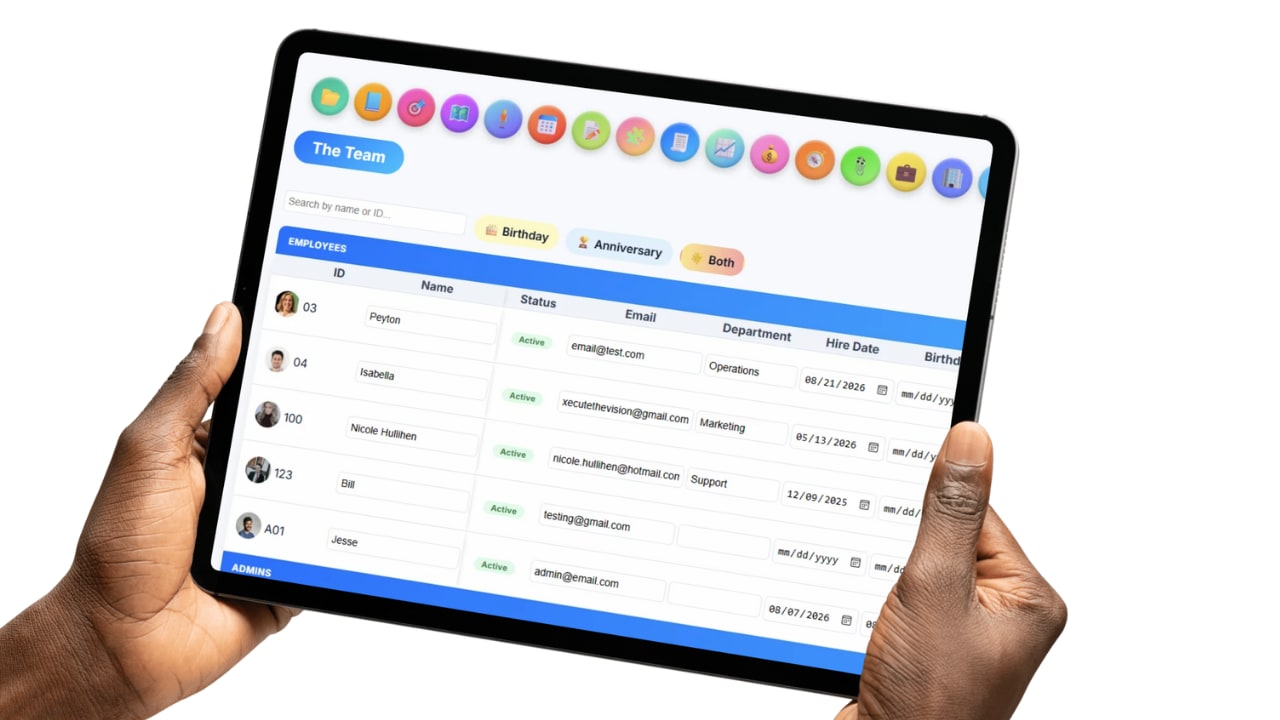
Every employee in the vault has a one-click exit interview icon right on their row, no separate tool to open.
Fill in the standard exit interview questions, rename any of them, or add a whole new section on the spot.
Add a date, time, and location, and it shows up on the calendar for both the admin and the employee, the same way a work shift does.
Save it to the employee record, print it for the personnel file, or copy it straight to Excel.
No retyping dates that are already on file.
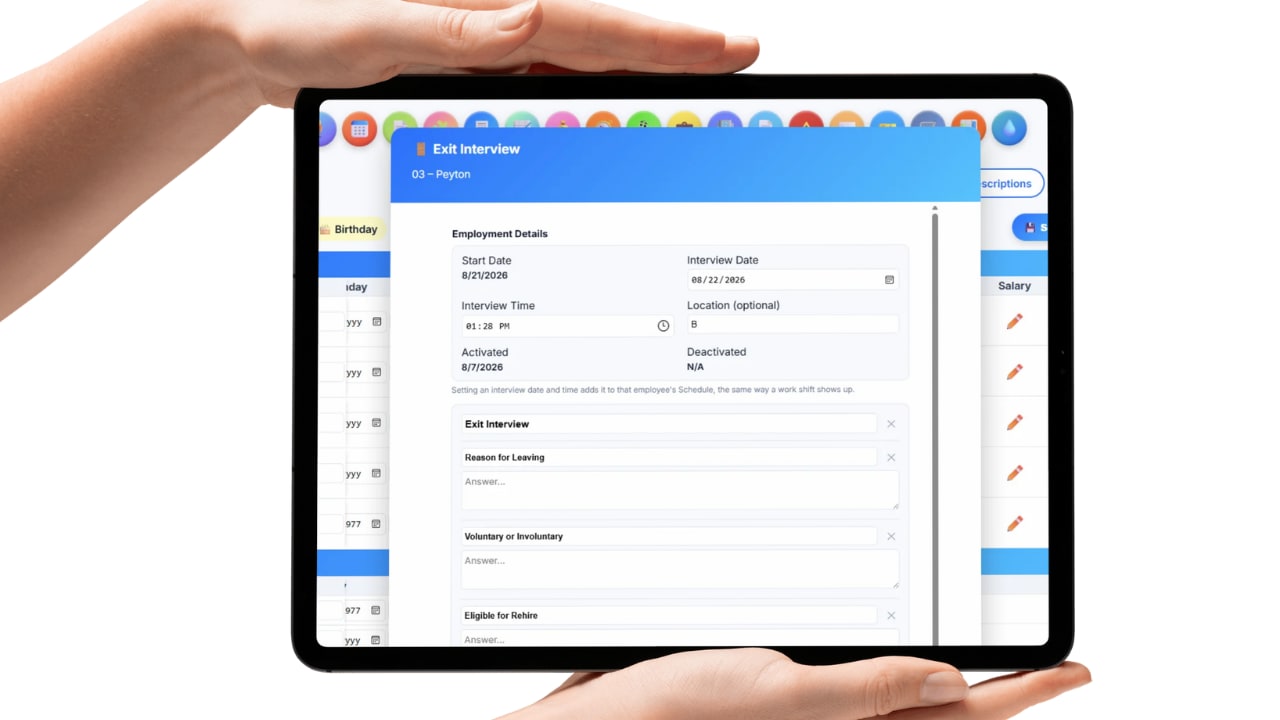
Start date and activation history pull straight from the employee's own record, the moment the exit interview opens, so nobody has to remember or retype a date that's already on file.
You set the actual interview date and time yourself, since an exit interview can happen before an employee is deactivated and notice periods rarely line up with the last day in the system.
One less form to fill out by hand means one less place for a date to get typed wrong.
Built to match how your company actually interviews, not a fixed form.
Every question ships with a standard set to start from, reason for leaving, rehire eligibility, manager feedback, compensation, and more, but every label can be renamed to fit your own wording.
Need to ask something the default list doesn't cover? Add a whole new section right inside the interview, no separate form to build.
The exit interview adapts to your process instead of forcing your process into someone else's template.
Set a date and time, and it shows up right where everyone already looks.
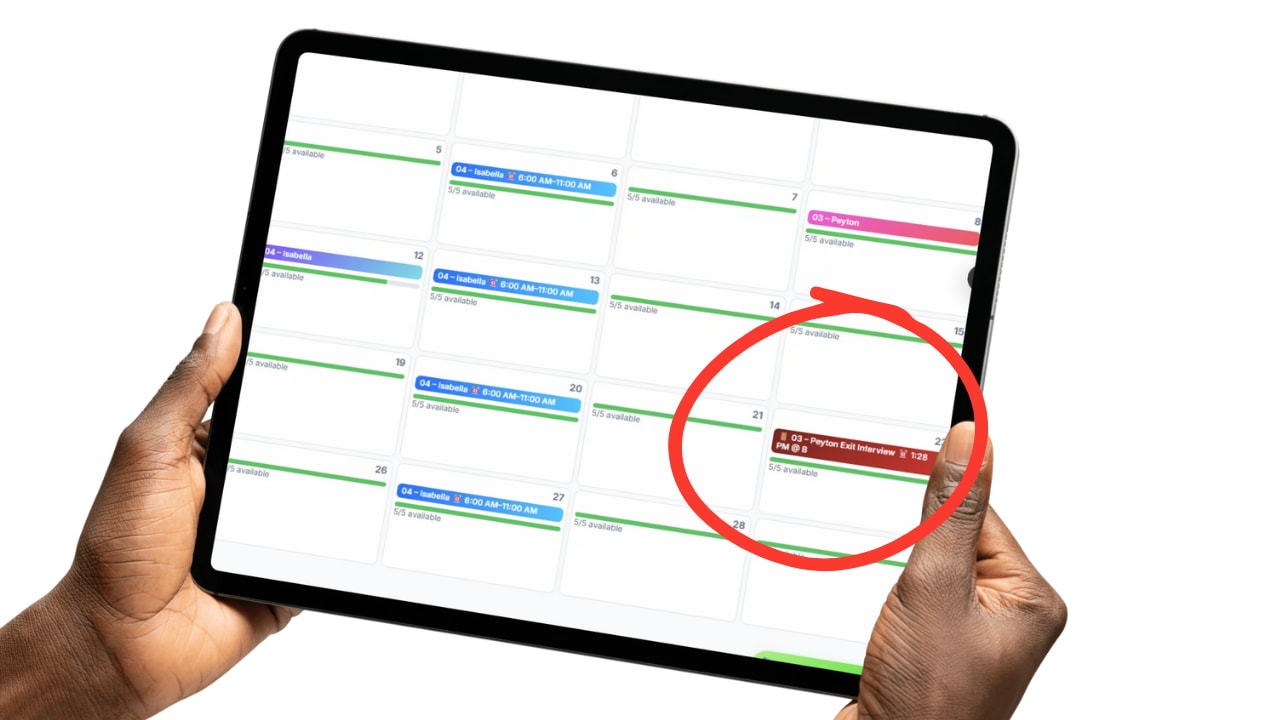
Once an interview date and time is set, it shows up on the Schedule for both the admin and the employee, the same place work shifts already show up, so nobody has to be told separately or check a different tool.
An optional location can be added too, so the calendar entry tells the whole story: when, and where.
It's styled distinctly from a real shift, so it's always clear at a glance what it actually is.
The way you set it up for one employee is how it opens for the next.

Whatever gets renamed or added during one employee's exit interview is saved as the template, so the next departure opens with the same sections and wording already built in.
Print gives you a clean copy for a personnel file, and copy to Excel drops the whole interview into a spreadsheet in one click, the same one-click copy pattern used everywhere else in Updoot.
No maintaining a separate offboarding document outside the system your employee records already live in.
Most exit interviews happen the same way: someone digs up an old Word doc, or pastes together a generic online form, fills it out once, and it lands in a folder nobody opens again. The dates get retyped by hand, the questions never quite match how the company actually talks about turnover, and the next departure starts the whole process over from nothing.
Updoot's exit interview lives directly on the employee it belongs to, inside the same Employee Vault that already tracks hire date, PTO, salary, and job description. Start date and activation history are already there, so the interview opens with the facts filled in instead of asking someone to remember them.
Every question can be renamed, and new sections can be added on the spot, so the interview matches how your company actually wants to ask, not a fixed list someone else decided on. Whatever gets set up gets saved as the template, so the next employee's exit interview opens pre-built instead of starting blank. Set a date and time and it lands on the Schedule for both the admin and the employee, the same place a work shift already shows up.
When it's done, it can be printed for the file or copied straight to Excel, so the feedback goes somewhere useful instead of sitting in a folder no one opens again. Every completed interview stays on the employee's record, so the answers build into an actual history of why people leave, not just a single form that's forgotten the moment it's filled out. That history is what makes it possible to spot a pattern and act on it, instead of hearing the same complaint on exit interview after exit interview with nothing ever changing.
Everything a departing employee's interview needs, already connected to their record.
Start date and activation history pull straight from the employee's record.
Rename any question label to match how your company actually asks it.
Whatever gets set up saves as the template for the very next employee.
Set a date and time and it shows up on the Schedule for both admin and the employee.
Every employee row has its own exit interview icon, no separate tool to dig for.
Print a clean copy straight from the interview for a personnel file.
Copy the completed interview to a spreadsheet in one click.
Every completed interview stays on file, building a real history to guide what changes going forward.
Short, practical reads on employee feedback, offboarding, and keeping HR records consistent.
Stop losing exit feedback to a form nobody remembers to fill out. Start your free trial of Updoot -- exit interviews, PTO, salary, projects, and meetings all in one platform built for small business.
Start Free Today →