
From Idea to Execution: The Ultimate Free Project Brief Template
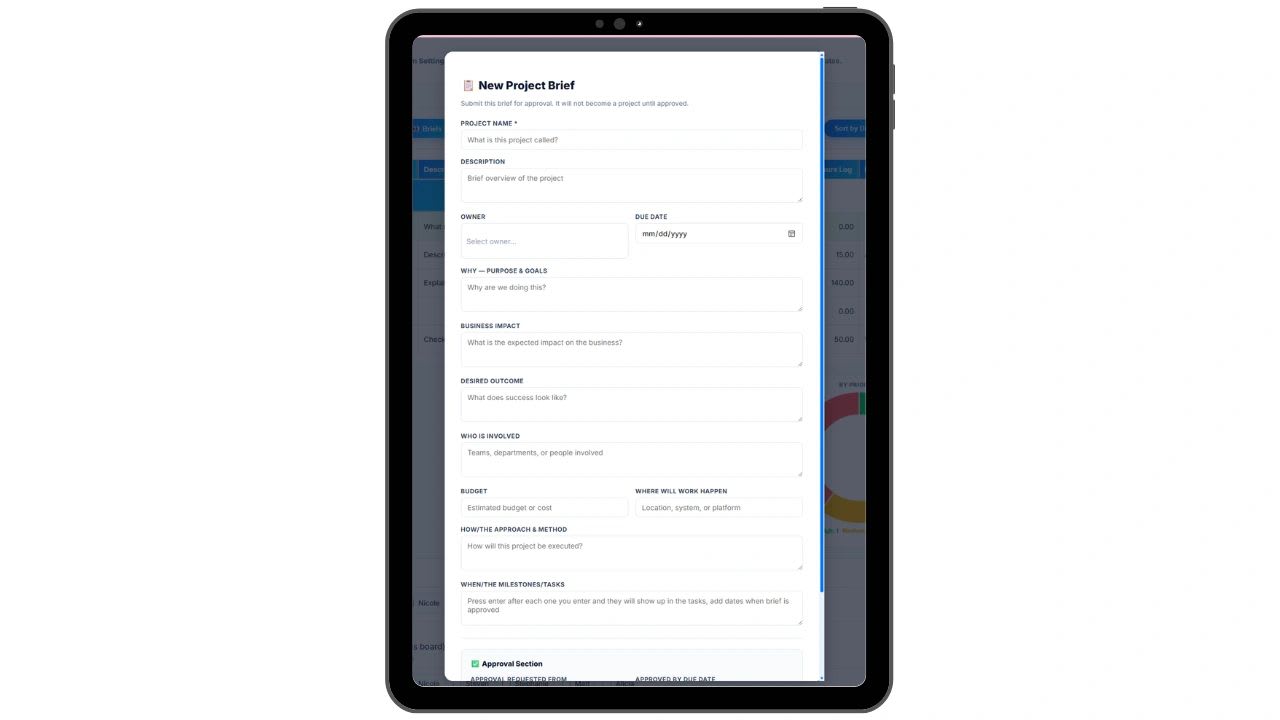
A project brief template is the fastest way to turn an idea into a project that actually gets finished. Ever start a project that sounded amazing but never got finished? When I started as a COO, I noticed that was consistently the case and needed to address it.
Teams would meet, the meetings would go off track because of a new shiny idea, and all of a sudden people were focused on whole new projects and had totally forgotten the ones that were 40% done from last week. Ideas are everywhere, but execution is everything. When a project lacks structure, clarity, or alignment, it stalls fast.
That is why I created the project brief template below to turn ideas into outcomes. Whether you are launching a new feature, campaign, system, or internal initiative, this brief makes sure your team knows the what, why, who, how, and when before anything starts. It is especially crucial as companies grow and resources are shared, so people work on what has the highest impact.
Will you need every one of these fields every time? No, but this is a comprehensive list of what to consider figuring out up front. A free project brief builder at the end assembles your brief and checks it for gaps.
What Is a Project Brief?
A project brief is a short document that outlines the purpose, scope, goals, and key details of a project before it gets approved or started. Think of it as the pitch and the plan rolled into one. It answers the questions every stakeholder has before they say yes: Why are we doing this? What does success look like? Who is involved? How much will it cost?
When will it be done?
A project brief is not a project plan. A project plan comes after approval and contains the detailed tasks, timelines, and resource allocations. A project brief is what gets you to approval in the first place.
Why You Need a Project Brief
A project brief is your single source of truth for turning a concept into a clear, collaborative plan.
| A project brief | Which means |
|---|---|
| Sets expectations | Everyone agrees on what done looks like before work starts |
| Aligns teams and stakeholders | Nobody is surprised by scope, timing, or cost |
| Surfaces potential blockers early | Dependencies are handled before they cause delays |
| Helps track accountability and delivery | There is one named owner and a record of what was promised |
| Drives results with intention, not guesswork | Projects are chosen for impact, not because they were the latest idea |
Who Should Write a Project Brief?
The person requesting the project writes the brief. This is usually a department head, a team lead, a project manager, or an employee who has identified a need or an opportunity. The brief is then submitted to whoever has the authority to approve it, whether that is a manager, a leadership team, or a budget committee.
In smaller companies, the same person might write and approve their own briefs. In larger organizations, there is usually a formal approval chain. Either way, the brief serves the same purpose: getting everyone on the same page before work begins.
23 Items to Include in a Project Brief
Let’s walk through each section of the template and how it adds value.
1. Project Name
Give your project a name that is easy to recognize across teams, documents, and dashboards.
2. Description
A short summary of what this project is and what it is trying to accomplish. Aim for clarity here; no buzzwords needed.
3. Project Type
Choose which type the project is. I find these to be the best descriptions so far, but feel free to modify them as you see fit.
| Project type | What it means |
|---|---|
| Foundational | Critical infrastructure or baseline work |
| High Quality | Customer-facing or brand-defining work |
| Experimental | Testing a new idea or channel |
4. Strategic Goal Alignment
Tie the project directly to a business or team goal. For example: "Supports Goal 2: Increase product adoption by 20%."
5. Originator
Who brought this idea forward? This helps track where the idea came from and who to loop in for context.
6. Owner or Author
The single person responsible for driving this forward and delivering the final result.
7. Contributors and Roles
Who else is involved, and what are they doing? List contributors with their specific responsibilities to avoid confusion and duplication.
8. Key Stakeholders and Reviewers
Who needs to review, approve, or stay informed? Naming them up front keeps everyone aligned and reduces surprise delays.
9. External References
Add links to mockups, documents, examples, or competitor inspiration, so everyone shares the same context and expectations.
10. File Storage and Source of Truth
Where are the core documents, creative files, or data sheets stored? Centralize them to eliminate version chaos.
11. Where Is This Going?
Explain where the project will live once it is launched, such as a website page, a customer support tool, or an internal dashboard.
12. Why Are We Doing This?
Define the problem or opportunity this project addresses. The better this section is, the easier it is to keep everyone focused on outcomes.
13. How Will We Complete This?
Lay out the approach: key phases, tools, tactics, or steps to get from idea to done.
14. Risks and Dependencies
What could block or delay this? What other projects or approvals does it depend on? Capture these early to prevent surprises.
15. Status and Phase
Track both status (such as Proposed, In Progress, or In Review) and phase (such as Planning, Execution, QA, or Launch).
16. Deliverables
What are the tangible outputs? Examples include a landing page, a webinar, a training document, or a product feature.
17. Success Metrics
How will you measure success? Use specific, trackable KPIs, such as increasing click-through rate by 15%, generating 200 leads, or achieving a 4.8 or higher user rating.
18. Timeline and Key Dates
List your major milestones and the expected launch date. For example:
| Milestone | Date |
|---|---|
| Kickoff | August 10 |
| QA | August 20 |
| Launch | August 30 |
19. Communication and Update Cadence
Where and how will the team communicate updates: Slack, email, or a project management tool? Set a rhythm, such as weekly updates on Fridays.
20. Will This Kick Off a New Process?
Is this a one-time project or the beginning of an ongoing process? If it starts a process, describe what happens next and who owns it.
21. Priority Level
Label the project Low, Medium, or High priority to help teams allocate effort appropriately.
22. Go-Live Plan
Outline the plan for launch day: who is pushing it live, what needs to happen, and how you will know it is successful.
23. Post-Launch Lessons Learned
Leave space to reflect once the project is complete. What went well? What could be improved next time?
Common Project Brief Mistakes to Avoid
| Mistake | Why it hurts |
|---|---|
| Being too vague | "Improve our marketing" is not a project. "Launch a six-week email nurture campaign targeting trial users who have not converted in 14 days" is a project. |
| Skipping the why | If you cannot explain why the project matters to the business, you will not get approval, and you probably should not. |
| Unrealistic timelines | Approvers know when a timeline is wishful thinking. Be honest about what is achievable. |
| No clear owner | A project without a named owner belongs to everyone, and therefore to no one. |
| Ignoring dependencies | If your project needs another team to finish their work first, say so. Hidden dependencies are one of the most common causes of project delays. |
Free Copy-Paste Project Brief Template
Copy and paste this template into Google Docs or Word, fill in the brackets, and delete any sections that do not apply to your project.
PROJECT BRIEF

Project Name: [Enter the name of the project]
Description: [2-3 sentences describing what this project is and who it is for]
Owner: [Name of the person responsible for driving this project]
Due Date: [Target completion date]

WHY
Purpose and Goals: [Why are we doing this? What problem does it solve or what opportunity does it capture? How does it connect to a business goal?]
Business Impact: [What is the measurable impact on the business if this project succeeds? Include data or estimates where possible]
Desired Outcome: [What does done look like? Describe the end state when the project is complete]

WHO
Who Is Involved: [List teams, departments, vendors, or individuals who will play a role]

BUDGET
Budget: [Estimated cost including labor, tools, software, and other expenses]

WHERE
Where Will the Work Happen: [Location, systems, or platforms involved]

HOW
Approach and Method: [General approach to execution. Methodology, build vs buy decisions, key strategic choices]

WHEN
Timeline and Milestones: [Key phases and milestones with estimated dates]
Milestone 1:
Milestone 2:
Milestone 3:

APPROVAL
Approval Requested From: [Name of approver]
Approval Due Date: [Date by which approval is needed to hit the project start date]
How to Submit a Project Brief for Approval
Once your brief is written, share it with your approver with enough lead time for them to review it properly. Do not send a brief and ask for same-day approval unless it is genuinely urgent. Give your approver at least three to five business days.
Follow up if you do not hear back. Approvers are busy and a brief sitting in an inbox is not a brief being reviewed. A simple follow-up message asking if they have any questions is professional and appropriate.
Once approved, move the brief into your project management system and use it as the reference document throughout the project lifecycle. Revisit it at key milestones to make sure the project is still on track to deliver what was originally promised.
Free Project Brief Builder
Use the builder below to draft your brief without starting from a blank page. Fill in the fields that apply, and it assembles a clean, one-page project brief you can print or copy.
It also checks the brief the way an approver would. The owner, the why, the success metrics, and the approver are treated as critical, because a brief missing any of them usually comes straight back. In the example, an onboarding email project is 92% complete; only the budget is blank, so it is ready to submit.
Copy it to Excel to keep a running list of briefs, where the completeness score and ready-to-submit check stay live formulas.
Project Brief Builder
Fill in the fields that matter for your project. The builder assembles a clean, one-page project brief, scores how complete it is, and lists what an approver will ask about first. Print it or copy it to Excel, where the completeness check stays a live formula. Nothing you enter is saved or sent anywhere.
Your project brief
Turn Project Briefs Into Finished Projects With Updoot
Ready to take your projects from "started" to "done and impactful"? Try Updoot’s project brief as part of its project management suite. It is flexible for product, marketing, operations, and internal initiatives, anything where accountability and clarity matter. Updoot is business management software for $5 per user per month.
Opens in Google Drive. View and download for free.
Related Reading
How to Create a Project Management SOP →
What Is a Gantt Chart and How to Create a Gantt Chart in Excel →
Frequently Asked Questions About Project Briefs
What is a project brief?
A short document that outlines the purpose, scope, goals, and key details of a project before it is approved or started. It is the pitch and the plan rolled into one.
What is the difference between a project brief and a project plan?
A project brief gets a project approved by explaining why, what, who, and roughly when. A project plan comes after approval and details the tasks, timelines, and resources.
What should be included in a project brief?
At minimum: project name, description, owner, why you are doing it, success metrics, deliverables, timeline, risks and dependencies, budget, and who needs to approve it.
Who writes a project brief?
The person requesting the project, usually a department head, team lead, project manager, or an employee who has spotted a need. It then goes to whoever has authority to approve it.
How long should a project brief be?
Usually one to two pages. It should be complete enough for an approver to decide, but detailed task planning belongs in the project plan.
How long should an approver have to review a project brief?
Give your approver at least three to five business days unless the project is genuinely urgent, and follow up if you do not hear back.
What are the three project types in this template?
Foundational for critical infrastructure or baseline work, High Quality for customer-facing or brand-defining work, and Experimental for testing a new idea or channel.