
Track Time Like a Pro: The Excel Time Tracking Template
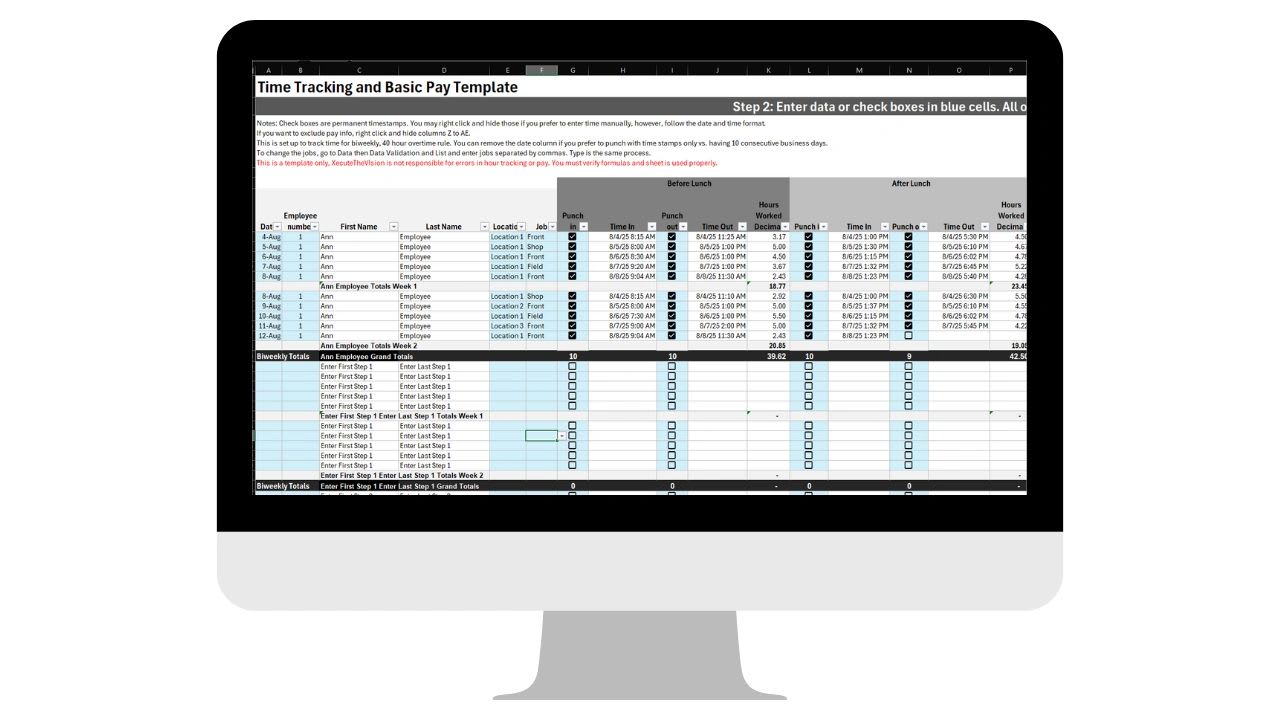
Excel time tracking templates give small businesses a simple, free way to track hours worked without paying for software. Try the free employee time log below, grab the free Time Tracking Template, then use this guide to set it up for your team in about five minutes.
Running a business means juggling customers, products, teams, and revenue goals, and somewhere in the middle of all that, making sure everyone is on the clock when they are supposed to be. Whether you are an owner, a team lead, or an operations manager, time tracking gets chaotic fast without a clear system.
I built this template after years of rolling out time tracking in operations roles. Getting employees to adopt time tracking software was always the hardest part, so the template does two jobs: it tracks hours accurately, and it gets your team used to the habit while you figure out which features you really need.
This time tracking template will stop working.
Beyond 1 or 2 users, spreadsheets become more of a problem than a solution. Manual entry is slow, error prone, and doesn't scale. Updoot does all of this for you.
- Slow. Hours get re-typed and checked by hand every pay period
- Error-prone. One typo or overwritten formula throws off the totals
- Unchecked. Hours reach payroll without anyone signing off
- Fast. Employees clock in from a phone, kiosk, or browser
- Accurate. Overtime, PTO, and payroll calculate automatically
- Approved. Managers approve hours before they reach payroll
Free template: Get the free Time Tracking Template for Excel and Google Sheets. Look for the Time Tracking Template on the templates page, then make a copy to start using it.
Free Employee Time Log
Free Employee Time Log
Log work and paid time off for each employee. The log totals work hours, PTO hours, and weekly overtime over 40 work hours per person, then copies straight into Excel or Google Sheets.
Totals by Employee
| Employee | Work Hours | PTO Hours | Regular | Overtime |
|---|
Entries
| Employee | Date | Type | Start | End | Break | Hours |
|---|
Why Time Tracking Matters in Business Operations
Time is money, but it is also insight. Tracking hours is not only about running payroll correctly. It shows you where time is being spent, how efficient your team is, when projects are over or under-resourced, and whether the business is running at the pace you think it is.
In my operations work across SaaS, manufacturing, and pharmaceuticals, one pattern held true everywhere: businesses that track time well tend to operate well. Accurate hours lead to accurate payroll, better project estimates, and hiring decisions based on real workload instead of gut feel.
Why Start With a Spreadsheet Instead of Software
There are plenty of time tracking tools on the market, and many are excellent. For freelancers, startups, and small teams that are just getting organized, though, the cost and learning curve can be a lot to take on at once. A spreadsheet is a practical first step because it has:
- No logins or subscriptions. Everyone already knows how to open a spreadsheet.
- Room to customize. You can shape the columns around your own process.
- A light footprint. Setup takes minutes and there are no ongoing fees.
- A good fit for short projects. It works well for contractors, seasonal help, and growing teams.
The trade-off is that a spreadsheet depends on people entering time correctly and on time. As your team grows, that dependence becomes the weak point, which is when a digital time clock starts to pay for itself.
What Is Inside the Excel and Google Sheets Time Tracking Template
This template takes the core features of popular time tracking software and simplifies them into a format anyone can use.
- Employee Setup sheet: add each person's name, role, and scheduled hours per week.
- Daily Time Entry: record start and end times with check-in and check-out boxes or manual entry.
- Automatic calculations: total hours worked per day, plus paid time off and overtime for each person.
- Dashboard filter view: a high-level summary of hours worked and who is currently clocked in.
The template is color-coded and formula-driven, with built-in logic that reduces common entry mistakes. To go from hours tracked to payroll ready, pair it with the free Payroll Template on the same free tracking templates page.
How to Use the Template in Under Five Minutes
- Open the Employee Setup tab and list everyone on your team.
- On the Time Entry tab, check the box when someone starts or stops working, or type the times in manually.
- Let the formulas calculate total hours, PTO, and overtime automatically.
- Filter the totals like a dashboard to spot trends, missing punches, or unusual hours.
The template adapts to how you work. Use it every day, once a week, or only during a busy project sprint.
Tips for Accurate Time Tracking
A template only works if the data going into it is reliable. Ask employees to record time as it happens rather than reconstructing the week on Friday. Have a manager review and approve hours before payroll, so errors get caught while they are still easy to fix. Keep one master file instead of letting copies multiply, and protect the formula cells so a stray keystroke cannot break the totals.
How Time Tracking Fits Into a Bigger Operations System
Time tracking is one piece of the operations puzzle. Once you trust your hours, you can connect them to payroll, project costs, client billing, and KPI dashboards. That is where time data stops being an administrative chore and starts driving better planning, smarter hiring, and stronger execution.
When you are ready to stop entering hours by hand, the Updoot employee time clock lets employees clock in from a phone, browser, or kiosk, calculates overtime and PTO automatically, and sends manager-approved hours straight to payroll.
Opens in Google Drive. View and download for free.
Related Reading
Excel and Google Sheets Timesheet Template (Free) →
How to Calculate Time Cards: A Complete Guide and Free Calculator →
What Is Time Theft? The Cost, How to Identify and Handle It →
Frequently Asked Questions About Excel Time Tracking
Can I track employee hours in Excel?
Yes. An Excel or Google Sheets template can record start and end times, total daily hours, and calculate PTO and overtime with formulas. It works best for small teams that enter time consistently.
Is this time tracking template free?
Yes. The Time Tracking Template is free on the XecuteTheVision free tracking templates page and works in both Excel and Google Sheets.
Does the template calculate overtime?
Yes. The template automatically totals hours worked per day and calculates paid time off and overtime for each person.
When should I switch from a spreadsheet to a time clock app?
Switch when manual entry starts causing payroll errors, when managers spend too long checking hours, or when employees work across locations. A time clock app records punches as they happen and sends approved hours to payroll.
Is there a free online time log for employees?
Yes. The free employee time log on this page records work and PTO entries for each person and totals work hours, PTO hours, and weekly overtime. Copy it into Excel or Google Sheets or print it.