
The Deputy Login Problem and What To Use Instead

If you landed here after searching for Deputy login, something probably went wrong. Maybe the app threw an error. Maybe an employee could not get in at shift start. Maybe you are just tired of a platform that makes a simple task harder than it needs to be.
Deputy is a scheduling-focused workforce management platform that shines at building complex schedules, automating shift coverage, and maintaining visibility into employee attendance. For what it does, it does well. But a pattern shows up consistently across review platforms: when Deputy stops working, it stops working at the worst possible time, and getting help is its own battle. adobe
This post covers what the Deputy login problem actually is, why it keeps happening, and what a growing number of managers are using instead.
What Is the Deputy Login Problem?
The login problem with Deputy is not one single bug. It is a cluster of frustrations that surface repeatedly across Capterra, G2, and GetApp.
Authentication friction during onboarding and session changes. Some users encounter password reset or authentication challenges during onboarding. For hourly teams clocking in at shift start, a login screen that requires re-authentication is not a minor inconvenience. It is a line of people standing around waiting before their shift has even started. adobe
GPS pinning employees in the wrong location. One of the most direct login-adjacent complaints is location verification failing at clock-in. Multiple users report the app pinning them in a different location far from their actual work site, which triggers errors and prevents a clean clock-in. For a field team or a multi-site operation, this creates a manual correction process that falls on the manager every time it happens. adobe
The app does not work without internet. Deputy requires an active internet connection to clock into a shift, making it a poor fit for businesses that operate from remote locations without stable internet connections. A warehouse basement, a construction site, a rural job location, any place where signal is unreliable means punches do not go through. adobe
Support is hard to reach when things break. Multiple verified reviews describe Deputy's customer support as chat and email only with no way to get anyone on the phone, and support being offshored in a way that requires repeating the same issue multiple times without resolution. Other users describe constant glitches that no one can explain and say they would pay more for a system that performed basic functionality more reliably. shopifyReddit Status
Why Deputy's Login Friction Is a Structural Problem
Deputy is built as a scheduling platform first. Time tracking and attendance are bolted on, and in some plans they are a separate purchase entirely. Deputy's entry-level Lite plan covers basic scheduling and timesheets, but HR tools, advanced analytics, and messaging are available as separate paid add-ons rather than included features. Tmetric
When a platform charges separately for each function, each module is also maintained separately. That structure tends to produce login and session issues because the employee experience spans multiple systems that do not always talk to each other cleanly.
Deputy's automation tools provide limited in-flow guidance, and adoption may require prior training, particularly for users on lower-tier plans with restricted support access. For a business where the manager is also doing payroll, scheduling, and HR, restricted support access on a lower plan is a real problem when something breaks. Capterra
What Deputy Actually Costs
Deputy's Lite plan starts at $5 per user per month and covers basic scheduling, timesheets, time clocking, and payroll integrations. The Core plan at $6.50 adds auto-scheduling, demand forecasting, and labor optimization. The Pro plan at $9 adds SSO, custom access levels, and bundles in Analytics and Messaging add-ons. Tmetric
The pricing looks straightforward until you factor in the add-ons. HR tools, advanced analytics, and messaging are all priced separately on lower tiers. There is also a minimum monthly spend of $25 regardless of how many users you have, which means very small teams pay more per user than the advertised rate. CRM.org
For a business that needs scheduling, time tracking, HR, and operational tools in one place, Deputy's add-on structure means the real cost is meaningfully higher than the entry price suggests.
What We Use Instead: Updoot
Updoot is built differently. Where Deputy is a scheduling platform that sells HR and analytics as add-ons, Updoot is a business operating system where every function is included in one platform at one price.
Here is the direct comparison across the features that matter most:
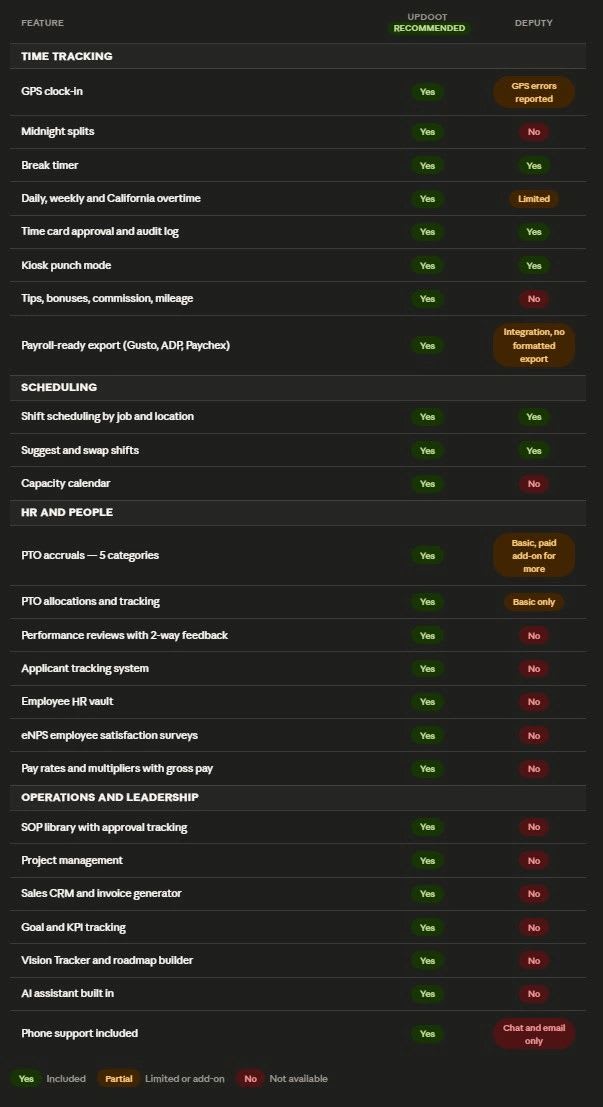
The Differences That Actually Matter Day to Day
Time tracking is the core, not an add-on. In Updoot, the clock-in and clock-out system is the foundation the platform was built around. There is no separate module to enable, no add-on to purchase, and no scenario where payroll data disappears because one piece of the platform went down independently.
Deputy is a scheduling app. Updoot is a business operating system. Deputy gives you shifts, basic timesheets, and a messaging add-on. Updoot gives you time tracking, HR, performance reviews, hiring, SOPs, project management, sales CRM, goal tracking, and an AI assistant, all in one place at one price. Teams that start on Deputy for scheduling eventually realize they are paying for three or four other tools to fill the gaps Updoot covers out of the box.
Every employee type is covered. Updoot handles hourly and salaried employees, tip tracking, bonuses, commission, mileage, and California overtime in the same platform. Deputy is built for shift workers. If your team has any complexity beyond punching in and out, you will outgrow it quickly.
Human support is included. Updoot offers unlimited support from real people. Deputy routes everything through chat and email with no option to speak to someone directly, and multiple verified users describe the support as offshored and unable to resolve technical issues. shopify
Sign in with Google. Updoot supports Google sign-in so employees are not managing a separate set of credentials just to clock in. That alone eliminates the most common source of login friction for hourly teams.
Who Should Stay on Deputy
Deputy is not the wrong tool for everyone. It is genuinely strong at scheduling for shift-based industries.
For retail, hospitality, healthcare, and other shift-driven teams that prioritize advanced scheduling and detailed timesheet approvals, Deputy delivers real operational value. If scheduling complexity is the primary problem and you do not need HR, operations, or leadership tools in the same platform, Deputy handles that well. adobe
The login and reliability problems tend to hit hardest when the business has grown beyond scheduling, when teams need HR and operational tools without paying for multiple add-ons, or when managers need to reach a real person quickly when something breaks.
Frequently Asked Questions
Why does my Deputy login keep failing?Deputy users report authentication challenges during onboarding and session changes, and GPS verification errors that prevent clean clock-ins when the app places an employee at the wrong location. If the issue is recurring rather than a one-time event, the GPS verification behavior or session management is likely the cause. adobe
Does Deputy work without internet?No. Deputy requires an active internet connection to clock into a shift. For teams working in locations with unreliable signal, this means missed punches and manual corrections. Updoot requires connectivity for clock-in as well, so if offline mode is a requirement, both platforms have the same limitation and you should evaluate tools built specifically for offline environments. adobe
What does Deputy charge for HR tools?Deputy HR is a separate paid add-on, not included in the base Lite or Core plans. If you need HR functionality alongside scheduling and time tracking, the real cost is higher than the entry price listed on their pricing page. Tmetric
What is the minimum spend on Deputy?Deputy charges a minimum of $25 per month regardless of how many users you have. For very small teams, this means the effective per-user cost is higher than the advertised rate. CRM.org
Is there a Deputy alternative that includes HR and operations?Yes. Updoot includes time tracking, HR, scheduling, performance reviews, applicant tracking, SOP management, project management, a sales CRM, goal and KPI tracking, a Vision Tracker, a Gantt roadmap, and an AI assistant in one platform. Deputy covers scheduling well. Updoot covers how a whole business runs.
What is the main difference between Deputy and Updoot?Deputy is a scheduling platform with time tracking and HR available as add-ons. Updoot is a business operating system with scheduling, time tracking, HR, operations, sales, and leadership tools all included. If scheduling is your only need, Deputy is a reasonable choice. If you are running a growing business and tired of paying for tools that do not connect, Updoot is built for that.