
Finding the Best Online Time Clock for Small Business
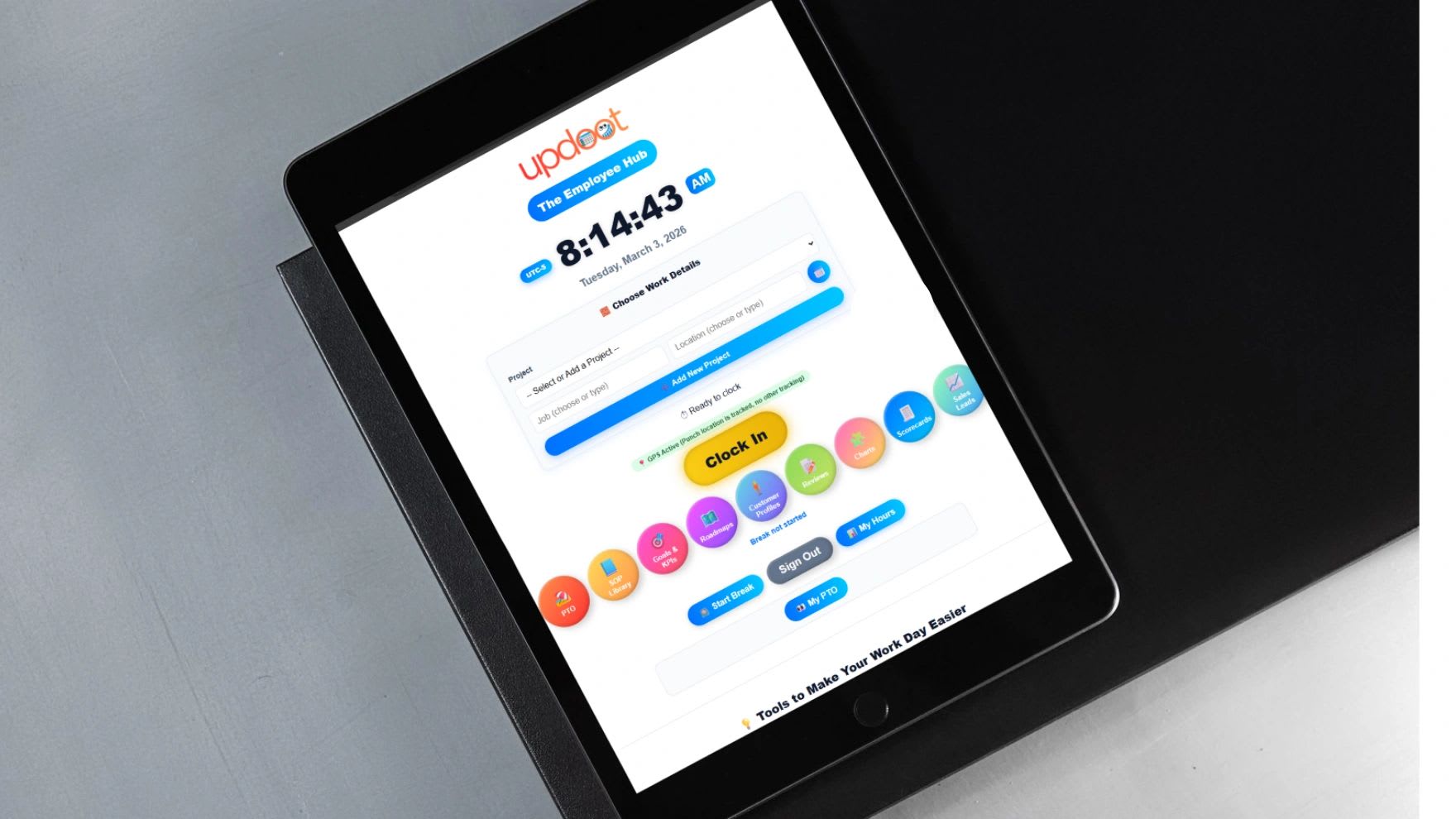
The best online time clock for small business does far more than record when people start and stop work. It connects every hour to payroll, job costing, scheduling, and client billing, and it gives you a real-time view of who is working and on what.
That matters because labor is usually the largest expense a small business can actually control. Yet many owners still rely on paper timesheets, disconnected apps, spreadsheets, or a basic punch-in system that does little more than store start and end times.
When time tracking is weak, everything downstream becomes unstable, from payroll and invoices to project margins and employee trust. This guide explains what matters when you choose an online time clock, what most businesses overlook, how to roll one out successfully, and how to put a dollar figure on the problem with a free calculator.
Why Time Tracking Is a Financial Control System
It is easy to think of a time clock as an HR tool. In practice, time data touches nearly every core function of the business. It drives payroll processing and overtime, determines job profitability and project billing, feeds workforce planning and labor forecasts, and supports paid time off tracking and compliance records.
When hours are inaccurate, the consequences ripple outward. Overtime errors increase labor costs. Missed punches delay payroll while someone chases down the missing times. Hours logged to the wrong job distort profitability reports, so you price the next job on bad data. And disputed hours damage employee trust faster than almost anything else.
The best online time clock for small business reduces those risks instead of creating more manual work. Think of it as a financial control, the same way you think of your bookkeeping or your bank reconciliation.
Core Features the Best Online Time Clock Must Include
Most products look similar on a pricing page. The differences show up in six areas, summarized in the table below and explained in detail after it.
| Feature | Why it matters | Question to ask the vendor |
|---|---|---|
| Accurate punches and audit log | Settles disputes with facts instead of memory. | Can I see who edited a time entry, when, and why? |
| Project, job, and location tracking | Shows where labor dollars actually go. | Can employees choose a job when they clock in? |
| Scheduling integration | Compares planned hours with actual hours. | Will I see overtime risk before the week ends? |
| Payroll-ready reporting | Turns payroll into a review, not a rebuild. | Does it export in the format my payroll provider needs? |
| Permissions and approvals | Keeps control as the team grows. | Can managers approve only their own team's time? |
| Dashboards and reports | Turns raw hours into decisions. | Can I see labor by project, job, and location on one screen? |
1. Real-Time, Accurate Punch Tracking
At a minimum, the system must capture precise clock-in and clock-out times, record breaks, and handle missed punches cleanly, with a simple way for employees to request a correction and managers to approve it.
Just as important is an audit log that stores every edit, who made it, and when. Without that history, a dispute over hours becomes one person's memory against another's. With it, everything is documented. Federal law requires employers to keep accurate records of hours worked for most hourly employees, as the Department of Labor explains in its recordkeeping fact sheet, so this is about protection as much as convenience.
2. Project, Job, and Location Tracking
This is where many time clocks fall short. Small businesses need more than total hours. They need to know where those hours went, whether to a specific project, an individual job, a physical location, or a particular client.
Imagine an employee works 40 hours in a week, with 25 on Project A and 15 on Project B. That split is what lets you invoice each client accurately, see whether each job made money, adjust your pricing, and plan next month's staffing. Without structured job tracking, you lose visibility into your margins.
3. Scheduling Integration
Scheduling and time tracking should not live in separate silos. When they are connected, you can compare scheduled hours with actual hours, see overtime risk early in the week, and spot shifts that are consistently understaffed or overstaffed.
Disconnected scheduling leads to reactive payroll management, where you only discover problems after the pay period closes. Integrated scheduling gives you proactive control while there is still time to adjust.
4. Payroll-Ready Reporting
A strong time clock should simplify payroll, not complicate it. Look for automatic weekly overtime calculations, paid time off accrual tracking, holiday tracking, clean exports in the format your payroll provider accepts, and an approval workflow that locks time once it is final.
The goal is for payroll to become a review process instead of a correction process, where you check the numbers rather than rebuild them the night before payday.
5. Structured Permissions and Approval Workflows
As you grow, control matters more. Employees should see only their own hours. Managers should approve time for their own teams. Administrators need access to reporting across the business, and there should be a clear separation between draft time and finalized time that has been approved for payroll.
Without those approval layers, anyone can change anything, and payroll becomes chaotic. Our guide to timecard approval covers how often to review and sign off on hours.
6. Clear Reporting and Operational Dashboards
Raw time data is not enough. You need to see weekly labor summaries, overtime alerts, paid time off balances, and labor broken down by project, job, and location.
That visibility supports better decisions. If overtime keeps showing up on the same kind of project, for example, you may need to adjust staffing or raise your prices for that work. A report that surfaces the pattern is worth more than a spreadsheet full of punches.
Free Time Clock Cost and Savings Calculator
It is hard to justify any software without a number. The calculator below estimates what loose time tracking costs you each month in three places: paid minutes that were not actually worked, manager time spent cleaning up payroll, and billable hours that never make it onto an invoice.
The example uses modest assumptions for a 12-person team. Replace every figure with your own estimates, and be conservative. Even a cautious estimate usually shows that the cost of inaccurate time far exceeds the cost of a good time clock.
Time Clock Cost and Savings Calculator
Estimate what loose time tracking costs your business each month, and compare it with the price of an online time clock. Every number is your own estimate, so start conservative. Copy the results to Excel with live formulas or print them for a budget conversation. Nothing you enter is saved or sent anywhere.
| Where money leaks today | How it is calculated | Per month |
|---|
In the example, six unworked minutes a day across 12 employees at $22 an hour adds up to about $572 a month. Cutting six hours of payroll cleanup by 70% saves $168 of manager time, and eight missed billable hours at $75 is $600 in revenue that never gets invoiced. That is roughly $1,340 a month against a time clock cost of $60, a return of more than 22 times the cost.
Common Pitfalls When Choosing a Time Clock System
Small businesses often underestimate how important this decision is. These are the mistakes that come up most often.
Choosing Based Only on Price
The cheapest systems often leave out job tracking, location tracking, overtime automation, audit logs, and structured reporting. The savings on the subscription disappear quickly once you count the payroll errors and lost billable hours those gaps allow.
Ignoring Project-Based Tracking
If you bill clients by the hour or price jobs based on labor, and your time clock cannot allocate hours by project, you are guessing at profitability. That guess shapes every future quote, so it is a dangerous one to get wrong.
No Connection Between Time and Billing
When hours have to be retyped into invoices, you add administrative time, increase the risk of error, and invite billing disputes. The best online time clock for small business connects tracked hours directly to billing, as we explain in our guide to time tracking for invoicing vs payroll.
Poor Mobile Functionality
For field teams, construction crews, service companies, and remote workers, mobile access is essential. A time clock that only works well on a desktop computer is out of date the day you buy it.
No Audit Trail
If time entries can be changed without recording who edited them and when, you are exposed during any disagreement over pay. Audit logs protect the business and employees equally.
Why the Right System Improves Profitability
For most service businesses, labor is the single largest line on the income statement. Without structured time tracking, you cannot spot inefficiencies, monitor overtime patterns, adjust staffing, or price projects accurately.
Accurate time tracking directly improves gross margin, net margin, cash flow, and the accuracy of every client invoice. That is why the best online time clock for small business is really a profit-protection tool. Every hour captured correctly is either paid correctly or billed correctly.
How to Implement a Time Clock System Successfully
Software alone does not solve problems. Implementation does. These steps make the difference between a system your team uses and one it works around.
Establish Clear Policies
Before launch, write down your clock-in expectations, break rules, overtime approval process, and paid time off procedures. Decide how rounding will work, if at all, and make sure it is neutral over time. Our guide to the 7-minute time clock rule explains how rounding works. Clear rules reduce conflict before it starts.
Roll It Out in Stages
Start with one team or location for a pay period or two. Fix the setup issues that come up, such as missing job codes or confusing approval steps, then expand to everyone. A small pilot surfaces problems when they are cheap to fix.
Train Managers on Approvals
Managers should review time every week, not just before payroll. A missed punch caught on Tuesday takes seconds to fix. The same punch discovered on payday creates a scramble.
Use Reports Proactively
Once the data is flowing, review overtime trends, labor allocation by project, missed punch patterns, and paid time off usage on a regular schedule. Time tracking data is strategic information, and it only pays off when someone looks at it.
Connecting Time Tracking to Payroll and Billing With Updoot
When you evaluate online time clocks, integration is the feature that matters most over the long run. Updoot is business management software built to connect time tracking with how the business actually runs.
Inside Updoot, employees track hours by project, job, location, and scheduled shift. Those same hours flow into payroll preparation, support job costing, feed invoice generation, and show actual versus scheduled labor, all without moving data between systems by hand.
The result is cleaner payroll, more accurate client billing, visible labor costs, and better planning. Updoot costs $5 per user per month, which is the default in the calculator above, and you can start a free trial to see how it fits your team.
Final Thoughts
Time tracking is not an afterthought. It is an operational foundation. The best online time clock for small business captures accurate hours, tracks time by project, job, and location, connects to scheduling, supports payroll, provides clean reporting, and reduces billing discrepancies.
Chosen wisely and implemented well, a time clock strengthens trust, protects profitability, and gives you leverage as you grow. Your labor data should work for you, not create more work. Choose a system that turns hours into insight.
Opens in Google Drive. View and download for free.
Related Reading
Best Time Clocks for Small Business: A Side-by-Side Comparison →
Frequently Asked Questions About Online Time Clocks
What is an online time clock?
An online time clock is software that lets employees clock in and out from a phone, computer, or kiosk, stores the punches in the cloud, and turns them into timesheets for payroll, job costing, and billing.
What features should the best online time clock for small business have?
Accurate punches with an audit log, time tracking by project, job, and location, scheduling integration, payroll-ready reports with overtime and paid time off, manager approvals, and clear dashboards.
How much does an online time clock cost?
Most online time clocks charge per user per month, and some charge extra for features such as job tracking or GPS. Updoot costs $5 per user per month and includes time tracking, scheduling, projects, and invoicing.
How does an online time clock save money?
It reduces paid time that was not worked, cuts the hours managers spend fixing payroll, and captures billable time that would otherwise never be invoiced. The calculator on this page estimates each of those for your business.
Why is an audit trail important in a time clock?
An audit trail records every change to a time entry, who made it, and when. It settles disputes with facts and supports the accurate records employers are required to keep for hourly employees.
How often should managers approve employee time?
Weekly is a good standard. Reviewing time every week catches missed punches and overtime early, so payroll becomes a quick review instead of a last-minute correction.
Should time tracking connect to invoicing?
Yes, if you bill clients by the hour or by job. When tracked hours flow straight into invoices, you avoid retyping, reduce billing errors, and stop losing billable time.