
Buddy Punch App Price and Feature Comparison Chart to Updoot
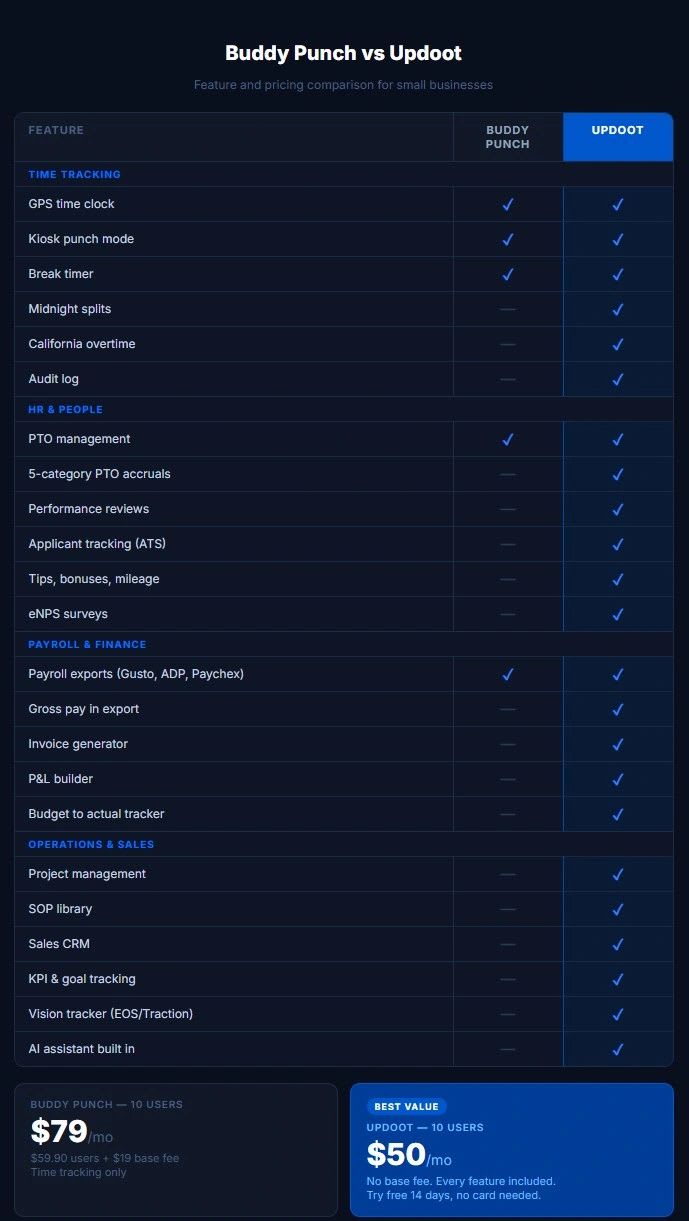
Use our free comparison chart of Buddy Punch features and pricing to Updoot to determine which is best for you. If you are shopping for employee time tracking software and Buddy Punch has come up in your search, you are probably looking for something straightforward: a way to track when your team clocks in and out, manage schedules, and export hours for payroll without building a spreadsheet from scratch every week.
Buddy Punch does that. But before you hand over your credit card, it is worth understanding exactly what you are paying for, what you are not getting, and whether there is a better option for your specific business at a significantly lower price point.
This comparison breaks down Buddy Punch versus Updoot across pricing, features, and the real-world needs of small business owners who are not just tracking time but actually trying to run and grow a business.
What Is Buddy Punch?
Buddy Punch is a cloud-based time tracking and scheduling software aimed primarily at small and mid-size businesses. It launched in 2013 and has built a solid reputation for doing the basics of time tracking reliably. The core product lets employees clock in and out, managers approve time cards, and businesses export hours for payroll.
It covers the fundamentals well. GPS tracking, scheduling, PTO management, and payroll integrations are all part of the package depending on which plan you are on. For a business that only needs time tracking and nothing else, Buddy Punch is a competent option.
The problem is that most small businesses need more than just time tracking. They need invoicing. They need project management. They need CRM tools, SOP libraries, performance reviews, and financial tracking. And the moment you start adding those tools from different vendors, your monthly software spend balloons and your team is jumping between five different platforms to get through the workday.
Buddy Punch Pricing: What You Actually Pay
Buddy Punch pricing starts at around $4.49 per user per month on their Starter plan, but that plan is limited. To get the features most businesses actually need including scheduling and payroll integrations, you need to move up to their Pro plan at around $5.99 per user per month, or their Enterprise plan which requires a custom quote.
Here is the catch that most small business owners miss. Buddy Punch charges a base fee on top of the per-user cost. That base fee starts at around $19 per month. So a business with 10 employees on the Pro plan is paying $19 plus $59.90, which comes to roughly $79 per month just for time tracking and scheduling.
That is not an unreasonable price for what it delivers. But when you factor in that you still need to pay for invoicing software, project management tools, HR software, and CRM tools separately, the total monthly software spend for a 10-person small business starts climbing past $300 or $400 per month fast.
Updoot Pricing: The Full Picture
Updoot costs $5 per user per month. No base fee. No tiers. No add-ons. Every feature is included for every user at that single price.
A 10-person team on Updoot pays $50 per month. Full stop.
That $50 includes everything in this comparison and significantly more. Time tracking, scheduling, invoicing, project management, CRM, HR tools, SOP library, payroll exports, performance reviews, financial tracking, and a Vision Tracker inspired by Gino Wickman's book Traction. Not as separate modules you unlock at higher tiers. All of it, for every user, at $5 per user per month.
The pricing philosophy behind Updoot is deliberate. Small businesses are already stretched thin. Charging them separately for every feature they need to run their business is a model that benefits the software company, not the customer. Updoot is built to replace the stack of tools a small business is currently paying for, not add to it.
Feature Comparison: Time Tracking
Both Buddy Punch and Updoot offer solid time tracking. Here is how they compare.
Buddy Punch time tracking features:Buddy Punch offers GPS tracking, facial recognition for punch verification, geofencing, a mobile app for iOS and Android, kiosk mode for shared devices, and break tracking. These are solid features and Buddy Punch has refined them over more than a decade.
Updoot time tracking features:Updoot includes an employee time clock with GPS, midnight splits so overnight shifts are handled correctly, a break timer, kiosk punch mode, admin time card approval with a full audit log, optional employee time card approval, and daily, weekly, or California overtime tracking built directly into the dashboard.
The overtime tracking is worth highlighting specifically. California overtime rules are notoriously complex with daily overtime thresholds that differ from federal standards. Most time tracking tools make you calculate California overtime manually or purchase an add-on. Updoot handles it automatically and surfaces it in the dashboard.
Both products cover the time tracking fundamentals. Buddy Punch has a slight edge on biometric punch verification with facial recognition. Updoot has an edge on overtime complexity and audit trail depth.
Feature Comparison: Scheduling
Buddy Punch scheduling:Buddy Punch includes scheduling on their Standard plan and above. You can build shifts, assign them to employees, and employees can view their schedules through the app. It is functional and works well for straightforward scheduling needs.
Updoot scheduling:Updoot includes scheduling with suggest and swap shifts by job and location, capacity awareness built into the schedule so you can see whether you are overstaffed or understaffed before you publish, and a capacity calendar that connects scheduling directly to your operational planning. The suggest and swap feature means managers are not manually filling every shift. Updoot surfaces available employees based on job type, location, and current capacity and suggests the right fit.
For businesses with multiple locations or complex shift patterns, Updoot's scheduling is more operationally aware than Buddy Punch's.
Feature Comparison: PTO Management
Buddy Punch PTO:Buddy Punch handles PTO requests, approvals, and basic accruals. Employees can request time off through the app, managers approve or deny, and balances update accordingly.
Updoot PTO:Updoot includes five categories of PTO accruals and allocations. Not just a single PTO bucket but separate tracking for vacation, sick time, personal days, and whatever categories your business uses. Balances accrue automatically based on the rules you set and integrate with time cards so your payroll export already reflects approved PTO correctly.
For businesses with differentiated leave policies, Updoot's five-category PTO system is significantly more flexible than a single-bucket approach.
Feature Comparison: Payroll Exports
Buddy Punch payroll:Buddy Punch integrates with Gusto, QuickBooks, ADP, Paychex, and several other payroll platforms. Exports are clean and the integrations are well-established. This is one of Buddy Punch's strongest areas.
Updoot payroll:Updoot exports payroll-ready files mapped for Gusto, ADP, Paychex, and other payroll systems with overtime calculations already applied. Tips, bonuses, commissions, punch notes, and mileage are all tracked in one place and included in the export. Pay rates and multipliers are configured per employee so gross pay is calculated in the export and your payroll provider receives clean data without manual adjustment.
Both handle payroll exports competently. Updoot's edge is the inclusion of tips, bonuses, commissions, and mileage in the same export so you are not reconciling multiple data sources before running payroll.
What Buddy Punch Does Not Include
This is where the comparison gets significant. Buddy Punch is a time tracking and scheduling tool. It does that job well. But it stops there.
When you use Buddy Punch, you still need separate tools for:
- Invoicing and project billing. Buddy Punch does not generate invoices or connect time entries to client billing. If you bill clients for hours worked, you are manually transferring data from Buddy Punch into your invoicing software.
- CRM and sales tools. Buddy Punch has no lead tracker, no sales pipeline, no customer profile builder, and no quote creator. These live in a separate tool.
- Project management. Buddy Punch does not include project management, task assignment, project templates, or proposal tools. Another separate tool.
- SOP management. No SOP library, no revision tracking, no approval workflows, no review due alerts. If your business runs on documented processes, those live somewhere else.
- HR tools beyond time and PTO. No performance reviews, no applicant tracking system, no job description library, no employee HR vault, no eNPS surveys, no org chart builder.
- Financial tracking. No budget to actual tracker, no P&L builder, no vendor management scorecards.
- Leadership tools. No KPI tracking, no Vision Tracker, no roadmap builder, no RASCI chart.
Every one of those tools costs money separately. A typical small business paying for Buddy Punch plus invoicing software plus a basic CRM plus project management plus HR tools is paying $200 to $400 per month across their software stack. And their team is logging into five different platforms every day to do their jobs.
What Updoot Includes That Buddy Punch Does Not
Updoot is built on the premise that a small business should not need ten different software subscriptions to run their operation. Everything listed below is included in the $5 per user per month price.
HR and People: Employee time clock with GPS, midnight splits, break timer, kiosk mode, overtime tracking, admin and employee time card approval, five-category PTO, pay rates and multipliers, tips and bonuses tracking, performance reviews with two-way feedback, an applicant tracking system for hiring, a custom job description library, an employee HR vault with emergency contacts and key dates, eNPS surveys, salaried employee setup, a team location map, and a HRIS covering employee management, roles, performance, and PTO.
Sales and Marketing: A sales CRM lead tracker and dashboard, a sales quote creator, a customer profile builder, competitor analysis tools, an invoice generator, and project billing that connects time entries directly to client invoices.
Finance: A budget to actual tracker, vendor management scorecards, payroll-ready exports with overtime and bonuses included, a P&L builder, and a capacity calendar.
Operations: An SOP library with review due alerts, revision tracking, and approval workflows, project management with custom templates and proposal tools, a flow chart builder, a risk tracker, a RASCI roles and accountability chart builder, scheduling with suggest and swap by job and location, and meeting agendas with Vision Tracker integration.
Leadership: A Vision Tracker inspired by Gino Wickman's book Traction for running your business on a proven operating system, a roadmap builder with Gantt view, an org chart builder, and goal and KPI tracking.
AI: Updoot is AI-powered throughout to help teams work smarter and faster. Doot, the AI assistant built into the platform, is available across modules to help you move faster without adding headcount.
Who Should Use Buddy Punch
Buddy Punch is the right choice if time tracking and scheduling are the only things you need, your business has no invoicing, CRM, project management, or HR requirements beyond basic time and PTO, and you are willing to manage a separate software stack for everything else. It is a well-built product that does what it promises.
Who Should Use Updoot
Updoot is the right choice if you are a small business owner who is tired of paying for five different tools that do not talk to each other, you need time tracking as part of a complete operational system rather than a standalone tool, you want to run your business from one platform rather than logging into multiple apps every day, and you want to pay $5 per user per month instead of $200 to $400 per month across a fragmented software stack.
Updoot is built for the business owner who is not just tracking time but actually trying to grow a business, manage a team, bill clients, track performance, and build operational systems that scale. The time clock is one feature in a complete platform, not the entire product.
The Bottom Line
Buddy Punch is a solid time tracking tool. If time tracking is all you need, it does the job reliably. But for most small businesses, time tracking is one piece of a much larger operational picture. Paying separately for every piece of that picture is expensive, inefficient, and creates friction for your team every single day.
Updoot gives you the complete picture at $5 per user per month with no base fee, no tiers, and no add-ons. A 10-person team pays $50 per month for everything they need to track time, manage people, bill clients, run projects, build operational systems, and lead their business with data.
The math is not complicated. The question is whether you want a time tracking tool or a complete business operating system. If it is the latter, Updoot is built for you.
Try Updoot free for 14 days at xecutethevision.com. No credit card required.
Frequently Asked Questions
Is Buddy Punch good for small businesses?
Buddy Punch is a competent time tracking and scheduling tool that works well for small businesses whose only need is tracking employee hours and managing schedules. Where it falls short is that it does not include invoicing, project management, CRM, or comprehensive HR tools, meaning most small businesses still need to pay for additional software alongside it.
How much does Buddy Punch cost per month?
Buddy Punch pricing starts at approximately $4.49 per user per month on their Starter plan plus a base fee of around $19 per month. Their Pro plan runs approximately $5.99 per user per month plus the base fee. A 10-person team on the Pro plan pays roughly $79 per month for time tracking and scheduling only.
How does Updoot compare to Buddy Punch on price?
Updoot costs $5 per user per month with no base fee and no tiers. A 10-person team pays $50 per month for every feature Updoot offers including time tracking, scheduling, invoicing, project management, CRM, HR tools, SOP library, and more. Buddy Punch at the same team size costs more and covers only time tracking and scheduling.
Does Buddy Punch include invoicing?
No. Buddy Punch does not include invoice generation or project billing. If you bill clients for employee hours, you need a separate invoicing tool. Updoot includes an invoice generator and project billing that connects time entries directly to client invoices at no additional cost.
Does Updoot replace Buddy Punch?
Yes. Updoot includes everything Buddy Punch offers including GPS time tracking, kiosk mode, PTO management, scheduling, payroll exports to Gusto, ADP, and Paychex, and overtime tracking. Updoot also includes everything Buddy Punch does not, including invoicing, CRM, project management, SOP library, performance reviews, and financial tools.
Can Updoot handle California overtime rules?
Yes. Updoot includes daily, weekly, and California overtime tracking built directly into the dashboard. California overtime calculates automatically based on your employee setup so you are not manually applying different rules for different employees.
Is there a free trial for Updoot?
Yes. Updoot offers a 14-day free trial with no credit card required. You can access every feature during the trial so you can evaluate the full platform before committing to a subscription.