
Free Shift Change Request Form Template for Managers and Employees
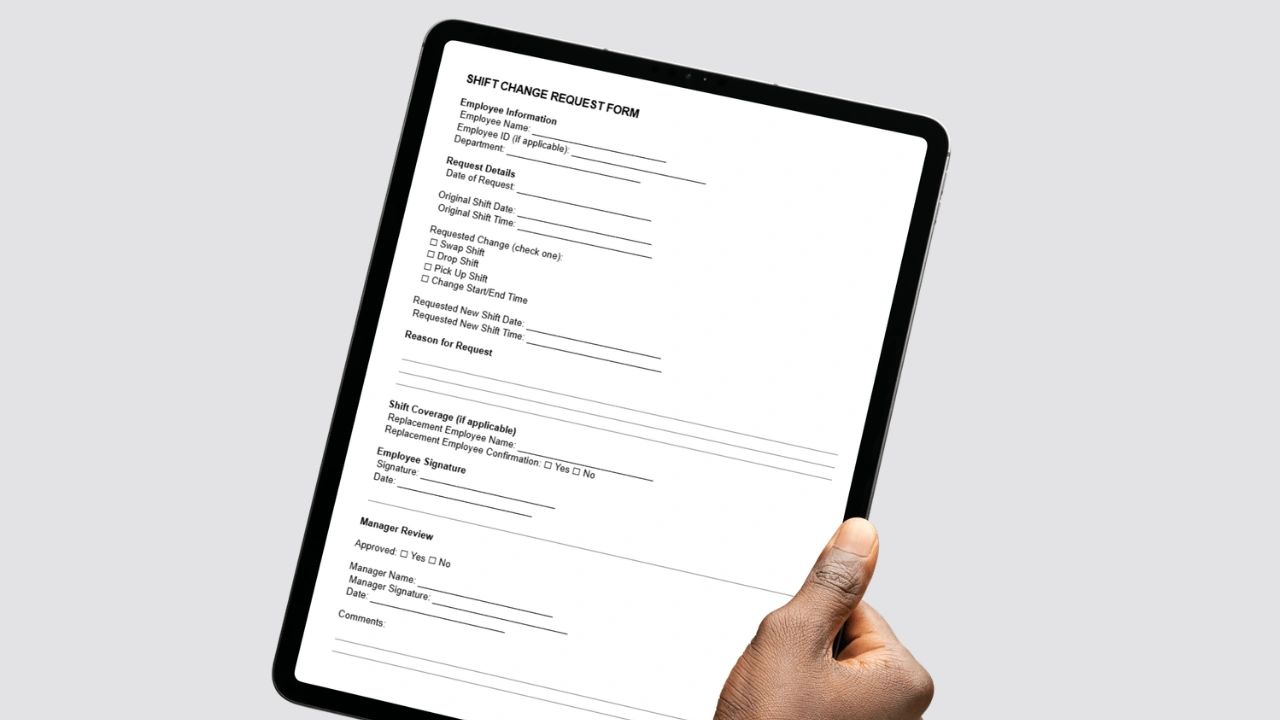
A shift change request form gives employees one clear way to ask for a schedule change and gives managers everything they need to approve or deny it quickly. Use the free fillable form in this guide as an employee or a manager to make the process simple and consistent.
Managing schedules is one of the most important, and often most frustrating, parts of running a team. Last-minute conflicts, planned time off, and changing availability mean one thing is certain: schedules will change. The difference between chaos and control comes down to how those changes are requested and approved.
If requests still arrive by text message, email, or a quick word in the hallway, you are inviting miscommunication, missed shifts, and payroll errors. This guide explains what a shift change request form is, why it matters, what to include, how managers should run the process, and how to move beyond paper when you are ready.
What Is a Shift Change Request Form?
A shift change request form is a standard document employees use to ask for a change to their scheduled hours. It covers the most common situations: swapping a shift with a coworker, dropping a shift, picking up an open shift, adjusting start or end times, and asking for coverage because of a personal conflict.
The form captures all the necessary details up front, so managers can make a decision without chasing information. Instead of piecing together a request from texts and conversations, everything is documented in one place.
Why You Need a Shift Change Request Form
If schedule changes are handled through scattered communication, they are costing you time and creating risk. Without a formal process, employees say they "told someone," managers miss requests, unapproved swaps happen anyway, coverage gaps appear, and payroll ends up paying the wrong person for the wrong hours.
A shift change request form solves those problems by creating structure, accountability, and visibility. Every change has a request, a decision, and a record.
Key Benefits of a Shift Change Request Form
1. Clear Communication
Every request states who is asking, which shift is affected, why the change is needed, and who will cover it if coverage is required. There is no guessing and no back-and-forth.
2. Manager Control and Approval
Nothing changes without approval. That protects staffing levels, makes sure a qualified person covers each shift, and prevents unexpected overtime from swaps that push someone over their weekly hours. Our time and a half calculator shows how quickly overtime adds up.
3. Fewer Scheduling Errors
When changes are documented, you avoid double-booked employees, missed shifts, and incorrect payroll calculations caused by paying the originally scheduled person instead of the one who actually worked.
4. Accountability for Employees
A formal process gives employees ownership of their schedules. They submit requests properly, find coverage when the policy requires it, and follow the same rules as everyone else, which is fairer for the whole team.
5. Record Keeping
A written record shows who asked for what and who approved it. That documentation helps resolve disputes, supports accurate payroll, and backs up your compliance records.
When Should Employees Use the Form?
The form should be used any time an employee wants to change their assigned schedule. Common reasons include personal appointments and emergencies, school or childcare conflicts, swapping shifts with a coworker, picking up extra hours, and changes in availability.
A simple rule works well: if the schedule is changing, it should be documented. Emergencies may need a phone call first, but the form should follow so the record is complete. If employees are unsure how to raise a change, our script to ask your manager for a schedule change helps.
What to Include in a Shift Change Request Form
An effective form is short but complete. The goal is to capture everything needed to make a decision without follow-up questions.
| Section | Fields | Why it matters |
|---|---|---|
| Employee information | Name, employee ID, department | Identifies the requester and their team |
| Request details | Date of request, original shift date and time, type of change, requested new date and time | Shows exactly what is changing and how much notice is given |
| Reason | A short explanation | Helps managers prioritize and apply policy fairly |
| Coverage | Replacement employee and whether they confirmed | Prevents gaps and confirms the swap is agreed |
| Signatures | Employee signature and date | Confirms the request is genuine |
| Manager review | Approval decision, manager name, signature, date, comments | Creates the record of the decision |
Free Fillable Shift Change Request Form
Use the form below as an employee to prepare a request, or as a manager to record a decision. As you fill it in, it checks whether the request meets your minimum notice requirement and whether coverage is confirmed for swaps and drops.
Click Print Form to print only the form or save it as a PDF, Copy as Text to paste it into an email or message, or Copy to Excel Log to add the request as a row in a spreadsheet log, where notice days and approval checks calculate with live formulas.
Shift Change Request Form
Employee information
Request details
Shift coverage (if applicable)
Employee signature
Manager review
How Managers Should Use the Form
Having a form is only the first step. The value comes from how consistently you use it.
1. Set Clear Expectations
Make it known that every shift change goes through the form, that text or verbal requests are not valid on their own, and that requests must be submitted within a set time frame. Consistency is what makes the system work, so apply it to everyone.
2. Define Approval Rules
Decide in advance how much notice is required, whether employees must find their own coverage, and which changes need manager approval and which can be approved automatically, such as a swap between two qualified employees in the same role. Written rules remove ambiguity and speed up decisions.
3. Centralize Submission
Requests get lost when they arrive in several places. Collect every form in one location, such as a shared folder, a single inbox, or a scheduling system. The easier it is to submit and track requests, the more reliably people will use the process.
4. Update the Schedule Immediately
Once a request is approved, update the master schedule right away, notify everyone affected, and make sure payroll and time tracking reflect the change. Delays between approval and update are where confusion starts.
Common Mistakes to Avoid
1. Allowing Off-the-Record Changes
If employees keep texting each other and swapping shifts without approval, the system breaks down. Stick to the process, and treat unapproved swaps the same way every time.
2. Overcomplicating the Form
If the form is long or confusing, employees will avoid it. Keep it to the fields you actually use to make decisions.
3. Not Enforcing Deadlines
Last-minute requests should be the exception, not the rule. Set clear cutoffs and apply them fairly, with a defined path for genuine emergencies.
4. Failing to Track Changes
If approved changes never reach the schedule or payroll, you will still have errors. The form only works when it is connected to your scheduling workflow.
Paper vs. Digital Shift Change Forms
Many businesses start with paper forms, and they work for a small team. They are easy to set up and need no technology. But paper forms are easy to lose, hard to track, not visible in real time, and require someone to update the schedule by hand.
Digital forms can be submitted instantly, tracked automatically, reflected in the schedule in real time, and connected to scheduling and payroll tools. Their only real downside is the initial setup. As a team grows past a handful of people, paper processes stop scaling.
| Paper forms | Digital forms | |
|---|---|---|
| Setup | Immediate | Some setup required |
| Tracking | Manual and easy to lose | Automatic |
| Visibility | Only when someone checks | Real time |
| Schedule updates | By hand | Automatic or one click |
| Payroll connection | None | Integrated |
Moving Beyond Forms: Automating Shift Changes
A shift change request form is a great starting point, but it is still a manual process. Modern scheduling systems let employees request changes digitally, notify managers automatically, track approvals in real time, update the schedule instantly, and sync with time tracking and payroll. That removes paperwork entirely and cuts admin time further.
Updoot scheduling does exactly that. Employees submit shift change requests and swaps digitally, managers approve or deny them in real time, schedules update automatically, and hours flow into payroll and billing. Updoot is business management software that manages your whole workforce in one system for $5 per user per month, and you can start a free trial anytime.
Final Thoughts
A shift change request form is one of the simplest ways to bring structure to scheduling. It creates clear communication, consistent approvals, better accountability, and fewer scheduling and payroll errors. If your current process feels messy or reactive, it is one of the fastest improvements you can make. Start with the free form above, set clear rules around it, and when you are ready, move the whole process into a system that connects scheduling, time tracking, and operations.
More Free Templates
Looking for more scheduling and HR templates? See our guides to 24-hour shift templates and scheduling, the 9/80 work schedule, the 2-2-3 work schedule, flextime policy and request templates, pay slips, job description formats, the EOS accountability chart, an annual budget template for Google Sheets, and risk registers.
Opens in Google Drive. View and download for free.
Related Reading
Flextime Policy and Request Templates →
Frequently Asked Questions About Shift Change Request Forms
What is a shift change request form?
A shift change request form is a standardized document employees use to request modifications to their scheduled work hours. It captures all necessary details upfront including who is requesting the change, what shift is affected, the reason, and who will provide coverage so managers can make informed decisions quickly.
When should an employee use a shift change request form?
Any time an employee wants to alter their assigned schedule including shift swaps with coworkers, dropping or picking up a shift, adjusting start or end times, or requesting coverage due to personal appointments, emergencies, school conflicts, or childcare needs. A good rule is that if the schedule is changing it should be documented.
What should a shift change request form include?
At minimum the form should capture employee name, date of request, original shift details, the requested change, reason for the request, replacement employee name and confirmation if applicable, employee signature, and a manager approval section with space for comments.
Can a manager deny a shift change request?
Yes. Managers can deny requests that would create staffing gaps, result in unqualified coverage, cause unexpected overtime, or conflict with company scheduling policies. Defining clear approval rules in advance removes ambiguity and helps managers make faster and fairer decisions.
What are the most common mistakes businesses make with shift change requests?
The most common mistakes are allowing off-the-record text or verbal swaps that bypass the formal process, overcomplicating the form so employees avoid using it, not enforcing submission deadlines so last-minute requests become the norm, and failing to update the master schedule immediately after approval which causes payroll errors.
What is the difference between a paper shift change form and a digital one?
Paper forms are easy to implement but get lost easily, require manual updates, and do not scale as teams grow. Digital forms allow instant submission, automated tracking, real-time schedule updates, and integration with scheduling and payroll tools. Most growing businesses find paper processes break down quickly once the team reaches more than a handful of employees.
How much notice should employees give for a shift change?
Set a minimum that fits your operation, commonly a few days to a week for planned changes, with a separate process for emergencies. Write it into your policy and apply it consistently.