
Risk Register: What It Is, How to Build One, and a Free Template
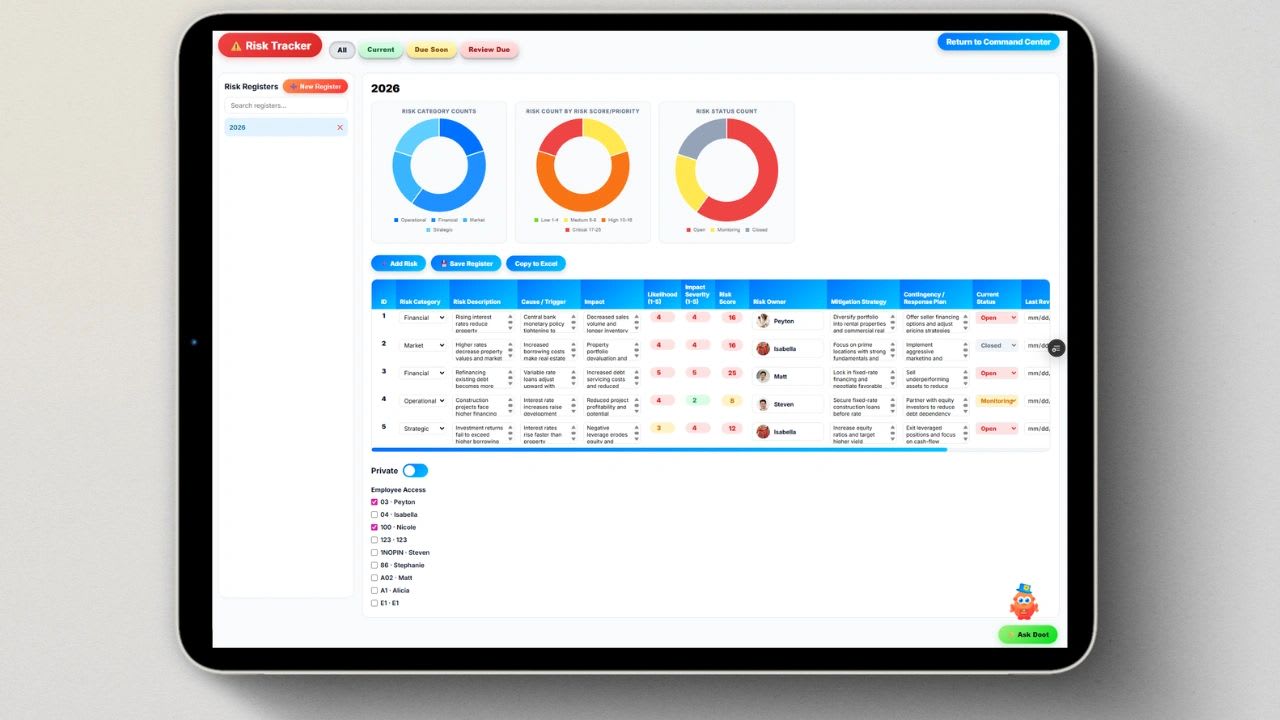
Use our free risk register template below to ensure every risk is captured. Every business carries risk. Deadlines slip. Vendors miss deliveries. Budgets stretch. Key people leave at the worst possible time. The question is never whether risks will appear but whether your team is ready to deal with them before they escalate into something that derails a project or damages the business.
A risk register is one of the most practical tools available for answering that question with confidence. It is not a bureaucratic document designed for auditors. Done well, it is a living record that keeps your team proactive, your leadership informed, and your projects on track even when things start to go sideways.
This guide covers everything you need to know: the definition, what to include, how to build one step by step, common mistakes to avoid, and a free template you can start using today.
What Is a Risk Register?
A risk register is a structured log used to identify, assess, and track every known risk that could affect a project or business. It documents each risk's description, category, likelihood, potential impact, owner, and mitigation plan in one centralized place.
Also called a risk log, it serves as the single source of truth for your organization's risk posture. Instead of risks living in someone's head, scattered across emails, or buried in meeting notes, the register surfaces them, scores them, assigns accountability, and tracks progress toward resolution.
ISO 73:2009, the international standard for risk management vocabulary, defines a risk register simply as a "record of information about identified risks." That definition is intentionally broad because a risk register works across industries, project types, and company sizes. A construction firm, a software team, a healthcare organization, and a small professional services business all benefit from the same underlying structure.
The key distinction worth making early is this: a risk register is not a one-time document. It is a living tool that should be reviewed, updated, and discussed regularly throughout the life of any project or planning cycle. Organizations that treat it as a compliance checkbox to fill out once and file away get very little value from it. Organizations that treat it as a working management tool catch problems earlier and respond faster.
Why a Risk Register Matters
The case for maintaining a risk register is straightforward once you understand what happens without one.
Without a risk register, risks tend to be managed reactively. Someone notices a problem, raises it in a meeting, and the team scrambles to respond. The response is usually slower than it would have been if the risk had been identified earlier, and often more expensive. Resources get pulled from other priorities. Deadlines shift. Stakeholders lose confidence.
With a risk register in place, risk management shifts from reactive to proactive. Risks are identified before they occur. Owners are assigned before problems escalate. Mitigation plans are built into the schedule rather than improvised on the fly.
The specific benefits include increased visibility across teams and stakeholders, better resource allocation because you know where exposure is concentrated, clearer accountability because every risk has a named owner, and a historical record that helps future projects avoid repeating the same mistakes.
For organizations subject to audits or regulatory requirements, a well-maintained risk register also provides documentary evidence of due diligence. Auditors, board members, and investors want to see that risk is being managed with intention, not just discussed in occasional meetings.
What to Include in a Risk Register
A risk register does not need to be complicated to be effective. The core fields every risk register should contain are as follows.
Risk ID. A unique identifier for each risk. This makes it easier to reference specific risks in meetings, reports, and communications without repeating the full description every time.
Risk name. A short, plain-language label for the risk. Keep it specific enough to be actionable. "Cybersecurity" is too broad. "Unauthorized access to customer payment data through third-party integration" is a risk.
Risk description. A brief explanation of what the risk is, what could trigger it, and why it matters. Aim for two to three sentences. The goal is to give any team member enough context to understand the risk without needing to ask follow-up questions.
Risk category. Grouping risks by category helps with pattern recognition and makes it easier to assign ownership to the right department. Common categories include schedule, budget, scope, resource, technical, vendor, compliance, and reputational.
Probability score. A rating of how likely the risk is to occur. Most teams use a 1 to 5 scale where 1 is very unlikely and 5 is almost certain. Some organizations use descriptive labels like low, medium, and high. Whatever system you choose, define it clearly and apply it consistently so scores across your register are comparable.
Impact score. A rating of how severe the consequences would be if the risk materialized. Again, a 1 to 5 scale works well. A score of 1 might mean a minor inconvenience with no project impact. A score of 5 might mean project failure, significant financial loss, or reputational damage.
Risk score. The product of probability multiplied by impact. This composite score allows you to rank risks by overall severity. A risk with a probability of 4 and an impact of 5 scores 20, which should draw more attention and resources than a risk scoring 6.
Risk owner. The named individual responsible for monitoring the risk and executing the mitigation plan. Risk ownership should go to someone with the authority to allocate resources and make decisions. Assigning risk ownership to someone without decision-making power guarantees the risk will be neglected.
Mitigation plan. The specific steps the owner will take to reduce the probability of the risk occurring, reduce its impact if it does occur, or both. This should be concrete and actionable, not vague reassurance.
Contingency plan. What the team will do if the risk materializes despite mitigation efforts. This is the backup plan, and having it documented in advance saves significant time and stress when something does go wrong.
Risk status. Whether the risk is open, under active mitigation, resolved, or closed. This field keeps the register current and makes it easy to see at a glance which risks are still being managed and which have been addressed.
Review date. When this risk was last reviewed and when it is next scheduled for review. High-severity risks should be reviewed more frequently than low-severity ones.
How to Build a Risk Register: Step by Step
Step 1: Identify Your Risks
Risk identification is where most teams either do a thorough job or a superficial one, and the difference shows up later when an unidentified risk becomes a crisis.
Start by bringing together a cross-functional group of five to eight people who represent different parts of the project or business. Diverse perspectives surface more risks than any single person or department can identify alone. Use structured brainstorming, review lessons learned from past projects, and look at external factors including market conditions, vendor relationships, regulatory changes, and technology dependencies.
The goal is not to produce an exhaustive list of every conceivable thing that could go wrong. That approach produces a register too large to manage effectively. Most teams should aim for 15 to 25 well-defined, specific risks at the outset and expand deliberately as the project progresses.
Step 2: Categorize Each Risk
Once you have your list, assign each risk to a category. Categories make it easier to see where risk is concentrated and to route each risk to the right owner. A project that has eight schedule risks and only one budget risk has a very different profile than one where the reverse is true, and that difference should inform where you focus management attention.
Step 3: Score Probability and Impact
Work through each risk and assign a probability score and an impact score. Do this as a team rather than in isolation. If one person scores a risk as a 4 probability and another scores it as a 2, that disagreement is valuable information. Discussing it often surfaces assumptions or information gaps that matter for how the risk is managed.
Define your scoring scale before you begin and share the definitions with everyone participating. A team that scores inconsistently produces a register that cannot be reliably used for prioritization.
Step 4: Assign Owners
Every risk needs exactly one owner. Not a team, not a department, one named person. This is the individual who is responsible for executing the mitigation plan, escalating the risk if it worsens, and updating the register when something changes.
Risk owners should be senior enough to have real authority over the relevant area. Assigning ownership of a budget risk to someone who cannot approve spending adjustments creates a situation where the owner cannot actually do the job.
Step 5: Document Mitigation and Contingency Plans
For each risk, document what the owner will do to reduce the probability or impact of the risk occurring, and what the team will do if it occurs anyway. Both pieces matter.
Mitigation plans are proactive. They reduce the likelihood or severity of a risk before it materializes. Contingency plans are reactive. They define the response protocol so the team is not improvising when something goes wrong.
Keep both plans specific. "Monitor the situation" is not a mitigation plan. "Weekly check-in with vendor on delivery timeline, escalate to procurement director if slippage exceeds 5 days" is a mitigation plan.
Step 6: Set a Review Cadence
A risk register that is not reviewed regularly is a documentation exercise, not a management tool. Set review cadences based on risk severity. High-severity risks should be reviewed weekly or at every project status meeting. Medium-severity risks can be reviewed monthly. Low-severity risks can be checked quarterly.
Build risk register review into your existing meeting rhythm rather than creating a separate meeting for it. If your team already has weekly project status meetings, add a standing agenda item for risk register review. If you use a Level 10 or EOS-style weekly meeting, the risk register connects naturally to the issues list.
Common Risk Register Mistakes
Risks are too vague. A risk named "supply chain issues" gives no one actionable information. Every risk should be specific enough that the owner knows exactly what they are monitoring and what would constitute a trigger for escalation.
No real ownership. Listing "the team" or "management" as the risk owner is the same as having no owner. When everyone owns a risk, no one does.
Scoring without shared definitions. If your team has not agreed on what a probability score of 3 actually means in your context, your scores will be inconsistent and your prioritization will be unreliable.
Set and forget. This is the most common and most damaging mistake. A risk register built at the start of a project and never updated reflects the risks that existed on day one. It does not reflect what is actually happening. By week six, it is decorative.
Starting with too many risks. A register with 100 risks sounds thorough. In practice, it is unmanageable. Teams that start too broad end up with a register full of poorly defined risks that never get properly owned or reviewed. Start focused and expand deliberately.
Scoring residual risk wrong. Residual risk is the remaining risk level after your mitigation controls are applied. If your residual risk score is higher than your inherent risk score, your controls are not working as intended. Always score residual risk separately and verify it makes sense relative to the mitigations in place.
This risk register template will stop working.
Beyond 1 or 2 users, spreadsheets become more of a problem than a solution. Manual entry is slow, error prone, and doesn't scale. Updoot does all of this for you.
- Slow. Risks get logged and rescored by hand
- Error-prone. Scores go stale between reviews
- Unowned. Nobody is sure who is handling each risk
- Smarter. AI agent Doot helps identify risks early
- Scored. Probability and impact scoring on every risk
- Owned. Every risk has an owner and a live status
Free Risk Register Template and Builder
Free Risk Register Builder
Add each risk, score its probability and impact from 1 to 5, and the register calculates the risk score and sorts your highest risks to the top. Copy it into Excel or Google Sheets, or print it.
| ID | Risk | Category | P | I | Score | Owner | Mitigation | Status |
|---|
Copy this template into a spreadsheet. Add or remove columns based on your organization's needs.
RISK REGISTER TEMPLATE

Organization: ___________________________
Project / Department: ___________________________
Owner: ___________________________
Last Reviewed: ___________________________
Review Frequency: ___________________________

================================================================

SCORING GUIDE

Probability:  1 = Very unlikely   2 = Unlikely   3 = Possible   4 = Likely   5 = Almost certain
Impact:       1 = Negligible      2 = Minor       3 = Moderate   4 = Major    5 = Severe
Risk Score:   Probability x Impact   (1-8 = Low | 9-14 = Medium | 15-25 = High)

================================================================

RISK LOG

ID  | Risk Name          | Category   | Description                        | Probability | Impact | Score | Owner | Mitigation Plan              | Contingency Plan             | Status  | Next Review
----|--------------------| -----------|------------------------------------|-------------|--------|-------|-------|------------------------------|------------------------------|---------|------------
R01 | [Risk name]        | [Category] | [What is it and why does it matter] | [1-5]       | [1-5]  | [P×I] | [Name]| [Specific steps to reduce]   | [Response if risk occurs]    | [Open]  | [Date]
R02 |                    |            |                                    |             |        |       |       |                              |                              |         |
R03 |                    |            |                                    |             |        |       |       |                              |                              |         |
R04 |                    |            |                                    |             |        |       |       |                              |                              |         |
R05 |                    |            |                                    |             |        |       |       |                              |                              |         |
R06 |                    |            |                                    |             |        |       |       |                              |                              |         |
R07 |                    |            |                                    |             |        |       |       |                              |                              |         |
R08 |                    |            |                                    |             |        |       |       |                              |                              |         |
R09 |                    |            |                                    |             |        |       |       |                              |                              |         |
R10 |                    |            |                                    |             |        |       |       |                              |                              |         |

================================================================

RISK CATEGORIES (customize to fit your business)

Schedule       - Timeline, milestone, or deadline risks
Budget         - Cost overrun or underfunding risks
Scope          - Requirement changes or scope creep
Resource       - Staffing, capacity, or key person dependency risks
Vendor         - Third-party delivery, quality, or contract risks
Technical      - System, tool, or technology risks
Compliance     - Regulatory, legal, or policy risks
Reputational   - Brand, customer, or stakeholder perception risks
Strategic      - Market, competitive, or business model risks

================================================================

STATUS DEFINITIONS

Open           - Risk identified, mitigation not yet started
In Progress    - Mitigation plan is being executed
Monitoring     - Mitigation complete, risk still being watched
Resolved       - Risk has been addressed and closed
Occurred       - Risk materialized, contingency plan activated

================================================================

REVIEW LOG

Date Reviewed  | Reviewed By      | Changes Made
---------------|------------------|------------------------------------------
               |                  |
               |                  |
               |                  |

================================================================

SIGN-OFF

Prepared by: ___________________________
Approved by: ___________________________
Date: ___________________________
How AI Is Changing Risk Identification
One of the most significant developments in risk management in 2026 is the use of AI agents to surface risks that human teams might miss.
Traditional risk identification depends entirely on what your team knows to look for. Experienced project managers catch more risks than junior ones, but even experienced managers have blind spots, particularly around risks that emerge from patterns across multiple data sources that no single person is monitoring simultaneously.
AI agents address this limitation by analyzing project data, schedules, task completion rates, team workloads, vendor timelines, and dependencies in real time. When a pattern emerges that historically precedes a risk, the agent flags it before the risk becomes visible to the team through conventional means.
This does not replace human judgment. It supplements it. The human team still reviews every flagged risk, decides how to score it, assigns an owner, and builds the mitigation plan. The AI agent handles the pattern recognition and analysis that would require hours of manual review to replicate.
Updoot's built-in AI agent, Doot, does exactly this. It monitors your active projects and surfaces risks automatically, suggesting an owner, initial probability score, and recommended next steps for your team to review and act on. When a mitigation task goes overdue, Doot flags it. When a project change alters the risk profile of a connected risk, Doot updates the probability score. Risk management becomes a continuous, connected process rather than a periodic manual exercise. If your team is ready to move beyond spreadsheet-based risk registers, Updoot gives you a live, AI-assisted risk register that stays current without requiring constant manual maintenance.
Key Takeaways
A risk register is a structured log that identifies, scores, assigns, and tracks every known risk to a project or business in one central place.
Every risk in a register needs a unique ID, a specific description, a probability score, an impact score, a named owner, a mitigation plan, a contingency plan, and a current status.
Risk registers must be reviewed regularly to stay useful. A register that is not updated reflects past risks, not current ones.
Common mistakes include vague risk descriptions, shared ownership, inconsistent scoring, and treating the register as a one-time document rather than a living management tool.
Start with 15 to 25 well-defined risks and expand deliberately rather than trying to capture every conceivable risk upfront.
AI agents like Doot in Updoot can surface risks from project data automatically, making risk identification more comprehensive and continuous than manual methods alone allow.
Frequently Asked Questions
What is the difference between a risk register and a risk matrix?
A risk matrix is a visual grid that maps risks by probability and impact. It is useful for communicating overall risk posture quickly. A risk register is a more detailed document that includes descriptions, owners, mitigation plans, contingency plans, and status tracking for each individual risk. Most organizations use both together.
How often should a risk register be updated?
High-severity risks should be reviewed at every project status meeting. Medium-severity risks should be reviewed at least monthly. Low-severity risks can be reviewed quarterly. The register as a whole should be updated any time a new risk is identified, an existing risk changes in probability or impact, or a mitigation action is completed.
Who is responsible for maintaining the risk register?
Typically the project manager or team lead is responsible for maintaining the register overall. Each individual risk has its own named owner responsible for executing the mitigation plan and keeping that risk's entry current.
What is a residual risk?
Residual risk is the level of risk that remains after mitigation controls have been applied. If a risk has an inherent score of 20 and your mitigation reduces the probability significantly, the residual score might be 8. Residual risk should always be lower than inherent risk. If it is not, your controls are not effective.
Do small businesses need a risk register?
Yes. The scale is different but the need is the same. A small business with five employees has fewer risks to track but those risks can be just as damaging relative to the organization's size. A simple register with 10 to 15 rows in a spreadsheet is enough to start and provides significant value over having no structured risk tracking at all.
What is the best format for a risk register?
A spreadsheet works well for small teams and simple projects. Dedicated project management software is better for larger teams, multiple concurrent projects, or organizations that need real-time visibility, automated alerts, and integration between risk tracking and project management.
Is there a free online risk register tool?
Yes. The free risk register builder on this page scores each risk by probability and impact, labels it Low, Medium, or High, and sorts your biggest risks to the top. Copy it into Excel or Google Sheets or print it.
Managing risk across multiple projects on a spreadsheet gets harder as your team grows. Updoot's built-in Risk Register, powered by the Doot AI agent, keeps your risk log live, connected to your projects, and automatically updated as conditions change. Start your free trial at updoot.com.
Find more free templates here
Weekly and biweekly meeting agenda template
Level 10 meeting agenda template