
Annual Budget Template Google Sheets
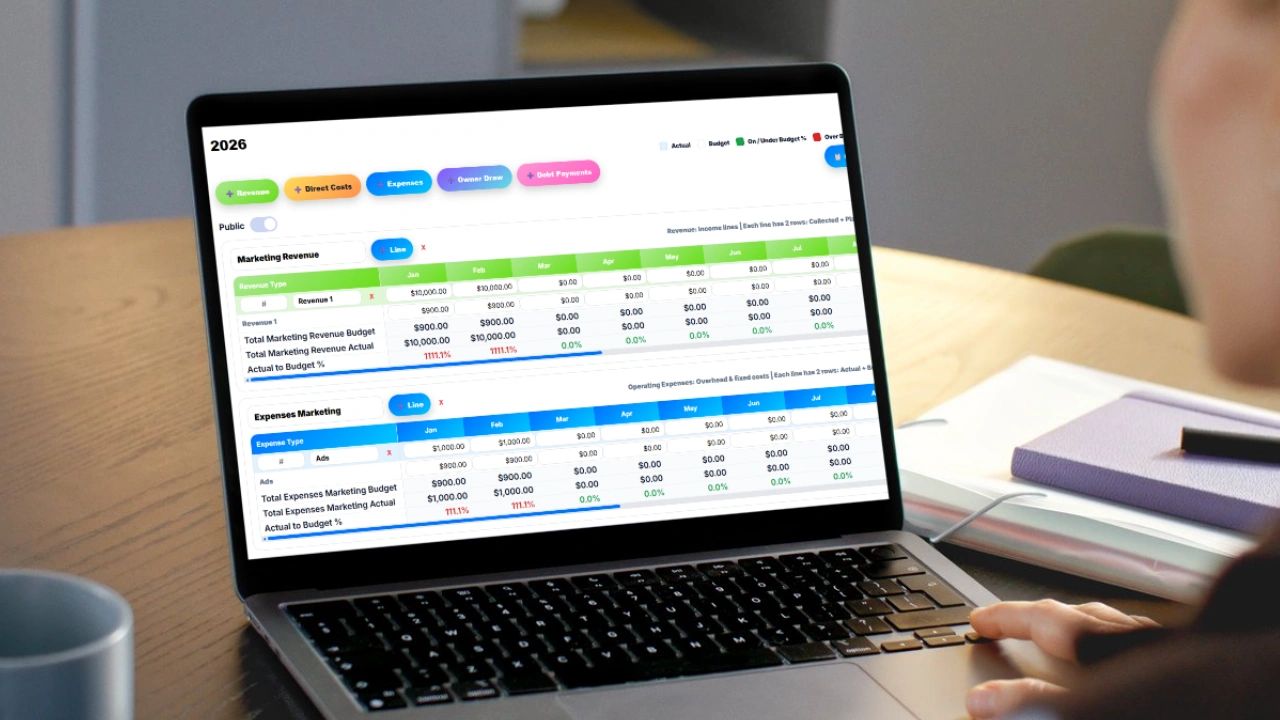
Use our free annual budget template in Google Sheets and open in Excel if needed. Managing your finances without a clear system is how small leaks turn into big problems. An annual budget template gives you a full-year view of your income and expenses so you can make smarter decisions, avoid surprises, and actually build profit or savings.
Whether you're running a business or managing your household, a structured budget in Google Sheets (or Excel) keeps everything visible, organized, and actionable.
What Is an Annual Budget Template?
An annual budget template is a spreadsheet that tracks your expected income and expenses over 12 months. Instead of guessing month to month, you plan ahead and adjust in real time.
A strong template does three things:
- Forecasts what you expect to earn and spend
- Tracks actuals so you know what really happened
- Calculates the difference so you can improve decisions
This is where most people fail. They track… but they don’t compare or adjust.
Why Use Google Sheets for Budgeting?
Google Sheets is popular because it’s:
- Accessible anywhere
- Easy to share with partners or teams
- Simple to customize
- Free
But the real advantage is visibility. You’re not digging through bank statements or guessing. Everything is in one place.
Key Sections Every Annual Budget Template Needs
If your template doesn’t include these, it’s incomplete.
1. Income Tracking
List all revenue sources:
- Salary or business revenue
- Side income
- Investments or passive income
Each month should have a projected and actual column.
2. Fixed Expenses
These don’t change much month to month:
- Rent or mortgage
- Insurance
- Subscriptions
- Payroll (for businesses)
These are predictable and should be easy to plan.
3. Variable Expenses
This is where most budgets break:
- Food or groceries
- Utilities
- Marketing spend
- Travel
These fluctuate, so tracking trends matters more than perfection.
4. Savings and Investments
If you don’t plan savings, it won’t happen.
Include:
- Emergency fund contributions
- Retirement
- Business reinvestment
5. Monthly Totals and Net Balance
Every month should automatically calculate:
- Total Income
- Total Expenses
- Net Profit (or Loss)
This is your reality check.
6. Annual Summary Dashboard
At the top or on a separate tab:
- Total yearly income
- Total yearly expenses
- Total savings or profit
This gives you a high-level view instantly.
Common Mistakes to Avoid
Let’s be real. Most budgets fail because of behavior, not tools.
- Overcomplicating the sheet If it’s too hard to use, you won’t use it
- Not updating regularly A budget is only useful if it reflects reality
- Ignoring small expenses These add up faster than you think
- No comparison between planned vs actual This is where the learning happens
Google Sheets vs Excel: Which Should You Use?
- Use Google Sheets if you want collaboration and accessibility
- Use Excel if you want more control, offline access, or advanced formulas
The good news: the structure is identical. You can move between both easily.
Where This Breaks Down (and What to Do About It)
Spreadsheets are a great starting point. But once your business grows, things get messy:
- Employees tracking time separately
- Expenses tied to projects
- Revenue coming from multiple clients
- Invoicing disconnected from budgeting
This is where systems matter.
A platform like Updoot connects:
- Time tracking
- Project budgets
- Payroll reporting
- Invoicing
So instead of manually updating a spreadsheet, your numbers update automatically based on real activity.
That’s the difference between tracking the past and controlling the future.
Excel Annual Budget Template (Copy + Paste Ready)
Below is a simple but powerful template structure you can paste directly into Excel.
Sheet 1: Annual Budget
Headers (Row 1)
Category Type Jan Feb Mar Apr May Jun Jul Aug Sep Oct Nov Dec Total
Example Rows
Salary	Income	5000 5000 5000 5000 5000 5000 5000 5000 5000 5000 5000 5000	=SUM(C2:N2)
Side Income	Income	500 400 600 450 500 550 600 500 450 500 550 600	=SUM(C3:N3)

Rent	Fixed Expense	1500 1500 1500 1500 1500 1500 1500 1500 1500 1500 1500 1500	=SUM(C4:N4)
Insurance	Fixed Expense	300 300 300 300 300 300 300 300 300 300 300 300	=SUM(C5:N5)

Groceries	Variable Expense	400 420 390 410 430 450 460 440 420 410 430 450	=SUM(C6:N6)
Utilities	Variable Expense	200 180 220 210 230 240 250 260 220 210 200 190	=SUM(C7:N7)

Savings	Savings	500 500 500 500 500 500 500 500 500 500 500 500	=SUM(C8:N8)
Monthly Totals (Bottom Section)
Total Income:     =SUMIF(B:B,"Income",C:C)
Total Expenses:   =SUMIF(B:B,"*Expense",C:C)
Net Balance:      =Total Income - Total Expenses
(Drag formulas across for each month)
Sheet 2: Summary Dashboard
Total Income: =SUM('Annual Budget'!O:O)
Total Expenses: =SUMIF('Annual Budget'!B:B,"*Expense",'Annual Budget'!O:O)
Total Savings: =SUMIF('Annual Budget'!B:B,"Savings",'Annual Budget'!O:O)

Net Yearly Balance: =Total Income - Total Expenses
Pro Tip
Add conditional formatting:
- Green for positive balance
- Red for negative
This gives you instant visibility without digging into numbers.
Frequently Asked Questions
What is an annual budget template? An annual budget template is a spreadsheet that tracks your expected income and expenses over 12 months. Instead of guessing month to month, you plan ahead, track what actually happens, and compare the two so you can make smarter decisions and adjust in real time.
What sections should every annual budget template include? Every complete annual budget template needs income tracking with projected and actual columns, fixed expenses that stay consistent each month, variable expenses that fluctuate, savings and investment contributions, monthly totals showing net profit or loss, and an annual summary dashboard that gives you a high-level view at a glance.
Why do most budgets fail? Most budgets fail because of behavior not tools. The most common reasons are overcomplicating the spreadsheet so it never gets used, not updating it regularly so it stops reflecting reality, ignoring small recurring expenses that add up quietly, and never comparing planned versus actual numbers which is where the real learning happens.
Should I use Google Sheets or Excel for my annual budget? Use Google Sheets if you want free access from anywhere, easy sharing with partners or team members, and simple customization. Use Excel if you want more control, offline access, or advanced formula functionality. The structure of a good annual budget template works identically in both and you can move between them easily.
What is the difference between fixed and variable expenses in a budget? Fixed expenses are predictable costs that stay consistent month to month like rent, insurance, subscriptions, and payroll. Variable expenses fluctuate based on activity like food, utilities, marketing spend, and travel. Tracking trends in your variable expenses over time matters more than hitting a perfect number each month.
What should a monthly budget summary automatically calculate? At minimum each month should automatically show total income, total expenses, and net profit or loss. This gives you an instant reality check on whether the month went as planned and where adjustments need to be made going forward.
Final Thought
A budget template is not about restriction. It’s about control.
Start simple. Stay consistent. Then upgrade your system when your complexity demands it.
When you want to move beyond spreadsheets and connect budgeting directly to time tracking, payroll, and invoicing, that’s where Updoot gives you a real operational advantage.
Find more free templates here
Weekly and biweekly meeting agenda template
Level 10 meeting agenda template
Flextime policy and request template
Related articles on Finance
Direct Costs vs Indirect Costs: Definitions and Examples
Owners Draw: What It Is, How It Works
Revenue vs Sales: What Is the Difference
How to Lower Customer Acquisition Costs for Small Businesses
What is a P&L Statement and How to Create One