
CRM System Examples: Features, Costs, and Implementation
CRM system examples are easier to compare once you know what a CRM should do for a small business, and what it will really cost once your whole team is using it.
The market is crowded. Every vendor says it is the easiest, the smartest, or the most affordable, and the price on the homepage is rarely the price you end up paying. Add-ons, higher tiers, onboarding fees, and the other tools you still need all change the math.
Below you will find the features that matter, five real CRM examples with current published pricing, a cost comparison at different team sizes, a step-by-step implementation plan, and a free pipeline calculator you can use today.
What Is a CRM System?
A CRM (customer relationship management) system is software that tracks your leads, deals, customers, and every conversation with them, so nothing falls through the cracks. At its simplest, it replaces the spreadsheet of leads and the sticky note that says "call back Tuesday."
The best CRM systems do more than store contacts. They connect your sales pipeline to the rest of the business: quotes, invoices, projects, and the people doing the work. That connection is where most standalone CRM tools fall short for small businesses.
Signs You Have Outgrown a Spreadsheet
- Leads go cold because nobody followed up in time
- Two people contact the same prospect without knowing it
- When a salesperson leaves, their customer history leaves with them
- You cannot say how much is in your pipeline or what will likely close this month
- Quotes and invoices are typed from scratch every time
If a few of these sound familiar, a CRM will pay for itself in recovered deals alone.
Features Every Small Business CRM Should Have
| Feature | Why It Matters |
|---|---|
| Lead and pipeline tracking | See every deal, its stage, and the next step at a glance |
| Contact and customer profiles | Full history, notes, and deal value in one record |
| Activity logging | Calls, emails, and meetings recorded so anyone can pick up where someone left off |
| Follow-up reminders | Leads get contacted on time instead of when someone remembers |
| Reporting and forecasting | Conversion rates, pipeline value, and expected revenue |
| Quotes and invoicing | A won deal becomes a quote and an invoice without re-typing |
| Mobile access | Follow up from the field, not just from a desk |
| Connection to the rest of the business | Projects, time, and billing tied to each customer |
Why integration matters most
This is where most CRMs fail small businesses. A CRM that does not connect to your invoicing, projects, or HR system creates more work, not less. You end up entering the same customer twice and switching between five tabs to get a full picture of one account. Mobile access matters too: your team is not always at a desk, and a lead followed up from a phone in the parking lot beats one followed up tomorrow morning.
CRM System Examples for Small Businesses
Prices below are published list prices at the time of writing. Vendors change pricing often, so confirm on each vendor's site before you buy.
1. Updoot: Best All-in-One CRM for Small Businesses
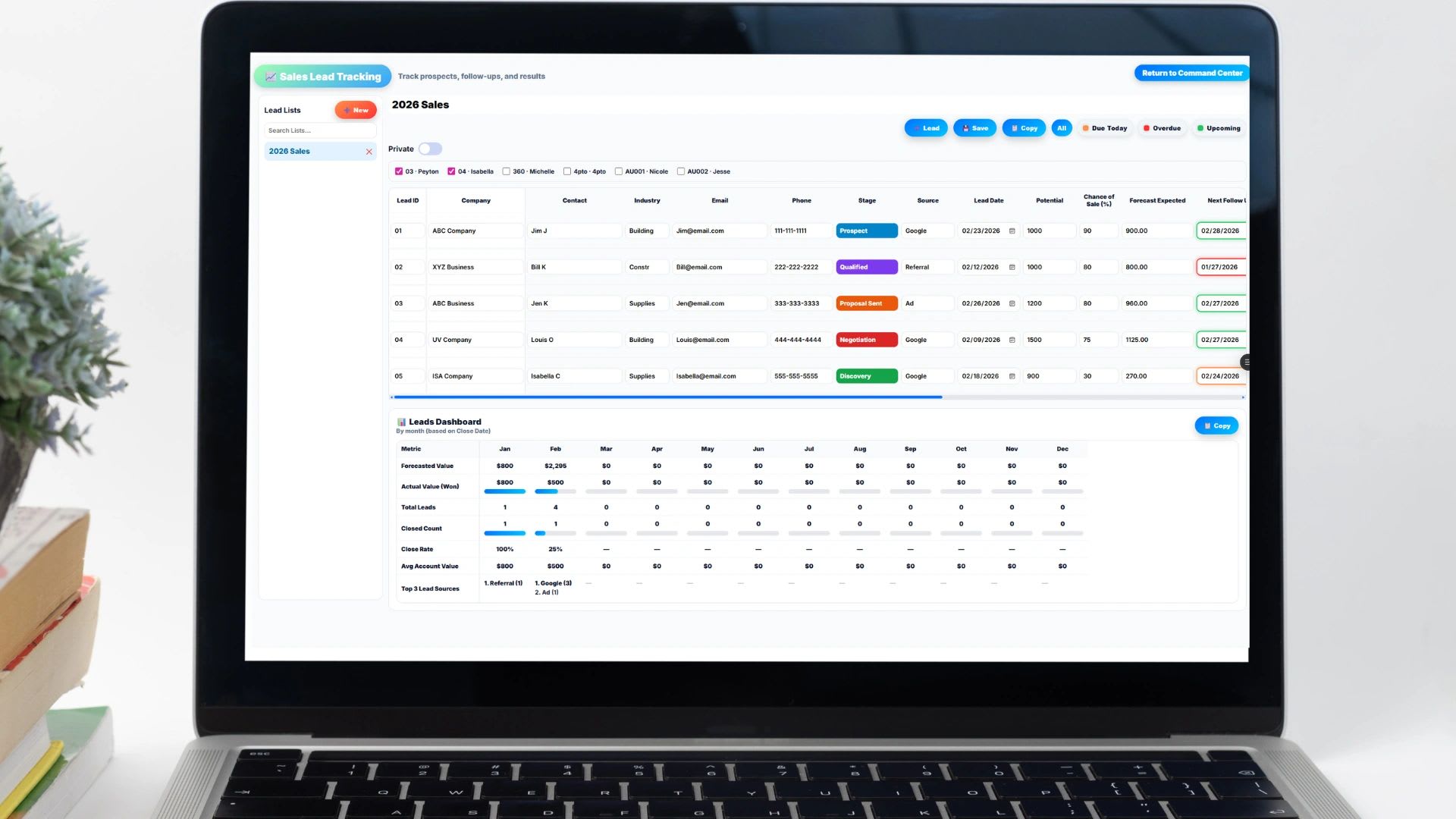
Updoot is built for small businesses that want CRM without paying for five separate tools. Unlike traditional CRM platforms that only manage leads and contacts, Updoot combines its CRM and pipeline with time tracking, scheduling, invoicing, project management, HR, SOPs, and KPI dashboards.
Key CRM features in Updoot:
- Sales lead tracker with full pipeline visibility and lead scoring
- Automatic follow-up reminders and round-robin lead assignment
- Customer profiles with detailed contact records and call logging
- Sales quotes that convert straight into invoices
- CRM dashboard showing pipeline health and conversion data
- AI-powered win and loss summaries to improve training and close rates
What makes Updoot different: Most CRM tools force you to connect outside software for billing, projects, and HR. Updoot removes that step. When a lead becomes a customer, your team can create the invoice, open a project, and track time against that account without leaving the platform. For an owner or operations manager, that means one system instead of five, one login instead of five subscriptions, and one place to see every customer relationship from first contact to final invoice.
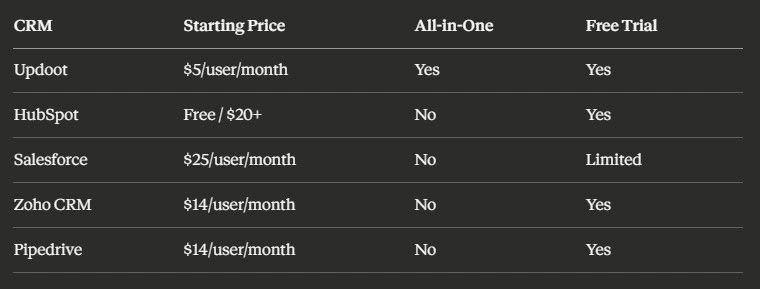
- Cost: $5 per user per month with every feature included. No contracts, no setup fees, no add-ons, and a 14-day free trial with no credit card required.
- Implementation: Built to be running quickly. Adding an employee takes seconds, and entering existing leads and customers needs no technical setup. Most small teams are up and running the day they sign up.
- Best for: Small businesses that want CRM, invoicing, projects, time tracking, and HR in one platform without enterprise prices or a pile of integrations.
2. HubSpot
HubSpot is known for its free CRM, which gives small businesses contact management, deal tracking, and basic email tools at no cost. It is a common starting point for businesses that are brand new to CRM software.
Key features:
- Contact and company records
- Deal pipeline with drag-and-drop stages
- Email tracking and templates
- Meeting scheduling
- Basic reporting
- Cost: Free for up to 2 users. Sales Hub Starter is $20 per seat per month billed monthly, with a lower rate billed annually. Professional is $90 per seat per month billed annually plus a one-time $1,500 onboarding fee, and Enterprise starts at $150 per seat per month plus a $3,500 onboarding fee, according to HubSpot's pricing page. Advanced reporting, automation, and sequences sit in the higher tiers.
- Implementation: HubSpot has extensive documentation and a large user community. The free tier is quick to set up, but configuring automation and integrations on paid plans can take real time or a HubSpot partner.
- Limitations: No built-in time tracking, payroll exports, scheduling, or HR. You will need separate software for those and will manage the connections between them.
- Best for: Businesses just starting with CRM that want a free tool and are comfortable adding other software for the rest of their operations.
3. Salesforce
Salesforce is the dominant CRM for large enterprises. It offers deep customization, advanced automation, and a massive marketplace of integrations and add-on apps.
Key features:
- Highly customizable sales pipeline
- Advanced automation and workflow rules
- AI-powered forecasting and assistance
- Extensive AppExchange marketplace
- Enterprise-grade reporting
- Cost: Starter Suite is $25 per user per month, and Pro Suite is $100 per user per month billed annually with a contract, per Salesforce's small business pricing. Larger editions cost more, and implementation for bigger deployments can add significant consulting fees.
- Implementation: Powerful but complex. Many businesses hire a Salesforce consultant or certified partner, and a full deployment can take weeks to months depending on requirements.
- Limitations: Cost, complexity, and setup time are real barriers for a small business. Time tracking, invoicing, scheduling, and HR are not included natively.
- Best for: Companies with complex sales processes, dedicated admin resources, and the budget for full implementation and ongoing administration.
4. Zoho CRM
Zoho CRM offers a broad feature set at a competitive price. It is popular with small to mid-size businesses that want more than a free tier but are not ready for Salesforce.
Key features:
- Multi-channel lead capture
- Workflow automation
- AI assistant for sales insights
- Territory management
- Connections to Zoho's broader suite of apps
- Cost: Free for up to 3 users. Paid editions run about $14 to $52 per user per month billed annually, or $20 to $65 billed monthly, as summarized by Method. See Zoho's pricing page for your region. Zoho also sells bundles that can be better value if you use several Zoho products.
- Implementation: Good documentation, and setup is manageable for most owners. The interface can feel busy compared to newer tools, and automation has a learning curve.
- Limitations: Time tracking, payroll exports, projects, and HR need Zoho's other apps or outside integrations.
- Best for: Small to mid-size businesses that want a capable standalone CRM at a reasonable price and are comfortable managing separate tools for other functions.
5. Pipedrive
Pipedrive is built around the sales pipeline. It is clean, intuitive, and designed for sales teams that want to focus on moving deals forward without a lot of noise.
Key features:
- Visual pipeline management
- Activity-based selling
- Email integration and tracking
- Revenue forecasting
- Mobile app
- Cost: Lite $14, Growth $39, Premium $59, and Ultimate $79 per seat per month, per Pipedrive's pricing page.
- Implementation: One of the easier CRMs to start. Most teams set up a pipeline and import contacts within a day or two.
- Limitations: Focused only on sales. No invoicing, time tracking, projects, scheduling, or HR, so for a small business wearing many hats it is one piece of a larger software stack.
- Best for: Teams with dedicated salespeople who want a focused pipeline tool.
CRM Cost Comparison
| CRM | Entry Price | Common Small Business Tier | 10 Users per Month | Includes Invoicing, Time, HR |
|---|---|---|---|---|
| Updoot | $5/user | $5/user (one plan) | $50 | Yes |
| HubSpot | Free (2 users) | Starter, $20/seat monthly | About $200 | No |
| Salesforce | $25/user | Pro Suite, $100/user | $250 to $1,000 | No |
| Zoho CRM | Free (3 users) | Professional, $23/user annual | About $230 | Separate apps |
| Pipedrive | $14/seat | Growth, $39/seat | $140 to $390 | No |
The bigger cost is often what sits around the CRM. If you also pay separately for invoicing, time tracking, scheduling, and HR, the true monthly cost of a standalone CRM is several times its sticker price.
Free Sales Pipeline Value Calculator
Free Sales Pipeline Value Calculator
Add your open deals with their value and stage. The calculator weights each deal by how likely deals at that stage are to close, so you get a realistic forecast instead of adding up every deal at full value. Change the stage percentages to match your own close rates. Nothing you enter is saved or sent anywhere.
Close Rate by Stage
| Deal | Stage | Value | Close % | Weighted |
|---|
A weighted forecast is more honest than adding every deal at full value. If most of your pipeline is in early stages, your real expected revenue is a fraction of the total.
CRM Implementation: Step by Step
| Step | What to Do | Common Mistake |
|---|---|---|
| 1. Define your sales process | List the real stages a deal goes through, from first contact to signed | Copying someone else's stages |
| 2. Clean your data | Remove duplicates and fill gaps in your spreadsheets before importing | Importing a mess and starting with bad data |
| 3. Set up the pipeline | Create stages, a few custom fields, and follow-up reminders | Building 40 fields nobody fills in |
| 4. Train the team | Show everyone what to log and when, in 30 minutes | Assuming people will figure it out |
| 5. Review after 30 to 60 days | Check that deals are updated and nothing is slipping | Never looking at usage again |
A few extra notes on each step:
- Define your sales process first. Map what happens from the moment a lead comes in to the moment a deal closes. Your pipeline stages should reflect reality, not theory.
- Clean before you import. Most businesses have customer and lead data in spreadsheets, inboxes, or an old tool. Duplicate and incomplete records undermine any CRM from day one.
- Keep the first setup simple. Configure stages, a few custom fields, and reminders. You can always add complexity later.
- Train for habits, not features. A CRM only works if your team uses it. Everyone who touches a lead needs to know what to log and when.
- Review after 30 to 60 days. Are deals being updated? Is the data accurate? Are leads falling through? Adjust based on what you see.
Know the Rules for Sales Emails
If your CRM sends marketing or sales emails, federal rules apply. The FTC's CAN-SPAM compliance guide explains the basics, including honest subject lines, a valid physical address, and a clear way to opt out that you honor promptly.
CRM Terms Worth Knowing
| Term | Meaning |
|---|---|
| Lead | A person or company that has shown interest but has not been qualified yet |
| Pipeline | All open deals, organized by the stage they are in |
| Deal stage | A step in your sales process, such as qualified, proposal sent, or negotiation |
| Conversion rate | The share of leads or deals that move to the next stage or close |
| Weighted forecast | Each deal's value multiplied by its chance of closing, then added up |
| Lead scoring | Points given to leads based on fit and activity, so the best ones get attention first |
| Round-robin assignment | New leads handed out to salespeople in turn so the work is shared evenly |
| Win/loss analysis | Reviewing why deals were won or lost to improve pitches and training |
Which CRM Is Right for You?
- Want CRM plus invoicing, projects, time tracking, and HR in one place? Updoot.
- Brand new to CRM and want to start free? HubSpot's free tier, knowing you may outgrow it.
- Dedicated sales team that only needs a pipeline? Pipedrive.
- Enterprise with complex needs and an admin budget? Salesforce.
- Want a standalone CRM with room to grow into a suite? Zoho.
For most small businesses, the right CRM is the one your team will actually update every day and that connects to how you bill and deliver work, not the one with the biggest brand name.
Final Thoughts
Compare CRM systems on three things: whether they cover the features you need, what they cost for your whole team including add-ons and onboarding fees, and what other tools you will still have to buy. Start simple, clean your data before you import it, and review how the team is using it after a month. A CRM earns its keep when every lead gets a follow-up and every won deal flows straight into work and billing.
Opens in Google Drive. View and download for free.
Related Reading
Cloud Based CRM Software for Small Business →
Frequently Asked Questions About CRM Systems
What is a CRM system?
A CRM (customer relationship management) system is software that tracks leads, deals, customers, and every conversation with them, so follow-ups happen on time and anyone on the team can see a customer's full history.
What features should a small business CRM include?
Lead and pipeline tracking, contact profiles, activity logging, follow-up reminders, reporting and forecasting, quotes and invoicing, mobile access, and a connection to projects and billing.
How much does a CRM cost?
It ranges widely. Some offer free tiers for two or three users, entry paid plans often run about $14 to $25 per user per month, and advanced tiers can reach $100 or more per user per month. Updoot is $5 per user per month with every feature included.
How long does CRM implementation take?
Simple CRMs built for small businesses can be running in a day. Complex enterprise rollouts can take weeks to months, often with a consultant.
What is the biggest CRM implementation mistake?
Importing messy data. Duplicates and incomplete records make the CRM untrustworthy from day one, so clean your spreadsheets before importing anything.
What is a weighted pipeline forecast?
It multiplies each deal's value by the chance that deals at its stage will close, then adds them up. It gives a more realistic revenue estimate than adding every open deal at full value.