
Top 20 Business Apps You Need to Scale and Which App Has Them All in One
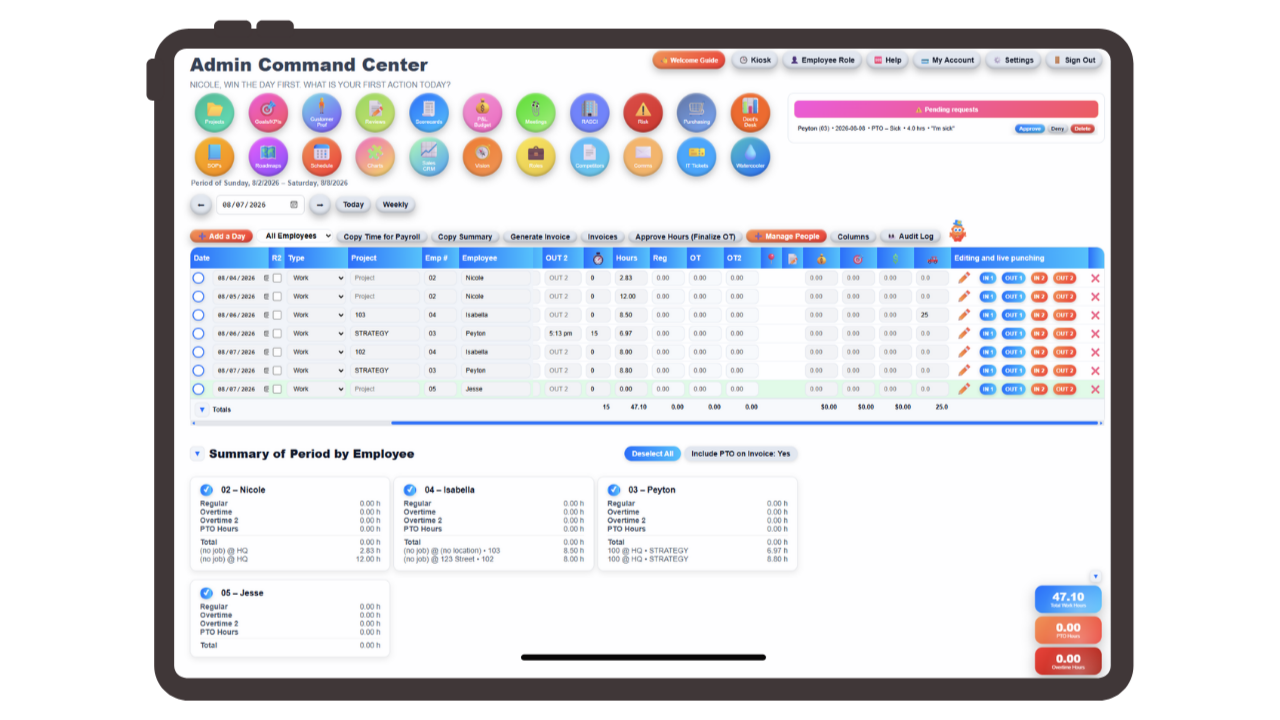
These are the top 20 apps a business needs to scale (and the solution that has them all in one). Every growing company ends up buying most of this list, usually one panicked purchase at a time, and usually without ever stepping back to count what it all adds up to.
The pattern is always the same. What worked at four people stops working at fifteen. The shared spreadsheet that tracked hours becomes a source of arguments. The invoice template someone made in Word gets copied, edited, and copied again until nobody knows which version is current. Somebody asks who approved a $2,000 purchase and the answer lives in a text message.
So you buy an app. Then another. Then eleven more. Each one solves the problem in front of you, and each one is genuinely good at its job. The trouble is what happens after: twenty logins, twenty bills, and no single place where the work actually connects.
This is a walkthrough of the twenty categories of business apps growing companies end up buying, what each one really does, and roughly what it costs. Then, at the end, an honest look at what running twenty of them does to a small operations team.
Most scaling businesses end up buying apps across twenty categories: time tracking, scheduling, PTO, HRIS, hiring, performance, payroll, invoicing, project billing, budgeting, purchasing, CRM, quoting, marketing planning, project management, SOPs, ticketing, goals, planning, and org design. Bought separately, a fifteen-person team typically pays $800 to $1,500 a month and spends hours every week moving the same data between them.
Key Takeaways
- Twenty app categories is a normal end state for a scaling business, not a sign of bad decisions.
- The cost of the tools is rarely the real cost; the manual re-entry between them is.
- Almost every category on this list needs data another category already has.
- Adoption fails on tool count long before it fails on tool quality.
- The question worth asking is not "which app is best" but "how many places does one fact have to be typed."
Table of Contents
- Business Apps for People and Time Tracking (1-8)
- Business Apps for Billing and Finance (9-13)
- Business Apps for Sales and Marketing (14-16)
- Business Apps for Operations and Documentation (17-19)
- Business Apps for Leadership and Planning (20)
- How Much 20 Business Apps Actually Cost
- The Hidden Cost of Running Too Many Business Apps
- The Business App That Replaces All 20
- Business Apps FAQs
Business Apps for People and Time Tracking (1-8)
This is usually where the buying starts, because payroll is the deadline that never moves.
1. Time Tracking Software
The first real purchase for most businesses with hourly staff. You need to know who worked, when, and for how long, in a record that holds up if someone disputes a paycheck. The features that separate a usable time clock from a frustrating one are unglamorous: GPS on the punch so you know people are where they said, a break timer that handles unpaid breaks correctly, and midnight splits so an overnight shift lands on the right day instead of dumping ten hours onto Tuesday. Add punch notes, mileage, tips, bonuses, and commission if your team earns any of those, because otherwise they get tracked on paper and typed in later. Expect $5 to $12 per user per month.
2. Overtime and Labor Compliance Software
Often sold as part of time tracking, often not. Daily overtime, weekly overtime, and California's double-time rules are genuinely different calculations, and getting them wrong is the kind of mistake that surfaces during an audit rather than during a normal week. If you have staff in multiple states you need a system that applies the right rule per person, not one blanket setting.
3. Employee Scheduling Software
Once you're past a handful of people, scheduling stops being something you can hold in your head. You need to build a schedule by job and by location, see whether you're actually staffed for the coming week, let people swap shifts without three phone calls, and get suggestions for who can cover a gap. The capacity view matters more than most buyers expect. Knowing you're short on Thursday is only useful if you find out before Thursday. Around $4 to $8 per user per month.
4. PTO and Leave Tracking Software
Vacation, sick, personal, bereavement, unpaid: five categories is typical, and each accrues differently. The spreadsheet version of this breaks the first time two people request the same week and nobody notices until one of them is already at the airport. What you want is requests, approvals, balances, and a calendar everyone can see, in one place. Around $3 to $6 per user per month, or bundled into HRIS.
5. HRIS Software for Employee Records
The system of record for your people: who works here, what their role is, what they're paid, their salary or hourly status, pay rates and multipliers, emergency contacts, and the documents you're legally required to retain. An HR vault for sensitive files matters here, since the alternative is a folder on someone's laptop. This is also where an org chart and a team location map live, so you can see structure and coverage rather than guessing. Expect $6 to $12 per user per month.
6. Applicant Tracking System (ATS)
The moment you're hiring more than occasionally, email stops working as a pipeline. A real ATS holds candidates by stage, parses resumes so you're not retyping work history, and summarizes applicants so a hiring manager can review ten people in the time it used to take to open ten attachments. A job description library is worth having attached to it, so every new req doesn't start from a blank page. $50 to $200 per month at the small end.
7. Performance Review and Employee Survey Software
Two things usually sold together. Reviews give you a documented, repeatable cycle instead of a manager's memory of the last six weeks. Employee sentiment, usually an eNPS survey, gives you a number for whether people would recommend working here, tracked over time. The number matters less than the trend. $4 to $10 per user per month.
8. Internal Communication and Intranet Software
Announcements, policy changes, wins, new hires. Chat tools are terrible at this because anything important scrolls away in a day. What you want is something closer to an intranet or a company watercooler: a place where announcements persist and new employees can catch up on what they missed. $0 to $8 per user per month.
Business Apps for Billing and Finance (9-13)
9. Payroll Software
Gusto, ADP, Paychex, and the rest. You will almost certainly keep whichever one you have, since switching payroll providers mid-year is a genuinely painful project. What matters is whether everything upstream can hand payroll clean hours. The failure mode isn't payroll itself; it's the two hours before payroll where someone reconciles a timesheet export against a PTO spreadsheet by hand. $40 base plus $6 to $12 per employee per month.
10. Invoicing Software
Creating, sending, and tracking invoices. Straightforward on its own. The complication for service businesses is that an invoice should be built from hours that were actually worked, which means your invoicing tool and your time tracking tool need to agree on what happened. When they don't, someone rebuilds the invoice manually from a timesheet, every single time. $15 to $50 per month.
11. Project Billing Software
Related but distinct. This is the ability to bill by project or client rather than by a flat monthly figure, which requires hours to be tracked against something, whether a project, a job, or a location, rather than logged as generic time. If your time clock doesn't capture that at the moment of the punch, no billing tool can reconstruct it afterward.
12. Budgeting and P&L Software
Budget versus actual, a profit and loss view, and some kind of dashboard that tells you whether the business is healthy without requiring you to read four reports. Most small businesses run this in a spreadsheet far longer than they should, mostly because dedicated tools are priced for finance departments. $30 to $150 per month when bought.
13. Purchasing and Purchase Order Software
Requisitions, approval routing, purchase orders, and three-way match, the check that the PO, the receipt, and the invoice all agree before anyone pays. This is one of the highest-value systems on the list and one of the last that small businesses buy, usually right after someone approves something expensive over text message and it goes badly. Vendor scorecards belong here too, so you know which suppliers actually deliver on time. $50 to $200 per month.
Business Apps for Sales and Marketing (14-16)
14. CRM Software
Leads, pipeline stages, and a dashboard showing what's likely to close. The most common small-business mistake is buying an enterprise CRM and using four percent of it. What most growing companies need is a lead tracker with stages, the ability to bulk-import a list from CSV, and a view of the pipeline that a non-salesperson can read. $20 to $100 per user per month, and it climbs fast.
15. Quoting Software
Building and sending quotes that convert into work. The natural companion to invoicing, since an accepted quote should become an invoice without anyone retyping the line items. Frequently bundled into CRM at a higher tier, which is how CRM bills quietly triple.
16. Marketing and Content Planning Software
A content calendar so posts and campaigns are planned rather than improvised, plus customer profile building, which documents who you're actually selling to, and competitor analysis to track what everyone else is charging and claiming. These often live in a project tool or a spreadsheet, which works until the person maintaining it leaves. $15 to $60 per month.
Business Apps for Operations and Documentation (17-19)
17. Project Management Software
Asana, Monday, ClickUp, Trello. Tasks, owners, due dates, and a view of what's in flight. The features that matter as you scale are reusable templates, so a recurring job doesn't get rebuilt from scratch each time, and briefs or proposals attached to the project, so the reasoning behind the work is recorded alongside the work itself. Also worth having: a Gantt or roadmap view, a whiteboard for early thinking, and flow charts for documenting how a process actually runs. $10 to $25 per user per month.
18. SOP and Documentation Software
Notion, Confluence, or a Google Drive folder that everyone has stopped trusting. The distinction between a document store and a real SOP library is governance: review due dates so procedures get revisited, revision history so you can see what changed, and approval tracking so someone signed off. Without those three, an SOP library becomes a graveyard of documents nobody is sure are current. $8 to $20 per user per month.
19. Internal Ticketing and Helpdesk Software
The system for requests that come from inside the company: IT problems, facilities issues, HR questions. Before this exists, requests arrive by text, hallway conversation, and email, and roughly a third of them are silently dropped. What you need is routing to the right person, priorities so urgent things surface, and resolution tracking so you can see what's still open. Also where a risk register and a RASCI accountability chart naturally live, since both answer "who owns this." $20 to $95 per agent per month.
Business Apps for Leadership and Planning (20)
20. Goal and KPI Tracking Software
The layer above daily work: quarterly goals, the numbers that indicate whether you're winning, and a long-range vision that connects the two. Teams running EOS or Traction will recognize this as the vision and rocks layer, tied to a weekly meeting agenda so the plan gets reviewed rather than written once and forgotten. Usually a spreadsheet, occasionally a dedicated tool at $10 to $30 per user per month.
How Much 20 Business Apps Actually Cost Per Month
Take a fifteen-person business buying sensibly at the low end of each range:
| Category | Typical monthly cost (15 users) |
|---|---|
| Time tracking | $75 |
| Scheduling | $60 |
| PTO tracking | $45 |
| HRIS | $90 |
| ATS | $50 |
| Performance & eNPS | $60 |
| Internal comms | $45 |
| Invoicing | $33 |
| Budget / P&L | $50 |
| Purchasing | $50 |
| CRM | $300 |
| Quoting | included above |
| Marketing planning | $25 |
| Project management | $150 |
| SOPs / docs | $120 |
| Ticketing | $95 |
| Goals / KPIs | $150 |
| Total | ~$1,398/month |
That's roughly $16,800 a year, excluding payroll processing. It's a real number, but it isn't the expensive part.
The Hidden Cost of Running Too Many Business Apps
Read back through the twenty categories and notice how often one needs data another already has.
Invoicing needs hours from time tracking. Project billing needs those hours tagged to a project, which has to happen at the punch. Payroll needs the same hours plus PTO, plus overtime already calculated. Scheduling needs to know who has approved time off. Performance reviews need to know what someone actually worked on. Purchasing approvals need to know who reports to whom. Budget-versus-actual needs both purchase orders and billed hours. The CRM needs quotes, and the quote needs to become the invoice.
When those systems are separate, the connections don't disappear. They just become someone's job. A person exports a CSV, opens two tabs, and retypes. That person is usually your best operations employee, and the work is invisible, so it never appears in a budget review.
Three costs follow, and none of them show up on a subscription line:
Re-entry time. Every handoff between tools is a manual step. Payroll week is the obvious one, but it's also every invoice built from a timesheet and every report assembled the night before a meeting.
Disagreement between systems. When the same fact lives in four places, the four places drift. Now hours in the time clock don't match hours on the invoice, and someone has to determine which is right, usually while a client waits.
Adoption collapse. This is the one that quietly kills the stack. Ask a fifteen-person team to check eleven tools daily and they'll check three. The other eight fill with stale data, which makes them less trustworthy, which makes people check them less. Tools don't fail because they're bad. They fail because there are too many of them.
Every app on this list is worth having. The categories are real, the problems are real, and a growing business genuinely needs all twenty things. The question worth asking isn't which app is best in each category. It's how many separate places a single fact, that one employee worked six hours on one project, has to be typed before it becomes a paycheck, an invoice, a budget line, and a report.
The Business App That Replaces All 20
This is the problem Updoot was built for. Not to be the best standalone time clock or the best standalone CRM, but to hold all twenty of these categories in one system so the connections between them happen automatically instead of manually.
An employee clocks in with GPS, a break timer, and midnight splits handled correctly, tagging their time to a job, project, or location. That single punch is now the source for everything downstream. Overtime, whether daily, weekly, or California rules, is applied automatically. An admin approves the time card, with a full audit log behind it. Those approved hours export payroll-ready to Gusto, ADP, or Paychex with overtime already calculated, and the same hours turn into a project-billed invoice without anyone opening a spreadsheet.
Everything else sits on the same foundation. PTO across five categories, an HRIS holding roles and pay rates and performance, a job description library, an HR vault, a team location map, kiosk punch mode, eNPS surveys, and an ATS with resume parsing, all reading from the same employee record. Sales runs a CRM lead tracker with CSV import, a quote creator that carries line items straight into an invoice, customer profiles, competitor analysis, and a content planner. Finance gets budget-to-actual, a P&L builder, a capacity calendar, vendor scorecards, purchase orders with approvals and three-way match, and a business health dashboard that reads from all of it. Operations gets project management with templates and briefs, an SOP library with review-due alerts and approval tracking, internal ticketing with routing and priorities, a risk register, a RASCI chart, flow charts, and scheduling with shift swaps and capacity by job and location. Leadership gets a Vision Tracker built on the Traction model, a Gantt roadmap, goals and KPIs, an org chart builder, a whiteboard, and meeting agendas wired to the vision.
Every module exports to Excel or Google Sheets, works on any device, signs in with Google, and has an AI assistant, Doot, sitting alongside the work. Admins, managers, and employees each get their own one-click dashboard.
The pricing is the part that tends to end the conversation: $5 per user per month, every feature included. No tiers, no add-ons, nothing behind a "contact sales" wall. For that fifteen-person team paying roughly $1,398 a month across seventeen separate tools, the equivalent is $75.
The savings are real, but the reason people stay is simpler. There's one login, and the hours only get entered once.
Ready to try Updoot free?
Every feature included. 14 days, full access, no credit card required.
Start Free TodayBusiness Apps FAQs
Most scaling businesses need coverage across twenty categories: time tracking, overtime compliance, scheduling, PTO, HRIS, applicant tracking, performance reviews, internal communications, payroll, invoicing, project billing, budgeting, purchasing, CRM, quoting, marketing planning, project management, SOPs, internal ticketing, and goal tracking. Not every business needs all twenty on day one, but nearly every business that reaches fifteen to twenty employees ends up needing most of them.
Bought separately at the lower end of typical pricing, a fifteen-person business spends roughly $1,400 a month, or about $16,800 a year, before payroll processing fees. CRM, project management, SOP tools, and goal tracking tend to be the largest line items because they are priced per user and scale directly with headcount.
It depends on whether your bottleneck is depth of features or the handoffs between tools. A large company with dedicated staff per function can absorb the integration work and benefit from specialized software. A small business usually cannot, because the manual re-entry between disconnected tools lands on one or two people. If your team is spending hours each week exporting from one system to type into another, consolidation is worth more than any individual feature.
Three costs, none of which appear on a subscription invoice. Re-entry time, where staff manually move data between systems. Disagreement between systems, where the same fact stored in several places drifts out of sync and someone has to reconcile it. And adoption collapse, where a team asked to check ten tools daily checks three, leaving the rest full of stale data that nobody trusts.
For businesses with hourly staff, time tracking usually comes first because payroll has a fixed deadline. Invoicing typically follows, then PTO tracking once informal approvals start causing scheduling conflicts. Purchasing approvals and internal ticketing tend to be bought later, usually after a specific incident, such as an unapproved expense or a dropped request that cost money.
No, and generally you should not. Switching payroll providers mid-year is disruptive and rarely worth it. What matters is that the system feeding payroll can hand it clean, approved hours with overtime already calculated, in a format your provider accepts. Most consolidation value comes from fixing everything upstream of payroll rather than replacing payroll itself.