
Standard Operating Procedure Template (Excel and Google Sheets)
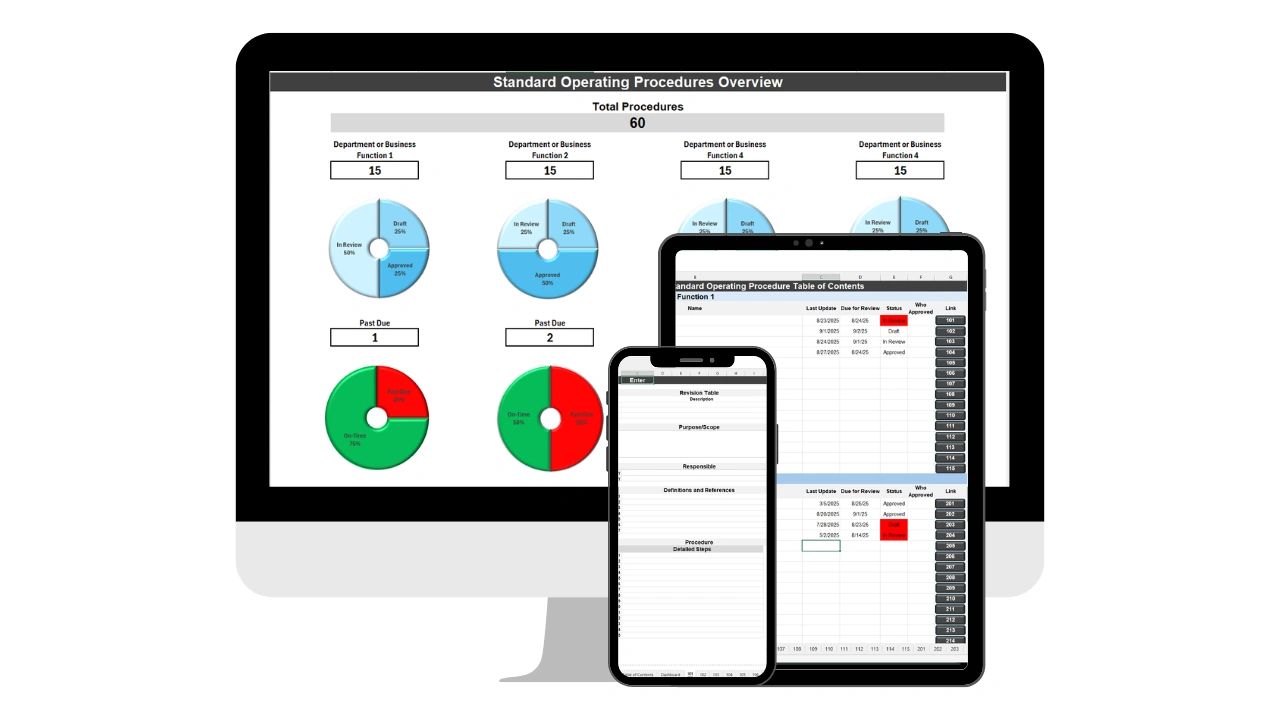
Use our Standard Operating Procedure template in Excel and Google Sheets to track all of your processes and procedures. A strong standard operating procedure template is one of the most powerful tools a business can implement.
Without documented processes, teams rely on memory. When key employees leave, knowledge leaves with them. When new hires join, training becomes inconsistent. When tasks are repeated daily without documentation, errors multiply. An SOP template creates the structure that eliminates all of that.
This guide covers what a standard operating procedure template is, what every SOP must include, how to write one properly, the difference between Excel and Google Sheets for SOP work, common mistakes to avoid, and an interactive SOP builder you can fill out and print right on this page.
What Is a Standard Operating Procedure Template?
A standard operating procedure template is a structured document format used to outline repeatable business processes. It ensures tasks are performed consistently, efficiently, and correctly regardless of who is completing them. Instead of starting from scratch every time you document a process, the template provides predefined sections that keep documentation consistent across departments.
Businesses use SOP templates for operations and project execution, HR onboarding and offboarding, client billing and payroll processing, inventory management, and customer service and compliance procedures. If a task is repeated more than once, it should have an SOP.
Why it matters for scale: For growing companies, SOP documentation is the foundation of scalability. Teams that document their processes onboard new hires faster, delegate more confidently, and maintain quality as they grow. Documentation is operational leverage -- it multiplies the effectiveness of every person on your team.
Excel vs. Google Sheets: Side-by-Side Comparison
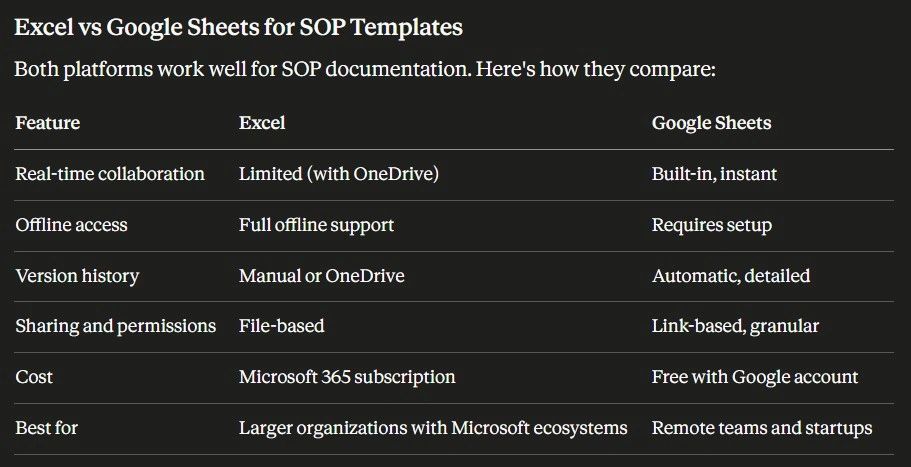
| Feature | Excel | Google Sheets |
|---|---|---|
| Offline access | ✓ Strong | Limited (with offline mode) |
| Formatting control | ✓ More precise | Good |
| Real-time collaboration | Limited (SharePoint required) | ✓ Native, instant |
| Automatic version history | Manual saves | ✓ Automatic |
| Link-based sharing | Requires OneDrive/SharePoint | ✓ One link |
| Best for | Microsoft 365 orgs | Remote teams, startups |
How to Use the SOP Template in Excel
- Use the Status dropdown column (set via Data Validation) to mark SOPs as Draft, Active, or Under Review
- Apply conditional formatting to highlight overdue review dates automatically
- Use the Department filter to sort SOPs by team without disrupting the master layout
- Freeze the header row (View → Freeze Panes) before sharing with your team
- Save to SharePoint or OneDrive to enable co-authoring
How to Use the SOP Template in Google Sheets
- Share with your team using a single link -- set view or edit permissions per person
- Use the built-in comment system to flag steps that need review without editing the document directly
- Version history is automatic -- click File → Version History to restore any previous state
- Add a Dropdown chip (Insert → Dropdown) to status columns for clean visual tracking
- Publish as a view-only link for company-wide access without giving edit rights
The 10 Required Components of an SOP Template
1. SOP Title
A clear title that identifies the task, department, and purpose. Example: "Client Invoice Processing Procedure -- Finance Team."
2. Purpose Statement
Explains why the process exists and what problem it solves. Example: "This procedure ensures all client invoices are generated, reviewed, and sent accurately within 48 hours of project completion."
3. Scope
Defines who the SOP applies to, what scenarios it covers, and what it explicitly does not cover. Scope prevents overlap and confusion between departments.
4. Roles and Responsibilities
Identifies who performs each step, who reviews it, and who approves it. Without clear ownership, processes stall and accountability disappears.
5. Required Tools or Systems
Lists the software, forms, access permissions, and templates needed to complete the process independently without asking anyone.
6. Step-by-Step Instructions
The core of any SOP. Steps must be sequential, numbered, specific, and action-based. Avoid vague phrases like "handle the invoice." Use precise language: "Generate invoice in billing system using approved project hours from the project tracker."
7. Quality Control Process
Documents how accuracy is verified, who reviews the output, and what standards must be met before the process is considered complete.
8. Exceptions and Edge Cases
Covers what happens when something goes wrong or an unusual scenario arises. This section is the most frequently skipped -- and it is where most process failures actually occur.
9. Version Control
Tracks the SOP version number, date updated, and author. Process documentation must evolve as the business changes or it becomes actively harmful -- teams follow outdated instructions.
10. Approval Section
Provides space for manager sign-off, executive approval, or compliance confirmation where required.
How to Write an SOP Using the Template
- Identify the repeatable task -- Start with high-impact processes: payroll, client billing, customer onboarding, and project execution. These are where errors are most costly.
- Break it into sequential steps -- Write each step as a single discrete action. If a step requires a decision, split it into two steps.
- Assign responsibilities to specific roles -- Never assign a step to "the team." Name the role: Finance Manager, Account Executive, Operations Lead.
- Define quality checkpoints -- Identify where the process could fail and add a verification step at each point.
- Review with the team that performs the task -- The people doing the work will catch gaps the manager writing the SOP will miss.
- Store in a centralized, searchable location -- A shared Google Drive folder or SharePoint library. Never email attachments or desktop files.
- Assign an owner and review schedule -- Every SOP needs one person responsible for keeping it current and a review date on the calendar.
Types of SOP Templates
| Type | Best For | Format |
|---|---|---|
| Simple | Small businesses, low-complexity tasks | Short checklist-style |
| Hierarchical | Complex multi-step operations | Headings with numbered sub-steps |
| Checklist | Recurring compliance tasks | Checkbox-based, highly structured |
| Flowchart | Visual processes, manufacturing | Decision tree diagram |
Common SOP Template Mistakes
Overcomplicating the template. If the document is too dense or formal, employees stop using it. Keep it practical. A two-page SOP that gets followed beats a ten-page SOP that collects digital dust.
Being too vague. Instructions must be actionable enough for someone new to follow independently without asking anyone. If they cannot, the SOP is incomplete.
Not assigning an owner. Every SOP needs one person responsible for keeping it current. Documentation without ownership degrades immediately.
Storing SOPs in scattered locations. A mix of email attachments, desktop files, and shared drives means nobody can find anything when they need it. Centralize or the documentation is functionally useless.
Free Interactive SOP Builder -- Fill Out and Print
Fill in the fields below to build a formatted SOP document you can print or save as a PDF. No account required.