
How to Calculate Overtime in California (Step-by-Step Guide)

If you’re managing employees in California, overtime isn’t optional, it’s one of the most strictly regulated parts of payroll. And this is where a lot of businesses get into trouble.
Unlike most states that only require overtime after 40 hours per week, California has daily overtime rules, double time rules, and 7th consecutive day rules. If you’re not calculating it correctly, you’re either underpaying employees (legal risk) or overpaying (profit leak).
This guide will walk you through exactly how to calculate overtime in California, with clear explanations, real examples, and a simple process you can follow.
Why California Overtime Is Different
Most states follow a simple rule:
- Overtime = anything over 40 hours in a week
California adds multiple layers:
- Daily overtime after 8 hours
- Double time after 12 hours
- Special rules for the 7th consecutive workday
That means you cannot just total weekly hours you must evaluate each day individually.
The Core California Overtime Rules
Let’s break this down in plain English.
1. Daily Overtime
- 1.5x pay for hours worked over 8 in a single day
- 2x pay for hours worked over 12 in a single day
2. Weekly Overtime
- 1.5x pay for hours worked over 40 in a week
👉 Important: You don’t double-count hours. If hours are already counted as daily overtime, they don’t also count toward weekly overtime.
3. 7th Consecutive Day Rule
If an employee works 7 days in a row:
- First 8 hours on the 7th day = 1.5x pay
- Hours over 8 = 2x pay
Step-by-Step: How to Calculate Overtime in California
To keep this simple, follow this exact process:
Step 1: Track Hours Per Day (Not Just Weekly)
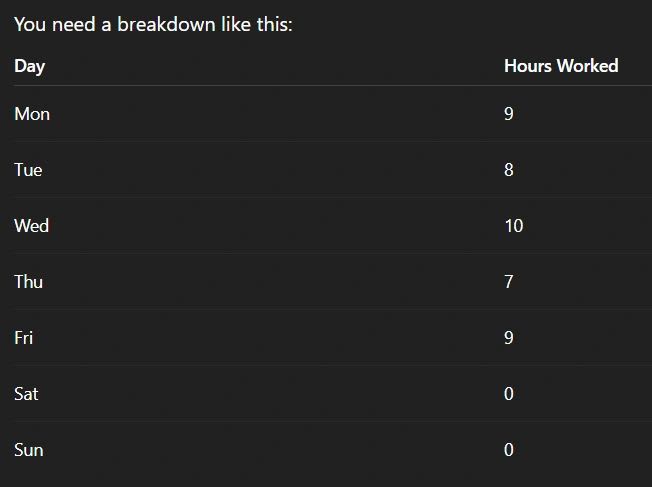
Step 2: Calculate Daily Overtime First
Let’s calculate:
- Monday: 9 hours → 1 hour OT
- Wednesday: 10 hours → 2 hours OT
- Friday: 9 hours → 1 hour OT
Daily OT total = 4 hours
Step 3: Calculate Weekly Hours
Total hours worked = 43 hours
Weekly overtime threshold = 40
So:
- Weekly OT = 3 hours
BUT…
👉 You already counted 4 hours as daily OT So you do NOT add more weekly OT
Final:
- Regular hours = 39
- Overtime hours = 4
Real Example #1 (Simple Case)
Employee works:
- 9 hours each day for 5 days
Total = 45 hours
Breakdown:
- Each day: 1 hour OT → 5 OT hours
- Weekly OT: already covered by daily OT
Final:
- Regular = 40 hours
- Overtime = 5 hours
Real Example #2 (Double Time)
Employee works:
- 13 hours in one day
Breakdown:
- First 8 hours = regular
- Next 4 hours (9–12) = 1.5x
- Last 1 hour (13th hour) = 2x
Final:
- Regular = 8
- OT (1.5x) = 4
- Double time (2x) = 1
Real Example #3 (7th Consecutive Day)
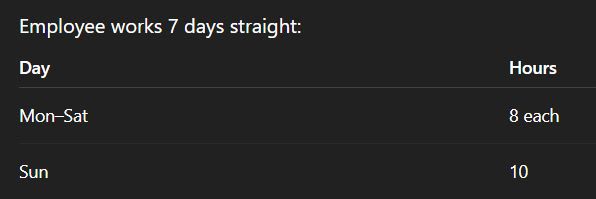
Breakdown:
- First 6 days = regular
- 7th day:
- First 8 hours = 1.5x
- Next 2 hours = 2x
Final:
- Regular = 48
- OT (1.5x) = 8
- Double time = 2
Common Mistakes to Avoid
This is where most businesses mess up:
❌ Only calculating weekly overtime
You must calculate daily first
❌ Double counting overtime
Daily OT and weekly OT don’t stack
❌ Not tracking daily hours properly
If you don’t have daily breakdowns, you cannot calculate correctly
❌ Ignoring the 7th day rule
This one gets missed a lot—and it’s a compliance risk
How to Get Started (Without Overcomplicating It)
If you’re doing this manually right now, here’s the simplest way to start:
- Track hours by day, per employee
- Calculate daily OT first
- Then check weekly totals
- Apply 7th day rules if needed
You can do this in a spreadsheet—but it gets messy fast, especially with multiple employees.
Why Most Businesses Struggle With This
It’s not that overtime is complicated—it’s that:
- Rules overlap
- Calculations depend on sequence
- Manual tracking leads to errors
Once you have more than a few employees, this becomes:
- Time-consuming
- Risky
- Hard to audit
Frequently Asked Questions About Calculating Overtime in California
How is overtime calculated in California? California requires overtime pay for hours worked over 8 in a day or 40 in a week, and double time for certain extended hours.
What is double time in California? Double time applies to hours worked over 12 in a day or over 8 on the seventh consecutive day of work.
Who qualifies for overtime in California? Nonexempt employees are eligible for overtime under California labor laws.
Why is California overtime different from federal law? California has stricter rules, including daily overtime requirements, unlike federal law which focuses on weekly hours.
How can employers ensure compliance with California overtime laws? By tracking hours accurately and applying the correct overtime rules consistently.
A Better Way to Handle California Overtime
If you want this to be accurate without spending hours calculating:
👉 Use Updoot
With Updoot, you can:
- Automatically track daily and weekly hours
- Apply California overtime rules (including daily + double time)
- Ensure compliance without manual calculations
- See real-time labor costs
Final Takeaway
Learning how to calculate overtime in California isn’t optional—it’s critical for running a compliant and efficient business.
The key is simple:
- Track daily hours
- Apply rules in the right order
- Don’t double count
If you get those three things right, you’ll avoid most of the common mistakes.
And if you want to save time and eliminate risk, use a system that does it for you because this is not something you want to guess on.
Opens in Google Drive — view and download for free
Related articles on HR
Which States Require Vacation Payout Upon Termination
How Many Write-Ups Before Termination?
Small Business Employee Benefits to Retain Employees
Job Description Format to Follow and a Template
W2 vs 1099 Employee: Checklist to Choose the Right One
How to Hire for Cultural Fit and a Free Hiring Tracker
Salary Bands Meaning and How to Build Them
Employee Coaching Plan to Improve Performance and Results