Work Management Software
Five real PTO types instead of one, approval requests that land in an inbox instead of a hallway conversation, and balances that connect straight to payroll.
From request to approval without a single text message or hallway conversation.
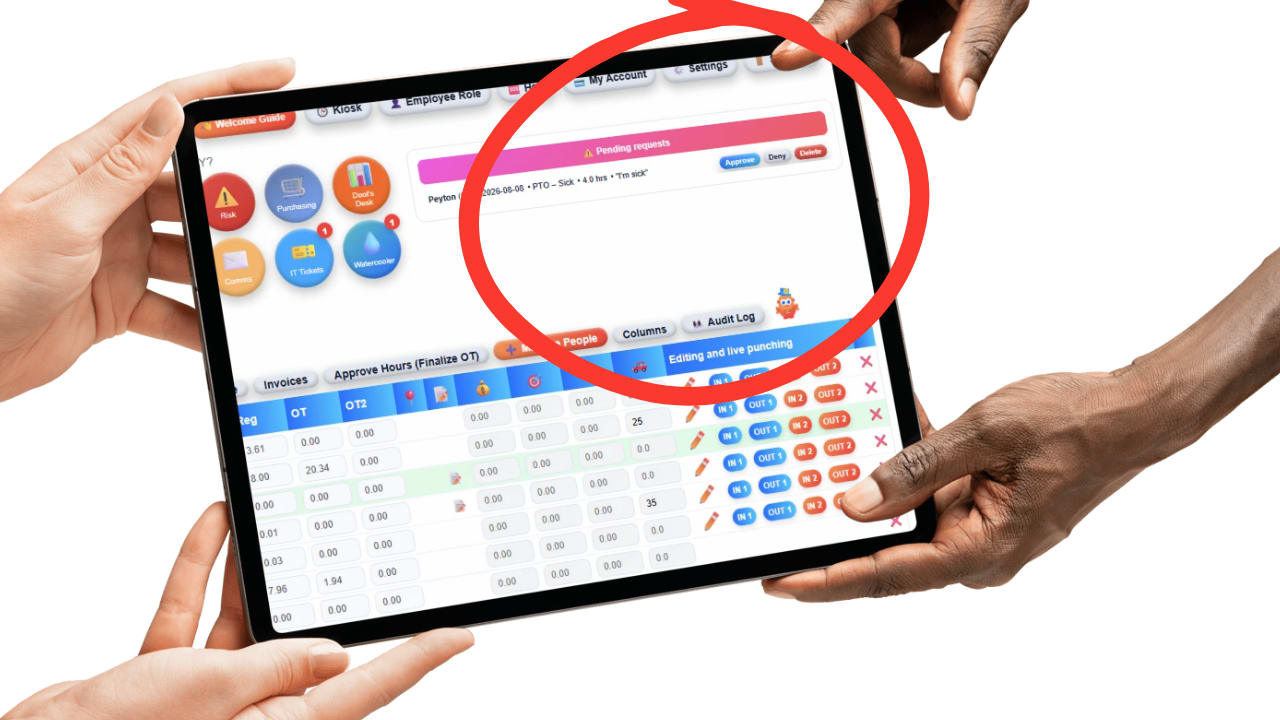
Pick the type, the dates, and submit, right from their own hub, no paper form or group text.
An email and an in-app notification go out the moment it's submitted, nothing to remember to check.
The balance updates automatically the moment it's approved, visible to both the employee and the admin.
Because "vacation" isn't the only reason someone needs time off.
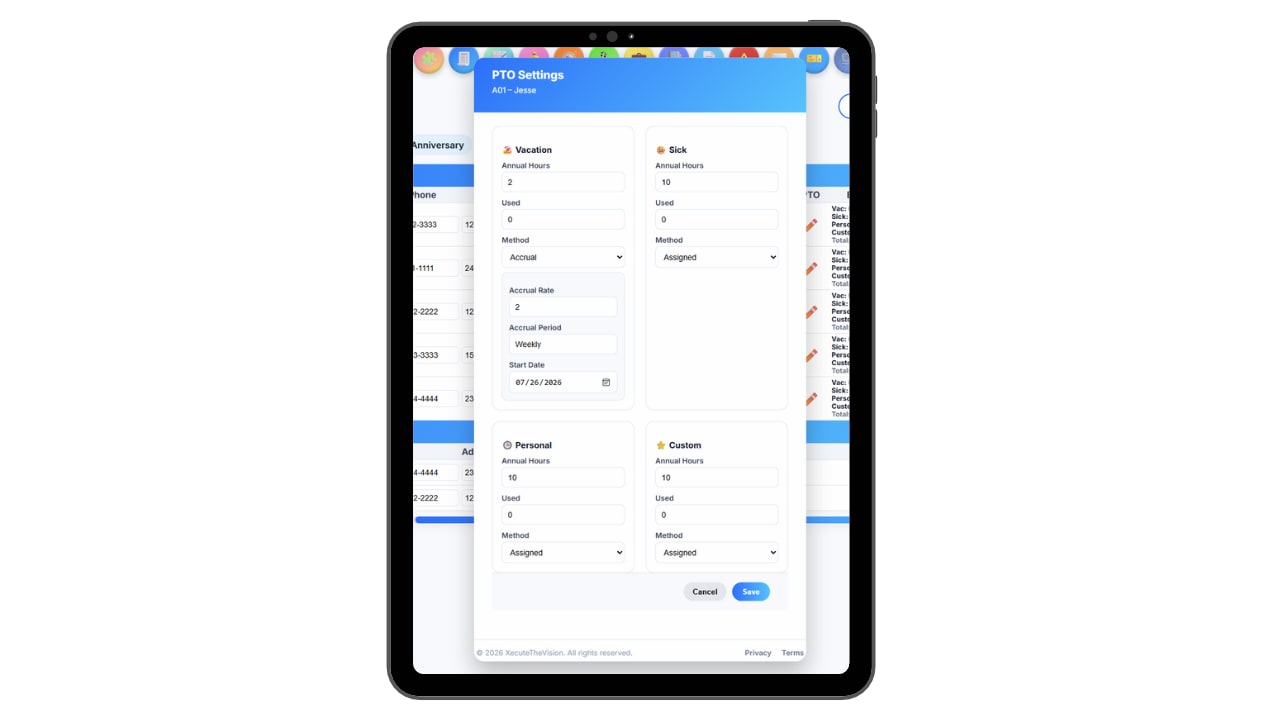
Personal, Sick, Vacation, Holiday, and Custom each track their own balance and history, instead of every kind of time off getting dumped into one number.
That separation matters the moment someone actually looks at the data: a business burning through sick days has a very different problem than one burning through vacation days, and a single combined bucket hides the difference.
Custom is the fifth type, and it's the one most other systems don't give you at all.
Most PTO software ships with two or three fixed categories, usually vacation, sick, and maybe personal, and stops there. That works fine until an employee needs bereavement leave, or qualifies for FMLA-protected leave, or has to sit on jury duty for a week. There's nowhere for it to go. It either gets forced into "sick," gets forced into "vacation," or gets tracked outside the system entirely on a sticky note or a separate spreadsheet nobody remembers to update.
That's a bigger problem than it sounds like. FMLA leave is legally protected time, it isn't supposed to draw down an employee's regular PTO balance, and it needs its own clean record in case it's ever questioned. Bereavement leave usually has its own company policy around how many days are paid and for which relationships. Jury duty often has its own rules too. Lumping all of it into "sick" or "vacation" doesn't just make the reporting messy, it makes it genuinely hard to prove what actually happened if a policy or a leave is ever challenged.
Updoot's Custom PTO type exists specifically for this. An admin can create as many named categories as the company actually needs, Bereavement, FMLA, Jury Duty, Parental Leave, whatever applies, each with its own balance and its own request and approval history, completely separate from Personal, Sick, Vacation, and Holiday. Nothing gets miscategorized, and nothing has to be tracked outside the system just because it doesn't fit one of the usual three buckets.
A quick reference for what each of the five types is actually meant to cover.
Appointments, errands, or anything that isn't illness and isn't a planned trip, the flexible catch-all for everyday life.
Illness, doctor visits, or a contagious day at home, kept separate so a rise in sick usage is easy to spot on its own.
Planned time off and trips booked in advance, the balance most employees watch closest.
Company-recognized paid holidays, assigned for the whole year in one click rather than added one at a time.
Bereavement, FMLA, jury duty, parental leave, anything with its own policy that shouldn't be mixed into another balance.
Approval doesn't require opening a separate app to remember to check.
The moment an employee submits a PTO request, the admin gets an email and an in-app notification, so nothing sits unnoticed in an inbox or gets missed because nobody thought to check the software that day.
Approving or denying takes one click from either the email or the notification itself, no digging through a menu to find the right screen.
The employee sees the outcome right away too, instead of following up days later to ask if anyone saw their request.
No adding each company holiday to the calendar by hand.
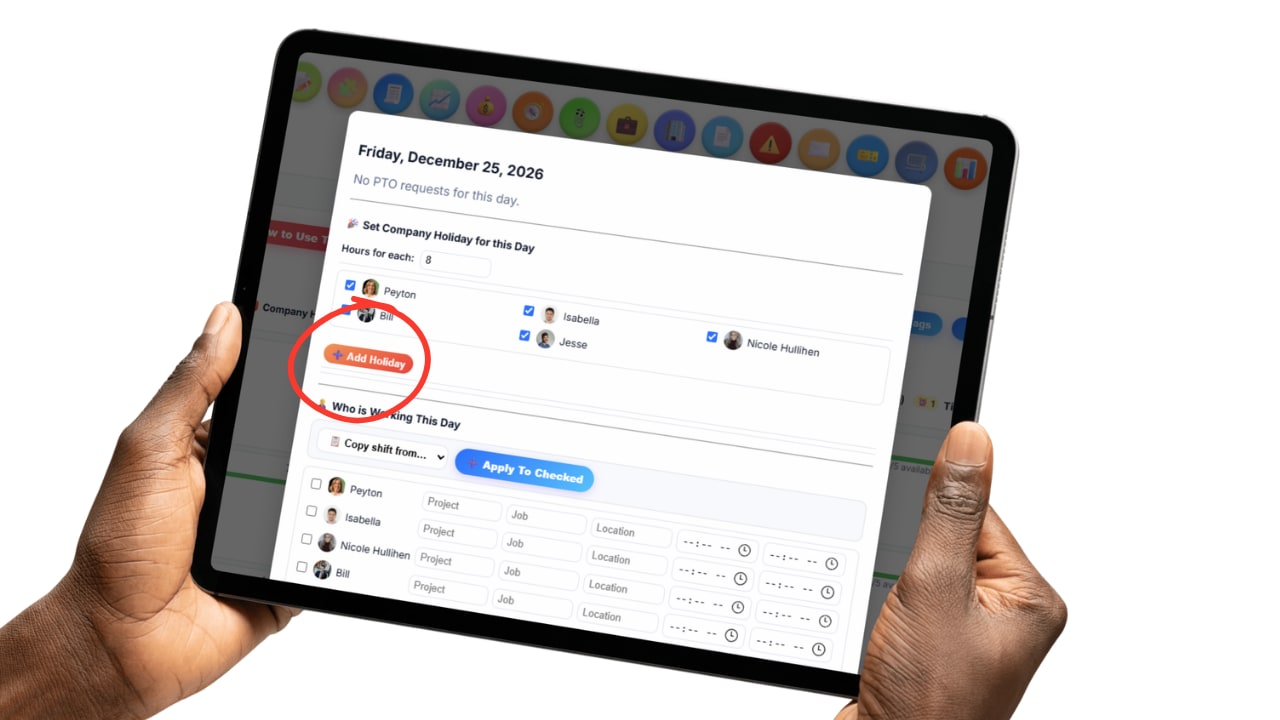
Instead of clicking into the calendar month after month to add each individual holiday, an admin can assign the whole year's worth of company holidays at once.
Every employee's Holiday balance and schedule reflect it immediately, no separate step needed to apply it person by person.
It turns a task that usually eats up an afternoon in January into something that takes a few seconds.
PTO doesn't live in its own disconnected corner of the software.

Every PTO balance is tied to the employee's actual salary rate, so when payroll runs, the dollar value of the time off is already calculated correctly, not something someone has to figure out by hand.
Holiday pay and any other applicable multiplier apply automatically too, so the payroll report reflects what an employee is actually owed for that time, not a flat guess.
Payroll becomes a review step instead of a math project.
Every employee can see their own PTO balance and usage by type in real time, so nobody has to email HR to ask how many vacation days they have left, and nobody finds out they're out of sick time only after a request gets denied. Admins get the same visibility across the whole team at once, who's used what, who's requested what, and what's still sitting unused.
PTO tracking in Updoot is optional, a business can turn it off entirely and it won't affect anything else. But it's recommended for a reason that has nothing to do with compliance paperwork: without visibility into who's actually taking time off, unused PTO quietly piles up, and that pattern is one of the clearer early signs of burnout. A tracker that shows real balances, by type, makes that pattern visible before it turns into a bigger problem, instead of getting noticed only after someone's already burned out or already gone.
Everything a small business actually needs to run time off without a spreadsheet on the side.
Personal, Sick, Vacation, Holiday, and Custom, each with its own balance and history.
Track bereavement, FMLA, jury duty, or anything else that shouldn't be lumped into another balance.
Requests reach the admin instantly and approve or deny in one click.
Employees and admins both see current balances and usage, no waiting or asking around.
Assign the whole year of company holidays at once instead of one at a time.
PTO ties to salary rates and multipliers, calculated straight into the payroll report.
Turn PTO tracking off entirely if it's not needed, it's a feature, not a requirement.
Visible balances make unused time off obvious before it becomes a bigger problem.
Short, practical reads on PTO categories, approvals, and keeping time-off records clean.
Stop forcing bereavement leave and FMLA into a "sick" balance that was never built for them. Start your free trial of Updoot -- PTO, time clock, scheduling, and payroll reporting all in one platform built for small business.
Start Free Today →