Employee Time Tracking
If you're still using paper timesheets or a wall-mounted punch clock, the hours aren't the problem. The transcribing, the adding, and the overtime math are. An online time clock does all of it as the shift happens.
There's no installation, no hardware, and nothing for employees to learn beyond tapping a button. Most businesses are running on it the same day they sign up.
Enter your team, set pay rates, and mark who is salaried and who is hourly. That's the whole setup.
Any computer, tablet, or phone. Nothing to install, and no card to slide into a machine.
Totals, overtime multipliers, and gross pay are done for you. No adding up cards at the end of the period.
Daily, weekly, and California rules applied without anyone reaching for a calculator.
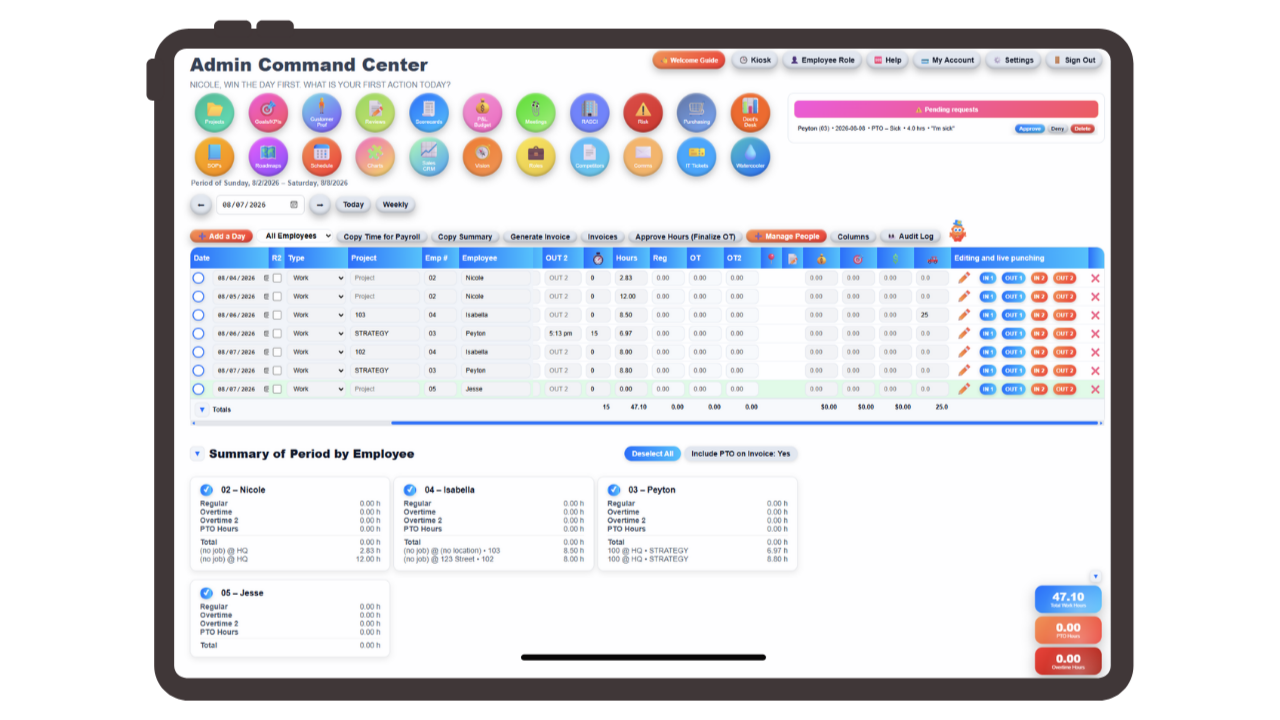
Overtime is where paper costs real money. Daily thresholds, weekly thresholds, and California's own rules each require different math, and doing that by hand across a stack of timecards produces errors in someone's favor every single period.
Updoot applies daily, weekly, and California overtime automatically as hours accumulate. It's worth saying plainly because plenty of time clocks don't: many calculate weekly overtime only and leave daily and California rules to you, which puts the hardest part right back on the person it was supposed to help.
Shifts that cross midnight are split automatically at the day boundary, so hours land on the correct day. That matters more than it sounds, because daily overtime and California rules are calculated per day, and a night shift counted entirely on the day it started throws both off.
The system also handles salaried and hourly employees together, along with multiple pay rates for people who work different roles at different rates, so the totals reflect how your team actually gets paid.
Not just hours. What those hours actually cost you.
Most time clocks hand you hours and leave the money to someone else. The Updoot payroll export calculates total gross pay with every multiplier already applied, across pay rates, overtime tiers, and PTO.
That means you can see what a pay period costs before it's processed, rather than finding out after your payroll provider runs it. Unless you need the tax withholding and filing side handled, this is effectively the whole picture in one place.
Everything exports to Excel or Google Sheets, so it goes wherever your accountant or payroll provider needs it. And because time is tied to jobs, projects, and locations, the same hours feed invoicing and job costing instead of being re-entered a second time.
The paper trail paper never actually gave you.
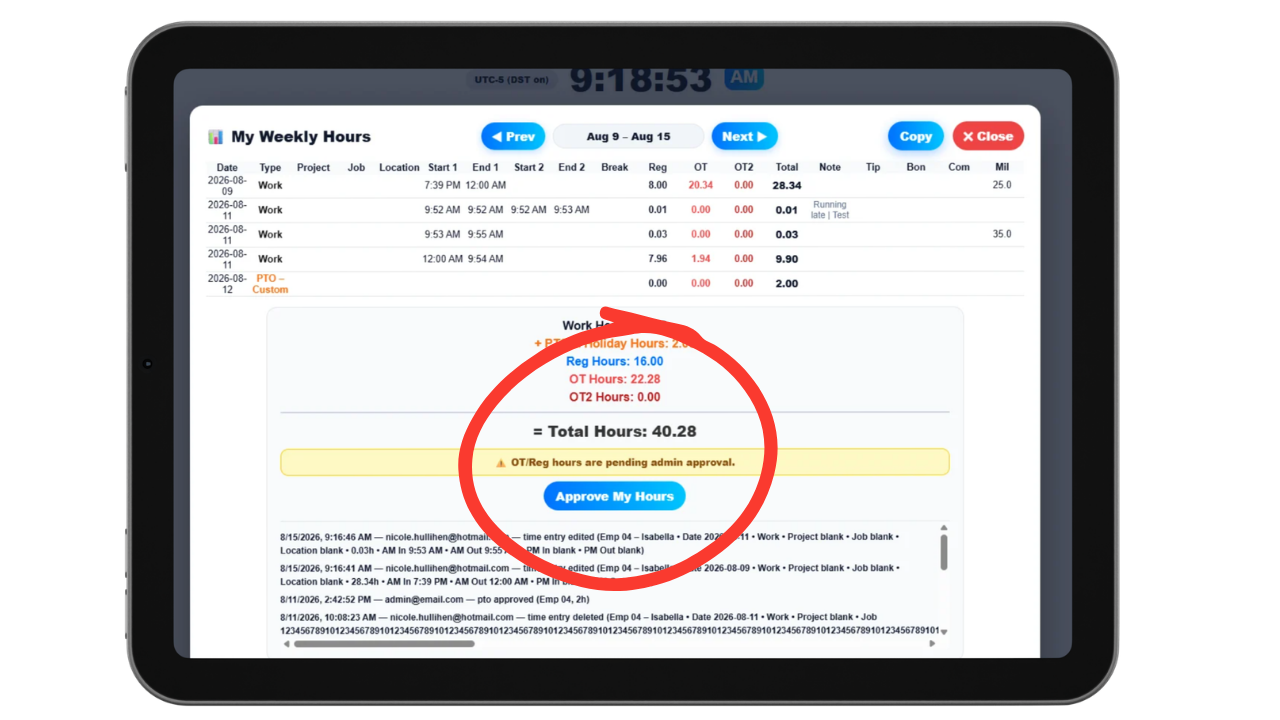
If you turn it on, employees review and approve their own hours before payroll. That single step removes most timecard disputes, because someone confirming their week in advance can't be surprised by it afterward.
The admin dashboard shows who hasn't approved yet with a reminder you can send in a click, so chasing people down stops being a recurring Friday task.
Every edit is captured in the audit log. If a punch is corrected, the change is recorded with it, and the break timer tracks unpaid breaks separately from California meal and rest periods, which are logged too. A punch card in a rack can't tell you who changed what or prove a meal break was taken. This can.
Admins can also punch someone in or out from the dashboard when a punch gets missed entirely, and that correction lands in the audit log like any other.
Paper feels cheap because the expense is hidden in labor. Someone transcribes cards into a spreadsheet, someone adds up the columns, someone figures the overtime, and someone deciphers a punch that smudged. Multiply that by every pay period and it's a part-time job nobody put on the org chart.
The errors are worse than the time. Manual overtime math tends to break in the employee's favor, illegible punches get rounded generously, and a card that goes missing turns into an estimate. None of it is defensible if an entry is ever disputed, because paper records what someone wrote, not what happened.
An online time clock removes the middle steps. Employees clock in from a browser on any device, hours accumulate with daily, weekly, and California overtime applied automatically, overnight shifts split at midnight so each day's hours are correct, and salaried staff, hourly staff, and multiple pay rates are all handled together.
The payroll export shows total gross pay with multipliers already in it, employees can approve their own hours with admin reminders for anyone who hasn't, and every edit and break is captured in an audit log. Same punches, minus the transcription, the arithmetic, and the arguments.
Everything paper timesheets and a wall clock can't do, without hardware to buy or install.
Daily, weekly, and California rules applied as hours accumulate.
Overnight shifts split at the day boundary so daily overtime is right.
Payroll totals with every multiplier already calculated.
Both handled together, including multiple pay rates per person.
Optional self-approval before payroll, which ends most disputes.
See who hasn't approved and nudge them from the dashboard.
Every correction recorded, which paper never gave you.
Unpaid breaks tracked separately from California meal and rest.
Clock someone in or out from the dashboard when a punch is missed.
Code hours as they're worked instead of writing it on a card.
Flag what happened on a shift, in the record instead of the margin.
Extra pay and mileage tracked with hours, not in a side spreadsheet.
Short, practical reads on time tracking, labor management, and running a tighter operation.
Same punches, none of the transcription or arithmetic. Start your free trial of Updoot -- browser-based clock in, automatic daily, weekly, and California overtime, gross pay export, and an audit log built for small business.
Start Free Today →