
What is Hubstaff and is it the Right Time Tracking Tool for You
.png)
See how Hubstaff app features stack up against the time tracking and features of Updoot and others in a handy side-by-side comparison chart. If you have been researching employee time tracking software, Hubstaff has almost certainly come up in your search. It is one of the most widely recognized names in the time tracking space, and for good reason. Hubstaff has been around since 2012, has built a large customer base, and offers a feature set that covers the core needs of businesses trying to track where their team's time is going.
But knowing what Hubstaff is and knowing whether it is the right tool for your business are two very different questions. This article covers what Hubstaff actually does, the category of tools it represents, the common limitations businesses run into with tools like it, what you should actually be looking for in a time tracking solution, and what to consider before committing to any platform in this space.
What Is Hubstaff?
Hubstaff is a cloud-based workforce management platform focused primarily on time tracking, employee monitoring, and productivity measurement. It was founded in 2012 and is built around the needs of businesses with remote, distributed, or field-based teams who need visibility into where employee time is being spent.
The core of what Hubstaff does is track time. Employees start a timer, work on a task or project, and stop the timer when they are done. That data flows into reports that managers and business owners can use to understand how hours are being allocated, run payroll, and bill clients for time spent on their projects.
Beyond basic time tracking, Hubstaff offers GPS location tracking for field teams, optional screenshot monitoring for remote workers, productivity scores based on keyboard and mouse activity, project and task management, scheduling, payroll integrations, and basic invoicing.
It is a capable tool for the specific problem it was built to solve: giving managers visibility into remote and distributed teams. If your primary challenge is knowing whether your remote team is actually working and where their time is going, Hubstaff addresses that directly.
The Category of Tools Hubstaff Represents
Hubstaff sits in a category of software that could broadly be called time tracking and workforce monitoring tools. Other well-known names in this space include Toggl Track, Time Doctor, Clockify, Harvest, and Buddy Punch. Each has a slightly different focus and feature mix but they share a common foundation: they are built to answer the question of where time is going.
These tools generally fall into two camps. The first camp is pure time tracking, tools like Toggl and Clockify that focus almost entirely on the act of logging hours with minimal additional functionality. The second camp, where Hubstaff sits, adds layers of monitoring, reporting, and workforce management on top of the core time tracking functionality.
What almost all of these tools share, regardless of where they sit in the spectrum, is a narrow focus. They were built to solve the time tracking problem. They were not built to run a business.
That distinction matters enormously for small business owners who are not just trying to track time but are trying to manage people, bill clients, run projects, document processes, track performance, and grow their company. For those owners, a specialized time tracking tool is one piece of a puzzle that requires five or six other tools to complete.
What Hubstaff Does Well
Before discussing the limitations, it is worth being honest about what Hubstaff does well, because it does several things genuinely well.
Remote team visibility. For businesses with employees working remotely, Hubstaff provides a level of visibility that most managers find genuinely valuable. The combination of time tracking, optional screenshot capture, and productivity scoring gives managers a picture of remote work activity that is difficult to get any other way.
GPS tracking for field teams. Businesses with employees working at client sites, on delivery routes, or across multiple locations rely on Hubstaff's GPS tracking to confirm that team members are where they should be and to track time accurately by location.
Project-based time tracking. Hubstaff handles the allocation of time to specific projects and tasks cleanly, which is valuable for service businesses that bill clients by the hour or need to understand the true cost of delivering a project.
Payroll integrations. Hubstaff connects to major payroll platforms including Gusto, QuickBooks, and others, making it easier to export approved hours for payroll processing without manual data entry.
Detailed reporting. The reporting tools in Hubstaff give managers significant flexibility in how they view and analyze time data, which is useful for businesses that need to slice their labor data in multiple ways.
These are real strengths and they explain why Hubstaff has built a large and loyal customer base. For businesses whose primary challenge is remote team monitoring and time tracking, it earns its place in the stack.
See how Hubstaff compares to others like it
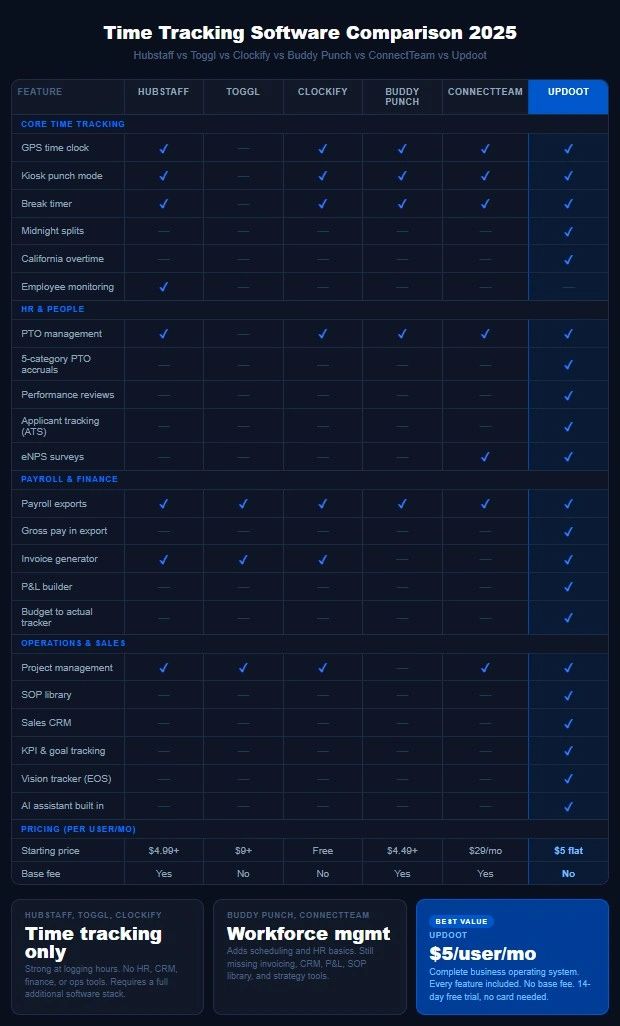
The Common Limitations of Hubstaff and Tools Like It
Understanding the limitations of Hubstaff is not about criticizing a product that does what it was designed to do. It is about helping business owners understand where purpose-built time tracking tools stop serving their needs and where the gaps start to cost them money, time, and operational clarity.
The monitoring approach creates culture problems. Screenshot capture, keystroke logging, and productivity scores based on mouse activity are features that some teams accept and others actively resent. For businesses built on trust and autonomy, these monitoring features can damage team culture in ways that are difficult to quantify but very real in their impact. High performers in particular, the employees every business most wants to retain, tend to respond worst to surveillance-style monitoring. This is not a limitation of Hubstaff specifically but of the monitoring-first philosophy that tools like it were built around.
Pricing adds up quickly. Hubstaff's pricing starts at around $4.99 per user per month for basic features but the plans required for GPS tracking, payroll integrations, and more advanced reporting push the cost significantly higher per user. Add a base fee on some plans and a growing team, and the monthly cost climbs faster than most small business owners expect when they first sign up.
It does not solve the invoicing problem cleanly. Hubstaff has basic invoicing functionality but it is not a full invoicing or billing solution. Businesses that need to move from tracked hours to professional client invoices typically find themselves bridging a gap with manual steps or additional software.
No real HR infrastructure. Hubstaff tracks time and monitors productivity. It does not include performance reviews, applicant tracking, HR document management, employee surveys, or the range of people management tools a growing business actually needs. Human resources beyond time tracking requires a completely separate system.
No sales or CRM tools. If your business needs to manage leads, track a sales pipeline, or build customer profiles, Hubstaff offers nothing in that direction. Your CRM lives elsewhere.
No operational or strategic infrastructure. There is no SOP library, no project management beyond basic task assignment, no KPI tracking, no financial management, no org chart builder, and no strategic planning framework. Running a business on Hubstaff requires a significant additional software stack to cover everything the business actually needs.
The software stack problem. This is the cumulative consequence of all the limitations above. A business using Hubstaff typically also pays for invoicing software, a CRM, an HR platform, project management tools, and something for strategic planning. Each of those is an additional monthly cost. Each requires its own login, its own learning curve, its own data that does not automatically talk to the other systems. The fragmentation creates inefficiency, increases the chance of data falling through the gaps, and produces a total monthly software cost that often exceeds what a complete platform would cost.
What You Should Actually Look for in a Time Tracking and Workforce Management Tool
If you are evaluating Hubstaff or any tool in this category, here is what to look for beyond the core time tracking functionality to make sure you are investing in a platform that serves your business as it grows rather than one you will need to replace or supplement significantly within 12 months.
- GPS and location tracking that works reliably on mobile. For field-based teams, GPS accuracy and mobile reliability are non-negotiable. Test the mobile app specifically in the environments where your team actually works before committing.
- Overtime tracking that handles complexity. Basic overtime is straightforward. But if you have employees in California, multiple shift types, or employees who work across different pay rate categories, you need a tool that handles overtime calculation correctly by default rather than requiring manual adjustment. California daily overtime rules in particular are handled incorrectly by many time tracking tools and the resulting payroll errors are both costly and legally risky.
- Payroll-ready exports that include everything. Time is only one component of what goes into payroll for most businesses. Tips, bonuses, commissions, mileage reimbursements, and PTO all need to flow into the payroll export cleanly. A tool that only exports raw hours forces you to aggregate the rest manually, which defeats much of the efficiency benefit of using software in the first place.
- Scheduling that connects to time tracking. Scheduling and time tracking are deeply connected operationally but many tools treat them as separate features or put scheduling behind a higher pricing tier. The most efficient systems are ones where the schedule informs the time tracking and the time tracking confirms execution against the schedule.
- Invoicing that connects to tracked time. If you bill clients for time, the path from time entry to client invoice should not require manual data transfer. Look for a tool where approved time entries flow directly into invoices without an intermediate export step.
- HR tools that cover the people management lifecycle. Time tracking is one piece of managing people. Performance reviews, PTO management across multiple leave categories, employee document storage, and onboarding tools are all part of the same people management picture. A platform that covers all of them eliminates the need for a separate HR system.
- A single platform for operational management. The businesses that run most efficiently are the ones where their time tracking, scheduling, HR, invoicing, project management, and reporting all live in one connected system. When data flows between these functions automatically, managers spend their time managing instead of reconciling data across multiple platforms.
What Hubstaff Alternatives Exist and What They Offer
The market for time tracking and workforce management software is large and growing. Here is a brief overview of the most commonly considered alternatives to Hubstaff.
Updoot takes a fundamentally different approach to the problem. Rather than building a specialized time tracking tool and leaving business owners to assemble the rest of their operational stack from additional software, Updoot is built as a complete business operating system for small businesses. Time tracking with GPS, midnight splits, California overtime, and kiosk mode is one feature in a platform that also includes scheduling, five-category PTO management, payroll-ready exports, invoicing, project billing, a sales CRM, performance reviews, an applicant tracking system, an SOP library, financial tracking tools including a P&L builder and budget to actual tracker, KPI tracking, a Vision Tracker inspired by Gino Wickman's book Traction, and an AI assistant built throughout the platform.
All of that is available at $5 per user per month with no base fee, no tiers, and no feature gates. A 10-person team pays $50 per month for the complete stack rather than $50 for time tracking and another $150 to $200 for everything else they need to run their business.
Toggl Track is a simpler, cleaner time tracking tool with no monitoring features. It is well-suited to freelancers and small teams who want straightforward time logging without the surveillance-style features. It does not include scheduling, HR, invoicing, or operational management.
Clockify is a free time tracking tool with paid tiers for more advanced features. It is one of the most accessible entry points for businesses new to time tracking software. Like Toggl, it is focused on time tracking and does not extend significantly into other operational areas.
Time Doctor is similar to Hubstaff in its monitoring-forward approach, including screenshot capture and activity monitoring. It is commonly used by outsourcing companies and businesses managing large remote teams where activity monitoring is a core requirement.
Buddy Punch focuses on time tracking and scheduling with a cleaner, less monitoring-heavy approach than Hubstaff or Time Doctor. It handles payroll integrations well but like the others does not extend into invoicing, HR, CRM, or operational management.
ConnectTeam is a mobile-first workforce management platform with strengths in team communication and scheduling for frontline workers. It covers more ground than pure time tracking tools but still leaves significant gaps in invoicing, financial management, and strategic planning tools.
The Real Question: Are You Buying a Feature or Building a System?
The most important thing to understand when evaluating Hubstaff or any tool in this category is whether you are making a feature purchase or a system investment.
A feature purchase solves one specific problem. Hubstaff solves the time tracking and remote monitoring problem. It does that job well. But if your business needs more than that specific solution, a feature purchase requires additional purchases, additional integrations, additional logins, and additional maintenance to build the complete picture.
A system investment solves the broader operational challenge. A platform that connects time tracking to scheduling to payroll to invoicing to HR to project management to financial reporting to strategic planning creates an operational system where data flows automatically, managers have a complete picture without manual reconciliation, and the business runs more efficiently as a whole.
For businesses at the very beginning of their software journey whose only immediate need is basic time tracking, starting with a focused tool like Hubstaff is a reasonable entry point. For businesses that are already managing multiple tools and feeling the friction of a fragmented stack, the math almost always favors consolidating onto a platform that covers the full operational picture at a comparable or lower total cost.
The question is not just what Hubstaff does. The question is what your business actually needs to operate and grow, and whether the tool you are evaluating is built for that scope or for a much narrower piece of it.
Frequently Asked Questions
What is Hubstaff used for?
Hubstaff is primarily used for employee time tracking, GPS location monitoring for field teams, remote worker productivity monitoring including optional screenshot capture, project-based time allocation, scheduling, and payroll integration. It is most commonly used by businesses with remote or distributed teams who need visibility into where employee time is going and confirmation that remote workers are actively working.
How much does Hubstaff cost?
Hubstaff pricing starts at around $4.99 per user per month for basic time tracking features. Plans with GPS tracking, payroll integrations, and more advanced reporting cost more per user. Some plans also include a base fee on top of the per-user cost. The total monthly cost for a team of 10 on a mid-tier plan typically runs $60 to $100 per month for time tracking and monitoring features only, not including the additional tools most businesses need for invoicing, HR, CRM, and project management.
Does Hubstaff include invoicing?
Hubstaff has basic invoicing functionality but it is not a full invoicing or billing solution. Businesses with complex invoicing needs or those who bill clients regularly typically find Hubstaff's invoicing insufficient as a standalone solution and use it alongside dedicated invoicing software.
Is Hubstaff good for small businesses?
Hubstaff works well for small businesses whose primary challenge is tracking time for a remote or field-based team. For small businesses that also need invoicing, HR management, sales tools, project management, and financial tracking, Hubstaff covers only one piece of the operational picture and requires significant additional software to fill the gaps.
What are the best alternatives to Hubstaff?
The most commonly considered alternatives to Hubstaff include Toggl Track, Clockify, Time Doctor, Buddy Punch, ConnectTeam, and Updoot. Each covers the time tracking fundamentals with different approaches to monitoring philosophy, pricing, and the breadth of additional features beyond core time tracking. Updoot is the most comprehensive option for small businesses looking to consolidate their operational software stack onto a single platform rather than managing multiple specialized tools.
Does Hubstaff monitor employees?
Yes. Hubstaff offers optional employee monitoring features including screenshot capture at set intervals, keyboard and mouse activity tracking, and productivity scores calculated from that activity data. These features are configurable and not all businesses that use Hubstaff enable them. Businesses considering these features should weigh the visibility benefits against the potential cultural impact on team trust and retention.
What should I look for in a time tracking tool?
Beyond basic time tracking, look for GPS reliability on mobile, overtime calculation that handles complexity including California overtime rules, payroll-ready exports that include tips, bonuses, mileage, and PTO alongside raw hours, scheduling that connects to time tracking, invoicing that flows from tracked time, HR tools that cover the full people management lifecycle, and ideally a single platform that connects all of these operational areas rather than requiring multiple separate tool.