
How to Track Leads Effectively
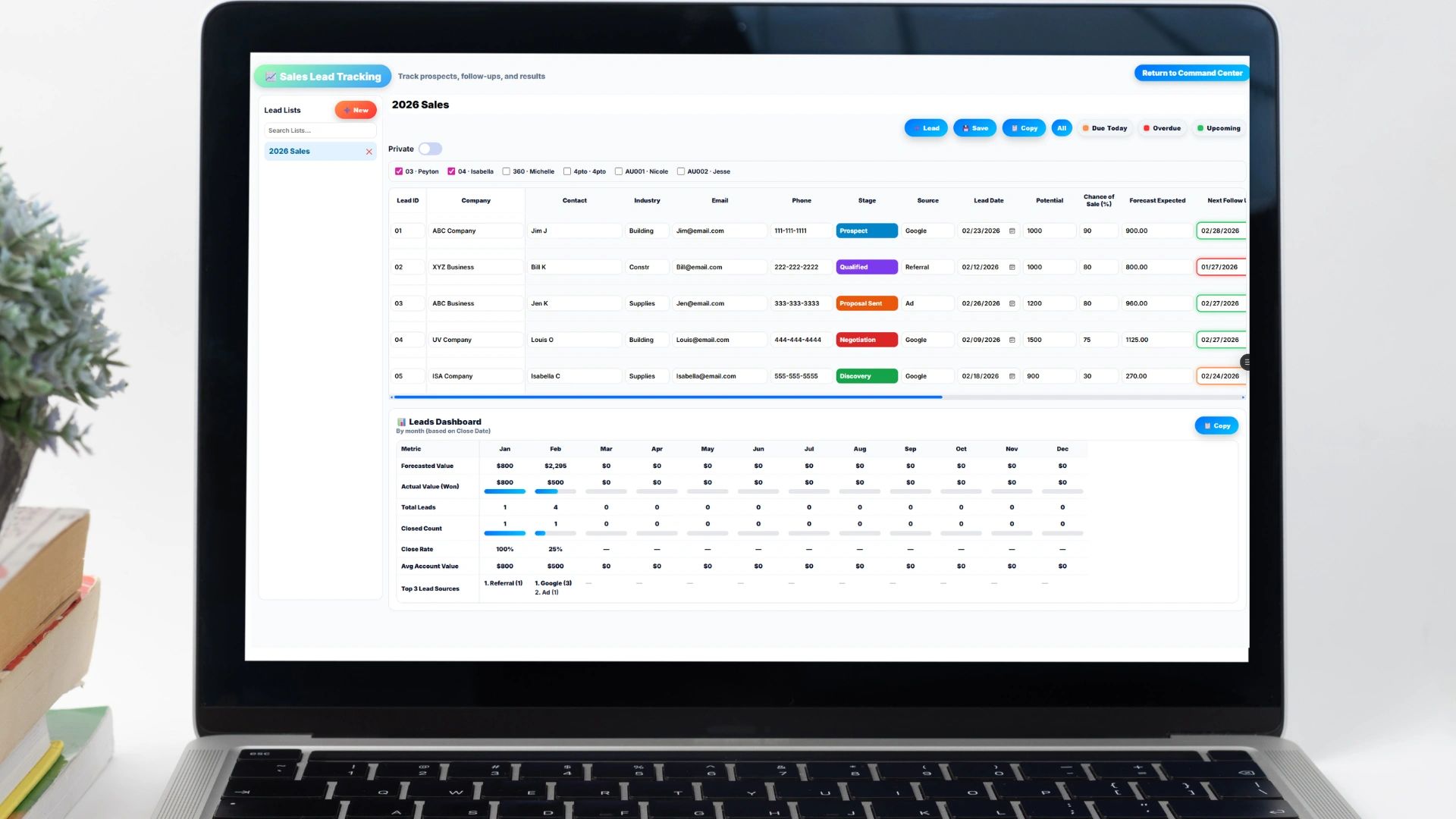
A complete guide to lead tracking for growing businesses
If you are generating leads but not tracking them properly, you are losing money. Every lead that comes in and gets forgotten is money you already spent on marketing or outreach to generate, wasted a second time on follow-through that never happened. Most businesses do not actually have a lead problem; they have a lead management problem. The leads are there. What happens to them afterward is where things fall apart.
Leads typically arrive from a mix of sources, including website forms, social media, referrals, paid ads, and email campaigns. Once they arrive, they need somewhere to go, and in most businesses that somewhere is wherever is most convenient in the moment: an inbox, a spreadsheet nobody else opens, or worse, in someone's head, where they stay until that person gets busy, takes a vacation, or leaves the company entirely and takes the only record of that lead with them. This is where growth breaks, quietly and a few leads at a time, long before anyone notices the pattern.
In this guide, you will learn what lead tracking actually is, why most businesses fail at it, how to track leads step by step, what data you should be tracking, the tradeoffs between different tracking methods, and you'll get a free interactive lead tracker you can start using immediately.
What Is Lead Tracking?
Lead tracking is the process of capturing, organizing, and managing potential customers from first contact to conversion. Done well, it answers questions like where a lead came from, who owns it, what stage it's in, what the next action is, and how likely it is to close. Without that system, you are guessing your way through every one of those questions. With it, you are running an actual pipeline instead of hoping things work out.
Why Lead Tracking Matters More Than You Think
Most people think of lead tracking as basic organization, a way to keep things tidy. It's actually closer to revenue visibility. When you track leads properly, you can see which marketing channels are actually generating business, identify exactly where deals stall in your sales process, forecast revenue with real confidence, improve conversion rates by fixing the specific stage that's leaking deals, and hold your team accountable for follow-up instead of taking their word for it.
The reality is simple: if you cannot see your pipeline clearly, you cannot grow predictably. Every decision about where to spend marketing dollars or where to add sales headcount becomes a guess instead of a calculation grounded in actual data.
Why Most Businesses Fail at Tracking Leads
Most lead tracking systems fail for a handful of simple, recurring reasons, and it's worth being honest about which of these apply to your own team.
1. No Defined Process
Leads come in, but there is no clear path for what's supposed to happen next, so what actually happens next depends entirely on who picks it up and how busy they are that day.
2. Too Many Tools
Leads end up spread across email, a CRM nobody fully adopted, personal notes, Slack messages, and spreadsheets, with nothing centralized. The result is that no single, trustworthy view of the pipeline ever actually exists, only fragments of it scattered across five different tools that don't talk to each other.
3. No Ownership
Nobody is explicitly responsible for following up, so nobody does. Everyone assumes someone else has it covered, which is functionally the same as nobody having it at all.
4. No Consistency
Data gets entered differently by each person, or skipped entirely depending on how busy someone is, which makes the data unreliable for reporting even on the days it does get entered.
5. No Follow-Up System
Leads are rarely lost because a prospect said no. They're lost because nobody followed up at all, and there's a meaningful difference between losing a deal and never actually competing for it.
The Core Components of Lead Tracking
If you want a lead tracking system that actually holds up, it needs to include these five things.
1. Lead Capture
Every lead needs to be captured in one place, regardless of where it originated, whether that's a website form, a contact page, a landing page, a social media message, or a manual entry from a phone call. The rule here is simple: if it isn't captured, it doesn't exist, no matter how promising the conversation was.
2. Lead Information
Each lead record should include the basics: name, company, email, phone number, lead source, and the date it was created. Optional but genuinely useful fields include industry, an estimated deal size, and notes, which give context the next time anyone touches this lead, even if it isn't the same person who first captured it.
3. Lead Status
Every lead must have a status that reflects where it actually sits, typically something like New, Contacted, Qualified, Proposal Sent, Closed Won, or Closed Lost. That single field creates visibility into exactly where every deal stands without anyone having to ask around to find out.
4. Ownership
Every lead needs a name attached to it. If no one owns it, it will not move forward on its own, and ownership is what drives the accountability that makes the rest of the system actually function.
5. Next Action
This is where most systems quietly fail. Every lead should have a defined next step, whether that's a call scheduled, a follow-up email, or a demo booked, because a lead with no next action is, for all practical purposes, a dead lead that just hasn't been labeled one yet.
How to Track Leads Step by Step
Here's how to put all of that into practice.
Step 1: Centralize Your Leads
Pick one system, whether that's a spreadsheet, a CRM, or a business management platform, and commit to it. The moment a lead exists in two places at once, one of those records will eventually go stale, and nobody will notice until it's too late to matter.
Step 2: Standardize Your Fields
Define exactly what gets tracked for every lead, and don't let people freestyle their own version of it. Consistency beats flexibility here: a field that's sometimes filled in and sometimes skipped is worse than no field at all, because you can never trust any report built on top of it.
Step 3: Define Your Pipeline Stages
Keep this simple and resist the urge to overcomplicate it. A pipeline with five to seven stages is more than enough for most businesses; adding more than that mostly adds friction to data entry without adding any real visibility in return.
Step 4: Assign Ownership Immediately
The moment a lead comes in, assign it to someone and notify that person directly. Speed matters here more than almost anywhere else in the process: a lead assigned within minutes gets followed up on, while a lead sitting unassigned for even a day is already cooling off.
Step 5: Require a Next Action
Make it a non-negotiable rule that no lead can exist in your system without a defined next step attached to it.
Step 6: Review Weekly
This is where most teams quietly fall apart. If you are not reviewing your pipeline on a weekly basis, the system will break down even if every other step was done correctly. A weekly review means checking open leads, flagging stalled deals, reassigning anything that's been neglected, and pushing every next action forward instead of letting it sit.
Spreadsheet vs CRM: What Should You Use?
Here's an honest comparison of the two most common starting points.
| Factor | Spreadsheet | CRM |
|---|---|---|
| Setup cost | Low | Higher, but often worth it past a certain team size |
| Automation | None | Reminders, workflows, automated tracking |
| Scalability | Breaks down with team growth | Built to scale |
| Learning curve | Minimal | Requires setup and onboarding |
| Best for | Solo operators, small teams | Growing teams, sales organizations |
Spreadsheet (Simple Start)
A spreadsheet is easy to set up, low cost, and flexible enough to adapt as you figure out what you actually need to track. The tradeoffs are real, though: it relies entirely on manual updates, it's easy to forget to update, it offers no automation, and it gets harder to manage the more leads and people you add to it. This makes it a solid choice for solo operators and small teams, but not much beyond that.
CRM System (Growth Mode)
A CRM brings automated tracking, better visibility across the whole pipeline, built-in reminders and workflows, and the ability to scale with a growing team. In exchange, you take on setup time and a learning curve while everyone gets used to a new system. For growing teams and sales organizations, that tradeoff is usually worth it.
The Benefits of Tracking Leads Properly
Get this right, and the improvements show up fast. You'll see increased conversion rates simply because you're following up more consistently, which alone tends to lift revenue. You'll make better marketing decisions because you actually know which channels are working. Your sales pipeline becomes clear instead of a source of constant guessing about what's actually happening. Team accountability improves because everyone knows exactly what they own. And growth accelerates because you stop losing easy opportunities to nothing more than neglect.
The Drawbacks You Should Expect
None of this is magic, and there are real tradeoffs worth planning for. It requires discipline: if your team doesn't consistently update the system, it fails regardless of how well it was designed. It takes real setup time upfront to define your process before you can expect anyone to follow it. And you should expect some resistance from your team, since people generally don't love adopting new systems, which means you'll need to enforce it rather than hope it catches on by itself.
Common Mistakes to Avoid
Avoid these and you'll already be ahead of most companies. Not tracking lead source means you'll never actually know where your best leads come from. Relying on a single follow-up email instead of a real cadence means most leads never hear from you again after that first message. Overcomplicating the system guarantees people won't use it consistently, if at all. And letting leads sit, even briefly, costs you deals, because speed is one of the few genuine competitive advantages left in sales.
How to Take This Further
At some point, spreadsheets break, and when that happens, what you actually need is a system that connects leads, projects, time tracking, and revenue in one place, because the real goal was never just tracking leads. It was always turning leads into revenue. That's where platforms like Updoot come in: instead of managing leads in one place, work in another, and billing somewhere else entirely, everything lives together. That consolidation is how you actually scale past the point where spreadsheets and disconnected tools stop holding up.
Final Take
Lead tracking is not optional. It is the foundation of predictable growth. If you implement even a basic system, one that captures every lead, assigns ownership, tracks status, defines next actions, and gets reviewed weekly, you will close more deals. Not because you suddenly got better at selling, but because you stopped letting opportunities slip through the cracks by default.
Interactive Lead Tracker
Fill in your business details and start logging leads below. Add as many rows as you need, then print the tracker or copy it as a table to paste into Google Sheets or Excel.
📋 Lead Tracker
Fill in your details and lead rows below. Print the tracker or copy it to paste into a spreadsheet.
| Lead Name | Company | Source | Status | Owner | Next Action | Next Action Date | ||
|---|---|---|---|---|---|---|---|---|
Tracking deal value, industry, or detailed notes for each lead? That's exactly where a spreadsheet starts to strain and a real CRM like Updoot takes over.
Related Reading
How to Manage Customer Relationships →
RFQ Meaning: What It Is, When to Use It, Ready-to-Use Template →
Ideal Customer Profile Scoring Rubric Examples and Template →