
How to Make Your Invoices Look Professional
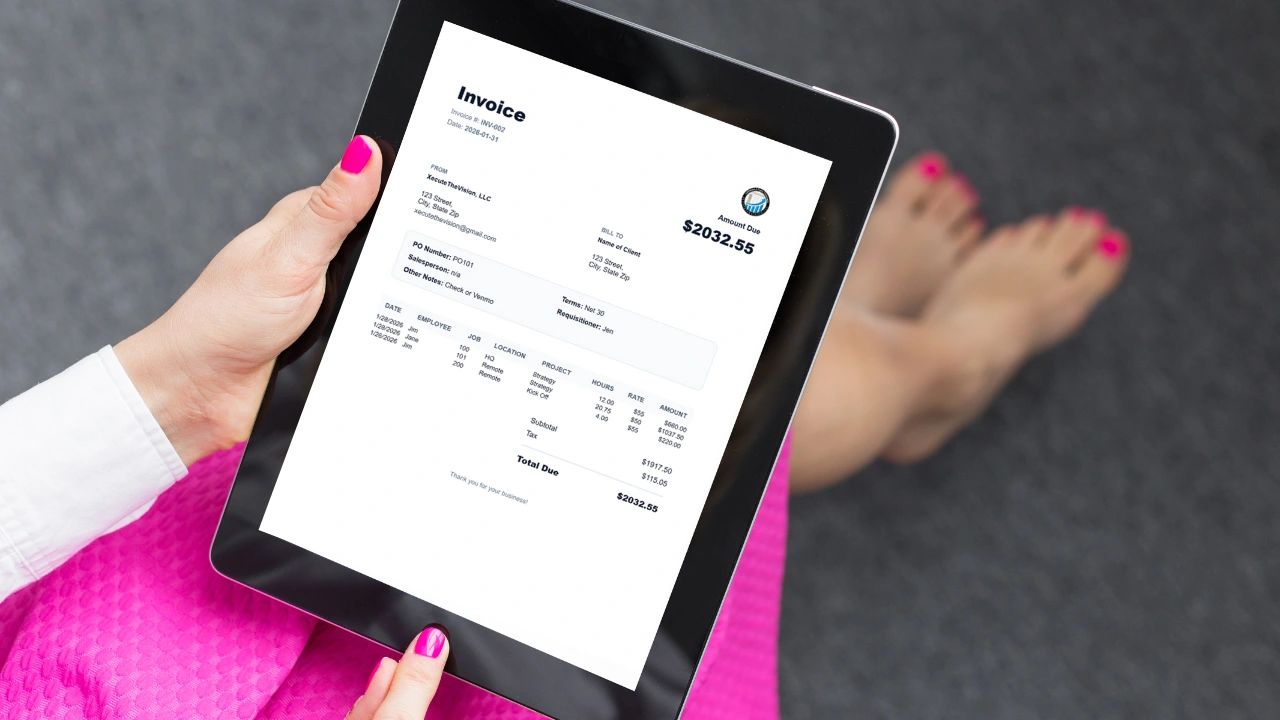
If you run a business, your invoice is not just a billing document.
It’s a brand document. It’s a trust document. It’s a credibility signal.
And the truth is most small businesses send invoices that look rushed, cluttered, inconsistent, or amateur.
The good news? You do not need a graphic designer. You need structure.
Below are the top questions business owners ask about professional invoices and how to get it right.
1. What Makes an Invoice Look Professional?
Professional invoices have five things in common:
- Clear branding
- Intentional spacing
- Transparent totals
- Proper reference fields (PO, terms, etc.)
- Clean, consistent PDF formatting
If any one of those is missing, the invoice starts to feel “homemade.”
Let’s break them down.
2. How Important Is Branding on an Invoice?
Extremely important.
Your invoice should instantly answer:
- Who is this from?
- Is this business legitimate?
- Does this company look organized?
Here’s what professional branding includes:
✔ Logo Placement
Your logo should be visible but not overpowering. Top left or top right is standard.
✔ Company Information
Include:
- Business name
- Address
- Phone (if relevant)
This should be cleanly stacked not scattered around the page.
✔ Consistent Font & Colors
Use one clean font (no script fonts). Use one brand color (subtle, not loud).
You don’t need gradients and effects. You need clarity and consistency.
Professional design is usually simple.
3. How Should an Invoice Be Structured?
Professional invoices follow a logical visual hierarchy.
Here’s the ideal structure:
- Header (Invoice title, number, date)
- From / Bill To section
- Meta details (PO, terms, salesperson, etc.)
- Line items table
- Totals section
- Footer note
The biggest mistake people make? Everything is crowded together.
4. Why Does Spacing Matter So Much?
Spacing communicates confidence.
When invoices are tight, cluttered, and compressed, it signals:
- Disorganization
- Rushing
- Inexperience
Professional invoices use:
- Generous margins
- Clear separation between sections
- White space between line items
- Breathing room around totals
White space isn’t empty space.
It’s structure.
If your invoice feels like a spreadsheet printout, it’s time to fix the layout.
5. How Should Line Items Be Displayed?
Your line items table should be clean and scannable.
Include columns like:
- Date
- Employee (if applicable)
- Job
- Location
- Project
- Hours
- Rate
- Amount
Best practices:
✔ Align numbers to the right ✔ Keep text left aligned ✔ Use consistent column widths ✔ Avoid wrapping text awkwardly
Numbers should be easy to scan vertically.
If someone can’t quickly verify the math, they lose confidence.
6. What Should the Totals Section Look Like?
Your totals section is the most important part of the invoice.
It should clearly show:
- Subtotal
- Tax
- Total Due
Here’s what makes it look professional:
✔ Right-aligned ✔ Slightly separated from line items ✔ Bold final total ✔ Clear labeling
Your “Total Due” should visually stand out — but not scream.
If it blends into everything else, your invoice lacks hierarchy.
If it’s oversized and flashy, it looks desperate.
Balance matters.
7. Should You Include PO Numbers and Terms?
Yes. Especially if you work with corporate clients.
Professional invoices often include:
- PO Number
- Payment Terms (Net 15, Net 30, etc.)
- Salesperson or account manager
- Requisitioner
- Notes
Adding these signals operational maturity.
It tells your client:
“This business understands structured procurement.”
Even if you’re small, you can present like a larger company.
That positioning matters.
8. How Should the PDF Be Formatted?
This is where most people get it wrong.
If your invoice:
- Prints cut off
- Has strange scaling
- Breaks across pages awkwardly
- Shifts downward on mobile
- Has inconsistent margins
It instantly feels unprofessional.
Your invoice PDF should:
✔ Fit on one letter page when possible ✔ Have consistent margins ✔ Not shift layout between screen and download ✔ Maintain formatting across devices
If your mobile-generated PDF looks different than desktop, fix it.
Consistency builds trust.
9. Should You Add a Footer Message?
Yes but keep it simple.
Examples:
“Thank you for your business.” “We appreciate the opportunity to work with you.” “Payment due within 30 days.”
Keep it centered and subtle.
It humanizes the invoice without turning it into a marketing email.
10. Can You Really Do All This Without a Designer?
Yes.
You just need:
- A structured template
- Clean typography
- Proper spacing
- Logical sections
- Consistent formatting
Professional design isn’t about decoration. It’s about clarity.
The Real Reason This Matters
A clean invoice does three powerful things:
- Speeds up payment
- Reduces client questions
- Positions you as organized and scalable
And if you’re growing a business, perception matters.
You don’t need to look like a freelancer using Word.
You need to look like a company with systems.
Final Thoughts
Your invoice is often the last interaction a client has before paying you.
Make that interaction feel:
- Organized
- Clear
- Confident
- Professional
You don’t need flashy design.
You need:
✔ Clear branding ✔ Proper spacing ✔ Transparent totals ✔ Structured fields ✔ Clean PDF output
If your invoice feels like chaos, your business feels like chaos.
And if your invoice feels structured, your business feels structured.
Professionalism is rarely about complexity. It’s about clarity.
Ready to Upgrade Your Invoices?
If you’re still building invoices manually in spreadsheets or sending PDFs that don’t reflect the level of service you provide, it’s time to upgrade.
A professional invoice generator should:
- Automatically format clean, polished PDFs
- Keep totals accurate and transparent
- Store branding and logo details
- Include PO numbers, terms, and notes
- Work consistently across desktop and mobile
- Generate ready-to-send invoices in seconds
You shouldn’t have to fight formatting every time you bill a client.
That’s why we built the VisionX Invoice Generator designed specifically for operators, service businesses, and growing teams that want structure without hiring a designer.
Create branded, professional invoices in minutes not hours.
👉 Start generating professional invoices here:
If your business is serious, your invoices should look serious too.
Let your billing reflect the level of company you’re building.
Opens in Google Drive — view and download for free
Related articles about billing and invoicing
Project Management Software with Invoicing the Complete Guide
Free Billing Format for Clients: Download Template and Examples