
Web Punch Clock: Clock In and Out From Any Browser, No App Needed
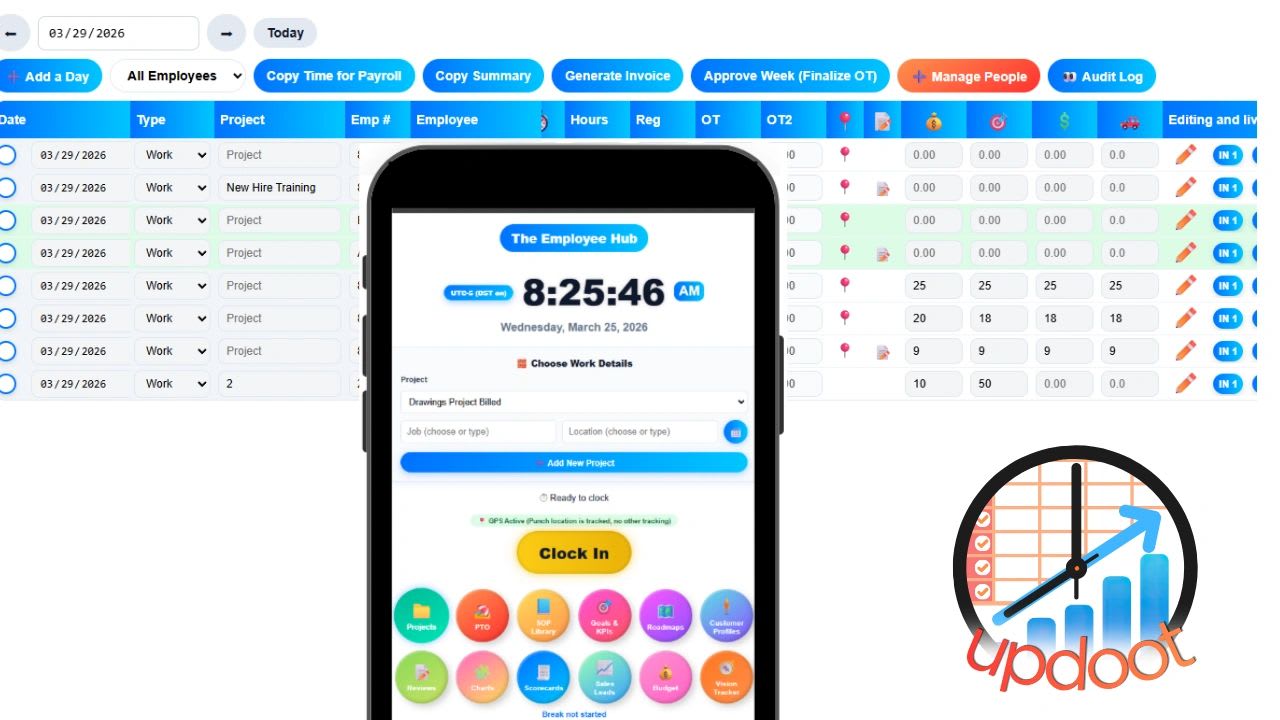
A web punch clock is a browser-based time clock that lets employees clock in and out from any internet-connected device without downloading an app, installing software, or buying hardware. Open a browser, go to the URL, punch in. That is the entire process.
For businesses where employees work at desks, shared computers, or any environment where asking people to download and manage a personal app creates friction, a web punch clock solves the problem cleanly. The clock-in station is a browser tab. It works on Windows, Mac, Chromebook, iPad, or any device with a browser and an internet connection.
Updoot's web punch clock is built into the platform alongside mobile clock-in and kiosk mode, so your team can punch in from wherever they are using whichever method fits their work environment.
How a Web Punch Clock Works
A web punch clock runs entirely in a browser. There is no software to install, no app store to navigate, and no hardware to purchase or maintain. Updoot in particular was designed to work from any browser and not require a separate app download. Apps are often less functional than the website anyway.
The workflow is simple. An employee navigates to the clock-in URL or logs in through the Updoot dashboard using their credentials or Google sign-in. They tap clock in. The system records the timestamp, the employee identity, and any job code or earning type they select. When their shift ends, they clock out. The system calculates total hours, applies their pay rate and any overtime multipliers, and adds the entry to their timesheet automatically.
Managers see every punch in real time from their own browser dashboard. Missed punches trigger alerts. Time cards build automatically throughout the pay period and move through an approval workflow before the payroll export runs.
Nothing about that workflow requires an app. It runs in a browser the same way email or any other web tool does.
Who a Web Punch Clock Is Built For
A web punch clock is the right fit for specific work environments where a browser is already the primary interface and adding an app creates unnecessary friction.
Office and desk-based teams. Employees who start their day by opening a computer do not need a separate phone app to clock in. A browser tab handles it in the same environment where they already work.
Shared computer environments. Retail back offices, warehouses with a shared workstation, and any facility with a common computer can run a web punch clock as a shared clock-in point. Multiple employees use the same device throughout the day, each logging in with their own credentials or PIN.
Hybrid teams. Employees who split time between home and office can punch in from either location using the same browser-based interface without needing to manage different clock-in methods for different days.
Teams without company phones. Requiring a mobile app assumes employees either have a smartphone or will use a personal device for work purposes. A web punch clock removes that dependency entirely.
Organizations with IT restrictions. Some businesses cannot install apps on managed devices due to IT policy. A web-based tool that runs entirely in a browser requires no installation and clears most IT restrictions without any configuration work.
What Updoot's Web Punch Clock Includes
Updoot's web punch clock is not a standalone time clock. It is one clock-in method inside a connected workforce management platform, which means every punch feeds directly into the same system that handles overtime calculation, time card approval, payroll export, HR records, and scheduling.
GPS clock-in. Even from a browser, Updoot records GPS coordinates at each punch so managers can verify location without requiring a mobile app.
Midnight splits. Overnight shifts that cross midnight are automatically split between the correct calendar dates. No manual correction required for employees working past midnight.
Break timer. Employees start and stop their break from the same browser interface. Break time is tracked, deducted from total hours, and recorded separately for compliance purposes.
Daily, weekly, and California overtime. Overtime is calculated automatically based on the rules that apply to your team. Federal weekly overtime, daily overtime, and California double time are all supported without manual calculation.
Earning type and job code selection. Employees select their earning type and job code at clock-in directly from the browser. That tagging turns raw hours into cost data organized by job, project, or location.
Tips, bonuses, commission, and mileage. Variable compensation is entered in the same system as clock time, not in a separate spreadsheet that gets reconciled later. Everything appears in the payroll export on the same row as the time entry it belongs to.
Kiosk mode from any browser. Set up any browser-connected device as a shared kiosk clock-in station. Employees enter their PIN or select their name, punch in, and the next employee does the same. One device serves the whole team without requiring individual logins.
Admin and employee time card approval with audit log. Every time card goes through a review and approval workflow before reaching payroll. Every edit is logged with who made it and when, creating an auditable record for every pay period.
Payroll-ready export. Approved hours export in a payroll-ready format for Gusto, ADP, Paychex, and more. The export includes regular hours, each overtime tier, pay rates and multipliers, and all variable compensation in one file. No manual reformatting, no CSV cleanup.
Sign in with Google. Employees authenticate with their existing Google credentials, removing the need to manage a separate username and password just to punch in.
The Features That Connect to Your Web Punch Clock
A web punch clock that only records time is a starting point. The value grows when that time data connects to the other parts of how the business runs. Updoot connects punch data to every function that depends on it.
Shift scheduling with suggest and swap. The schedule lives in the same platform as the time clock. Managers build shifts by job and location. Employees can suggest availability and swap shifts within the system. When an employee punches in, the punch maps automatically to their scheduled shift without manual reconciliation.
Capacity calendar. See staffing levels across every shift and location from a single view. Identify gaps before they become coverage problems rather than after a shift has already been understaffed.
Five categories of PTO accruals and allocations. PTO balances update in the same system as time cards. When an employee takes a vacation day, the entry flows through the same approval process as a regular time card and appears correctly in the payroll export without a separate manual adjustment.
Salaried employee setup. Salaried employees are configured separately from hourly workers. Their pay is calculated correctly in the export without forcing salaried hours into an hourly format.
Pay rates and multipliers with gross pay in export. Set each employee's base rate and applicable multipliers once. The system applies them to every punch automatically and shows the base rate, the multiplier, and the resulting pay amount as separate fields in the payroll report.
Employee HR vault. Emergency contacts, birthdays, anniversaries, and other employee records are stored in the same platform as time data. No separate HR system required for basic employee record management.
HRIS with performance tracking. Employee management, roles, and performance records connect to the same workforce data that the time clock generates. A performance review references the same employee record as the time card.
Two-way performance reviews. Managers and employees both contribute to performance feedback in the same system. Reviews are tied to employee records rather than living in a separate tool.
eNPS employee satisfaction surveys. Track team satisfaction with built-in survey tools without adding another platform to the stack.
Applicant tracking system. Hire directly into the same system your team clocks into. New hire records flow from the ATS into the HRIS and then into the time clock setup without re-entering data.
SOP library with revision and approval tracking. Document how shifts should run, how punch corrections are handled, and any other process that touches time and attendance. SOPs stay current with review due alerts and revision tracking built in.
Project management with custom templates. Track project hours from the same platform where employees punch in. Job code tagging at clock-in feeds project cost reports without a separate time tracking tool.
Sales CRM and invoice generator. For businesses that bill clients by the hour, tracked time connects directly to invoicing within the same platform.
Goal and KPI tracking. Team and individual goals sit in the same system as workforce data. Labor cost, attendance trends, and overtime patterns inform business performance without pulling data from multiple sources.
Vision Tracker. Built around the framework from Gino Wickman's Traction, the Vision Tracker connects company goals to the operational data the time clock generates.
Gantt roadmap builder and org chart. Leadership planning tools live in the same platform as the daily punch clock, connecting strategy to execution without switching tools.
AI assistant. Doot, Updoot's built-in AI assistant, is available across the platform to help teams work faster without a separate AI subscription.
Unlimited human support. Real people, not a chatbot or a ticket queue with a 48-hour response window.
Web Punch Clock vs Mobile App vs Kiosk Mode
Updoot supports all three clock-in methods from the same platform, so the right choice depends on your team's environment rather than the platform's limitations.
A web punch clock works best for desk-based employees, shared computer environments, and teams where browser access is already the primary work interface. No app required, no hardware required, works on any device.
A mobile app clock-in works best for field teams, employees without regular computer access, and anyone who needs GPS location verification at clock-in from a personal or company device.
Kiosk mode works best for shared physical spaces where a single device serves multiple employees throughout a shift. A tablet mounted at the entrance to a warehouse, a restaurant back office, or a job site trailer becomes the shared clock-in point for the whole crew.
Because all three methods feed into the same Updoot platform, businesses with mixed team types can run all three simultaneously. A field employee uses the mobile app. An office employee uses the web punch clock. A warehouse crew uses the shared kiosk. Every punch lands in the same system, goes through the same approval workflow, and flows into the same payroll export.
Related Reading
Clock-In System for Small Business →
Time Tracking Software for Construction in 2026 and Beyond →