
The When I Work Login Problem and What We Use Instead
If you typed "When I Work login" into Google today, you probably were not searching for a review. You were trying to get into your account. The fact that you ended up here suggests something went wrong, and you are not alone.
When I Work has real strengths: it simplifies scheduling, keeps teams connected, and the mobile app adds flexibility for shift-based workers. But a pattern shows up consistently in reviews across Capterra, G2, and Software Advice: the platform is reliable until it is not, and when it stops working, the timing is almost always the worst possible moment.
This post covers what the When I Work login problem actually is, why it keeps happening, and what a growing number of managers are using instead.
What Is the When I Work Login Problem?
The login problem is not one single bug. It is a category of frustrations that users report repeatedly across review platforms, and it clusters around three situations.
The app goes down during payroll. One business owner with nearly six years on the platform described losing access on the day payroll was due with no way to reach support. Another reported the app going down with missing clock-in data for a full week and no communication from the platform about the outage. Software Advice
Employees cannot clock in or out reliably. Multiple users report the app being inconsistent, with employees unable to clock in and out and payroll reports not available on a consistent basis. When hourly workers cannot punch in at shift start, the ripple effect hits payroll accuracy, labor cost reporting, and manager trust in the data. Software Advice
Session and access issues with no phone support. Users who have raised access and login issues report that When I Work's support operates through chat and email tickets only, with no option to speak to someone directly. One user noted that this approach causes friction when a customer genuinely needs hands-on help to resolve a problem. Fingercheck
None of these issues mean When I Work is a bad product. It has millions of users and a strong overall rating. But if your business runs on hourly time data and you cannot tolerate downtime on payroll day, the login reliability question is worth taking seriously before you are locked in.
Why Does This Keep Happening?
The short answer is that When I Work is a scheduling-first platform that added time tracking as a secondary function. Time and attendance tracking is an add-on across all plans, not included in the base per-user rate. That structure signals where the platform's core investment is: building and managing schedules. The time clock is a feature, not the foundation. Taskford
When time tracking is an add-on, it tends to be the first thing that breaks under load and the last thing that gets prioritized in product updates. That is not unique to When I Work. It is a pattern across most scheduling platforms that expanded into time tracking rather than building time tracking first.
Shift management can also become cumbersome, with users citing problems copying shifts, managing multiple shift types, and finding or swapping shifts. The approval and drop process for shifts is sometimes confusing or slow, which can result in missed shifts and extra administrative work for managers. WorkforceHub
The login specifically fails for one of two reasons: server-side outages, which affect everyone at once and are usually tied to third-party infrastructure, or session management issues, where the app logs employees out unexpectedly or fails to maintain their authenticated state between shifts. The second type is harder to diagnose and more disruptive because it appears random and inconsistent.
What When I Work Actually Costs (and What That Includes)
Before switching anything, it is worth understanding what you are actually paying for.
When I Work pricing starts at $2.50 per user per month on the Essentials plan, $5 on Pro, and $8 on Premium. Time and attendance tracking is a separate add-on across all three tiers, and the add-on pricing is not published on the vendor's pricing page. Taskford
That last part matters. If you are managing more than 20 hourly staff, you need to request the full pricing breakdown before budgeting, because the base per-user rate does not reflect what you will actually pay once time and attendance is added. Taskford
For a team of 30 employees on the Pro plan, you are starting at $150 per month before the time tracking add-on. For many small businesses, that is a reasonable price if the platform works reliably. For businesses that have experienced outages during payroll, the value calculation changes.
What We Use Instead: Updoot
Updoot is a time tracking platform built from the ground up around the clock-in and clock-out workflow, not scheduling with time tracking bolted on. The difference shows up in day-to-day reliability and in how the login and session management actually works for hourly employees.
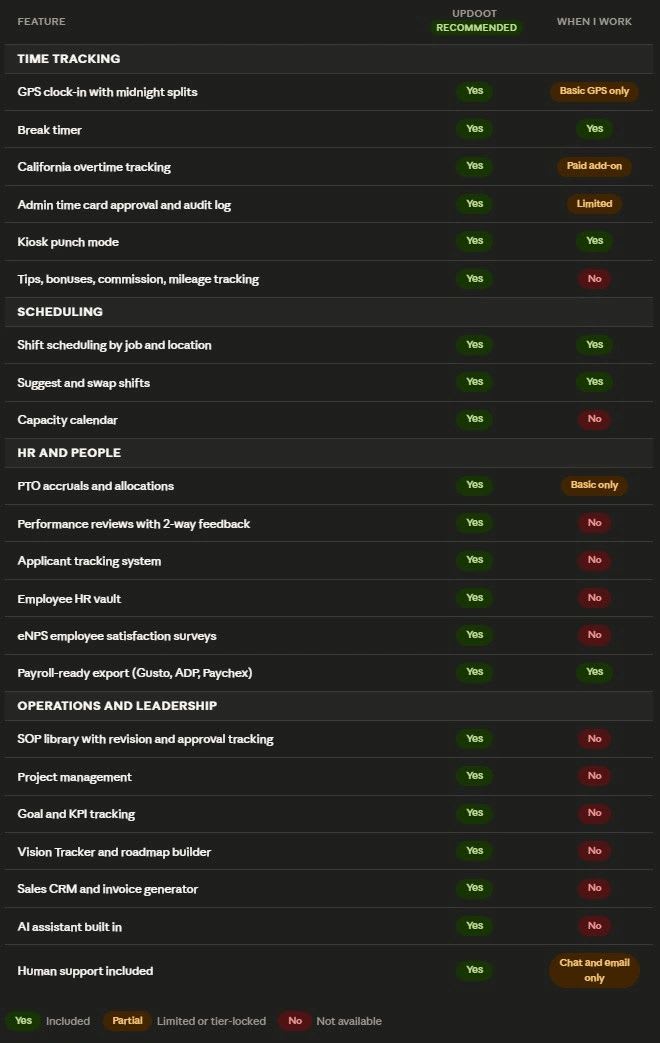
Here is how the two platforms compare across the features that matter most for time-tracking reliability.
The Differences That Actually Matter Day to Day
Time tracking is the core, not an add-on. In Updoot, the clock-in and clock-out system is the foundation the platform was built around. There is no separate add-on to enable, no unlisted price to request, and no scenario where payroll data disappears because the time tracking module went down independently of the scheduling module.
When I Work is a scheduling app. Updoot is a business operating system. When I Work gives you shifts and messaging. Updoot gives you time tracking, HR, performance reviews, hiring, SOPs, project management, sales CRM, goal tracking, and an AI assistant, all in one place. Teams that start on When I Work for scheduling eventually realize they are paying for three or four other tools to fill the gaps Updoot covers out of the box.
Every employee type is covered. Updoot handles hourly and salaried employees, tip tracking, bonuses, commission, mileage, and California overtime in the same platform. When I Work is built for shift workers. If your team has any complexity beyond punching in and out, you will outgrow it quickly.
Human support is included. Updoot offers unlimited support from real people. When I Work routes everything through chat and email tickets with no option to speak to someone directly.
Who Should Stay on When I Work
This is not an argument that When I Work is the wrong tool for everyone. It is genuinely the right fit for some teams.
If your primary need is scheduling and shift communication, and time tracking is secondary, When I Work is one of the most affordable and well-designed scheduling platforms available. Its Essentials plan at $2.50 per user per month undercuts most competitors while covering scheduling, time clock, and team messaging in a single package. Toggl
When I Work integrates natively with nine payroll systems including Rippling, Gusto, QuickBooks Online, ADP Run, ADP Workforce Now, Square Payroll, and Paychex. If you are already inside one of those ecosystems and scheduling is the main workflow, the platform performs well. SalaryBox
The login and reliability problems tend to hit hardest when hourly time accuracy is the central priority, when teams work in low-connectivity environments, or when the business cannot tolerate any gap between what the time clock says and what payroll processes.
How to Switch Without Losing Historical Data
If you decide to move, the process is simpler than most managers expect.
Start by exporting your current timesheet data from When I Work before canceling. Most payroll platforms accept CSV imports, and Updoot's onboarding team can walk you through mapping your existing data to the new format.
Set a transition date aligned with the start of a new pay period. Running two systems simultaneously, even for a week, creates reconciliation headaches that most managers do not want to deal with. A clean cutover at pay period start keeps the books clean.
Train your team before the first shift on the new system, not during it. Updoot's employee-facing clock-in takes under three minutes to walk through. The manager dashboard takes a bit longer, but most users are comfortable with it within the first pay cycle.
Give yourself one full pay cycle to validate that hours are calculating correctly before relying on the data for payroll. Run a spot check on three or four employees each day during the first week.
Frequently Asked Questions
Why does my When I Work login keep failing?
When I Work login failures most commonly happen during platform-wide outages, when employee sessions expire between shifts and require re-authentication, or when the time and attendance add-on experiences an independent issue from the main scheduling platform. Multiple users have reported losing access during critical payroll windows with no way to reach live support. If the issue is recurring rather than a one-time event, the session management behavior is likely the cause. Software Advice
Is there a When I Work alternative that is easier to log into?
Yes. Platforms that build time tracking as a core feature rather than an add-on tend to handle session persistence better. Updoot keeps employee sessions active between shifts so the clock-in process starts with a single tap rather than a login screen. For teams that have experienced repeated login friction, this is the most common reason they switch.
Does When I Work work offline?
No. When I Work requires an active internet connection for employees to clock in and out. If your team works in areas with unreliable signal, missed punches will show up in your timesheet data as gaps that require manual correction. Updoot supports offline clock-in with automatic sync when connectivity returns.
What happens to my data if I leave When I Work?
You can export your timesheet and scheduling data as a CSV before canceling your account. When I Work does not delete data immediately upon cancellation, but the access window varies. Export your data before you change your subscription status to ensure you have a complete record.
What is the main difference between When I Work and Updoot?
When I Work is a scheduling platform with time tracking available as an add-on. Updoot is a time tracking platform with scheduling built in. That structural difference determines which problems each platform handles best. For shift scheduling as the primary workflow, When I Work is strong. For hourly time accuracy, payroll reliability, and field team clock-in as the primary workflow, Updoot is built specifically for that use case.