
The Employee Dashboard: One Place to Clock In, Work, and Align
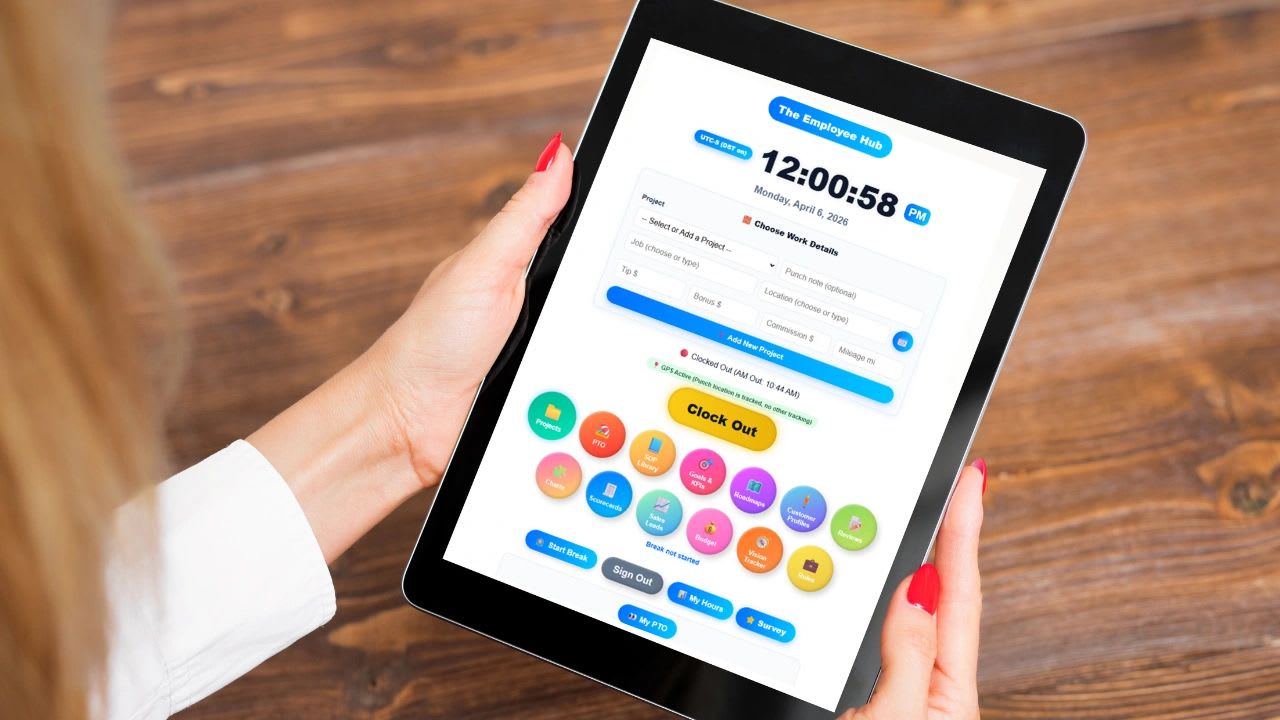
An employee dashboard gives every person on your team one place to start the day, see their work, and know how they are doing. Many companies blame low productivity, missed results, or slowing growth on effort, when the real problem is visibility. Employees do not know where to look, managers do not know what is happening, and work ends up scattered across systems, messages, and spreadsheets.
The result is confusion, missed steps, and a surprising amount of wasted time. People ask the same questions every morning, forget to clock in, work on the wrong priority, or redo a task because they could not find the instructions.
An employee dashboard fixes this by bringing everything into one screen. From a single place, employees can clock in and out, check their schedule, request time off, work on assigned projects, follow standard procedures, and track their goals and performance. This guide explains what an employee dashboard is, why it matters, what each part should do, and how it fits into a real workday, and it includes a free calculator for the cost of scattered tools.
What Is an Employee Dashboard?
An employee dashboard is a central workspace where employees manage their day. Instead of logging into a time clock app, a scheduling tool, a project board, a shared drive, and an HR portal separately, they open one screen that connects all of it.
A good dashboard ties together time tracking, scheduling, work assignments, company processes, and performance. The goal is simple: give employees everything they need to start, manage, and finish their work without friction, and give managers a clear view of what is happening without having to ask.
Why the Employee Dashboard Matters
Without a dashboard, employees rely on verbal instructions, scattered messages, separate systems, and their own memory to get through the day. That setup produces predictable problems. Punches get missed because the time clock is one more app to remember. Priorities are unclear because the latest instruction is buried in a chat thread. Work is done inconsistently because the right procedure is hard to find, and accountability suffers because nobody can see who is doing what.
With a dashboard, the picture changes. Work is structured, because every employee sees the same organized view of their day. Expectations are clear, because assignments, deadlines, and goals are right in front of them. Time is tracked accurately, because clocking in is the first thing they see. And performance improves, because people can see how they are doing and what matters most.
Clock In and Out: Start the Day With Clarity
The first action of every workday should be simple. Employees need a fast, reliable way to clock in and out, and when the time clock lives on the same screen as everything else, it stops being something people forget.
With a built-in time clock, an employee can start a shift in seconds, pick the project or job they are working on, and end the shift with a single action. Because the hours are tied to a job from the start, the record is clean, payroll is accurate, and managers can see labor by project without anyone rebuilding it from notes at the end of the week. Our guide to the Updoot time clock shows how it works on a kiosk or a phone.
PTO Management: Clear, Simple Time-Off Requests
Requesting time off should not require an email chain, a paper form, or a manager who remembers every conversation. Inside the employee dashboard, the whole process becomes simple. Employees request time off directly, managers approve or deny it quickly, balances are visible to everyone who needs them, and the schedule updates automatically once a request is approved.
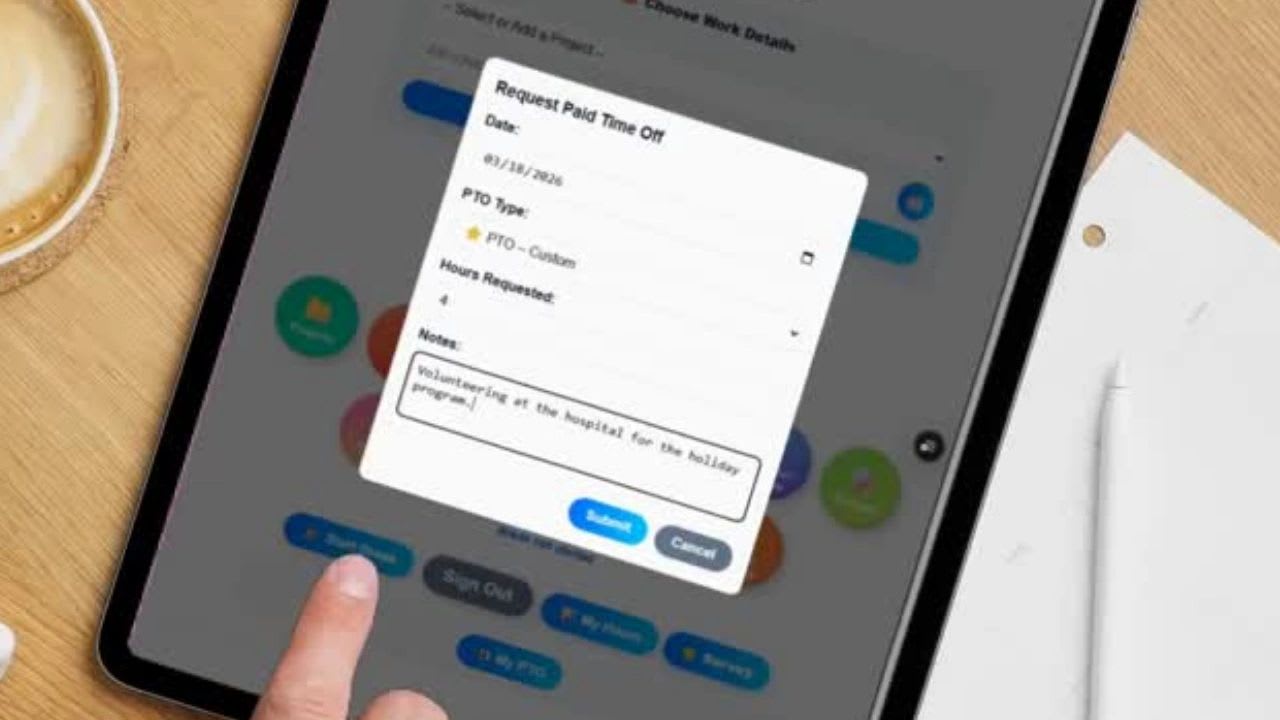
That clarity removes a steady source of friction. Employees know exactly how much time they have available, managers can see coverage before they approve a request, and nobody discovers on Monday morning that two people on the same team are both out.
Projects: Know What You Are Working On
One of the biggest problems on most teams is a simple lack of clarity. Employees arrive and ask, "What should I be working on?" and then wait for an answer. Every one of those questions costs a little time for the employee and a little attention from the manager.
The dashboard solves this by showing each person their assigned projects, active tasks, priorities, and deadlines as soon as they log in. Instead of waiting for direction, employees can start immediately, and managers can spend their time removing obstacles rather than handing out assignments.
SOPs: Standardize How Work Gets Done
Consistency is what separates good teams from great ones. Standard operating procedures, or SOPs, make sure work is done the same way every time, that employees follow proven best practices, that training new hires is faster, and that mistakes become less common.
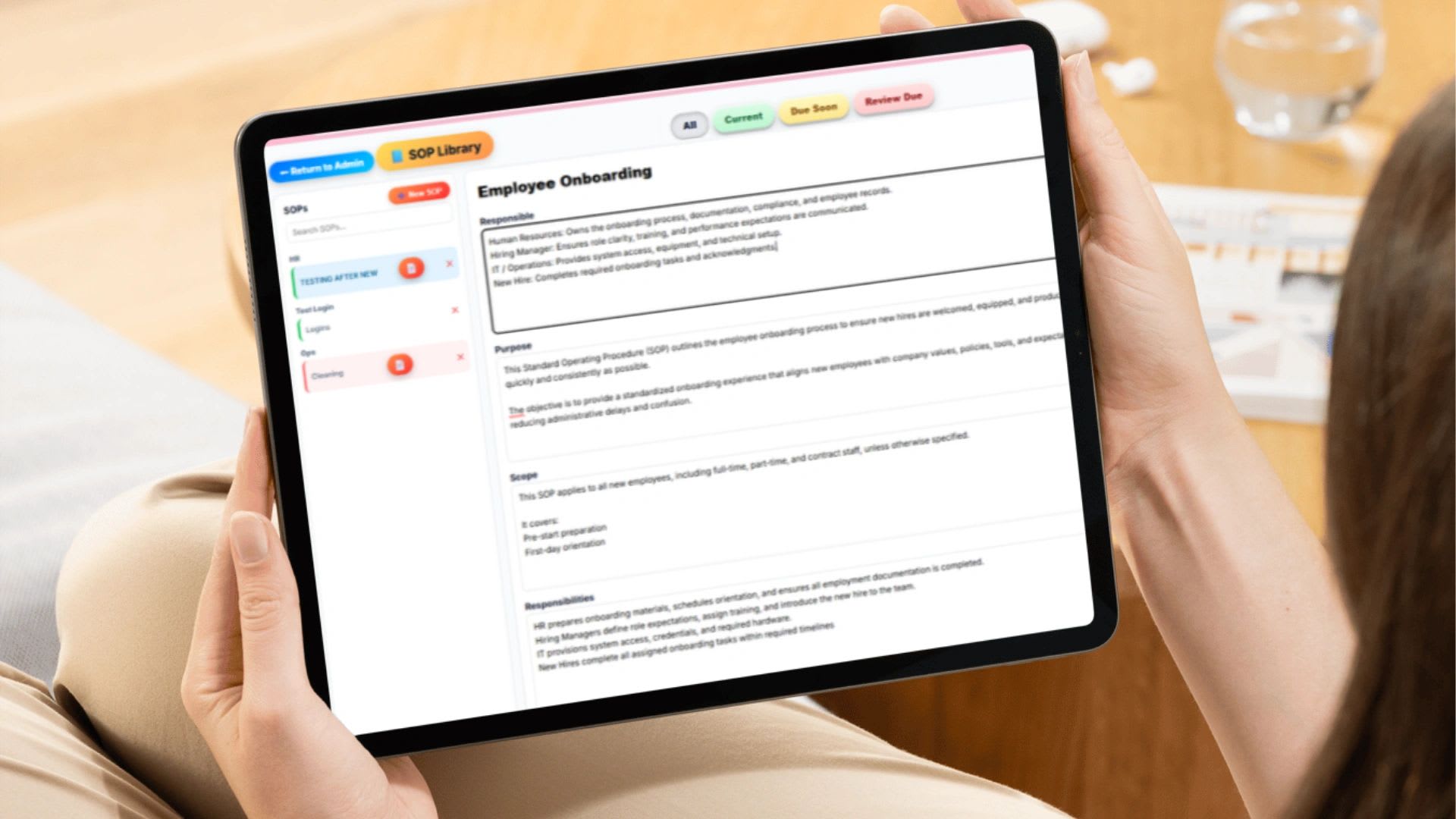
When SOPs live inside the employee dashboard, people can open the right procedure at the moment they need it and follow it step by step, rather than hunting through a shared drive or asking a coworker. That keeps everyone aligned with company standards, even on the evening shift or in a location where the manager is not on site. Our guide to SOPs for small business explains how to write them.
Goal Tracking: Keep Employees Focused on What Matters
Work gets done faster when people know what they are working toward. Without clear goals, employees stay busy without always being productive. Priorities shift, progress is hard to see, and it becomes difficult to tell whether the team is winning.
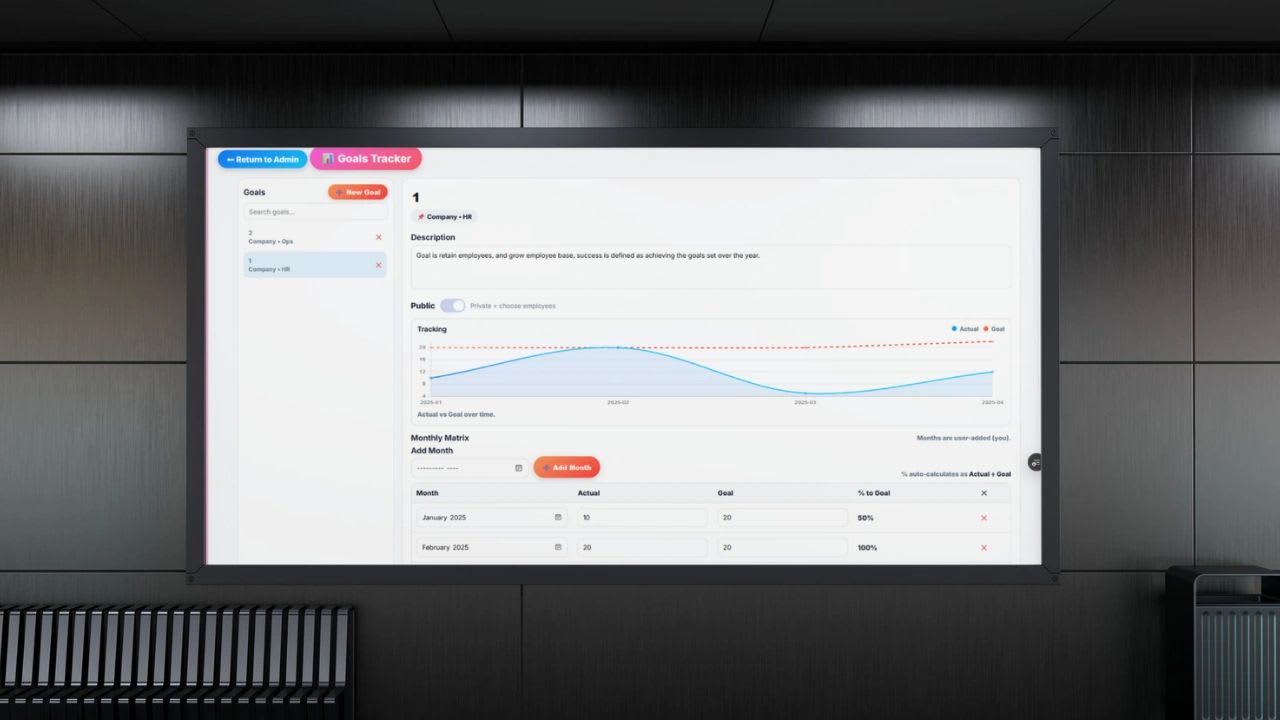
Goal tracking inside the employee dashboard makes expectations visible and measurable. Employees can see their individual and team goals, track progress as it happens, understand the priorities for the week or month, and stay aligned with the company's larger objectives. Instead of guessing what matters most, they can focus on the work that actually moves the business forward.
How Goal Tracking Improves Performance
Putting goals on the dashboard changes behavior in four ways. First, priorities become clear, because employees can see exactly what they are working toward instead of relying on the last thing someone said.
Second, progress becomes measurable. Instead of guessing how they are doing, employees can see what is completed, what is in progress, and what is falling behind, early enough to do something about it. Third, accountability increases, because when goals are visible, ownership is obvious to everyone. And fourth, motivation improves, because seeing progress in real time creates momentum, and small wins become visible instead of disappearing into a busy week.
Goal tracking is not separate from the work. It is part of the daily rhythm. An employee clocks in, reviews assigned projects, checks current goals, and works toward measurable outcomes, tracking progress through the day so daily effort stays connected to long-term results.
Performance Reviews: Visibility Into Progress
Employees perform better when they know where they stand. A dashboard makes performance visible by bringing goals, feedback, reviews, and progress over time into one view, so reviews are not a once-a-year surprise.
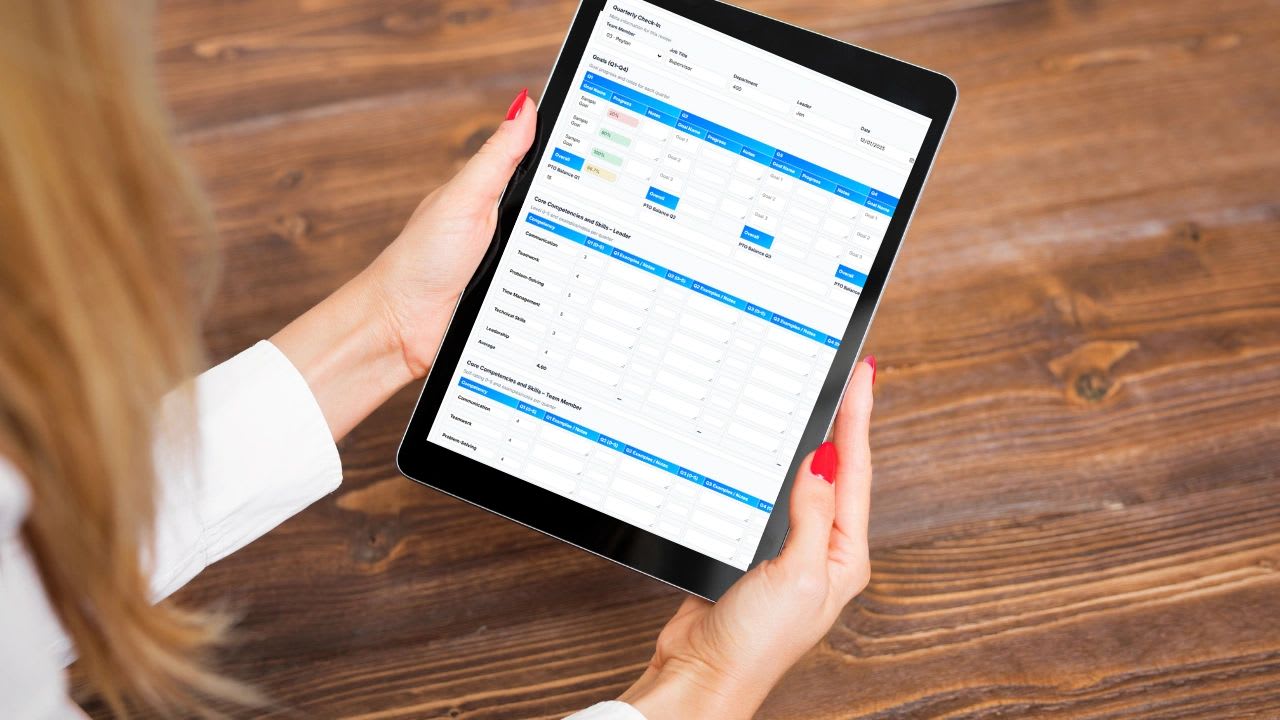
That visibility builds accountability, motivation, and alignment with what the company expects. Employees see their progress and feedback as it happens, managers have a record to draw on when it is time for a review, and conversations about performance are grounded in facts rather than memory.
Bringing It All Together
The real power of an employee dashboard is not any single feature. It is how everything connects. When the time clock, PTO, projects, goals, SOPs, and performance all live in one place, you create a system where work is structured, time is tracked, expectations are clear, and execution improves.
Employees no longer need to ask what to do next. They already know, because the answer is on the screen in front of them.
What This Looks Like Day to Day
Picture a typical shift. An employee arrives and clocks in from the dashboard, selecting the job they are starting on. They glance at their schedule and assigned work to see what matters today, then open the SOP for the first task and follow it step by step. Through the day, they check off progress on their goals. If they need a day off next month, they request it in the same place, and at the end of the shift they clock out with one tap.
Everything happens on one screen. There is no hunting for instructions, no chasing a manager for an answer, and no end-of-week scramble to reconstruct hours from memory.
Estimate the Cost of Scattered Tools
Minutes lost to switching apps, asking what to work on, and searching for instructions add up quickly across a team. Use the calculator to put your own numbers on it, compare what you pay for separate tools today, and preview what a dashboard with your chosen modules would show an employee.
Scattered Tools Cost Calculator
Estimate what it costs when employees hunt across apps, messages, and spreadsheets to find out what to do. Enter your own numbers, then pick the modules your team would use to preview their dashboard. Nothing you enter is saved or sent anywhere.
Preview a Dashboard
The Result: Better Execution Across the Board
When employees have a clear system, the effects show up everywhere. Productivity rises because people spend their time working instead of searching. Errors fall because procedures are easy to follow. Time tracking becomes accurate because clocking in is part of the routine. Managers gain real visibility, and teams stay aligned around the same priorities.
None of this is about adding more tools. It is about simplifying how work happens, so the tools people already need are all in one place.
How Updoot Powers the Employee Dashboard
Updoot brings all of this together in one system, and each employee's dashboard is customizable. If the sales team needs to track leads alongside PTO and goals, you turn those modules on for that department in one click, and everyone else keeps a simpler view without leads cluttering their screen. Staff can clock in from any browser with the Updoot online time clock.
Employees clock in and out through a kiosk or their phone, and managers assign work by project, job, and location. PTO and scheduling, SOPs, goals, and performance reviews all live on the same dashboard, so every employee knows when they are working, what they are working on, how to do it, and how they are performing. Updoot is business management software for $5 per user per month, and you can start a free trial to set up your team's dashboard today.
Final Thoughts on Employee Dashboards
If your team feels disorganized, it is rarely because people are not working hard. It is usually because they do not have a clear system to work within. An employee dashboard fixes that by turning each workday into a structured, visible, and repeatable process, where everyone knows what to do, how to do it, and how they are doing.
Opens in Google Drive. View and download for free.
Frequently Asked Questions About Employee Dashboards
What is an employee dashboard?
An employee dashboard is a central workspace where employees manage their day, bringing together time tracking, scheduling, PTO, work assignments, procedures, goals, and performance in one screen.
What should an employee dashboard include?
Most teams benefit from a time clock, schedule, PTO requests and balances, assigned projects and tasks, SOPs, goal tracking, and performance reviews. Some roles add extras such as sales leads.
Why do employees need a dashboard?
Without one, employees rely on messages, memory, and separate apps, which leads to missed punches, unclear priorities, and inconsistent work. A dashboard puts everything they need in one place so they can start working immediately.
How does an employee dashboard help managers?
Managers see who is clocked in, what each person is working on, PTO requests, and progress toward goals without having to ask, which frees their time for coaching and removing obstacles.
Can different employees see different things on their dashboard?
In Updoot, yes. Each dashboard is customizable by department or role, so a sales team can see leads while other employees keep a simpler view.
How much does an employee dashboard cost?
Updoot includes the employee dashboard, time clock, PTO, projects, SOPs, goals, and performance reviews for $5 per user per month.