
How to Choose Mobile Workforce Management Software
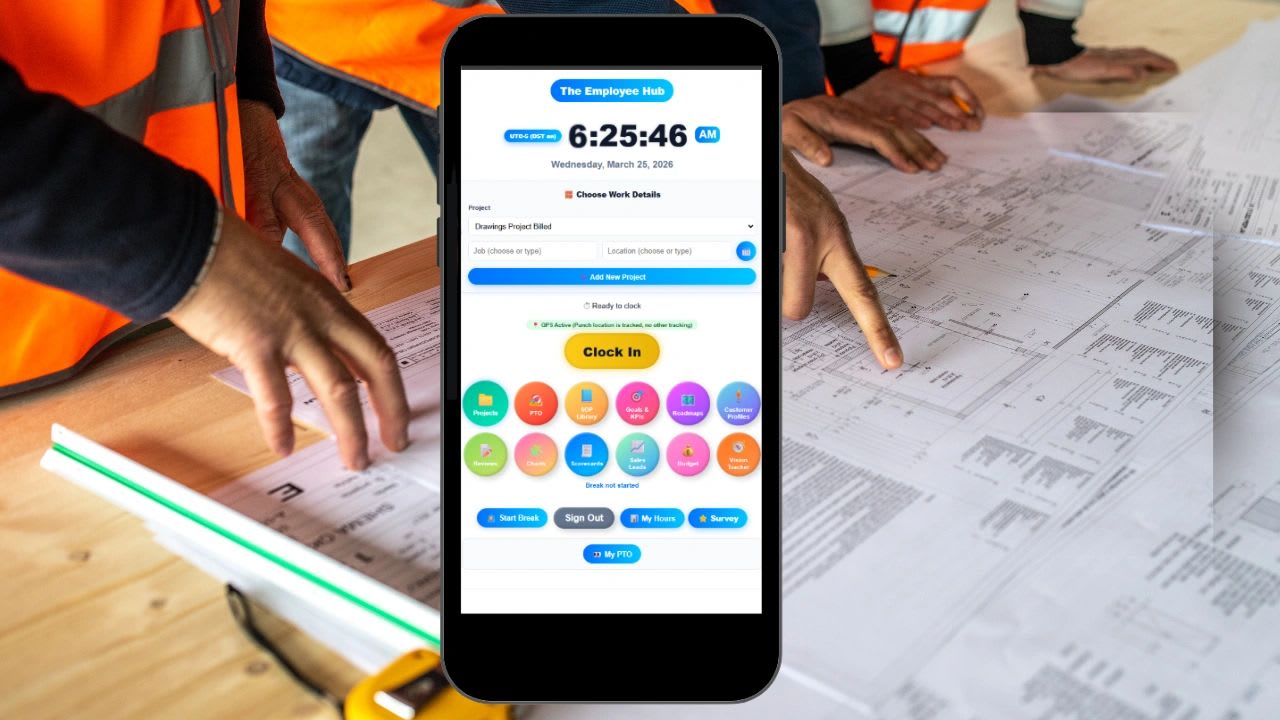
Mobile workforce management software is a system that helps businesses manage employees who are not tied to a desk. That includes field technicians, crews that move between job sites, remote teams, hybrid employees, and service teams who spend their day at client locations.
At its core, this kind of software solves four problems. It tracks where employees are working, how long they are working, what work they have been assigned, and how those hours connect to payroll, projects, and billing. Most tools do this through some combination of mobile time tracking, GPS location, scheduling, task assignment, timesheet approval, and payroll export.
The real question, though, is not what a tool includes. It is whether the tool fits how your business actually operates every day. This guide explains when you need mobile workforce software, the six capabilities that matter most, the pitfalls that lead to bad purchases, and a set of questions to define what you really need. It also includes a free weighted scorecard you can use to compare vendors side by side.
When Do You Actually Need Mobile Workforce Management Software?
Many businesses adopt this kind of software either too early or too late. Too early, and they pay for complexity their team is not ready to use. Too late, and they spend months fighting payroll errors and scheduling gaps that software would have prevented.
Signs You Likely Need It
You are probably ready if more than five to ten employees regularly work away from a central office. The same is true if hours still arrive through paper timesheets, text messages, or a photo of a notebook page.
Payroll is another clear signal. If verifying hours takes more than a few hours each pay period, or if you regularly call employees to ask when they actually started and finished, you are paying for a missing system in management time.
Watch also for trouble confirming where work was performed, growing scheduling conflicts and missed shifts, and a general sense that you are losing visibility into daily operations as the business grows. Any two or three of these together usually justify the investment.
Signs You Probably Do Not Need It Yet
If your team is three to five people who work in the same place, you can usually verify work through direct conversation. When payroll is simple, there is no overtime complexity, and you do not bill clients by the hour or track costs by job, a lightweight time clock may be all you need for now.
The mistake many businesses make is buying software to fix chaos instead of defining structure first. Software does not fix a broken process. It amplifies whatever process you already have. Decide how clock in, approvals, and job coding should work, then find a tool that supports that workflow.
What to Look For in Mobile Workforce Management Software
This is where most buyers get overwhelmed. Every vendor lists dozens of features, but only a handful determine whether the system succeeds over the long term. The table below summarizes the six that matter most, followed by a closer look at each.
| Capability | What good looks like | Warning sign |
|---|---|---|
| Time tracking | Clock in with one or two taps, time coded to jobs, works offline. | Employees skip it or clock in hours late. |
| Scheduling | Shows conflicts and availability, syncs with actual hours. | Managers rebuild the schedule by hand every week. |
| GPS tracking | Location captured at punches or during work hours only, geofenced sites. | Constant tracking that feels like surveillance. |
| Job and project tracking | Hours tied to clients and jobs, estimated vs actual. | Only total hours per person. |
| Reporting | Labor cost per job, overtime, attendance, on one screen. | Reports that need exporting and rebuilding. |
| Mobile experience | Designed for phones first, fast on a weak signal. | A desktop app squeezed onto a small screen. |
1. Time Tracking That Matches Reality
Time tracking is the foundation of workforce management, but not all time tracking is equal. Employees should be able to clock in and out from their phone in seconds and assign that time to a specific job or task as they go.
Look for offline tracking that stores punches when the signal drops and syncs later, which matters for basements, rural sites, and large buildings. You also want a clear audit trail showing every edit, who made it, and why. If employees avoid using the system, it fails immediately, so the best software is the one people use without friction.
2. Scheduling That Reflects Real Operations
Scheduling is more than dragging names onto a calendar. A good tool shows availability and conflicts clearly, lets employees request swaps without a chain of text messages, and notifies people automatically when something changes.
Most importantly, the schedule should sync with time tracking, so you can compare scheduled hours with actual hours and spot overtime before it happens. If managers are constantly fixing schedules by hand, the tool is creating work instead of saving it.
3. GPS Tracking Without Overreach
GPS is one of the most misunderstood features. It should answer one question: did the employee actually perform work at the job site? It should not feel like surveillance for its own sake.
Good systems capture location only during work hours or at the moment of a punch, use geofences around job sites to flag punches made far from the work, and are transparent, so employees know exactly what is recorded and when. Tell your team before you turn it on and put the rules in writing. Rules on employee location tracking and notice can vary, so review our guide to GPS tracking laws by state and confirm the requirements where you operate. When GPS feels intrusive, adoption drops and accuracy suffers.
4. Job and Project Tracking
This is where many tools stop short. Basic systems only record hours per person. Better systems connect those hours to the work itself, so you can assign time to projects and clients, see hours per job, and compare estimated time with actual time.
That connection is what turns time data into costing and billing data. Without it, you are tracking activity, not productivity, and you cannot tell which jobs make money.
5. Reporting That Actually Helps Decisions
Nearly every product has reporting. Very few have reporting managers use. Look for simple dashboards that show labor cost per job, overtime building up during the week, attendance patterns, and productivity trends over time.
If a report takes ten clicks to build or has to be exported to a spreadsheet before anyone can read it, it will not get used. A useful report answers a question a manager is already asking.
6. Mobile Experience First, Not Desktop First
Your workforce is mobile, so your software must be designed for phones first. Employees need to clock in quickly, find their tasks, view their schedule, and submit updates from a job site with gloves on and a weak signal.
During a trial, hand the app to your least technical employee and watch them use it without help. If they struggle, adoption will fail, however powerful the back office looks in the sales demo.
Free Mobile Workforce Software Scorecard
Feature lists make every product look the same. A weighted scorecard forces you to decide what matters most to your business before you look at vendors, then scores each tool against those priorities.
Set a weight for each criterion first. Then book demos or start trials and score each tool from 1 to 5. Enter the price per user and any add-ons or separate tools you would still need to pay for, and the scorecard shows the weighted score out of 100 and the true monthly cost. The example compares three hypothetical tools for a 15-person field team.
Mobile Workforce Software Scorecard
Compare up to three tools on the criteria that matter most. Set a weight from 1 to 5 for how important each criterion is to your business, then score each tool from 1 to 5 after a demo or trial. The scorecard calculates a weighted score out of 100 and the true monthly cost, including add-ons. Nothing you enter is saved or sent anywhere.
| Criterion | Weight |
|---|
In the example, Tool A scores 88 out of 100 and costs $75 a month for 15 users. Tool B looks close in some areas but needs $60 a month in add-ons, which brings it to $180 and $12 per user. Tool C has the lowest sticker price at $4 per user, yet $120 in extra tools pushes its true cost to $180 as well, while it scores lowest on job tracking and payroll connection. That is exactly the kind of result a feature list hides.
The Biggest Pitfalls When Choosing Software
Most businesses do not end up with the wrong tool because they picked a bad product. They end up with the wrong tool because they asked the wrong questions. These five pitfalls come up again and again.
Pitfall 1: Choosing Features Over Workflow
Buyers often compare feature lists instead of asking how a tool fits the way the team actually works. A product can have fifty features and still be wrong for you if clocking into a job takes six taps or if approvals do not match how your supervisors operate. Map your workflow first, then test each tool against it.
Pitfall 2: Underestimating Total Cost
Pricing is rarely as simple as the headline number. Per-user pricing scales quickly as you hire. Core features such as GPS, job costing, or payroll export are sometimes sold as add-on modules. You may still need separate systems for projects or invoicing, and every tool carries training and onboarding time. A cheap tool that requires five other tools is not cheap.
Pitfall 3: Ignoring Adoption Risk
Even the best software fails if employees do not use it consistently. Common blockers include too many steps to clock in, confusing screens, poor performance on phones, and no clear benefit for the employee. Show your team what is in it for them, such as accurate pay, fewer calls about hours, and easy time off requests, and adoption follows. If they resist, your data becomes unreliable.
Pitfall 4: Overbuilding Too Early
Many companies buy enterprise-level systems before they need them. The result is complexity that slows teams down, features nobody uses, and higher costs with no return. Start with what you need now and choose a tool that can grow with you, rather than paying today for what you might need in three years.
Pitfall 5: Not Connecting Systems Together
One of the biggest hidden costs is disconnected software. When time tracking, project management, payroll, standard operating procedures, and communication all live in different tools, you end up entering the same data twice and reconciling numbers that never quite match. Every handoff between systems is a chance for an error.
How to Gauge What You Actually Need
Before you book a single demo, answer four practical questions. Your answers become the weights in the scorecard above.
What Is Currently Broken?
Be specific. Is payroll slow? Are hours inaccurate? Is scheduling messy? Is job costing unclear? Write down the two or three problems that cost you the most time or money. If you cannot name the problem, software will not fix it.
What Decisions Do You Need Better Data For?
Software should support real decisions, such as which jobs are profitable, which employees are over or underused, where time is being lost, and how accurate your estimates are. If nobody will use the data to decide anything, collecting it is wasted effort.
How Complex Is Your Team Structure?
Simple teams need simple tools. Teams spread across several locations or roles need structured permissions and approvals. Hybrid and field teams need a strong mobile-first platform. Let complexity drive your choice, not the length of a feature list.
What Systems Are You Already Using?
Map your current payroll system, project tools, communication channels, and HR processes. Then decide whether the new software will replace some of them or simply add another layer. Replacing three tools with one usually delivers far more value than adding a fourth.
When Mobile Workforce Management Becomes Critical
Every growing business reaches a tipping point where manual systems stop scaling. It usually shows up as an inability to verify hours without chasing people, payroll that takes too long to reconcile, projects that go over budget before anyone notices, managers who spend more time coordinating than leading, and employees who are not clear on what is expected of them.
At that point, software is no longer optional. It becomes infrastructure, as basic to the business as your phone system or your bank account.
Where Updoot Fits In
Most mobile workforce tools focus on a single slice of the problem, such as time tracking, scheduling, or GPS. Updoot takes a broader approach. It is business management software that connects operational systems in one platform instead of splitting them across separate apps.
Inside Updoot, time tracking is tied to projects, and tasks carry hours and deadlines. Standard operating procedures live next to the work they describe. Employee dashboards show assigned work and paid time off, performance tracking is tied to execution, and invoices are built directly from tracked hours.
For a scaling business, that removes the need to stitch tools together and eliminates the hidden cost of disconnected systems. Updoot costs $5 per user per month, and you can start a free trial and score it with the scorecard above alongside any other tool you are considering.
Final Thoughts
Choosing mobile workforce management software is not about finding the most features or the lowest price. It is about clarity: knowing what problem you are solving, how your team really works, how much complexity you can manage, and whether your systems should be separate or unified.
Most businesses do not need more software. They need better alignment between work, data, and decisions. Define your process, weight what matters, test with your real team, and choose the tool that makes the business run better, not just the one that tracks more.
Opens in Google Drive. View and download for free.
Related Reading
Mobile Workforce Management Guide →
Frequently Asked Questions About Mobile Workforce Management Software
What is mobile workforce management software?
It is software that helps businesses manage employees who work away from a desk. It typically combines mobile time tracking, GPS, scheduling, task assignment, timesheet approvals, and a connection to payroll, projects, or billing.
When does a business need mobile workforce management software?
Usually once five to ten or more employees work outside a central office, hours arrive by paper or text, payroll verification takes hours each cycle, or you cannot confirm where work was performed.
What features matter most in mobile workforce software?
Fast mobile time tracking, job and project time allocation, scheduling that syncs with actual hours, transparent GPS, useful reporting, and an app designed for phones first.
Is GPS tracking of employees a good idea?
It can be, when it is limited to work hours or punches, uses geofences around job sites, and is fully disclosed to employees. Rules on tracking and notice vary by location, so confirm the requirements where you operate.
How do I compare mobile workforce management tools?
Use a weighted scorecard. Decide how important each criterion is, score every tool from 1 to 5 after a demo or trial, and compare the weighted scores along with the true monthly cost, including add-ons and any separate tools you would still need.
How much does mobile workforce management software cost?
Most tools charge per user per month, and some charge extra for modules such as GPS, job costing, or payroll export. Always add up the price per user, the add-ons, and any other tools required to get the full picture. Updoot is $5 per user per month.
Why do workforce software rollouts fail?
Most failures come from poor adoption. Too many steps to clock in, confusing screens, weak phone performance, and no clear benefit for employees all lead to skipped punches and unreliable data.