
RASCI Charts: The Hidden Secret to Clarity and Accountability
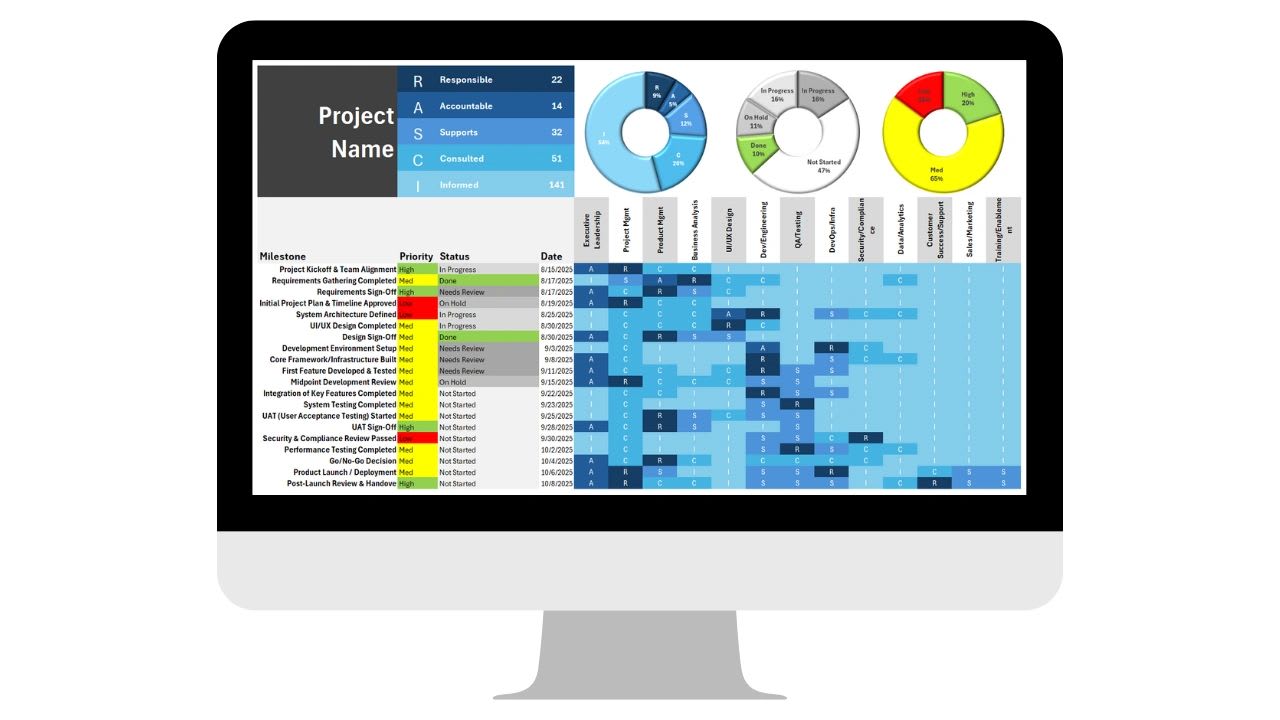
A RASCI chart is a simple table that shows exactly who does what on every task, project, or decision. In any organization, confusion about ownership is a silent productivity killer. Emails pile up, decisions stall, and people spend hours working out whether something is their job or someone else's.
A RASCI chart removes that confusion. By assigning five clear roles, Responsible, Accountable, Support, Consulted, and Informed, to every task, it eliminates duplicated effort, closes accountability gaps, and speeds up decisions.
This guide explains what each RASCI role means, how RASCI compares with RACI, who benefits most, and how to fill out a chart step by step. It also includes a free RASCI chart builder that checks your chart for the most common mistakes.
What Is a RASCI Chart?
RASCI is an acronym for the five roles a person can play on a task. A RASCI chart, sometimes called a responsibility assignment matrix, maps tasks or decisions down the side against people or roles across the top, with a letter in each cell showing how that person is involved.
| Letter | Role | What it means | How many per task |
|---|---|---|---|
| R | Responsible | Does the work | At least one |
| A | Accountable | Owns the outcome, approves, and signs off | Exactly one |
| S | Support | Helps the Responsible person get the work done | Zero or more |
| C | Consulted | Gives input before decisions are made (two-way) | Zero or more, kept small |
| I | Informed | Is kept updated on progress or results (one-way) | Zero or more |
By defining these roles for every task, you remove guesswork. Everyone can see who is doing the work, who makes the final call, who should be asked for input, and who simply needs to hear about the result.
RASCI vs. RACI
RACI is the more familiar four-letter version, with Responsible, Accountable, Consulted, and Informed. RASCI adds Support, which separates the people who actively help with the work from those who are only consulted. That distinction matters on larger tasks, where several people contribute effort but only one person drives the work. For small teams, you may not need every letter, since some roles overlap. Use the ones that add clarity and skip the rest.
Why RASCI Charts Matter
Organizations without clear ownership tend to suffer from the same four problems. Decisions are delayed because nobody knows who has the authority to approve. Effort is duplicated because two people do the same work without realizing it. Accountability gaps appear, so when something goes wrong, nobody is clearly responsible. And communication overload sets in as teams copy everyone on everything rather than executing.
A RASCI chart addresses all four by making ownership explicit. The benefits follow directly: clarity, because everyone knows their role in each task; accountability, because one person owns each outcome; efficiency, because fewer emails and meetings are needed; alignment, because the right people are consulted and informed; and easier onboarding and scaling, because new team members can see how work flows on day one.
Who Needs a RASCI Chart?
RASCI charts help almost any team, but they are especially valuable in a few situations. Project teams with many tasks and dependencies use them to keep handoffs clean. Cross-functional initiatives, where marketing, operations, product, and finance overlap, use them to avoid turf confusion. Leadership teams use them to clarify decision-making authority.
Fast-growing companies use them to prevent chaos as responsibilities shift and new people join. And change management efforts, such as rolling out a new system or process, use them to assign clear roles for each step. In short, any team facing unclear ownership, slow decisions, or repeated "I thought you were handling that" moments will benefit.
How to Fill Out a RASCI Chart
1. List the Tasks or Decisions
Down the left side, list every key task, deliverable, milestone, or decision. Be specific. "Marketing" is too broad to assign, while "write campaign copy" or "approve campaign budget" can be assigned clearly.
2. List the People or Roles
Across the top, list everyone involved. You can use individual names, job titles, teams, or departments. Using roles rather than names keeps the chart useful when people change jobs.
3. Assign R, A, S, C, and I
For each task, work across the row. Ask who actually performs the task, and mark them R. Ask who signs off on the final outcome, and mark exactly one person A. Mark S for anyone who helps the Responsible person, C for anyone whose input is needed before the work is finished, and I for anyone who needs to know the result. Leave cells blank when a person has no role.
The same person can be both Responsible and Accountable on smaller tasks. In that case, mark them A, which implies they also own the work, or use "A/R" if your team prefers.
4. Review and Confirm
Share the draft with everyone on it and adjust based on their feedback. Check each row for exactly one A and make sure someone is doing the work, either an R or the A handling it themselves, and check each column to make sure nobody is overloaded or has been left out of work they should own.
5. Use It Actively
A RASCI chart is not a document to file away. Refer to it in planning, meetings, and handoffs, and point to it whenever someone asks who owns a decision. Pairing it with an accountability chart for the organization as a whole gives both the big picture and the task-level detail.
Free RASCI Chart Builder
Use the builder below to create your own chart. Enter your people or roles, list the tasks, and pick a letter for each cell. The builder checks every row for the rule that matters most, exactly one Accountable person, and adds up each person's R and A assignments so you can spot overloads.
The example maps a small marketing campaign across five roles. Copy it to Excel, where the A count, R count, check column, and workload row are live COUNTIF formulas, or print it to share with the team.
RASCI Chart Builder
List your tasks down the side and your people or roles across the top, then choose R, A, S, C, or I in each cell. The builder checks every task for exactly one Accountable person, counts each person's workload, and flags gaps and overloads. Print the chart or copy it to Excel with check formulas. Nothing you enter is saved or sent anywhere.
Tips for Making RASCI Charts Work
Keep it simple. Focus on the tasks and decisions that cause confusion. A chart with 200 rows will not be read.
Only one A per task. When everyone is accountable, nobody is. This is the single most important rule.
Limit the Cs. Every Consulted person adds time to a decision. Consult the people whose input genuinely changes the outcome and inform the rest.
Use colors or symbols. Color-coding the letters makes the chart easy to scan, as in the builder above.
Treat it as a living document. Update it when roles change, projects evolve, or new people join.
Connect it to your tools. RASCI charts pair well with project management software and Excel templates, so the owner on the chart matches the owner on the task.
Common RASCI Mistakes
Too many As, which recreates the confusion the chart was meant to fix. No R at all, which means a decision-maker is assigned but nobody does the work. One person with an A or R on nearly every row, which signals a bottleneck or an owner who needs to delegate. Our guide on learning to delegate work can help. And a chart nobody uses, which happens when it is built once and never referenced again.
Bringing RASCI Into Daily Work
A RASCI chart is most powerful when roles are visible where the work happens. Updoot is business management software with a built-in RASCI tool alongside tasks, projects, SOPs, and meetings, so ownership stays clear as work moves forward. It costs $5 per user per month, and you can start a free trial anytime. You can also get a ready-made RASCI chart template from our business tools collection.
Final Thoughts
A RASCI chart may look like a small tool, but its effect on clarity, speed, and accountability is large. Teams that use one make decisions faster, waste less effort, scale projects without confusion, and bring new people up to speed quickly. If your team struggles with unclear ownership, duplicated work, or stalled decisions, a RASCI chart is one of the simplest ways to regain control. Clarity is not just nice to have. It is a competitive advantage.
Opens in Google Drive. View and download for free.
Related Reading
Best RASCI Chart Software and App for Small Business →
Frequently Asked Questions About RASCI Charts
What does RASCI stand for?
RASCI stands for Responsible, Accountable, Support, Consulted, and Informed, the five roles a person can play on a task or decision.
What is the difference between RASCI and RACI?
RACI has four roles. RASCI adds Support, which separates people who actively help with the work from those who are only consulted for input.
Can a task have more than one Accountable person?
No. Each task should have exactly one Accountable person who owns the outcome and signs off. Multiple Accountable people recreate the confusion the chart is meant to remove.
Can the same person be Responsible and Accountable?
Yes, especially on smaller tasks. Mark them A, or A/R, to show they both own and perform the work.
What is the difference between Consulted and Informed?
Consulted is two-way: their input is needed before the work or decision is finished. Informed is one-way: they are told about progress or results.
How do I make a RASCI chart in Excel?
List tasks in column A and roles across row 1, enter R, A, S, C, or I in each cell, and use COUNTIF on each row to check for exactly one A. The free builder on this page copies all of this to Excel.
When should a RASCI chart be updated?
Whenever roles change, new people join, or a project enters a new phase. Treat it as a living document.