
QuickBooks Time Tracking vs Updoot: Features and Pricing Chart
This is exactly what QuickBooks Time offers in a side-by-side comparison chart to make the decision easy. QuickBooks is one of the most recognized names in small business software. If you have been running a business for more than five minutes, you have almost certainly encountered it. QuickBooks Time, formerly known as TSheets before Intuit acquired it in 2017, is the time tracking product that sits alongside QuickBooks accounting software and is marketed as the natural time tracking choice for businesses already in the QuickBooks ecosystem.
The logic is appealing. You already use QuickBooks for accounting. Why not use QuickBooks Time for time tracking so everything stays connected? It is a reasonable starting point. But it is worth understanding exactly what you are getting, what you are not getting, and whether the ecosystem argument is strong enough to justify the limitations and the cost before you commit.
This article breaks down QuickBooks Time tracking, what it does well, where it falls short, and how it compares to Updoot for small businesses that need more than just a time clock that feeds into their accounting software.
What Is QuickBooks Time Tracking?
QuickBooks Time is a cloud-based time tracking and scheduling tool owned by Intuit and designed to integrate with QuickBooks accounting software. It was originally built as TSheets, an independent time tracking company founded in 2006, and was acquired by Intuit in 2017 for $340 million.
The core product allows employees to clock in and out via mobile app, web browser, or a designated kiosk device. Time entries are organized by job, customer, or project and can be exported directly into QuickBooks for payroll processing and client invoicing. The QuickBooks integration is the product's defining feature and primary selling point.
Beyond time tracking, QuickBooks Time includes GPS location tracking for field teams, scheduling, overtime tracking, timesheet approval workflows, and basic reporting. For businesses that are deeply embedded in the QuickBooks ecosystem and need their time tracking data to flow cleanly into their accounting records, it serves that specific purpose reliably.
The QuickBooks Ecosystem Argument: Is It as Strong as It Sounds?
The primary reason most businesses choose QuickBooks Time over alternatives is the integration with QuickBooks accounting. It is a real benefit. When time entries flow automatically into QuickBooks for payroll and client billing, it eliminates a manual data transfer step that costs time and introduces error.
But the ecosystem argument has limits that are worth examining honestly.
First, most modern time tracking tools including Updoot export payroll-ready files that are compatible with QuickBooks and other accounting platforms. The integration between time tracking and accounting is not exclusive to QuickBooks Time. It is a standard feature of the category.
Second, the QuickBooks ecosystem locks you into Intuit's pricing decisions. QuickBooks has raised prices significantly and repeatedly over the past several years. When your time tracking product is part of the same ecosystem as your accounting software, switching either one becomes more complicated and potentially more disruptive. The convenience of integration comes with a dependency that limits your flexibility as Intuit changes pricing, features, or support terms.
Third, and most importantly for small businesses evaluating their total software stack, the QuickBooks ecosystem argument only addresses one integration out of many that a growing business needs. Time tracking needs to connect to payroll, yes. But it also needs to connect to project management, invoicing, HR systems, scheduling, and CRM. QuickBooks Time does not solve those integration challenges. It only solves the one between time tracking and QuickBooks accounting.
What QuickBooks Time Does Well
Before examining the limitations, it is worth being precise about where QuickBooks Time genuinely delivers value.
QuickBooks integration. The native connection between QuickBooks Time and QuickBooks Online and QuickBooks Desktop is genuinely seamless. Time entries flow into payroll and invoicing without manual export steps. For businesses that run payroll and client billing entirely through QuickBooks, this is a meaningful operational efficiency.
GPS tracking for field teams. QuickBooks Time includes reliable GPS location tracking that captures where employees clock in and out and tracks their location during work hours. For businesses with field crews, delivery teams, or employees working at client sites, this provides the location verification that managers need.
Scheduling. The scheduling tool in QuickBooks Time allows managers to build and publish employee schedules, assign shifts, and give employees visibility into their upcoming schedule through the mobile app. It is functional and works well for straightforward scheduling needs.
Mobile app reliability. The QuickBooks Time mobile app is well-designed and reliable. Employees can clock in and out, switch between jobs, and view their timesheet from their phone without technical friction.
Timesheet approval workflow. Managers can review, adjust, and approve employee timesheets before they are exported for payroll, which provides an important checkpoint for accuracy and reduces payroll errors.
Brand trust. For small business owners who already use QuickBooks and trust the Intuit brand, there is a comfort in staying within the same ecosystem that is genuinely valuable even if it is difficult to quantify.
The Limitations of QuickBooks Time Tracking
Understanding the limitations of QuickBooks Time is important for making an informed decision rather than defaulting to the most familiar brand name.
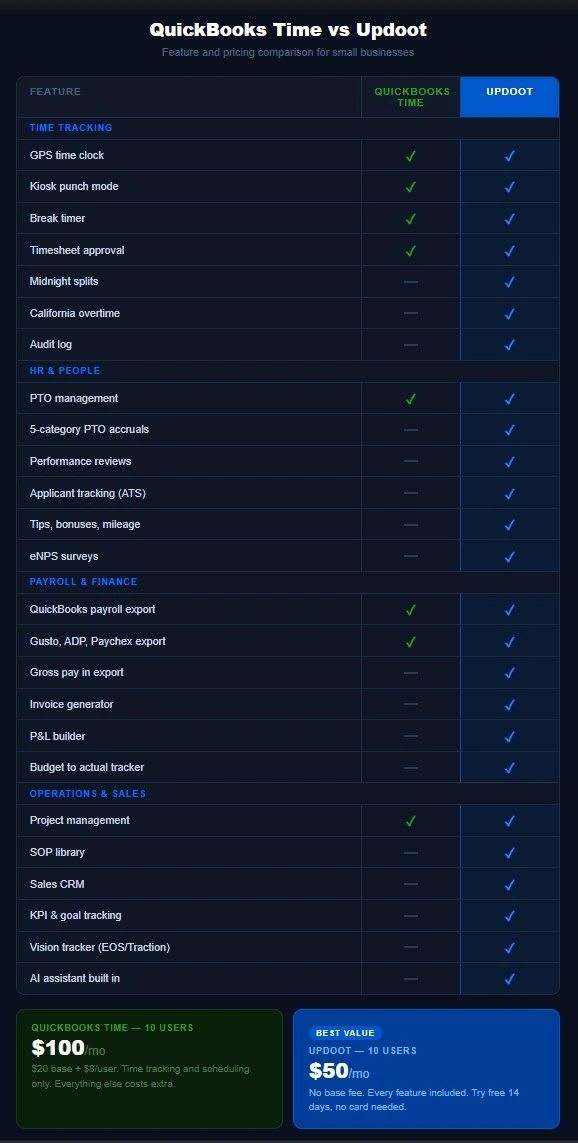
The price is significantly higher than comparable options. QuickBooks Time pricing starts at around $20 per month as a base fee plus $8 per user per month on their Premium plan. For a team of 10 that is $100 per month for time tracking and scheduling only. The Elite plan, which adds geofencing and project tracking, runs $40 per month base plus $10 per user, bringing the same 10-person team to $140 per month. For what is fundamentally a time tracking and scheduling tool, these are high prices that compound quickly as your team grows.
No invoicing beyond QuickBooks. QuickBooks Time does not generate standalone invoices. Its invoicing functionality is entirely dependent on feeding time data into QuickBooks Online where invoices are then created. If you do not use QuickBooks Online for invoicing, the invoicing benefit disappears entirely and you are left with a time tracking tool that exports data.
No HR infrastructure. QuickBooks Time tracks time and schedules shifts. It does not include performance reviews, applicant tracking, employee document management, HR surveys, job description libraries, or any of the people management tools a growing business needs beyond basic time and attendance.
No sales or CRM functionality. There is no lead tracker, customer profile builder, sales pipeline, or quote creator in QuickBooks Time. Your sales process lives in a completely separate tool.
No operational or strategic tools. No SOP library, no KPI tracking, no project management beyond basic job assignment, no financial planning tools beyond what feeds into QuickBooks, and no strategic planning framework. Running a complete business on QuickBooks Time requires assembling a significant additional software stack.
California overtime limitations. QuickBooks Time handles standard federal overtime but California's daily overtime rules, which differ significantly from federal standards with daily thresholds that kick in at 8 hours and double time at 12, require careful configuration and are not automatically handled for all business scenarios.
The total cost problem. A 10-person business using QuickBooks Time at the Premium level is paying $100 per month for time tracking and scheduling. That same business still needs to pay for HR software, CRM, project management, and operational tools. The total monthly software spend to run a complete business on top of QuickBooks Time typically runs $300 to $500 per month or more. The familiarity of the QuickBooks brand can obscure how expensive the full stack actually becomes.
What Updoot Offers Instead
Updoot takes the opposite approach to QuickBooks Time. Rather than building a specialized tool that integrates with your accounting software and leaving you to assemble everything else, Updoot is built as a complete business operating system where time tracking is one feature in a comprehensive platform that covers the full scope of running a small business.
Here is what that means in practice.
Time tracking that goes further. Updoot includes GPS time tracking, kiosk punch mode, break timer, midnight splits for overnight shifts, admin and employee time card approval with a full audit log, and daily, weekly, and California overtime tracking calculated automatically. The California overtime handling alone eliminates a compliance risk that QuickBooks Time leaves partially unaddressed.
HR and people management. Updoot includes five-category PTO accruals, performance reviews with two-way feedback, an applicant tracking system for hiring, a custom job description library, an employee HR vault with emergency contacts and key dates, eNPS employee surveys, salaried employee setup, tips and bonuses tracking, pay rates and multipliers with gross pay calculated in the payroll export, and a HRIS covering the full employee management lifecycle. None of this requires a separate HR platform.
Payroll exports that connect to everything. Updoot exports payroll-ready files mapped for QuickBooks, Gusto, ADP, Paychex, and other payroll platforms with overtime, tips, bonuses, commissions, and mileage all included. The QuickBooks connection is there. It just does not require you to pay Intuit for the privilege of using it.
Invoicing and project billing. Updoot includes an invoice generator and project billing that connects time entries directly to client invoices without requiring a separate accounting platform. Time tracked on a project flows to an invoice without an intermediate export step.
Sales and CRM. Updoot includes a sales CRM with lead tracking, customer profile builder, competitor analysis, a sales quote creator, and a pipeline dashboard. Your sales process lives in the same platform as your time tracking and HR tools.
Financial management. Updoot includes a budget to actual tracker, vendor management scorecards, a P&L builder, and a capacity calendar. Financial visibility that goes beyond what flows into QuickBooks is built into the platform.
Operations and leadership. Updoot includes an SOP library with revision tracking and review alerts, project management with custom templates, a flow chart builder, a risk tracker, a RASCI accountability chart builder, scheduling with suggest and swap functionality, meeting agendas with Vision Tracker integration, KPI and goal tracking, a Gantt roadmap builder, and an org chart builder. The Vision Tracker is inspired by Gino Wickman's book Traction and gives small businesses a built-in operating system for running their company strategically.
AI built throughout. Updoot's AI assistant, Doot, is available across every module in the platform and helps teams work faster and smarter without requiring additional tools or switching between applications.
All of this for $5 per user per month. No base fee. No tiers. No feature gates. A 10-person team pays $50 per month for the complete platform. Compare that to $100 per month for QuickBooks Time's Premium plan covering time tracking and scheduling only, plus everything else you still need to buy separately.
Quickbooks Time vs Updoot Work Management
The Real Cost Comparison
The price comparison between QuickBooks Time and Updoot is most honest when it accounts for the total cost of running a complete business operation rather than comparing just the time tracking components.
A 10-person business on QuickBooks Time Premium pays $100 per month for time tracking and scheduling. To complete the operational picture they typically also pay for QuickBooks Online at $30 to $90 per month depending on plan, a separate HR tool, a separate CRM, a project management tool, and something for strategic planning and KPI tracking. A conservative estimate of the complete stack runs $250 to $400 per month.
The same 10-person business on Updoot pays $50 per month for everything. Time tracking, scheduling, HR, invoicing, CRM, project management, financial tools, operational infrastructure, and leadership frameworks included.
The argument for QuickBooks Time is the native QuickBooks integration. The argument against it is that you are paying a significant premium for one integration while still building and paying for an incomplete stack around it.
Who Should Choose QuickBooks Time
QuickBooks Time is the right choice if your business runs entirely within the QuickBooks ecosystem for accounting, payroll, and client billing, the native integration between time tracking and QuickBooks is a meaningful operational priority rather than a nice-to-have, your time tracking needs are straightforward with no overtime complexity, and you have no plans to consolidate your operational software stack.
It is a solid product for a specific use case. If that use case matches your business precisely, it does the job reliably.
Who Should Choose Updoot
Updoot is the right choice if you are paying for multiple tools that do not talk to each other and want to consolidate, your time tracking needs are part of a larger operational picture that includes HR, invoicing, sales, and project management, you are spending more than $100 per month total on your operational software stack for a small team, you need California overtime handled correctly without manual configuration, or you want a complete business operating system rather than a specialized tool that requires five others to fill the gaps.
Try Updoot free for 14 days at xecutethevision.com. No credit card required.
Frequently Asked Questions
What is QuickBooks Time tracking?
QuickBooks Time is a cloud-based time tracking and scheduling tool owned by Intuit, the company behind QuickBooks accounting software. It allows employees to clock in and out via mobile app or kiosk, tracks GPS location for field teams, manages employee scheduling, and integrates directly with QuickBooks Online and QuickBooks Desktop for payroll and client invoicing. It was formerly known as TSheets before being acquired by Intuit in 2017.
How much does QuickBooks Time cost?
QuickBooks Time pricing starts at $20 per month base fee plus $8 per user per month on the Premium plan. The Elite plan costs $40 per month base plus $10 per user per month. A 10-person team on the Premium plan pays $100 per month for time tracking and scheduling only. Additional tools for HR, CRM, project management, and operational management are not included and must be purchased separately.
Is QuickBooks Time the same as TSheets?
Yes. TSheets was an independent time tracking company founded in 2006 that was acquired by Intuit in 2017 for approximately $340 million. Intuit rebranded the product as QuickBooks Time and integrated it into the QuickBooks product suite. The core functionality remained largely the same after the acquisition though the product has continued to evolve under Intuit's ownership.
Does QuickBooks Time work without QuickBooks?
Yes, QuickBooks Time can be used as a standalone time tracking tool without a QuickBooks subscription. However its primary value proposition is the native integration with QuickBooks for payroll and invoicing. Without that integration, it is a time tracking and scheduling tool at a price point that many alternatives match or exceed at lower cost.
How does Updoot compare to QuickBooks Time on price?
Updoot costs $5 per user per month with no base fee. A 10-person team pays $50 per month for the complete Updoot platform including time tracking, scheduling, HR, invoicing, CRM, project management, financial tools, and leadership frameworks. QuickBooks Time at the same team size costs $100 per month on the Premium plan for time tracking and scheduling only, with everything else requiring additional software purchases.
Does Updoot integrate with QuickBooks?
Updoot exports payroll-ready files that are compatible with QuickBooks and other accounting platforms including Gusto, ADP, and Paychex. The export includes hours, overtime calculations, tips, bonuses, commissions, and mileage so your accounting software receives complete and accurate data without manual reconciliation.
Can Updoot replace QuickBooks Time?
Yes. Updoot includes everything QuickBooks Time offers including GPS time tracking, kiosk punch mode, scheduling, PTO management, payroll exports, and timesheet approval. Updoot also includes extensive functionality that QuickBooks Time does not offer including invoicing, HR management, sales CRM, project management, SOP library, financial tracking, and strategic planning tools, all at a lower per-user price with no base fee.
What is the best time tracking software for small businesses?
The best time tracking software for a small business depends on what the business actually needs beyond time tracking. For businesses that only need basic time logging and have no other operational software requirements, free or low-cost tools like Clockify are sufficient. For businesses embedded in the QuickBooks ecosystem with straightforward time tracking needs, QuickBooks Time is a reasonable choice. For small businesses that need time tracking as part of a complete operational platform covering HR, invoicing, project management, sales, and financial management, Updoot provides the most complete solution at the lowest total cost.