
Connecteam Alternatives for Small Business Like Yours
If you are searching for Connecteam alternatives, you are probably in one of two situations. Either you have tried Connecteam, hit a wall with the cost, complexity, or mobile performance, and you are ready to move on. Or you are doing your homework before committing to anything and want to know what else exists before you decide.
Either way, this article is for you. We are going to look honestly at what Connecteam is, where it falls short, and why Updoot has become the option that teams choose when they want Connecteam-level functionality without the setup overhead or pricing that comes with it.
What is Connecteam?
Connecteam is a workforce management platform built for non-desk employees. It is organized into three hubs: Operations, Communications, and HR and Skills. Inside those hubs you get a GPS-enabled time clock, employee scheduling, task management, digital forms, team chat, training tools, and a stack of HR functions including document management and onboarding flows.
On paper, it is impressive. The breadth is real. Connecteam has genuinely committed to the deskless workforce market in a way that many competitors have not.
The problems are not with what Connecteam promises. The problems are with what happens when you try to make it work for a team of real people on real devices in real work environments.
Where Connecteam Falls Short
Setup Complexity
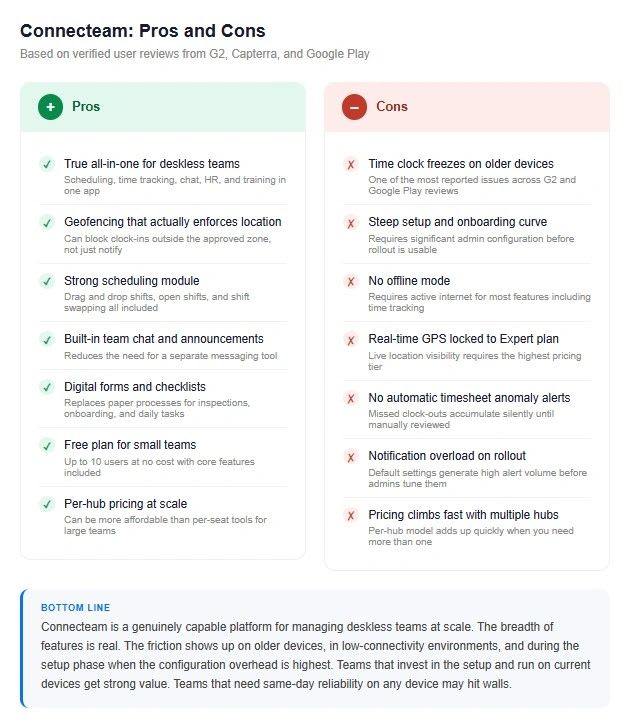
Connecteam requires significant admin configuration before a single employee can have a useful experience. You need to set up hubs and modules, configure role-based permissions, define what each job type can see and access, and adjust notification settings before rolling anything out. Skip any of those steps and your employees log in to a chaotic interface that shows them things they should not see and hides things they need.
Users consistently report that the learning curve for admins is steep. For small business owners who are also the person managing payroll, scheduling, and half a dozen other things, that setup burden is not trivial.
Mobile Performance
The time clock freezing issue is one of the most commonly flagged problems in Connecteam reviews across G2, Capterra, and Google Play. It tends to surface more on older devices, which matters because older devices are exactly what many hourly workers carry. Connecteam has released updates targeting this issue, but it remains a recurring complaint in recent reviews.
For a field-based or hourly team, a time clock that freezes is not a minor inconvenience. It is the core function of the platform failing at the moment it matters most.
Offline Limitations
Connecteam requires an active internet connection for most of its features. For teams that work in areas with weak connectivity, including construction sites, warehouse interiors, or rural locations, this creates real gaps. If an employee cannot get a signal, they cannot clock in. The record does not sync later. The time is gone.
Pricing at Scale
Connecteam is priced per hub rather than per user, which sounds like a deal until your team grows and you realize you need more than one hub to get the features you actually want. The free plan is capped at ten users. Once you move to paid tiers and add the hubs required for scheduling, GPS time tracking, and HR tools, the cost climbs faster than the original pricing page suggests.
Updoot as a Connecteam Alternative: A Detailed Comparison
Updoot was built specifically for the problems that appear when you put Connecteam in front of hourly and field-based teams. Here is how the two products compare across the features that matter most.
Time Clock and GPS Tracking
Connecteam includes a GPS-enabled time clock with geofencing that can be configured to restrict clock-ins to approved locations. This works well when the app is running correctly. The freeze issues and mobile performance problems create gaps in the record that have to be corrected manually.
Updoot includes GPS clock-in with location logging on every punch. The clock-in experience is optimized for the employee who needs to start their shift in thirty seconds on a three-year-old Android phone. It works consistently. Geofencing is enforced rather than advisory, meaning the system does not allow a clock-in outside the approved zone rather than simply logging that one happened.
Scheduling
Connecteam has a full scheduling module with drag-and-drop shift management, open shift posting, and shift swapping. It is one of the stronger parts of the platform and the feature that many users cite as the main reason they chose it.
Updoot includes scheduling with shift suggest, shift swap, and availability management. The difference is that scheduling in Updoot connects directly to the time clock and payroll export without requiring the employee to navigate between modules. The shift they are scheduled for is the shift the system expects them to clock into. Discrepancies get flagged automatically.
Timesheet Accuracy and Anomaly Detection
Connecteam does not automatically flag timesheet anomalies. If an employee forgets to clock out, the system continues accumulating time until someone notices. Timesheets can show extreme totals, like eighteen or twenty-two hours in a single entry, with no alert. This gets corrected in manual timesheet review, which means it either gets caught before payroll or it does not.
Updoot flags anomalous entries automatically. If a punch looks wrong based on the scheduled shift, the configured work parameters, or a missing clock-out, the system surfaces it before it reaches payroll. The goal is to eliminate the category of payroll error that happens because no one caught the outlier in time.
Onboarding and Setup Time
Connecteam setup typically takes days for an admin who is learning the platform while building it. Getting a team of twenty people to a functional, permission-correct, correctly-configured rollout is a real project.
Updoot is designed to be functional on day one. The defaults are built for common use cases so that the first experience an employee has after downloading the app is a working time clock, not a configuration screen. Admins can add complexity over time. The core functions do not require it upfront.
Pricing
Connecteam free plan: up to ten users. Paid plans are priced per hub per month with a base charge plus per-user fees on higher tiers. To access GPS time tracking with real-time location, you need the Expert plan, which is the highest pricing tier.
Updoot offers a free tier that covers the core time tracking and scheduling functionality for teams getting started. Paid plans scale by team size without requiring you to purchase separate hubs for features that should be connected by default. Real-time GPS is not locked behind a premium tier upgrade.
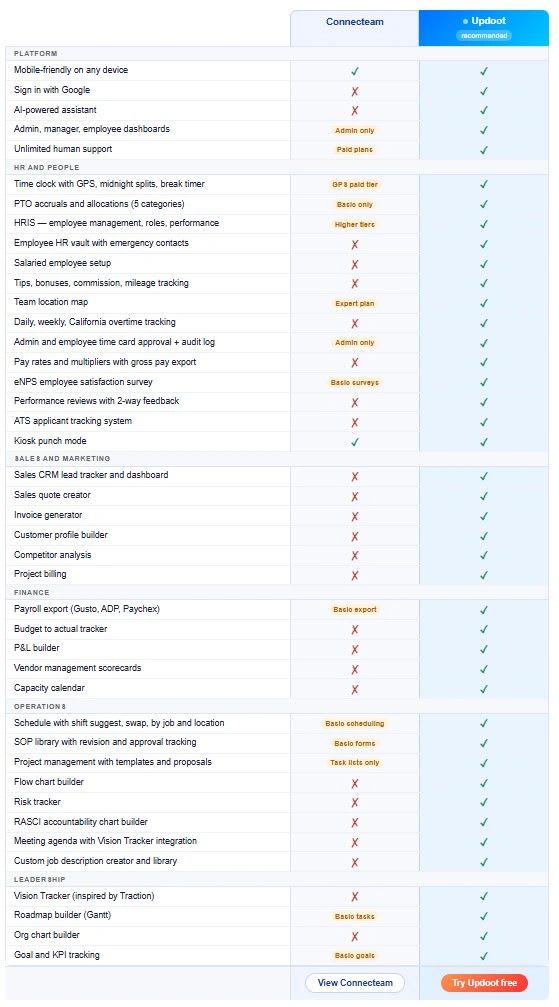
Feature Comparison at a Glance
Who Should Choose Connecteam
Connecteam is genuinely the right choice for some teams. If you are managing a retail, hospitality, or healthcare staffing operation with a large number of shift workers and you need the full communications, training, and HR hub in addition to time tracking and scheduling, Connecteam's breadth is hard to match in one platform. If your team is on current devices with reliable connectivity and your admin team has the capacity to invest in proper setup and configuration, Connecteam can deliver real value.
It is also worth noting that Connecteam continues to improve. The freeze issues that are documented in reviews from 2023 and 2024 are less prevalent in more recent feedback as the company has released targeted updates.
Who Should Choose Updoot
Updoot is the right choice when the core job is getting accurate time records for hourly and field-based workers without the setup complexity and platform weight of an enterprise-adjacent tool.
If your team is spread across job sites, if your workers are on older devices, if you need clock-in to work in areas with inconsistent connectivity, or if you have experienced the specific frustration of discovering a timesheet problem on payday, Updoot was built for those situations.
Updoot is also the right choice if you tried Connecteam and found that the configuration requirements, the mobile performance, or the pricing at the tier that includes the features you actually need were not worth the tradeoff.
The pitch is not that Updoot does everything Connecteam does for less money. The pitch is that Updoot does the things that matter most for hourly teams, does them more reliably, and gets your team running faster.
Ready to see it? Sign up free and have your first employee clocked in today.
Frequently Asked Questions
What is the best Connecteam alternative for small businesses?
For small businesses with hourly or field-based workers, Updoot is the most direct Connecteam alternative. It covers GPS time tracking, scheduling, PTO management, and payroll export without requiring the multi-hub configuration that Connecteam demands before it becomes usable. The free tier is genuinely functional for teams getting started, not a locked-down demo.
Why do people look for Connecteam alternatives?
The most common reasons people cite when switching away from Connecteam are the time clock freezing on older mobile devices, the setup complexity required before employees can have a working experience, the pricing jump required to access real-time GPS on the Expert plan, and the lack of automatic timesheet anomaly detection. For teams that only need the core time tracking and scheduling functions, the platform's full scope can feel like more overhead than it is worth.
Does Connecteam work offline?
No. Connecteam requires an active internet connection for most features, including time tracking. Teams working in areas with inconsistent connectivity, such as construction sites, warehouse interiors, or rural locations, can experience missed punches that are not recoverable. Updoot supports offline clock-in with automatic sync when the device reconnects.
How does Connecteam pricing compare to alternatives?
Connecteam's free plan is capped at ten users. Paid plans are priced per hub per month rather than per user, which can be cost-effective for large teams that need multiple hubs but more expensive than it appears for teams that only need one or two. Real-time GPS tracking requires the Expert plan, which is Connecteam's highest pricing tier. Updoot includes GPS tracking at all paid plan levels.
Is Connecteam good for construction teams?
Connecteam has features that construction teams use, including GPS time tracking, job site geofencing, and task management. The limitations that show up most for construction specifically are the offline mode gap, the mobile performance issues on older devices, and the real-time GPS being locked to the highest pricing tier. For construction teams where connectivity is inconsistent and devices vary, those limitations matter more than they would in an office environment.
What makes Updoot different from other Connecteam alternatives?
Most Connecteam alternatives either add more complexity, as larger platforms like ADP or Workday do, or strip features down to a basic punch clock. Updoot is built to cover the full operational need of an hourly team, GPS tracking, scheduling, PTO, payroll export, anomaly detection, while keeping the employee experience simple enough that someone with no tech background can clock in and go. The setup time is measured in hours, not days. The free plan is functional. And the mobile experience was built for the actual devices your team carries, not the devices a software product manager owns.
Can I import my Connecteam data into Updoot?
Yes. Updoot supports employee data import and timesheet import from CSV exports. If you are moving an active team from Connecteam, you can export your employee list and historical timesheet data and bring it into Updoot without starting from scratch. Reach out to the support team and they will walk you through it.