
Clock In in Spanish: Translate Your Time Clock App and Time Phrases
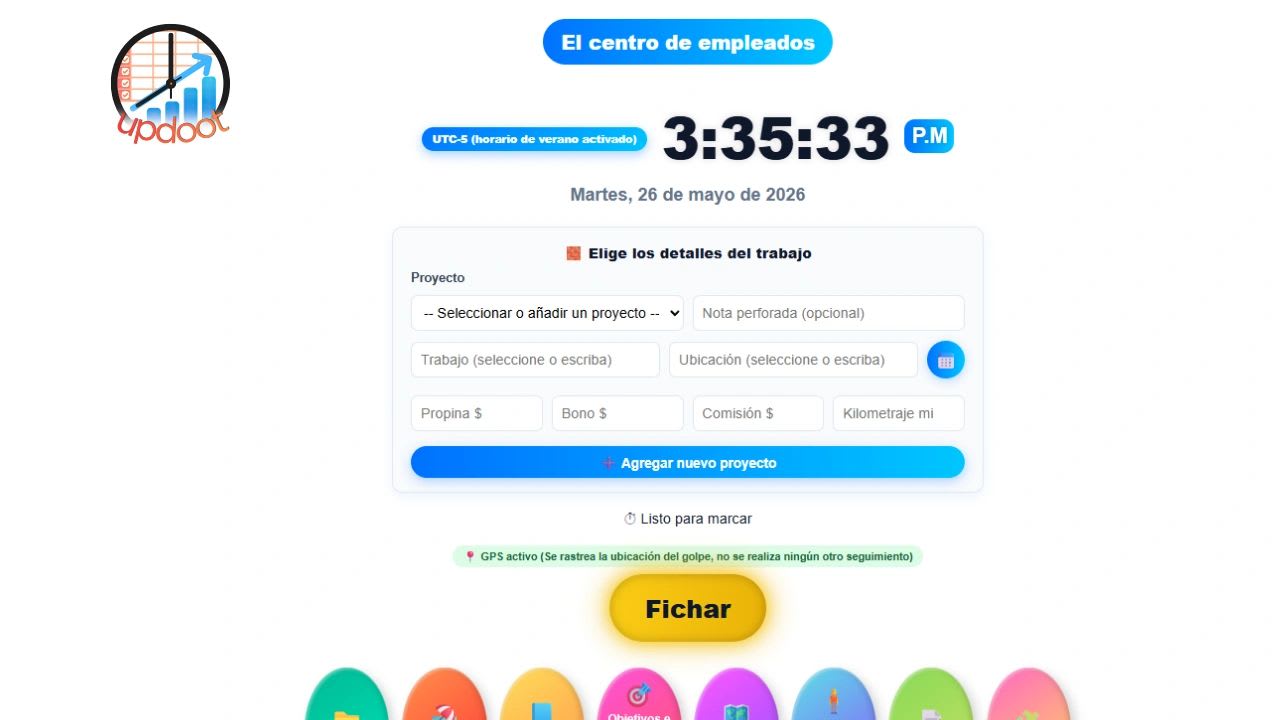
Clock in in Spanish can be said several ways, and the right one depends on where your team is from. If you manage a team that speaks Spanish, or you are a Spanish-speaking employee trying to figure out a time clock app, this article covers everything you need.
We will walk through how to say clock in and clock out in Spanish, the workplace phrases managers use most, how to change your browser to Spanish so your tools display in the right language, and why Updoot is a time clock app your Spanish-speaking team can start using today. A free bilingual poster maker at the end turns the phrases into a printable sign.
How to Say "Clock In" in Spanish
The phrase "clock in" translates to several expressions in Spanish depending on the region and context.
Fichar is the most common term in Spain. Employees "fichan" when they start their shift and "fichan la salida" when they leave.
Marcar entrada is widely used across Latin America. It means to mark your entry or punch in. The opposite is marcar salida, to punch out.
Registrar entrada means to register your start time and is common in formal or HR contexts.
Checar is used in Mexico and parts of Central America, especially with time clocks. "Checar entrada" means to clock in, and "checar salida" means to clock out.
Clock In and Clock Out in Spanish: Quick Reference
| English | Spain | Mexico | Most of Latin America |
|---|---|---|---|
| Clock in | Fichar (la entrada) | Checar entrada | Marcar entrada |
| Clock out | Fichar la salida | Checar salida | Marcar salida |
| Time clock | Reloj de fichar | Reloj checador | Reloj marcador |
| Shift | Turno | Turno | Turno |
| Break | Descanso | Descanso | Descanso |
| Timesheet | Hoja de horas | Hoja de horas | Hoja de horas or registro de horas |
| Overtime | Horas extra | Horas extra | Horas extra |
| Payroll | Nómina | Nómina | Nómina |
Registrar entrada and registrar salida are understood everywhere, so they are a safe choice for written policies read by people from different countries.
Why a Spanish Time Clock Matters for Employers
About 44.9 million people in the U.S., roughly 1 in 7 people age 5 and older, speak Spanish at home, according to USAFacts, based on Census Bureau data. In construction, hospitality, agriculture, cleaning, landscaping, healthcare, and manufacturing, Spanish is often the primary language for a significant portion of the workforce.
If your time clock app is only in English and your employees primarily speak Spanish, you have a problem. Missed punches, confusion about break rules, timesheet errors, and payroll disputes often trace back not to employee negligence but to a language barrier with the tool they are supposed to use.
The simplest fix is to give your team a time clock that works in their language, or to set up their devices in Spanish so apps and browsers display correctly.
How to Change Your Browser to Spanish
If your employees use a web-based time clock or HR tool, changing the browser language to Spanish means the interface displays in Spanish wherever the app supports it. Here is how to do it on every major browser.
How to Change Google Chrome to Spanish on Windows
According to Google’s Chrome help, only Chrome on Windows lets you pick a display language separate from the computer’s.
| Step | What to do |
|---|---|
| 1 | Open Chrome and click the three dots in the top right corner, then Settings. |
| 2 | Click Languages. |
| 3 | Under Preferred languages, click Add languages, search for Spanish, and pick the regional version your team uses, such as Spanish (United States) or Spanish (Mexico). |
| 4 | Click the three dots next to Spanish and check Display Google Chrome in this language. |
| 5 | Click Relaunch. Chrome restarts in Spanish. |
On a Mac, Chrome follows the computer’s system language, so use the Safari on Mac steps below to switch the Mac to Spanish. On Android, Chrome follows the phone’s language.
How to Change Mozilla Firefox to Spanish
| Step | What to do |
|---|---|
| 1 | Open Firefox, click the menu button (three horizontal lines), and select Settings. |
| 2 | In the General panel, scroll to the Language section. |
| 3 | Open the language drop-down and choose Search for more languages if Spanish is not listed. |
| 4 | Add Spanish and select it as the language Firefox displays. |
| 5 | Close and reopen Firefox to apply the change. |
Mozilla’s instructions for using Firefox in another language note that not every regional variant is available; if yours is not listed, choose the general Spanish option.
How to Change Microsoft Edge to Spanish
| Step | What to do |
|---|---|
| 1 | Open Edge, click the three dots in the top right corner, and select Settings. |
| 2 | Click Languages in the left menu. |
| 3 | Under Preferred languages, click Add languages, search for Spanish, and pick your regional variant. |
| 4 | Click the three dots next to Spanish and select Display Microsoft Edge in this language. |
| 5 | Restart Edge when prompted. |
These steps follow Microsoft’s Edge language guide. By default, Edge uses the same language as Windows.
How to Change Safari to Spanish on a Mac
Safari uses the Mac’s system language rather than its own language setting.
| Step | What to do |
|---|---|
| 1 | Click the Apple menu in the top left corner and open System Settings. |
| 2 | Go to General, then Language and Region. |
| 3 | Click the plus button under Preferred Languages, select Spanish, and click Add. |
| 4 | Move Spanish to the top of the list and confirm when prompted. |
| 5 | Restart Safari. It now displays in Spanish. |
How to Change Safari to Spanish on iPhone and iPad
| Step | What to do |
|---|---|
| 1 | Open Settings on your iPhone or iPad. |
| 2 | Tap General, then Language and Region. |
| 3 | Tap Add Language and select Spanish. |
| 4 | Move Spanish to the top of the list. |
| 5 | Your device and Safari switch to Spanish. |
How to Change Chrome to Spanish on Android
Chrome on Android follows the phone’s language. The menu names vary by phone maker; on many phones it is under System, and on Samsung phones it is under General management.
| Step | What to do |
|---|---|
| 1 | Open Settings on your Android device. |
| 2 | Tap System (or General management on Samsung), then Languages. |
| 3 | Tap Add a language and select Spanish. |
| 4 | Drag Spanish to the top of the list. |
| 5 | Confirm or tap Apply. Your device and Chrome switch to Spanish. |
Setting Up a Time Clock App in Spanish for Your Team
Changing the browser language helps with web-based tools, but the most reliable solution is a time clock app built with field workers in mind, with a clock-in flow simple enough that language is not a barrier.
Updoot is built for the kind of team that needs this most: construction crews, hospitality staff, cleaning companies, landscaping teams, and any business with hourly workers who are not sitting at a desk. The time clock works on any mobile device, the interface is simple enough that employees can learn it in minutes, and GPS clock-in means your workers can punch in from the job site without confusion about where they need to be.
For managers, Updoot includes a team location map so you can see in real time where your crew is and who is clocked in. For payroll, the timesheet export is ready to go directly to Gusto, ADP, Paychex, or your payroll provider of choice, with gross pay, overtime, and any pay rate multipliers already calculated.
If your team has both English-speaking and Spanish-speaking employees, Updoot works the same way for both. Updoot is business management software for $5 per user per month.
Common Spanish Phrases for Workplace Time Tracking
If you are a manager communicating time clock expectations to Spanish-speaking employees, these phrases will help. They use "marcar," which is understood across most of Latin America; the poster maker below switches them to "fichar" or "checar" if your team uses those.
| Spanish | English |
|---|---|
| Por favor, marca tu entrada al llegar y tu salida al irte. | Please clock in when you arrive and clock out when you leave. |
| No olvides marcar tu entrada antes de empezar a trabajar. | Do not forget to clock in before you start working. |
| Si olvidas marcar tu salida, avisa a tu supervisor. | If you forget to clock out, let your supervisor know. |
| Los descansos deben registrarse en la aplicación. | Breaks must be recorded in the app. |
| Tu hoja de horas debe estar completa antes del viernes. | Your timesheet must be complete before Friday. |
| Las horas extra deben ser aprobadas por tu supervisor antes de trabajarlas. | Overtime must be approved by your supervisor before you work it. |
Free Bilingual Time Clock Poster Maker
Use the poster maker below to turn these phrases into a sign for the break room, the time clock kiosk, or the job trailer. Choose the Spanish your team uses: Latin America (marcar), Mexico (checar), or Spain (fichar). The phrases switch to match.
Check the rules you want on the poster, change the title if you like, and print it. Spanish appears first in larger type with the English underneath, so both groups can read the same sign. Copy it to Excel to keep a bilingual phrase list for onboarding new hires.
Bilingual Time Clock Poster Maker
Pick the Spanish your team uses, choose the phrases you want, and add a title. The maker builds a printable English and Spanish poster for the break room or job trailer. Copy it to Excel to keep a bilingual phrase list for onboarding. Nothing you enter is saved or sent anywhere.
Your poster
Making Time Tracking Work for Spanish-Speaking Teams
Most timekeeping problems with Spanish-speaking crews are communication problems, not effort problems. Use the words your team actually uses, post the rules in both languages, set devices to Spanish where the tools support it, and choose a time clock simple enough that nobody has to read a manual to punch in.
Do that, and missed punches, break confusion, and payroll disputes drop, which saves time for everyone, including you.
Sources
How many people speak Spanish at home? (USAFacts)
Change Chrome languages (Google Chrome Help)
Use Firefox in another language (Mozilla Support)
Use Microsoft Edge in another language (Microsoft Support)
Opens in Google Drive. View and download for free.
Related Reading
The 7 Minute Time Clock Rule: What It Is and How It Works →
Frequently Asked Questions About Clocking In in Spanish
How do you say clock in and clock out in Spanish?
The most common ways to say clock in are fichar in Spain, checar entrada in Mexico, and marcar entrada in most of Latin America. Clock out is fichar la salida, checar salida, or marcar salida. Registrar entrada and registrar salida are understood everywhere.
What is the Spanish word for timesheet?
The most common translation is hoja de horas, which means sheet of hours. You will also see registro de horas (hours record) and tarjeta de tiempo (time card), depending on the region and context.
How do I change my browser to Spanish?
In Chrome on Windows, go to Settings, then Languages, add Spanish, and choose Display Google Chrome in this language. In Firefox, go to Settings, then General, then Language. In Edge, go to Settings, then Languages. On a Mac or iPhone, change the device language under Language and Region.
Is there a time clock app that works for Spanish-speaking teams?
Yes. Look for a simple mobile clock-in flow, GPS verification, and a payroll export that handles overtime correctly. Updoot is built for field and hourly teams and works on any mobile device.
What is overtime in Spanish?
Overtime is horas extra or horas extraordinarias. Horas extra is most common in payroll and HR contexts, while horas extraordinarias is the more formal term.
How do you explain payroll to Spanish-speaking employees?
Payroll in Spanish is nómina. You can say "Tu nómina se procesa los viernes" (your payroll is processed on Fridays) or "Puedes ver tus horas en la aplicación" (you can see your hours in the app). Keep payroll communication simple and consistent.
Does Updoot work for Spanish-speaking teams?
Yes. Updoot is built for hourly and field-based teams, and the simple clock-in flow works regardless of language background. GPS verification means employees do not need to read complex instructions to punch in correctly.