
The Best Excel Courses for Every Skill Level: A Comparison Guide
.png)
.png)
Whether you're just starting out or looking to master advanced features, learning Microsoft Excel is one of the most valuable skills you can invest in no matter your industry. From finance and operations to marketing and project management, Excel powers productivity, decision-making, and data analysis.
But with so many courses available, how do you know which one is right for you?
In this guide, we compare some of the best Excel courses available today based on content, value, delivery style, and who they’re best suited for. Whether you’re a beginner or a pro, this list has something for you.
1. XecuteTheVision Excel Courses
Website: Shop Excel Classes Best For: Professionals who want business-focused Excel training with real-world use cases
Created by a Microsoft MVP and former COO, XecuteTheVision offers three powerful Excel courses designed with business impact in mind. Unlike generic tutorials, these courses teach you how to use Excel to solve everyday business challenges.
Courses include:
- Excel Xecutor – Teaches beginner to mid-level skills using an event planning template
- Excel Survival Course – Focused on essential business tools like project tracking, budgets, and order management
- Xpert Excel – Advanced course with 220+ functions, formulas, and tricks, pulled from viral social media content and practical use
Why it stands out:
- Taught by a business leader who’s trained thousands
- Courses are clear, actionable, and engaging
- Real templates and business examples with a workbook you keep
- Affordable pricing and lifetime access with no subscription fees
2. Excel Skills for Business (Coursera x Macquarie University)
Website: coursera.org Best For: Learners who want a structured, academic approach
This multi-course program is offered by Macquarie University on Coursera and covers Excel from basics to advanced data analysis. You'll work on practical assignments and receive a certificate upon completion.
Pros:
- University-backed credibility
- Flexible pace
- Good progression from beginner to intermediate
Cons:
- Less applicable to real-world job templates
- Academic tone may not suit all learners
3. Microsoft Excel – Excel from Beginner to Advanced (Udemy)
Website: udemy.com Best For: Cost-conscious learners who want a big bundle of content
With over 1 million students, this Udemy course by Kyle Pew covers a wide range of Excel features including pivot tables, macros, and VBA. It's popular and highly rated.
Pros:
- Low cost (often discounted under $20)
- Lifetime access
- Covers a wide range of topics
Cons:
- Less focus on real-life business application
- Can feel overwhelming to complete
4. LinkedIn Learning – Excel Essential Training
Website: linkedin.com/learning Best For: Professionals already using LinkedIn Learning for upskilling
Taught by Excel expert Dennis Taylor, this course gives a strong foundation in the basics and introduces core features like formulas, formatting, and charting.
Pros:
- Well-produced and easy to follow
- Great for onboarding or team training
- Included with LinkedIn Premium
Cons:
- Surface-level depth
- Lacks customization or real-world scenarios
5. Excel Jet – Excel Training for Speed and Accuracy
Website: exceljet.net Best For: People who want to learn shortcuts, formulas, and time-saving techniques
Excel Jet is known for its no-fluff approach to learning Excel fast. If you're already comfortable with the basics and want to improve your efficiency, this is a great pick.
Pros:
- Quick, focused lessons
- Emphasis on keyboard shortcuts and formula structure
- Great for power users
Cons:
- Not beginner-friendly
- Lacks context around business use
6. Chandoo – Excel School Program
Website: chandoo.org Best For: Analysts and professionals who want to become “awesome in Excel”
Chandoo is a well-known name in the Excel space. His Excel School program is a self-paced, paid course designed to make you proficient in Excel and dashboards.
Pros:
- Well-respected instructor
- Focus on data visualization and dashboards
- Helpful community forum
Cons:
- Higher cost than most courses
- May be better suited to analysts than general business users
7. GoSkills Excel Courses
Website: goskills.com Best For: Learners who want bite-sized, modular Excel lessons
GoSkills offers beginner to advanced Excel lessons in short videos you can complete at your own pace. The platform also provides a certificate after completion.
Pros:
- Short, digestible lessons
- Affordable subscription model
- Modern user interface
Cons:
- Subscription-based (not one-time fee)
- Not industry-specific
8. Miss Excel
Website: missexcel.com Best For: Visual learners who want a fun, lifestyle-based approach to learning Excel
Miss Excel offers vibrant, bite-sized video lessons taught by Kat Norton, who brings high energy, creativity, and positivity into her content. Her viral TikTok and Instagram videos helped her grow a huge following.
Pros:
- High-energy, creative teaching style
- Courses on Excel, Google Sheets, and Microsoft Office
- Very beginner-friendly
Cons:
- May be too light for those seeking deep business application
- Less suited for corporate environments or advanced users
9. Excel Dictionary
Website: exceldictionary.com Best For: Learners looking for a comprehensive index of Excel formulas, functions, and terms
Excel Dictionary offers a searchable library of over 1,000 Excel formulas and explanations, with short videos showing how each function works. Great for quick answers and self-guided learning.
Pros:
- Excellent for reference or on-the-spot learning
- Clear, concise videos
- Great for intermediate to advanced users
Cons:
- Not structured as a formal course
- Lacks projects or guided examples
Which Excel Course is Right for You?
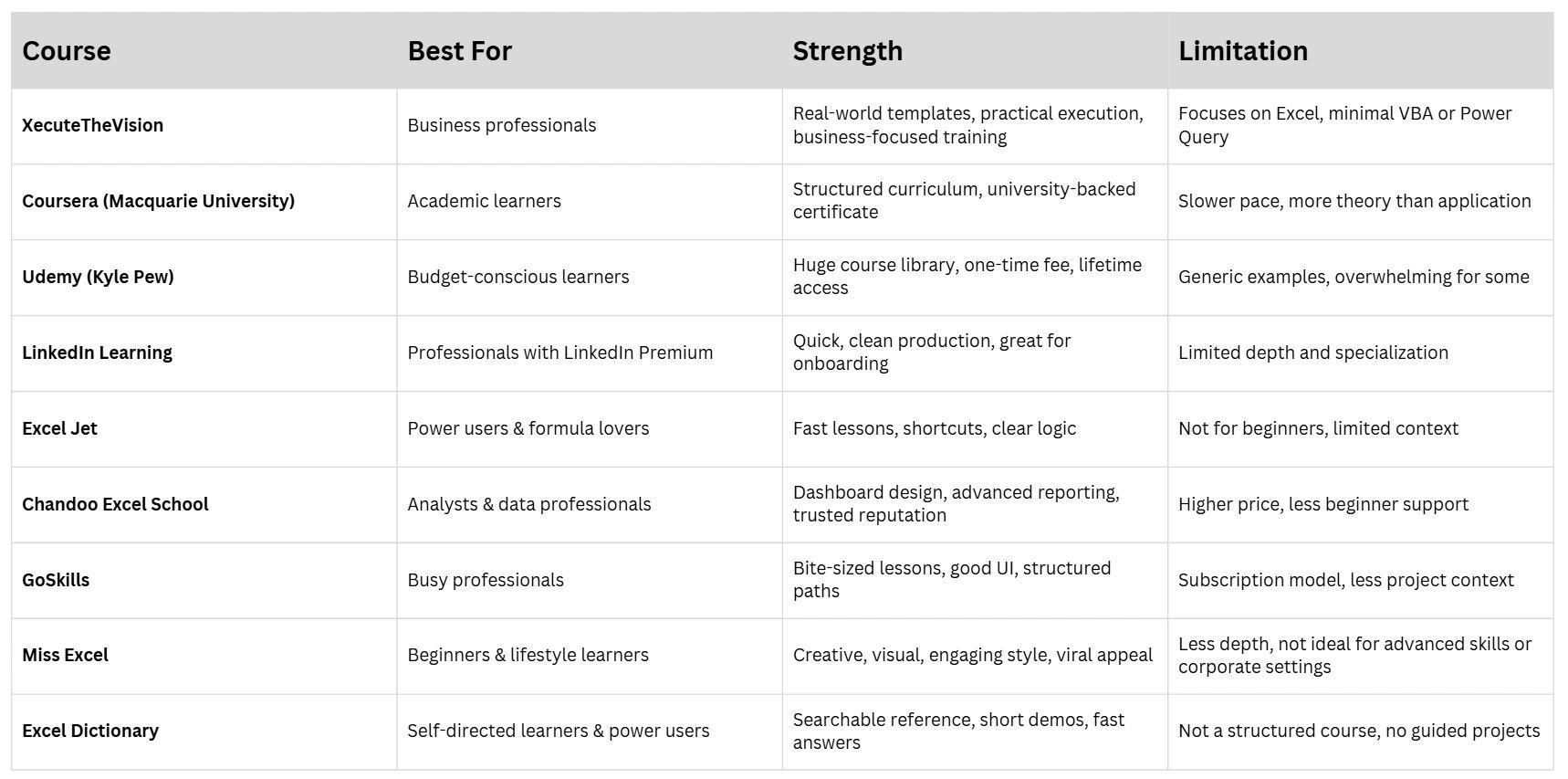
Final Thoughts
If you're looking to level up your Excel skills in a way that actually impacts your work not just memorizing formulas then XecuteTheVision's Excel courses stand out for their business focus, simplicity, and effectiveness. They’re especially powerful for teams, small business owners, and professionals who want to stop wasting hours wrestling with spreadsheets and start working smarter.
Explore the full course list at: 👉 Shop Excel Classes