
Standard Operating Procedure Template (Excel and Google Sheets)
.png)
Use our Standard Operating Procedure template in Excel and Google Sheets to track all of your processes and procedures. A strong standard operating procedure template is one of the most powerful tools a business can implement.
Without documented processes, teams rely on memory. When key employees leave, knowledge leaves with them. When new hires join, training becomes inconsistent. When tasks are repeated daily without documentation, errors multiply.
An SOP template creates structure. Let’s break down what a standard operating procedure template is, what should be included in one, how to write it properly, common mistakes to avoid, and how to implement SOPs in a growing business.
What Is a Standard Operating Procedure Template?
A standard operating procedure template is a structured document format used to outline repeatable business processes. It ensures tasks are performed consistently, efficiently, and correctly regardless of who is completing them.
Instead of starting from scratch every time you document a process, the template provides predefined sections that keep documentation consistent across departments.
Businesses use SOP templates for:
- Operations and project execution
- HR onboarding and offboarding
- Client billing and payroll processing
- Inventory management
- Customer service and compliance procedures
If a task is repeated more than once, it should have an SOP.
Why an SOP Template Matters
A well-structured SOP template improves consistency, efficiency, accountability, training speed, quality control, and risk reduction. It removes ambiguity. When instructions are clear, mistakes decrease.
For growing companies, SOP documentation is the foundation of scalability. Teams that document their processes onboard new hires faster, delegate more confidently, and maintain quality as they grow.
Excel vs Google Sheets for SOP Template Side by Side Comparison
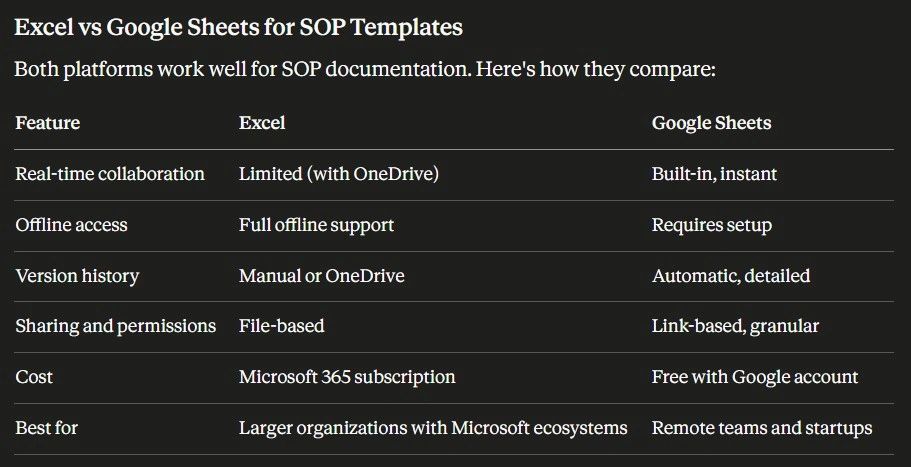
Both formats are included in the download. Choose the one that fits your workflow.
How to Use the SOP Template in Excel
The Excel SOP template uses structured tables with locked header rows so your formatting stays intact as you add content.
To get the most out of it:
- Use the Status dropdown column (set via Data Validation) to mark SOPs as Draft, Active, or Under Review
- Apply conditional formatting to highlight overdue review dates automatically
- Use the Department filter to sort SOPs by team without disrupting the master layout
- Lock the header row (View → Freeze Panes) before sharing with your team
- Save a copy to SharePoint or OneDrive to enable co-authoring
Excel works best for organizations already running Microsoft 365 who want a standalone document with precise formatting control.
How to Use the SOP Template in Google Sheets
The Google Sheets version is built for teams that collaborate in real time. It includes the same structured sections as the Excel version with a few platform-specific advantages:
- Share with your team using a single link — set view or edit permissions per person
- Use the built-in comment system to flag steps that need review without editing the document directly
- Version history is automatic — click File → Version History to restore any previous state
- Add a Dropdown chip (Insert → Dropdown) to status columns for clean visual tracking
- Publish the sheet as a view-only link for company-wide access without giving edit rights
Google Sheets works best for remote teams, startups, and organizations that prioritize collaboration over complex formatting.
What Should Be Included in an SOP Template?
Every standard operating procedure template should contain these ten components:
1. SOP Title
A clear title that identifies the task, department, and purpose. Example: "Client Invoice Processing Procedure — Finance Team."
2. Purpose Statement
Explains why the process exists and what problem it solves. Example: "This procedure ensures all client invoices are generated, reviewed, and sent accurately within 48 hours of project completion."
3. Scope
Defines who the SOP applies to, what scenarios it covers, and what it does not cover. Scope prevents overlap and confusion between departments.
4. Roles and Responsibilities
Identifies who performs each step, who reviews it, and who approves it. Without clear ownership, processes stall.
5. Required Tools or Systems
Lists the software, forms, access permissions, and templates needed to complete the process independently.
6. Step-by-Step Instructions
The core of any SOP. Steps should be sequential, numbered, specific, and action-based.
Avoid vague phrases like "handle invoice." Use precise language: "Generate invoice in billing system using approved project hours from the project tracker."
7. Quality Control Process
Documents how accuracy is verified, who reviews the output, and what standards must be met before the process is considered complete.
8. Exceptions and Edge Cases
Covers what happens when something goes wrong or an unusual scenario arises. This section is frequently skipped — and it's where most process failures occur.
9. Version Control
Tracks the SOP version number, date updated, and author. Process documentation must evolve as the business changes.
10. Approval Section
Provides space for manager sign-off, executive approval, or compliance confirmation where required.
What Makes a Good SOP Template?
A good standard operating procedure template is clear, concise, structured, repeatable, measurable, actionable, accessible, editable, organized, and scalable.
Those ten qualities determine whether your SOP template becomes an operational asset — or ignored documentation collecting digital dust.
How to Write an SOP Using a Template
Follow this process to build an SOP from scratch:
- Identify the repeatable task
- Break it into sequential steps
- Assign responsibilities to specific roles
- Define quality checkpoints and review criteria
- Review the draft with the team who performs the task
- Store it in a centralized, searchable location
- Update it whenever the process changes
Start with high-impact processes first: payroll, client billing, customer onboarding, and project execution. These are where errors are most costly.
Types of SOP Templates
- Simple SOP template — Best for small businesses. Short, direct, checklist-style format.
- Hierarchical SOP template — Best for complex operations. Uses headings and sub-steps to organize multi-layered processes.
- Checklist SOP template — Best for recurring compliance tasks. Highly structured and measurable.
- Flowchart-based SOP template — Best for visual processes. Common in manufacturing and operations-heavy environments.
The Excel and Google Sheets templates in this download support the simple and hierarchical formats out of the box.
Common Mistakes When Creating SOP Templates
- Overcomplicating the template. If the document is too dense or formal, employees stop using it. Keep it practical.
- Being too vague. Instructions must be actionable. If someone new cannot follow the SOP without asking questions, it is incomplete.
- Not updating SOPs. Processes change. Templates must be reviewed periodically, at least once per year, or whenever a tool, team, or workflow changes.
- No assigned owner. Every SOP needs one person responsible for keeping it current.
- Storing SOPs in scattered locations. Documentation must be centralized and searchable. A shared Google Drive folder or SharePoint library works. A mix of email attachments and desktop files does not.
Why SOP Templates Support Business Scalability
Businesses that scale successfully run on documented systems. Without SOP templates, training takes longer, quality varies by employee, accountability weakens, and mistakes repeat without correction.
With SOP templates in place, new hires onboard faster, managers delegate with confidence, and processes stay consistent as the team grows. Documentation is operational leverage, it multiplies the effectiveness of every person on your team.
Using a Spreadsheet-Based SOP Template
Many businesses prefer creating SOPs in spreadsheets because:
- They allow structured formatting.
- Sections can be standardized.
- Version control can be tracked.
- Ownership can be assigned.
- Departments can be filtered or categorized.
A well-built spreadsheet-based standard operating procedure template provides structure without complexity.
It keeps processes clean and organized while remaining editable.
My Downloadable Standard Operating Procedure Template
If you’re looking for a ready-to-use standard operating procedure template, I offer:
- A structured spreadsheet-based SOP template designed for clarity and scalability.
- Predefined sections aligned with best practices.
- Editable format for growing businesses.
- Clear formatting for step-by-step execution.
- Version tracking structure built in.
And for teams ready to centralize operations, Updoot provides a structured SOP management system that connects process documentation with live execution.
.png)
Frequently Asked Questions
What is a standard operating procedure template?
A standard operating procedure template is a structured document format used to outline repeatable processes within a business. It ensures tasks are performed consistently and correctly regardless of who completes them, eliminating reliance on memory or undocumented knowledge.
What should be included in an SOP template?
Every SOP template should include a clear title, a purpose statement, scope, roles and responsibilities, required tools and systems, numbered step-by-step instructions, a quality control process, exceptions and edge cases, version control tracking, and an approval section.
What is the difference between an Excel and Google Sheets SOP template?
Excel offers stronger offline access and formatting control, making it better suited for organizations running Microsoft 365. Google Sheets offers real-time collaboration, automatic version history, and simpler sharing making it better suited for remote teams and startups.
How often should SOP templates be updated?
SOPs should be reviewed whenever processes change, when errors start repeating, when new tools are introduced, or when team feedback reveals gaps. Every SOP should have an assigned owner responsible for keeping it current. Documentation that isn't maintained becomes a liability.
Why do SOP templates fail in most businesses?
The most common reasons are overcomplicating the template so employees stop using it, writing instructions too vague for someone new to follow independently, failing to assign an owner for maintenance, and storing SOPs in scattered locations where they can't be found quickly.
How do SOP templates support business growth?
When processes are documented, new hires onboard faster, managers delegate with confidence, quality stays consistent across team members, and mistakes stop repeating. Without SOP templates, growth amplifies chaos and every new person added creates a new source of inconsistency.
What is the difference between a simple and hierarchical SOP template?
A simple SOP template works best for small businesses using a short checklist-style format. A hierarchical SOP template suits complex operations, using headings and sub-steps to organize multi-layered processes. The right format depends on the complexity of the task being documented.
Going Beyond Excel and Google Sheets and Implementing SOPs in Updoot
If you want more than just documentation if you want live visibility and centralized access SOP management should live inside your operational system.
In Updoot, SOPs can be:
- Organized by department
- Assigned to responsible employees
- Controlled by visibility permissions
- Updated with version tracking
- Centralized for team access
Instead of scattered documents, processes stay connected to your workflow.
That means:
- Teams can reference procedures directly while executing projects.
- Managers can control visibility.
- Documentation remains structured and accessible.
.png)
Related articles on SOPs
SOP Management: How to Organize, Track, and Control