Salesforce Alternatives: What Small Businesses Actually Need
This is an alternative to Salesforce if you are budget-conscious small business under 75 employees who wants to maximize gains. I implemented Salesforce at a small business as a COO and after that experience, I built Updoot. It was more than 3 times the cost expected and about that much longer in time, almost a year and a half!
If you are searching for Salesforce alternatives, you are probably in one of a few situations. You looked at Salesforce pricing and the numbers did not add up for your business size. You signed up, got deep into implementation, and realized the platform requires more time, money, and technical expertise than you budgeted for. Or you are doing your research before committing and want to know if there is something that does what Salesforce does without the enterprise price tag and the months-long setup.
All three situations are valid and extremely common. Salesforce holds roughly 22 percent of the global CRM market, which means it is also the platform that generates the most small business regret when the implementation reality sets in. This article gives you the honest picture of what Salesforce actually is, where it falls short for small businesses, and why Updoot is the alternative that covers your CRM needs alongside the rest of the tools you need to run your business.
What is Salesforce?
Salesforce is a cloud-based customer relationship management platform founded in 1999. It is the largest CRM vendor in the world and built for enterprise-scale sales organizations. The platform covers lead tracking, pipeline management, contact and account management, sales forecasting, marketing automation, customer service workflows, analytics, and a massive ecosystem of integrations through its AppExchange marketplace.
For large sales teams with dedicated Salesforce administrators, implementation budgets, and ongoing technical support, Salesforce is genuinely powerful. The customization depth is unmatched. The reporting and analytics are enterprise-grade. The integration ecosystem covers virtually every business tool category.
The problem is that almost none of that is accessible to a small business without a significant investment of time, money, and expertise that was never part of the original sales conversation.
Where Salesforce Falls Short for Small Businesses
The Real Cost Is Not the Listed Price
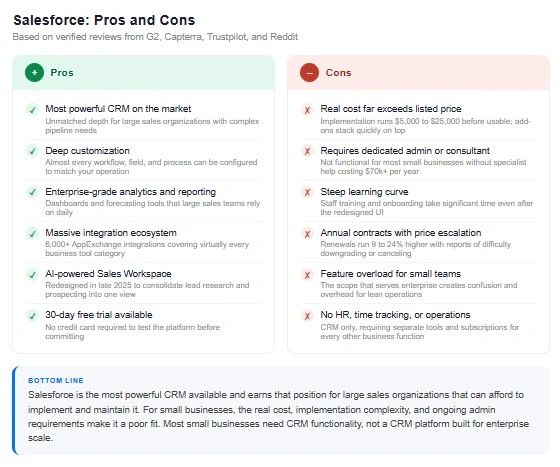
Salesforce's Starter Suite is listed at $25 per user per month, which sounds reasonable. The problem is that the Starter Suite lacks workflow automation and custom objects, which are standard CRM functionality for most businesses. Getting those requires upgrading to the Pro Suite at $100 per user per month.
That is before implementation costs, which for small businesses typically run between $5,000 and $25,000 before the platform is usable. Einstein AI add-ons start at $50 per user per month on top of the base plan. Advanced analytics add another $75 per user per month. Annual contracts on Pro Suite and above lock you in, and multiple reviewers report 9 to 24 percent renewal price increases with difficulty downgrading or canceling.
For a small business owner who budgeted for a CRM tool, the total cost of a functional Salesforce setup is frequently five to ten times what the pricing page suggested.
Implementation Requires Specialists
Salesforce is not a platform you set up in a day or a week. It realistically requires a dedicated Salesforce administrator or a paid consultant. A Salesforce admin runs $70,000 or more per year in staffing costs if you hire internally. External consultants charge project rates that quickly approach or exceed the implementation cost estimates above.
Multiple small business owners report being locked into annual contracts for a platform they could not use without expensive third-party help they had not budgeted for.
The Learning Curve Is Real
Salesforce addressed its complexity complaints with a redesigned UI in late 2025 that consolidates some functions into a single Sales Workspace view. Reviewers note this helped. But the fundamental reality is that Salesforce is an enterprise platform and the learning curve for new users remains steep. Capterra reviewers consistently flag that onboarding and staff training take significant time, and that the software's vast scope creates confusion before it creates efficiency.
Feature Overload for Small Teams
Reviewers consistently describe feeling overwhelmed by the number of features, configuration options, and pricing packages. For a small business with a three-person sales team that needs to track leads, manage customer profiles, and send quotes, the full scope of Salesforce is not an asset. It is overhead.
No HR, Time Tracking, Scheduling, or Operations
Salesforce is a CRM. It does not touch payroll, HR, scheduling, time tracking, invoicing, project management, or any of the operational tools a small business needs alongside sales management. Running a small business on Salesforce means Salesforce for CRM plus separate tools for everything else, each with their own subscription, login, and data silo.
Updoot as a Salesforce Alternative: A Detailed Comparison
Updoot was built for small and mid-size businesses that need a functional CRM without the enterprise pricing, implementation complexity, and technical overhead of Salesforce, and that need that CRM to live alongside HR, time tracking, scheduling, invoicing, and operations in one platform.
CRM and Lead Tracking
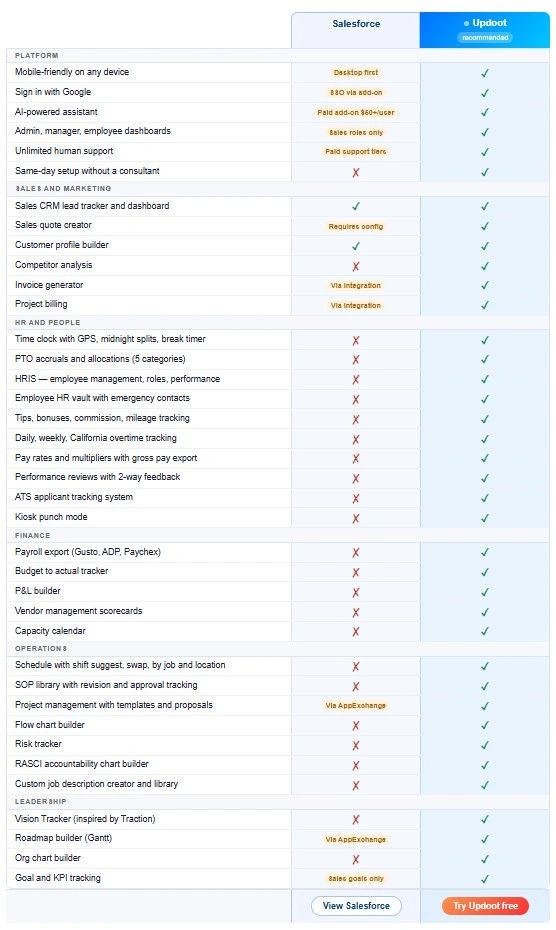
Salesforce CRM is deep, customizable, and built for large sales organizations with dedicated admins. It tracks leads, contacts, accounts, opportunities, and pipelines with enterprise-grade reporting and forecasting.
Updoot includes a sales CRM with lead tracker and dashboard built for small business sales teams. Leads, pipeline stages, customer profiles, and activity tracking are all included without requiring a consultant to configure or an admin to maintain. The CRM connects directly to the invoice generator and quote creator so the sales workflow runs end to end in one platform instead of bouncing between tools.
Sales Quotes and Invoicing
Salesforce includes quoting functionality but it requires configuration and the invoice and billing workflows depend heavily on integrations with separate tools like DocuSign or billing platforms.
Updoot includes a sales quote creator and invoice generator natively. A lead in the CRM becomes a quote, and a quote becomes an invoice, without leaving the platform or configuring an integration. For small businesses where the salesperson and the person sending invoices are often the same person, this matters.
Customer Profiles
Salesforce contact and account management is comprehensive and highly customizable for enterprise use cases.
Updoot includes a customer profile builder that stores the customer relationship data a small business actually uses alongside the CRM pipeline and billing records. No configuration required. No admin needed to set up the fields.
Competitor Analysis
Salesforce does not include a built-in competitor analysis tool.
Updoot includes competitor analysis as part of the sales and marketing toolkit, giving small business owners a structured place to track competitive intelligence alongside their CRM data.
Project Billing
Salesforce can be connected to project billing tools through AppExchange integrations but it is not native functionality.
Updoot includes project billing natively, connecting project work directly to invoicing without a third-party integration or additional subscription.
HR, Time Tracking, and Operations
Salesforce covers CRM and nothing else. Every other operational need requires a separate tool.
Updoot covers CRM alongside GPS time tracking, employee scheduling, PTO management, payroll-ready export, HRIS, performance reviews, ATS, SOP library, project management, budget to actual tracker, P&L builder, RASCI accountability charts, org chart builder, Vision Tracker, and Gantt roadmap builder. For a small business owner currently paying for Salesforce plus separate tools for HR, scheduling, invoicing, and project management, Updoot is the consolidation that reduces cost and eliminates the tool-switching that eats time every day.
Pricing
Salesforce Starter Suite starts at $25 per user per month but lacks core functionality. Pro Suite at $100 per user per month is where most businesses actually need to be, before implementation costs, add-ons, and annual contract lock-in.
Updoot pricing is transparent, includes all features, and starts with a free tier so you can see the full platform before committing to anything. No implementation consultant required. No annual contract forcing you in before you are ready.
Setup Time
Salesforce implementation for a small business realistically takes weeks to months with outside help.
Updoot is designed to be functional the same day you sign up. The CRM, time clock, and scheduling are all usable without configuration sprints or technical expertise. You can have your first lead in the pipeline and your first employee clocked in on day one.
Who Should Choose Salesforce
Salesforce makes sense for mid-size to large businesses with dedicated sales teams, a budget for implementation and ongoing administration, and complex CRM requirements that need deep customization, enterprise-grade reporting, and a broad integration ecosystem. If your sales operation has 20 or more people, a dedicated sales ops function, and the budget to implement and maintain an enterprise platform, Salesforce delivers capabilities that smaller tools cannot match.
It is a poor fit for small businesses with lean teams, tight software budgets, or founders who need to be up and running without a consultant.
Who Should Choose Updoot
Updoot is the right choice for small and mid-size businesses that need a functional CRM without the Salesforce price tag, implementation overhead, and complexity, and that need their CRM to live in the same platform as their HR, time tracking, scheduling, invoicing, and operations.
If you evaluated Salesforce and the real cost was three times what you expected, or if you need your sales tools and your business operations tools to talk to each other without building integrations, Updoot was built for your situation.
Sign up free and have your first lead in the pipeline today.
Frequently Asked Questions
What is the main difference between Salesforce and Updoot?
Salesforce is an enterprise CRM built for large sales organizations with dedicated admins, implementation budgets, and complex customization needs. Updoot is built for small and mid-size businesses that need a functional CRM without the enterprise pricing and technical overhead, alongside HR, time tracking, scheduling, and operations in one platform. Salesforce does one thing at enterprise scale. Updoot does everything a small business needs in one login.
Why do small businesses look for Salesforce alternatives?
The most common reasons are implementation costs that run $5,000 to $25,000 before the platform is usable, pricing that jumps from $25 to $100 per user per month once you need standard CRM functionality, annual contracts that lock you in before you know if the platform works for your team, the steep learning curve that requires dedicated admin support, and feature overload that creates more complexity than value for small teams.
Is Salesforce good for small businesses?
Salesforce can work for small businesses that have a dedicated sales focus, budget for implementation, and the patience for a steep learning curve. For most small businesses with lean teams and limited technical resources, the real cost and complexity of a functional Salesforce setup is not justified. There are tools that cover the core CRM need at a fraction of the cost and time investment.
Does Salesforce include HR or time tracking?
No. Salesforce is a CRM platform and does not include HR, time tracking, scheduling, payroll, invoicing, project management, or any operational tools. Small businesses using Salesforce for CRM need separate subscriptions for all of those functions. Updoot covers all of it in one platform.
How much does Salesforce actually cost for a small business?
The Starter Suite is listed at $25 per user per month but lacks core functionality. The Pro Suite at $100 per user per month is where most businesses need to be. Add implementation costs of $5,000 to $25,000, Einstein AI add-ons at $50 per user per month if needed, and annual contract requirements. The total first-year cost for a small business getting a functional Salesforce setup is typically well above what the pricing page suggests.
What makes Updoot different from other Salesforce alternatives?
Most Salesforce alternatives are other standalone CRM tools that replace the sales tracking function but still leave you needing separate tools for HR, scheduling, invoicing, and operations. Updoot covers the CRM plus the full operational stack in one platform. For a small business owner who currently pays for a CRM, a scheduling tool, an HR system, an invoicing tool, and a project management platform separately, Updoot replaces all of them in one subscription.
Can I import my Salesforce data into Updoot?
Yes. Contact records, lead data, and customer profiles can be imported from CSV exports out of Salesforce. Reach out to the Updoot support team and they will walk you through the migration. Unlimited human support is included on all plans.