Best Time Clocks for Small Business a Side-by-Side Comparison
.png)
Here is a side-by-side complete comparison chart of best time clocks for small business in 2026. A time clock for small business is not a luxury. It is the difference between knowing what your labor actually costs and guessing at it every pay period. For a business with 10, 20, or 50 hourly employees, an hour of untracked overtime per person per week adds up to a payroll problem that compounds month after month without anyone catching it.
Small businesses face a specific version of this challenge. They do not have a payroll department to catch errors. They do not have an HR team reconciling timesheets. The owner or a single manager is handling scheduling, time tracking, payroll, and everything else simultaneously. The time clock they choose either makes that job easier or harder, and most make it harder by solving one piece of the problem while leaving the rest to manual work.
This guide covers what a small business time clock actually needs to do, the three platforms worth considering in 2026, and how to decide which one fits where your business is right now.
What a Small Business Time Clock Actually Needs to Do
Before comparing platforms, it helps to be clear about what the job actually requires.
Accurate clock-in and clock-out. This sounds obvious, but accuracy means more than recording a timestamp. It means capturing the right employee, the right time, the right job or location, and flagging anything that looks wrong before it reaches payroll.
Overtime calculation. Federal weekly overtime kicks in after 40 hours. California adds daily overtime after 8 hours in a day and double time after 12. A time clock that does not calculate overtime automatically forces someone to do it manually every pay period, which means errors and missed thresholds.
Payroll-ready output. Hours that live inside a time clock app and cannot connect cleanly to your payroll provider create a manual transfer step every single pay period. That step is where mistakes happen and where time gets wasted.
Approval workflow. Managers need to be able to review, edit, and approve time cards before they go to payroll. Every edit should be documented in an audit log so disputes can be resolved without relying on memory.
Support when something goes wrong. Small businesses cannot afford to spend hours troubleshooting a platform with no one to call. Support quality is not a bonus feature. It is a core requirement.
The 3 Best Time Clocks for Small Business in 2026
1. Updoot (Best Overall)
Updoot is the best time clock for small businesses that have moved past the point where a single-function tool is enough. The time clock is built as the core of the platform, not an add-on to a scheduling app, and it connects directly to HR, payroll export, scheduling, and every other operational function a growing business needs.
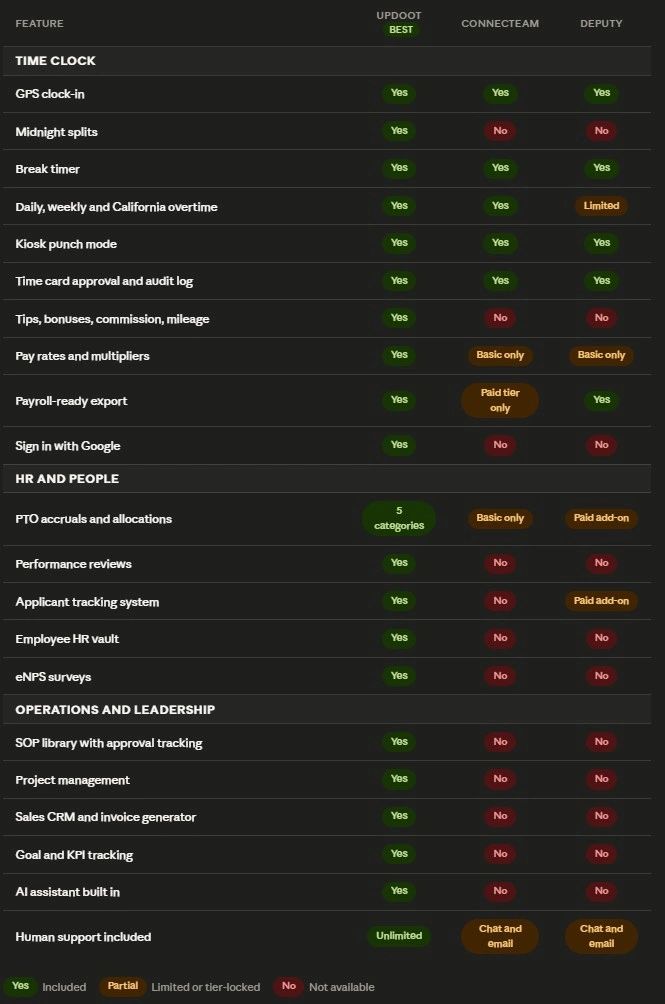
The time clock itself. Updoot's employee time clock includes GPS clock-in, midnight splits for overnight shifts, a break timer, and kiosk punch mode for shared devices. Daily, weekly, and California overtime are all calculated automatically and broken out separately in reports so every tier is transparent and auditable. Both admin time card approval and optional employee time card approval include a full audit log. Every edit is documented with who made it and when.
Tips, bonuses, commission, and mileage in one place. For restaurants, field service teams, sales-driven businesses, and anyone whose payroll includes more than base hours, Updoot tracks all variable compensation in the same system as time entries. That means the payroll export reflects actual total compensation, not just clock time that someone has to supplement manually.
Payroll-ready export. When a pay period closes, Updoot generates a payroll-ready export formatted for Gusto, ADP, Paychex, and more. The export includes regular hours, each overtime tier, pay rates and multipliers, and all variable compensation components on one file. No CSV cleanup, no manual field mapping.
Pay rates and multipliers built in. Set an employee's base rate and any applicable multipliers once, and the system applies them automatically to every time entry. The payroll report shows the base rate, the multiplier, and the resulting pay amount per entry so any manager or auditor can verify the math without reconstructing it.
HR built into the same platform. Updoot includes five categories of PTO accruals and allocations, a full HRIS with employee management and performance tracking, an employee HR vault with emergency contacts, birthdays, and anniversaries, salaried employee setup, eNPS employee satisfaction surveys, two-way performance reviews, and an applicant tracking system. None of these require a separate subscription.
Scheduling connected to time tracking. Updoot's shift scheduler handles job-based and location-based scheduling with suggest and swap shifts and a capacity calendar. Because scheduling and the time clock live in the same platform, time card data automatically maps to the correct shift and job code without manual reconciliation.
Operations and leadership tools. Updoot goes beyond time tracking and HR to include an SOP library with revision and approval tracking, project management with custom templates, a sales CRM, invoice generation, goal and KPI tracking, a Vision Tracker built around Gino Wickman's Traction framework, a Gantt roadmap builder, an org chart, and an AI assistant called Doot. For a small business running multiple point solutions, Updoot replaces most of the stack.
Human support included. Unlimited support from real people. Not a chat queue or a ticket system with a 48-hour response window.
Sign in with Google. Employees authenticate with their existing Google credentials, which eliminates a separate login for the time clock and removes one of the most common sources of clock-in friction for hourly teams.
Best for: Small and growing businesses that need time tracking, HR, scheduling, and operations in one platform without paying for multiple tools.
2. Connecteam
Connecteam is a fully featured time clock with GPS tracking, geofencing, kiosk mode, and seven different overtime calculation methods, plus task assignments, safety checklists, training modules, digital forms, and team announcements built in. Taskford
For small businesses with deskless or mobile teams that need time tracking and team communication in one mobile-first app, Connecteam covers both well. Managers can use geofencing and GPS geolocation tracking to ensure that frontline workers are clocking in and out at their designated locations, and the platform prevents early clock-ins and blocks punches outside approved locations. WorkTime
The free plan is worth noting. For a small deskless team, the free plan for up to 10 users is a legitimate option, not just a teaser, giving full access to every feature across all three product hubs. Taskford
The pricing structure becomes important once a team grows. Connecteam separates features into three hubs: Operations, Communications, and HR and Skills, each priced individually. A business wanting all three on the Basic plan is looking at $87 per month, not $29. Most field teams exceed 10 users, so the free Small Business Plan is not a sustainable option for long-term use, and upgrading to the Expert plan for live GPS and breadcrumb tracking is a significant price jump at $99 per month annually, more than three times the Basic plan. TaskfordHiveDesk
Connecteam is also designed primarily for mobile use. Teams that primarily work from desktop computers will find the platform less suited to that environment, and it does not include the HR depth, operational tools, or leadership features that growing businesses eventually need.
Best for: Small mobile and deskless teams under 10 users who need time tracking, GPS verification, and team communication in a mobile-first app.
3. Deputy
Deputy suits small businesses with hourly staff that need daily visibility into attendance, mobile clock-ins, and payroll-ready timesheets. It is especially useful for managing compliance and approvals across roles and locations. Toggl
Deputy's time clock supports multiple clock-in methods including facial recognition and PIN codes, and Deputy sends break reminders and allows employees to confirm whether they have taken required breaks, which can help reduce compliance risks. It also works in over 100 countries and supports multiple languages, making it a good option for businesses with diverse or distributed teams. Toggl
For scheduling-heavy businesses, Deputy has genuine depth. Deputy's AI-assisted scheduling uses team preferences, availability, and labor compliance to assign shifts, and its labor forecasting engine adjusts schedules based on historical sales, demand trends, and even weather. CostBench
The limitations are worth understanding before committing. Deputy's pricing can be complex, with separate fees for scheduling and time tracking, and it can be expensive for simple needs. Some features like geofencing and multi-device tracking require higher-tier plans, and the required monthly minimum spend may not suit very small teams. SalaryBoxToggl
Deputy also does not include the HR depth, operational tools, sales features, or leadership tools that Updoot provides. It is a scheduling-first platform that does time tracking well, not a business operating system.
Best for: Small businesses in retail, hospitality, and food service with complex scheduling needs and compliance requirements across multiple locations.
Side by Side Comparison
How to Choose the Right Time Clock for Your Small Business
The right platform depends on where your business is right now and where it is heading.
If your team is under 10 people and you need a free starting point, Connecteam's free plan is the most generous offer in the market. You get GPS, geofencing, kiosk mode, and overtime calculations at no cost. The ceiling hits when you exceed 10 users and have to decide whether the paid plan cost makes sense for what you are getting.
If scheduling is the central challenge and your operation is in retail, hospitality, or food service, Deputy handles complex scheduling and compliance well. Its AI-assisted scheduling and multi-country support make it a practical choice for businesses with rotating workforces and compliance requirements across locations.
If you are running a growing business that needs time tracking connected to HR, payroll export, scheduling, and operations in one platform, Updoot is the only option on this list that covers the full picture. The time clock is not a standalone module. It connects to every other part of how the business runs, from the payroll export that formats correctly for your provider to the HR records that inform performance reviews to the SOP library that documents how shifts should be run.
The most expensive time clock for a small business is not the one with the highest monthly fee. It is the one that solves one problem while leaving four others to manual work.
Frequently Asked Questions
What is the best time clock for small business in 2026?
The best time clock for a small business depends on what the business needs beyond basic punch-in and punch-out. For businesses that need GPS clock-in, overtime calculation, payroll-ready export, HR tools, scheduling, and operations in one platform, Updoot covers the full scope without requiring multiple subscriptions. For small mobile teams under 10 users who need a free starting point, Connecteam's free plan is a practical option. For scheduling-heavy businesses in hospitality and retail, Deputy handles compliance and shift complexity well.
What features should a small business time clock have?
A small business time clock should include accurate GPS clock-in, automatic overtime calculation covering daily, weekly, and California rules, a time card approval workflow with an audit log, payroll-ready export formatted for your payroll provider, kiosk punch mode for shared devices, and break tracking. For businesses with variable compensation, the ability to track tips, bonuses, commission, and mileage in the same system as clock time is essential.
Do small business time clocks connect to payroll?
Most do, but the depth of that connection varies. Some platforms export a raw CSV that still requires manual formatting before it can be processed by your payroll provider. Others generate a payroll-ready export formatted specifically for providers like Gusto, ADP, and Paychex. Updoot generates a payroll-ready export that includes hours, overtime tiers, pay rates, multipliers, and variable compensation in a single file without manual cleanup.
Is a physical time clock or software better for small business?
Software-based time clocks are better for most small businesses in 2026. They work on any device, update automatically, do not require hardware maintenance, connect to payroll and HR systems, and provide GPS verification that a physical punch clock cannot offer. Physical time clocks made sense when they were the only option. Software does everything they do and significantly more.
How does a small business time clock prevent time theft?
GPS clock-in records the employee's location at every punch so managers can verify that clock-ins happened at the correct job site. Kiosk mode with PIN or photo verification prevents one employee from clocking in for another. Time card approval workflows with audit logs catch unauthorized edits before they reach payroll. Overtime alerts flag when hours are approaching thresholds so managers can act before costs accumulate.
What is the difference between a time clock and a time tracking app?
A time clock app focuses on employee punch-in and punch-out, attendance, and shift management for hourly workers. A time tracking app focuses on logging hours by project, task, or client, typically for knowledge workers or agencies. Many platforms now combine both. Updoot includes a full employee time clock for hourly teams alongside project-level time tracking for salaried and project-based work.
Can a small business time clock handle California overtime?
Not all of them. Federal overtime rules require overtime after 40 hours in a week. California adds overtime after 8 hours in a day, overtime after 40 hours in a week, and double time after 12 hours in a day and on the seventh consecutive day of a workweek. A platform that only calculates weekly overtime will produce incorrect payroll for California employees. Updoot calculates daily, weekly, and California overtime automatically and breaks each tier out separately in the payroll export.